To check a QR code before you trust it, look at the code itself for a sticker pasted over it, read the web address your camera previews before you open it, and close any page that suddenly asks you to log in, pay or download something. A QR code hides its destination until you scan it, and these checks can reveal warning signs. They cannot prove that a destination is safe.
QR fraud depends on the victim not checking the destination. The FBI's 2022 advisory and the FTC's 2023 consumer alert both describe attacks that a short check before opening the link would catch: a tampered sticker, a look-alike domain, or an unexpected login or payment demand. This guide is the hands-on, pre-scan routine: what to inspect on the object, how to read the preview, what other kinds of code payload look like, and what to do if you slip. For the wider picture, it links out to the guides on the technical attack surface, spotting scams in the wild, authentication codes and quishing defenses for organizations.
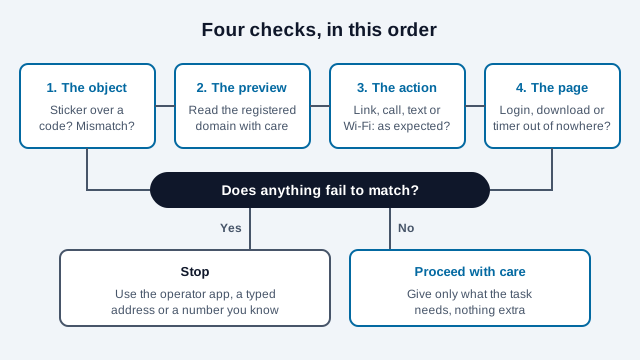
How to verify a QR code before scanning
Start with the object the code is printed on. Fraudsters have pasted their own stickers over genuine codes on parking meters, restaurant tables, and ticket machines, and the physical sign is often the first thing that gives them away.
Before you scan a code in a public place:
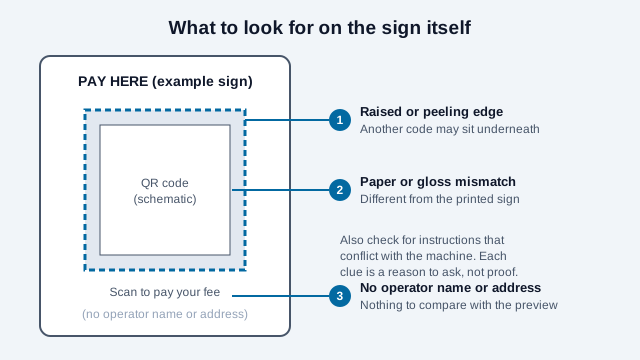
- Run a finger lightly over its edge. A raised seam, a ridge, or a layer of paper starting to peel can mean another code has been covered. Genuine labels sometimes have raised edges too, so treat this as a reason to look closer.
- Compare the code with the sign around it. If the paper, gloss, or color does not match, ask the operator before you scan. A mismatch is not proof of tampering, but it is worth a question.
- Look at what surrounds the code. Branding, clear instructions, and a contact route you already know all help you judge it. Legitimate businesses do use temporary stickers, but an unmarked code taped to a wall or pole with no explanation is best left alone.
- Look for a printed address or operator name next to the code. A sign that spells out where the code leads gives you something to compare with the preview.
The Canadian Centre for Cyber Security goes further and lists scanning a code on a label that may cover another code as a habit to avoid unless staff verify it first. It also suggests typing a URL yourself when that is easy, rather than scanning for convenience. Both are reasonable when the task involves money.
How to read camera URL previews safely
The camera apps on current iPhones and Android phones (see how to scan a QR code for each platform) decode the code and show the web address in a small banner before anything opens. Exact wording and layout differ by phone and software version, but the banner is your chance to check where you are going, so read it before you tap.
Three things are worth checking in the preview:
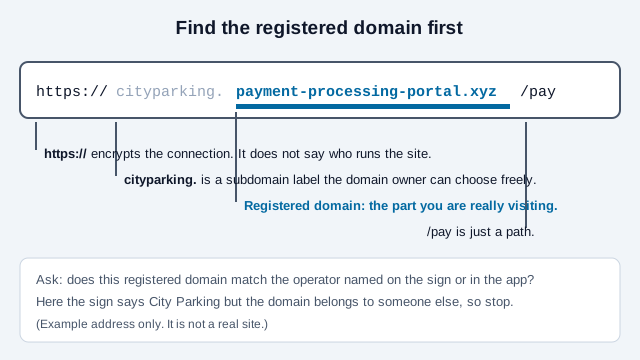
- The registered domain, which is the name directly before the ending such as
.com,.org, or.gov. Scammers put a familiar word at the front to distract you: incityparking.payment-processing-portal.xyz, the site you would actually visit ispayment-processing-portal.xyz. - Look-alike spelling. Watch for swapped characters, such as
paypa1.comwith the digit 1 in place of an l, orcornpany.comwith "rn" standing in for "m". - The type of action. Web links start with
https://, but a code can also start a phone call (tel:), a text message (SMSTO:), or a Wi-Fi connection (WIFI:). Make sure the action is the one you meant to take before you accept it.
Long addresses are cut off in the banner. If the preview ends in an ellipsis, find a way to see the full address first before you decide.
What do other kinds of QR payload look like?
Not every code is a web link. Common formats use a short prefix that tells the phone what to do. The table lists typical prefixes and what to check. Prompts differ between phones, so read whatever your phone shows before you accept.
| Payload prefix | What the phone may offer | What to check |
|---|---|---|
https:// | Open a web page | The registered domain and what the page asks for |
tel: | Start a phone call | The number against one on the operator's own website. |
SMSTO: or sms: | Prepare a text message | The number and the pre-filled text before you press send |
WIFI: | Join a wireless network | Network name against the venue's staff-confirmed name |
mailto: | Prepare an email | Recipient address and subject |
BEGIN:VCARD | Offer to save a contact | Name, number and website before saving |
The point of the table: a code can pre-fill an action, but a person still approves it. If the prompt describes something you did not intend, decline it.
Which checks matter in different locations?
The attention levels below reflect how each setting can be exploited. They are suggestions, not measured attack rates. A familiar place or a lower level does not make a code safe. The UK's National Cyber Security Centre has described fraud involving public codes as relatively small compared with other cyber fraud, with most cases in open spaces such as train stations and car parks, and it considers codes in pubs and restaurants probably safe to scan. It also reports an increase in quishing, where the code arrives in a phishing email.
| Where you find the code | Suggested attention | Typical scam | What to do instead |
|---|---|---|---|
| Parking meters and EV chargers | High | A sticker over the real code that leads to a fake card payment form | Feel for a sticker edge, and pay through the operator's official app or the machine itself |
| Unexpected mail and invoices | High | Fake parcel fees or threats to cut off a utility | Type the company's known website address into your browser yourself |
| Work email (quishing) | High | Fake password-reset or MFA pages that steal a login session | Check with IT through a channel you already know, and follow your workplace device policy |
| Restaurant table tents | Moderate | A substituted table sticker or a rogue payment form | Check that the preview shows the restaurant's own domain |
| Conference and event badges | Lower | Contact cards and schedule downloads | Look at the contact details before saving them to your address book |
| Retail product packaging | Lower | Counterfeit warranty-registration pages | Check that the domain matches the brand printed on the pack |
Operators who want to make this easier for visitors can follow the habits in the guides for parking and restaurant menu codes, such as printing the destination beside the code.
Which warning signs on the page mean you should stop?
If you have already opened the page, close it as soon as you see any of these:
- A download starts or is demanded. A menu, schedule, or payment page has no reason to make you install an APK file, a program, or a phone configuration profile.
- A login form appears out of nowhere. A public code that goes straight to a Microsoft 365, Google, or banking sign-in page is a classic phishing setup.
- The browser warns you. Do not enter payment details on a page marked "Not secure" or showing a certificate error. The opposite does not hold, though: a padlock only means the connection is encrypted, and scam sites use HTTPS too.
- A countdown is pushing you. Timers like "Complete your payment within 2 minutes" exist to stop you thinking.
- The payment method is odd. If the page asks you to pay in a way the operator would not normally accept, check the accepted methods on its known website or with its help desk.
- The page asks for more than the task needs. A parking payment needs a plate number and a card, not your date of birth.
How can you inspect a code without opening it?
If you want to know what an unfamiliar code contains without letting your phone open it, you can decode it separately and look the address up:
- Take a photo of the code, and do not tap the camera's preview link.
- Upload the photo to the QR Payload Decoder, which reads the code in your browser and shows the exact text inside it without opening the destination.
- If the text is a public web address, check it with VirusTotal or Google Safe Browsing for known threat reports. Never submit password-reset links, private document links, sign-in tokens, or anything else that works like a key. A clean result only means nobody has reported the address yet.
A newly registered look-alike site will often show a clean result simply because nobody has flagged it yet. The decoder tells you what the code says, and the QR security scanner adds an automated check, but only your own judgment about the registered domain and the context settles whether to proceed.
What to do if you scanned a malicious QR code
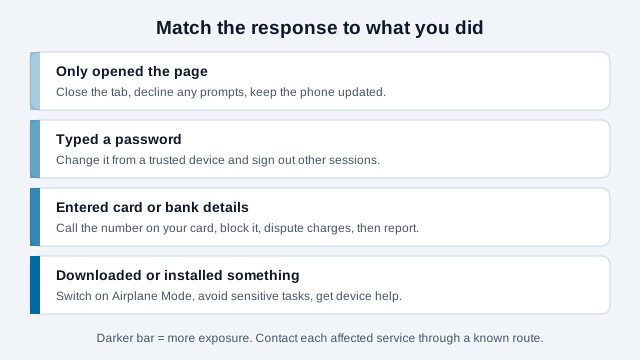
If you typed a password or payment details into a page you now think is fake, act straight away:
- If a file started downloading unexpectedly, switch on Airplane Mode to cut the phone off from mobile data and Wi-Fi.
- If you entered card details, call your bank's fraud line (use the number on your card, not one from the page) to block the card and dispute any charges.
- From a device you trust, change the affected passwords and use the account's "sign out of all other sessions" option where it has one.
- Report it to the FBI Internet Crime Complaint Center (ic3.gov) and the Federal Trade Commission (reportfraud.ftc.gov).
What is a practical pre-scan checklist?
Print this or keep it in your notes. It takes under a minute once it is routine.
- Is the code part of the sign, or a sticker on top of it?
- Is there an operator name or address printed beside it?
- Does the preview show a registered domain that matches that operator?
- Is the action (link, call, text, Wi-Fi) the one the sign describes?
- Can you finish the task in the operator's app or on a site you type yourself?
- Is the page asking only for what the task needs?
If you manage a household, a small shop or a team, agree on two fallbacks in advance: one trusted app or website per recurring task (parking, transit, payroll), and one person to ask when something looks off. Both beat deciding under pressure.
What common mistakes do people make?
Picture a commuter who parks in the same car park every morning. One day the pay station shows a code with a slightly shinier finish. She scans it because the machine is the same, the preview says only "pay.parking-fee-help.example" and she takes the word "parking" as a good sign. The page asks for her card number and email, and a countdown timer starts. The registered domain was never the car park operator's, and the shiny finish was the clue she skipped.
That is an illustration, not a real report. It shows three typical mistakes: trusting familiarity of place over the evidence, reading the first familiar word in the address instead of the registered domain, and carrying on after a timer or an unexpected card form appeared. A fourth is searching for the page afterward in a panic and pasting the same card details into a "refund" form.
What checks cannot settle?
- A genuine-looking domain can still be a compromised or hijacked site, and nothing in the preview shows that.
- A sticker can be a legitimate temporary replacement. Only staff or the operator can confirm.
- Threat-database lookups lag behind new fraud sites, so a clean result is weak evidence.
- Preview behavior differs between phone models and software versions, so test your own phone on a harmless code first.
For more on how these scams work and how organizations defend against them, see the guide to QR code scams and quishing, or read can QR codes be hacked? for which fears are real and which are myths. If you publish codes yourself, the static versus dynamic comparison explains how the choice affects what a scanner sees.
This guide is for general information only and is not professional security advice. If you believe you disclosed credentials or payment details, contact the affected institution and report the incident to the authorities listed above.
References
- FTC: Scammers Hide Harmful Links in QR Codes (December 2023)
- FBI IC3: Cybercriminals Tampering with QR Codes to Steal Victim Funds (January 2022)
- Canadian Centre for Cyber Security: Security considerations for QR codes (ITSAP.00.141)
- UK NCSC: QR codes, what's the real risk?
- NIST SP 800-124 Rev. 2: Guidelines for Managing the Security of Mobile Devices in the Enterprise (May 2023)
- OWASP Mobile Application Security (MASVS / MASTG)