A QR code is a square, two-dimensional barcode that stores text, a web address or other data in a grid of black and white squares that a phone camera can read in a fraction of a second. QR stands for Quick Response. The format is defined by the international standard ISO/IEC 18004, and the largest version can hold up to 7,089 digits or 4,296 letters and numbers, far more than the product number printed under a supermarket barcode.
DENSO WAVE, then a division of the Japanese auto-parts maker DENSO, released the QR code in 1994 to track components on factory lines. This guide explains what the name means, what each part of the pattern does, how a reader turns the squares back into data, which types of QR codes exist, and what people actually use them for.
What does QR code stand for?
QR is short for Quick Response. DENSO WAVE chose the name because the development concept focused on high-speed reading. A barcode of the time held only about 20 alphanumeric characters, and users also wanted to encode Japanese Kanji and Kana, so the team set out to build a symbol that held far more and could still be read in an instant from any angle.
So when someone asks what the QR in QR code means, the honest answer is that it describes a design goal rather than a technology. A "QR barcode", a "QR image code" and a "QR code" are the same thing. The word "QR Code" is a registered trademark of DENSO WAVE, which is why you sometimes see it capitalized, but the trademark covers the word only, not the pattern. DENSO WAVE also kept its patent rights while declaring it would not exercise them and published the specification, which is a large part of why every phone maker and generator, including ours, can use the format for free.
What does a QR code look like?
A standard QR code is a square made of smaller squares called modules. Three of its corners carry a large square-inside-a-square marker, the fourth corner does not, and the space between them looks like random noise. That noise is the encoded data.
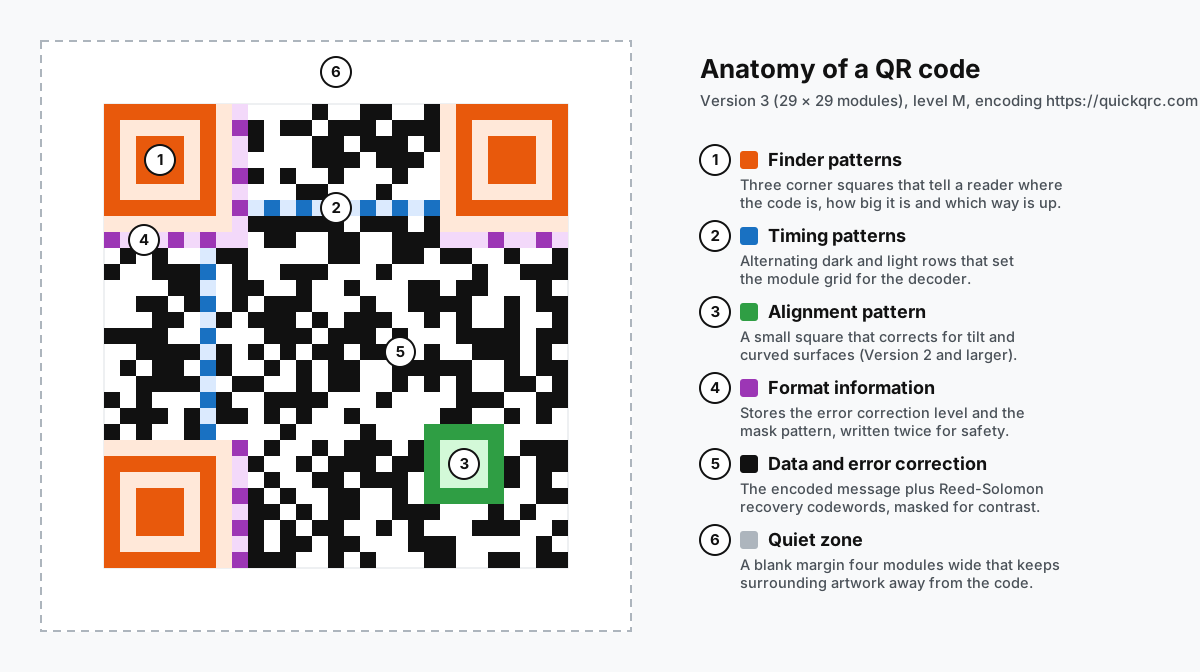
The size of the grid depends on the version. ISO/IEC 18004 defines 40 versions. Version 1 is 21 × 21 modules, each version adds four modules per side, and Version 40 is 177 × 177. A short web address usually lands in Version 2 to 4, which is why most codes you see on posters look about as busy as the example above. Longer content or a higher error correction level pushes the code to a larger, denser version.
The overall shape is always square for a standard QR code. Rounded dots, colored modules, a logo in the middle or a frame with a "Scan me" label are design choices layered on top, and they work only while the reader can still find the corner markers and tell dark modules from light ones. Our QR code color and design guide covers how far you can push that.
How do QR codes work?
A QR code turns data into a grid of dark and light modules. Each dark module is a binary 1 and each light module a 0. A camera captures the grid, software converts the pattern back into characters, and the phone decides what to do with the result: open a link, offer to join Wi-Fi, save a contact. The code is passive. It holds data and nothing else, and the action depends on the app that reads it.
Some of the modules carry your data and some are fixed structure that helps the reader. ISO/IEC 18004 defines these functional parts:
- Finder patterns. The three corner squares. Each has a 1:1:3:1:1 ratio of dark, light, dark, light and dark modules along any line through its center, a ratio that is rare in ordinary images, so a reader can spot it quickly and work out the code's position, size and rotation.
- Timing patterns. A line of alternating dark and light modules running between the finder patterns, which tells the decoder exactly where each column and row sits.
- Alignment patterns. Smaller squares that appear from Version 2 up. They let the decoder correct for a tilted phone or a code printed on a curved bottle.
- Format information. Fifteen bits next to the finder patterns that record the error correction level (L, M, Q or H) and which of eight mask patterns was applied. It is stored twice so one damaged copy is not fatal.
- Version information. Two extra blocks that appear only in Version 7 and larger, telling the reader the grid size.
- Data and error correction area. Everything else: the message itself plus Reed-Solomon recovery codewords.
- Quiet zone. A blank margin at least four modules wide around the whole code, so text, borders or artwork nearby cannot be mistaken for part of the pattern.
Before the code is drawn, the encoder applies a mask, an XOR pattern that flips certain modules. Without it, data could produce large blank areas or accidental finder-like shapes. The encoder tests all eight masks and keeps the one that scores best for even contrast.
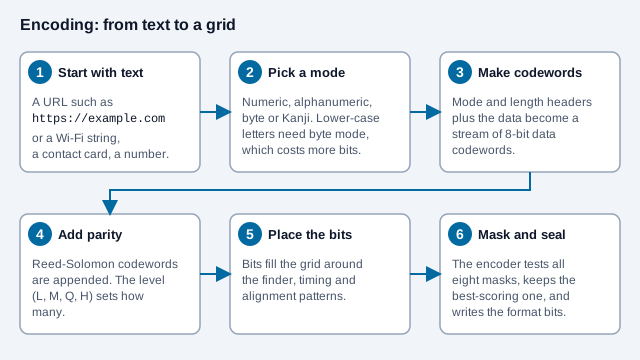
The mode choice has a cost you can see in real codes. The standard's alphanumeric mode covers digits, upper-case letters and a few symbols, so a web address with lower-case letters is normally stored in byte mode, one byte per character. That is why a short URL such as the one in the example needs more space than the same number of digits would.
How much does a version hold?
Capacity depends on the version, the mode and the error correction level together. For byte mode, which most web addresses use, the first few versions hold the following numbers of characters, according to the Thonky QR tutorial.
| Version | Modules | Level L | Level M | Level Q | Level H |
|---|---|---|---|---|---|
| 1 | 21×21 | 17 | 14 | 11 | 7 |
| 2 | 25×25 | 32 | 26 | 20 | 14 |
| 3 | 29×29 | 53 | 42 | 32 | 24 |
| 4 | 33×33 | 78 | 62 | 46 | 34 |
| 5 | 37×37 | 106 | 84 | 60 | 44 |
Reading across a row shows the trade: the same Version 3 symbol holds 53 characters at Level L but only 24 at Level H, because the parity codewords take the room. Reading down a column shows why a long link makes a busy code. Our character limit guide has the full numeric, alphanumeric and Kanji tables.
How does a QR code reader work?
A QR code reader is any app or device that decodes QR codes: the camera on your phone, a handheld scanner at a checkout, or a web tool like our online QR code scanner. Technically, they all follow roughly the same steps:
- Capture and threshold. The image is converted to pure black and white. Good readers do this in small regions so a shadow across half the code does not ruin it.
- Find the corners. The reader scans for the 1:1:3:1:1 ratio of the three finder patterns. Their positions give it the code's location, size and rotation, and the missing fourth marker tells it which way is up.
- Build the grid. Timing and alignment patterns let the reader correct for perspective and sample the center of every module as either dark or light.
- Read the format. The format bits reveal the error correction level and mask, so the reader can undo the mask and get the raw bits back.
- Repair errors. Reed-Solomon decoding uses the recovery codewords to fix modules that were dirty, scratched, glared or covered by a logo.
- Decode the message. The bits are split into segments, each tagged with an encoding mode (numeric, alphanumeric, byte or Kanji), and turned back into text.
- Act on it. The phone looks at the text. A string starting with
https://becomes a link preview,WIFI:becomes a join-network prompt, and plain text is simply shown.
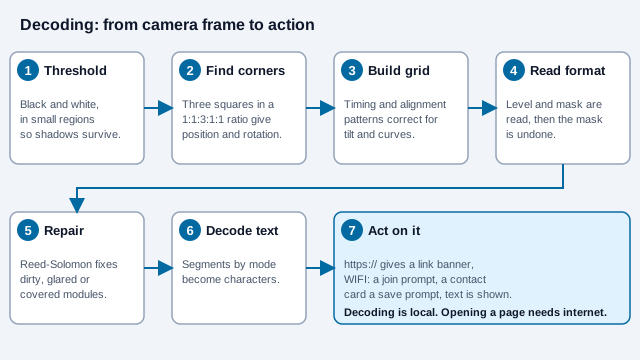
All of that happens on the device. Decoding needs no internet connection; only the action afterwards, such as opening a website, does.
How is a QR code different from a regular barcode?
A traditional 1D barcode encodes data in the widths of bars along a single line. A QR code is a 2D barcode: it uses both directions, which gives it much more room and lets it survive damage.
| Feature | 1D barcode (UPC-A, EAN-13) | QR code (ISO/IEC 18004) |
|---|---|---|
| Direction of data | One (horizontal) | Two (horizontal and vertical) |
| Typical capacity | UPC-A holds 12 digits and EAN-13 holds 13 | Up to 7,089 digits or 4,296 alphanumeric characters |
| What it holds | An identifier that a system looks up in a database | A self-contained payload such as a URL, contact card or Wi-Fi login |
| Scan direction | The scan line has to cross the bars | Readable at any rotation by a camera |
| Damage tolerance | A check digit detects errors but cannot repair them | Recovers up to about 30% of the data at the highest correction level |
The two are not rivals everywhere. Retail tills still run on EAN and UPC, and GS1 is moving products toward QR codes that carry the same number plus a web link. See QR codes vs. barcodes in logistics and our GS1 Digital Link guide.
How does error correction work?
When a QR code is created, Reed-Solomon parity codewords are added alongside the data, so a reader can rebuild parts of the code that it cannot see. You choose one of four levels:
- Level L restores roughly 7% of damaged codewords. It makes the smallest, least dense code, which suits small prints on clean surfaces.
- Level M restores roughly 15%. It is a common default for brochures and screens.
- Level Q restores roughly 25%. It suits labels and signs that will get worn.
- Level H restores roughly 30%. It is the usual choice when a logo covers the center, though the logo still needs to be small and the result tested.
Higher levels cost space: the same link at Level H needs a larger version than at Level L. The percentages also refer to codewords, not to a fixed area of the picture, and covering a finder pattern can stop a scan at any level. Our QR error correction levels guide goes deeper.
What are the different types of QR codes?
"Types of QR codes" means two different things, and most confusion comes from mixing them up. One is the symbol type, meaning the physical format of the grid. The other is the content type, meaning what kind of data sits inside.
QR code symbol types
DENSO WAVE lists several members of the QR family. Nearly every code you meet in daily life is Model 2.
| Type | What is different | Where you would see it |
|---|---|---|
| QR Code Model 2 | Versions 1 to 40, up to 177 × 177 modules and 7,089 digits. This is what "QR code" means today. | Posters, packaging, payments, tickets, menus |
| QR Code Model 1 | The original 1994 format. Tops out at Version 14 (73 × 73 modules) and 1,167 digits. | Legacy industrial systems only |
| Micro QR Code | One finder pattern instead of three and a two-module quiet zone. The largest size, M4, is 17 × 17 modules and holds 35 digits. | Tiny parts and circuit boards; many phone cameras will not read it |
| rMQR (Rectangular Micro QR) | A rectangular symbol for narrow spaces that holds more than Micro QR. Standardized as ISO/IEC 23941:2022. | Thin labels, cables, test tubes |
| SQRC | Looks like a normal code but has a restricted section only authorized readers can decode. | Internal company data, access control |
| Frame QR | Has an open "canvas" area inside the code where images or text can go. | Promotions, authenticity marks |
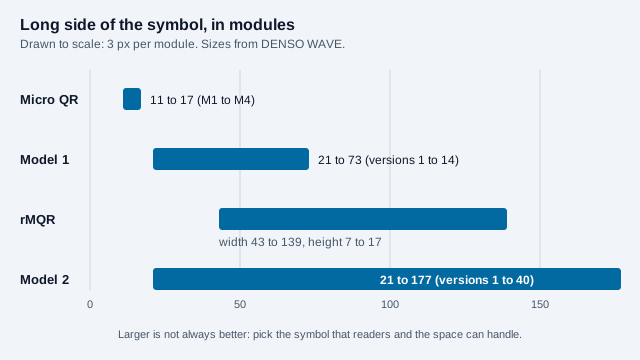
If you are printing something for the public, use a standard Model 2 code. The other formats need readers that support them, which ordinary phones often do not. Our Micro QR code guide explains when the small formats make sense. A decorative border with a "Scan me" label is a different thing from DENSO's Frame QR; that is covered in our QR code frame guide.
QR code content types
This is what most people mean by QR barcode types: a URL code, a Wi-Fi code, a vCard code and so on. They are all the same Model 2 symbol, just with differently formatted text inside, as the examples in the next section show. We support dozens of them; the full list is on our QR code types page.
QR code examples: what can a QR code contain?
A QR code can hold any text or binary data, but phones recognize a handful of standard formats and offer a matching action. Here is what the encoded text actually looks like for common examples:
| Example | Text stored in the code | What the phone does |
|---|---|---|
| Website | https://quickqrc.com |
Shows the link and opens it in the browser |
| Wi-Fi login | WIFI:S:CafeGuest;T:WPA;P:espresso42;; |
Offers to join the network without typing the password |
| Contact card | BEGIN:VCARD … END:VCARD |
Offers to save the name, phone, email and company |
| Phone call | tel:+15555550123 |
Opens the dialer with the number filled in |
| Text message | sms:+15555550123 |
Opens messaging with the number filled in |
mailto:hello@example.com?subject=Order |
Opens a new email with recipient and subject filled in | |
| Crypto payment | bitcoin: followed by a wallet address |
Hands off to a wallet app |
| Plain text | Any sentence, serial number or code | Displays the text |
The example image at the top of this page is a website code. You can make any of these yourself with our free QR code generator, or follow how to make a QR code step by step.
What is the purpose of a QR code?
The purpose of a QR code is to move information from a physical object or screen into a device without anyone typing. That one job covers a wide range of uses:
- Opening a web page from print: menus, flyers, product manuals, real estate signs. See restaurant menu QR codes.
- Payments: many mobile payment systems display or scan a QR code at checkout. See how to accept QR code payments.
- Tickets and boarding passes, which a gate scanner checks against a database. See event ticketing QR codes.
- Sign-in and device pairing, such as linking a messaging app to a laptop or setting up an authenticator. See how Google uses QR codes for passkeys.
- Sharing Wi-Fi and contact details in one scan.
- Tracking parts and assets, the job the code was invented for. See QR code asset tracking.
QR codes are a poor fit when nobody has a reason to pull out a phone, or when the code is placed where it cannot be scanned, such as on a fast-moving vehicle or a billboard seen from the highway. For tap-to-read alternatives, compare QR codes and NFC. For the full backstory, read our history of the QR code.
What is the difference between static and dynamic QR codes?
A static code stores its data directly in the pattern. A dynamic code stores a short web address that points to a service's server, and the server redirects each scan to the real destination.
| Feature | Static code | Dynamic code |
|---|---|---|
| Where the data lives | In the printed pattern | On a redirect server |
| Lifespan | The code never expires, though the page it points to can disappear | Depends on the service, plan and server staying available |
| Editing after printing | Not possible | The destination can be changed |
| Scan analytics | None from the code itself | The service can record scan counts, times and device types |
| Cost | Free to create with open standards | Usually a subscription |
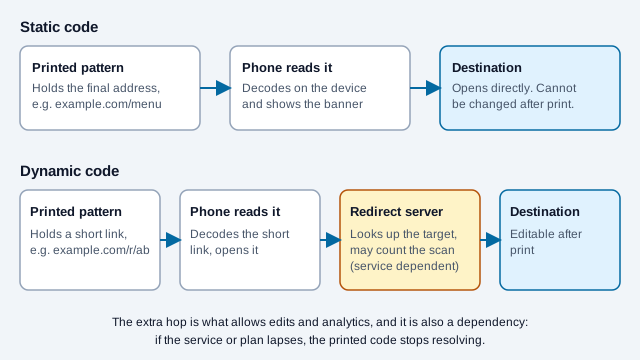
Our static vs. dynamic QR codes guide explains which fits which job.
How do you scan a QR code?
Recent iPhones and most current Android phones read QR codes in the built-in Camera app, so you do not need a separate QR code reader app. On some older or non-Google Android builds the feature sits in Quick Settings or Google Lens instead.
- Open the Camera app from the home screen or the lock screen.
- Hold the phone steady and get the whole code in frame, with all three corner squares visible and good light.
- Tap the banner or notification that appears. It shows where the code leads, so you can check the address before you open it.
Our how to scan a QR code tutorial also covers scanning from a saved image, a screenshot or a laptop webcam. If a code refuses to scan, work through why a QR code is not scanning.
Are QR codes safe to scan?
The pattern is just data and cannot run code by itself. The risk comes from where it sends you or what it asks you to do.
- Read the address in the preview and check that it matches the organization you expect and uses HTTPS.
- On parking meters, restaurant tables and transit stations, run a finger over the code to check that no sticker has been pasted on top.
- If a scan lands on an unexpected login or payment page, close it and do not enter anything.
The FBI's public service announcement on tampered QR codes gives the same advice: check that the address is the site you intended, look for a sticker pasted over the original, and avoid entering login or financial details on a page reached through a code. Our QR code safety guide explains how to spot deceptive codes.
What mistakes do people make with QR codes?
Look at a small gym that prints its class timetable code on a banner and puts the destination page on a free trial of a website builder. The banner works for two months, then the trial lapses and the page disappears. The code still decodes perfectly, which is why nobody suspects it, but every scan lands on an error. Treating the code and the page behind it as one thing hides the failure.
- Printing too small for the viewing distance, or shrinking the quiet zone to fit a layout.
- Choosing a dynamic code for a job a free static code would handle, then losing it when a plan lapses.
- Encoding a long link, so the grid becomes dense and the modules tiny.
- Testing the preview on one phone and never the printed result.
What should you check before publishing a QR code?
- Decide what the scan should do and pick the content type to match (link, Wi-Fi, contact, text).
- Keep the payload short, and choose a correction level that fits the surface: higher for worn or branded codes.
- Keep the clear border, and use dark modules on a light background.
- Scan the exact printed or on-screen version with two or more phones.
- Write down where the destination lives and who keeps it online.
What does this introduction not cover?
Format details such as which Micro QR or rMQR variants a given phone can read, and what a particular platform shows in its scan banner, change with software releases and are not settled here. Capacity numbers in this guide come from the QR standard family as summarized by DENSO WAVE and the Thonky tutorial, not from the paid text of ISO/IEC 18004 itself. This guide is general information, not security or legal advice.
References
- ISO/IEC 18004:2024, QR code bar code symbology specification
- ISO/IEC 23941:2022, Rectangular Micro QR Code (rMQR) bar code symbology specification
- DENSO WAVE: History of the QR Code
- DENSO WAVE: Types of QR Code
- DENSO WAVE: Micro QR Code
- DENSO WAVE: rMQR Code
- DENSO WAVE: QR Code FAQ (trademark and free use)
- DENSO WAVE: Error correction feature
- DENSO WAVE: QR Code versions
- Thonky: QR code tutorial, character capacities
- FBI IC3: public service announcement on tampered QR codes (PSA220118)