A QR code asset label should identify exactly one inventory record, or open an authorized workflow for that record. The inventory system, not the printed symbol, holds ownership, location, condition, custody, maintenance and audit history. A scan is a claim that someone stood near an item, and the process around the label decides whether anyone can trust that claim.
This guide covers what a label can and cannot do, how to design the asset ID and record, what to put in the code, a low-cost Google Forms pilot, the event log and reconciliation habits that keep records honest, how QR compares with barcodes and RFID, label materials, offline plans, and a rollout checklist. A spreadsheet and form can run a small, low-risk inventory. They do not prove who scanned a label, where the asset is, or whether a submitted update is legitimate, so plan those controls before you generate a batch.
What can a QR asset label do, and what can it not?
| Capability | QR label alone | Inventory workflow |
|---|---|---|
| Carry an asset identifier or URL | Yes | Consumes and validates it |
| Record check-out or return | No | Form or application records an event |
| Authorize a user | No | Identity and permission controls decide |
| Show current location or custodian | No | Derived from reviewed records |
| Provide audit history | No | Append-only events and controlled corrections |
NIST's Cybersecurity Framework 2.0 places asset management in its Identify function because an organization needs to know which assets support its work before it can manage them by importance and risk. A label is one data-capture step inside that wider practice.
How should you design the asset ID and record?
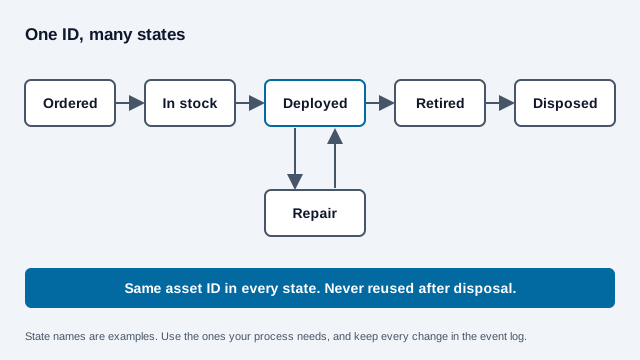
Give each item a stable, unique asset ID that is never reused after disposal. GS1's Global Individual Asset Identifier (GIAI) follows the same rule: GS1 Australia describes it as an alphanumeric reference of up to 30 characters that must stay unique for a period well beyond the life of the asset's records, and that must never be reused if the tag stays with the asset. GS1 UK lists tools, laptops and equipment as typical GIAI items. You do not need GS1 membership to run a small register, but copying that discipline saves arguments later.
Keep serial numbers in the record, and do not use them as your primary key. Formats collide across vendors, some items have none, and they are hard to read on a worn plate.
A practical asset table holds:
- asset ID, type, manufacturer, model and serial number;
- owner or responsible department;
- approved site and current recorded location;
- custodian or assignment;
- lifecycle state such as ordered, in stock, deployed, repair, lost, retired or disposed;
- purchase, warranty, inspection and maintenance dates;
- data classification or criticality where it applies; and
- label version and last physical verification date.
Decide who can create records, issue labels, transfer custody, approve disposal, correct errors and view sensitive fields. Anyone who photographs a label should not see the whole record.
What should the QR code contain?
Three payload patterns cover most cases:
- A plain asset ID. It is simple and readable offline, but the scanner needs a separate application or lookup process.
- A controlled record URL. It opens a web application that requires sign-in and checks permission for the requested asset.
- A pre-filled action form. It opens a form with the asset ID supplied, suitable only for a controlled, low-risk process with review.
Leave out credentials, door codes, network secrets, employee details, purchase values and confidential maintenance notes. Treat every value read from a code as untrusted input. OWASP's API security guidance lists broken object-level authorization as a top risk: an application must check permission on every request for an object, and a hard-to-guess identifier does not replace that check. A permanent code that points to a short address on your own domain, such as assets.example.com/a/000417, also lets you move systems later without relabeling. The static vs dynamic guide explains when a redirect you control is enough.
How do you run a small-team pilot with Google Forms?
For a low-risk pilot, keep an inventory sheet as the current reviewed state and a separate append-only event log. The log should never silently overwrite the master record.
- Create a form with asset ID, action, location, condition, notes and any approved staff identifier.
- Limit responder access to the intended people or group where your account setup supports it.
- Turn off public response summaries and unnecessary response editing.
- Use Google's Pre-fill form feature to create a responder URL containing one asset ID.
- Test the link with a non-owner account before encoding it.
- Generate one label per asset with the bulk QR code generator.
- Review submitted events and apply valid state changes to the master inventory through a controlled step.
A pre-filled value can be edited by whoever opens the form, so it does not prove the label was scanned. Treat it as a convenience. Google Forms access, email collection, one-response limits and publication are separate settings, and each needs a deliberate choice instead of the default.
Why use an append-only event model?
Record each check-out, return, movement, inspection, repair, loss report and disposal as a new event with a form or server timestamp. Overwriting the previous location erases who changed it and why, which is the first thing an auditor or an angry department head asks.
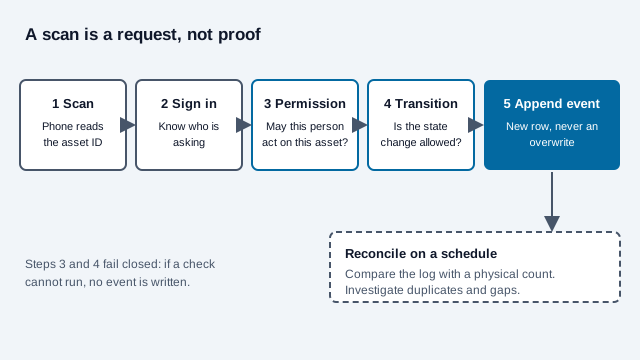
A useful event holds:
- event ID and timestamp, and the asset ID;
- action type, with previous and proposed state where available;
- the signed-in actor or an approved staff reference;
- source device or station when it is needed and lawful;
- notes, exception reason and approver; and
- reconciliation status.
Add validation rules that block impossible transitions: checking out an asset already assigned to someone else, disposing of an item still in repair, or returning an asset to a site that is not approved for it. High-value or safety-critical changes can require a supervisor to approve.
Should you use QR codes, barcodes or RFID?
The three technologies solve different problems, and the cost figures below come from vendors, so treat them as indicative. Vendor comparisons we read put barcode and QR reading at up to about one meter with a clear line of sight, and UHF RFID at roughly 3 to 10 meters without line of sight, with one vendor quoting tag costs of $0.01 to $0.10 for barcodes and $0.08 to $0.50 for RFID tags. The same source estimated barcode deployments at $5,000 to $25,000 against $50,000 to $500,000 or more for RFID. Your quotes will differ.
| Question | QR label | 1D barcode | RFID tag |
|---|---|---|---|
| Reader | Phone camera or 2D imager | Laser or imager | Dedicated reader |
| Line of sight needed | Yes | Yes | No |
| Bulk counting | One at a time | One at a time | Many tags per pass |
| Data on the tag | An ID or URL, more than a 1D code | A short ID | Chip memory, varies by tag |
| Cost to start | Lowest: printed label, existing phones | Low | Highest |
| Best fit | Equipment someone can walk up to | Existing scanner fleets | Hidden, dense or high-volume items |
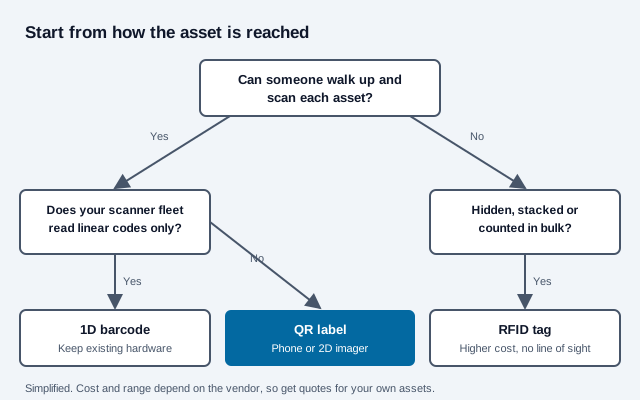
Many registers combine them: a QR label for the walk-up check and an RFID tag only on the few categories that need bulk counts. The QR code vs NFC guide covers a third option for phone-tap use, and the QR code vs barcode guide covers the symbology choice in more depth.
How should the label look and where should it go?
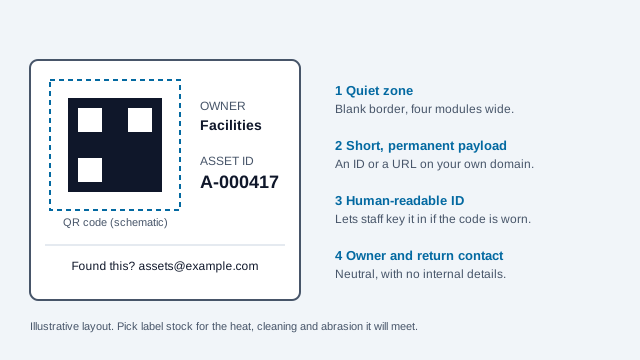
- Print the human-readable asset ID beside the code so a damaged symbol can still be keyed in.
- State the owning organization and a safe return or support channel.
- Use dark modules, a light background and the full four-module quiet zone.
- Choose material and adhesive that survive heat, cleaning, abrasion, moisture, UV and the asset's surface. For permanent product-identification labels, UL 969 describes marking and labeling systems that are tested as a complete combination of stock, ink and overlaminate, so changing the ink can void the evaluation. Check the current edition and whether your equipment needs it.
- Avoid vents, controls, curved edges, removable covers, and safety or certification markings.
- Use tamper-evident material when label substitution matters.
- Test the finished label after it is stuck on, not only the artwork on screen.
There is no universal label size. A short asset ID makes a less dense symbol than a long pre-filled form URL, and module size, scanner, lighting, contrast, damage and curvature all change what reads. Use the print size guide, try higher error correction for worn surfaces, and run representative samples through the scannability tester.
How do you issue, replace and retire labels?
Control label stock and the generation files, and record when each label is issued and by whom. If a label is damaged, verify the physical asset before reprinting, mark the old label version replaced, and investigate unexplained duplicates. Stickers can be moved onto other equipment, a point the quishing guide raises for public codes and that applies inside a building too.
When an asset is sold, donated, returned to a lessor or disposed of, remove or permanently invalidate organization-specific labels and sanitize its data under your policy. Never give its asset ID to a different item. Keep the historical record for the period your rules require.
How do cycle counts and reconciliation work?
Scanning activity does not replace physical verification. Schedule cycle counts by value, mobility, safety and risk, and during a count check the asset ID, serial number, condition, location, custodian and label integrity.
Investigate:
- records with no recent physical confirmation;
- two assets carrying the same label;
- one asset with several active labels;
- impossible or rapid location changes;
- updates by unexpected accounts;
- missing, covered or replaced labels; and
- assets marked disposed that remain active.
What if there is no signal?
A web form can fail in basements, warehouses, remote sites and during an identity-provider outage. Decide whether staff may queue updates, use numbered paper transaction slips, scan into an approved offline application, or postpone noncritical moves. Offline entries need unique event IDs and a reconciliation step so one movement is not submitted twice. Settle conflicts by review, not by trusting the latest device clock.
What are the security, privacy and backup basics?
- Require sign-in for nonpublic inventory data and check permission on every asset view and action.
- Use least-privilege roles and remove departed staff promptly.
- Do not publish the sheet or enable responder result summaries.
- Protect exports and backups, and test a restore.
- Minimize employee and location data and set a retention period.
- Log administrative changes and review suspicious activity.
- Show a neutral public lost-and-found page rather than internal records to anyone outside the company.
When is a spreadsheet no longer enough?
Move to a maintained asset-management platform when you need reliable concurrent updates, several sites, role-based approvals, offline sync, maintenance scheduling, depreciation, software relationships, procurement integration, regulatory evidence, supported service levels or large-scale reconciliation.
Before migrating, clean IDs and states, name the source of truth, preserve audit history, test label redirects and run both systems in parallel for a cycle. A platform that merely prints QR codes is not enough of a reason to buy. Compare access control, export, retention, backup, uptime, integration, label lifecycle and what leaving the vendor would cost. Related reading: manufacturing and logistics guides.
What mistakes break asset tracking?
Picture an office with 300 laptops, monitors and tools, each tagged with a pre-filled form link. A technician replaces a damaged label by printing a copy of a neighbor's file, so two laptops now share one ID. For months, check-outs land on the wrong record, and the next cycle count finds one laptop that "never moved" and one that "does not exist". Nobody noticed because the log was overwritten each time a location changed.
- Reusing an asset ID, or printing duplicates without a record of it.
- Encoding secrets or full records in the code.
- Treating a pre-filled form as proof of presence.
- Letting the spreadsheet overwrite history.
- Testing the label on screen but not on the finished asset.
- Skipping cycle counts because the scan log looks tidy.
Deployment checklist
- Asset IDs are unique, stable and never reused.
- The data model, states, roles and approvals are written down.
- The payload holds no secret or unnecessary personal data.
- Every record action enforces permission.
- Labels show a readable ID and are tested on real surfaces.
- Issuance, replacement, duplicate and retirement procedures exist.
- The event log preserves history and supports reconciliation.
- Offline and outage steps are rehearsed.
- Cycle-count frequency follows asset risk.
- Backups, restore, retention and platform exit are tested.
Two things this checklist cannot settle: how long your industry or tax rules require you to keep disposal and maintenance records, and whether your equipment needs labels certified to a specific standard. Confirm both with your compliance or finance adviser. This guide is general information, not legal or accounting advice.
References
- NIST Cybersecurity Framework 2.0 (Identify / Asset Management)
- NIST CSWP 29: The NIST Cybersecurity Framework 2.0
- GS1 Australia: Global Individual Asset Identifier (GIAI)
- GS1 UK: What is a Global Individual Asset Identifier?
- Google: publish, share, and pre-fill Forms
- Google: view and manage form responses
- OWASP API Security: broken object level authorization
- DENSO WAVE: QR Code area and quiet zone
- ANSI Webstore: UL 969, Marking and Labeling Systems
- Oxmaint: barcode vs QR code vs RFID for facility assets (vendor)
- Itemit: QR vs RFID (vendor)