In logistics, a QR code works best as a short, opaque identifier on a carton, tote, pallet or return slip, backed by a system that knows what the identifier means at each handoff. It also works where phones and 2D imagers are already in use, which means receiving, putaway, picking checks, proof of delivery and returns more often than the high-speed sorter. Keep the identifier free of secrets and confirm that every reader in the chain can decode it.
This guide follows a shipment through a facility and out the door: what the code identifies at each stage, how pallet labels relate to GS1 rules, how returns and proof of delivery use codes, what to do in dead zones, how to protect the data, and how to roll out a pilot. It deliberately does not repeat the symbology comparison; for 1D versus 2D, GS1-128 and DataMatrix, read QR codes vs barcodes in logistics.
Where does a QR code fit along a shipment's journey?
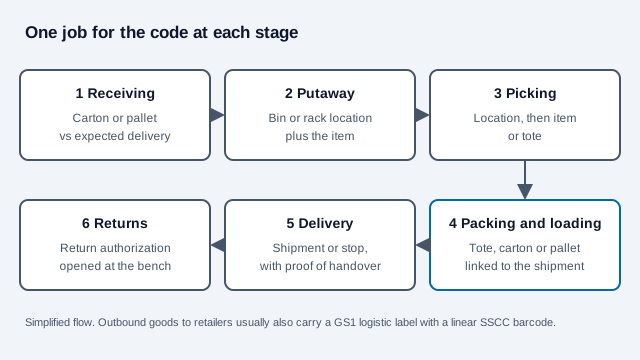
Pick the stage where a code removes a manual step or a typing error, and give it one job there. A code that tries to be the pick label, the shipping label and the customer link at once usually ends up satisfying none of them.
| Stage | What the code identifies | Who scans it | What the scan should trigger |
|---|---|---|---|
| Receiving | Carton, pallet or purchase-order line | Dock handheld or phone | Match against the expected delivery, flag shortages |
| Putaway | Bin, shelf or rack location | Handheld | Confirm the item and the location together |
| Picking | Location, then item or tote | Handheld or wearable | Confirm the right line, block a wrong pick |
| Packing and loading | Tote, carton, pallet | Pack bench or dock scanner | Link contents to the outbound shipment |
| Delivery | Shipment or stop | Driver's device | Record arrival and hand over proof |
| Returns | Return authorization | Returns bench | Open the authorization and route the item |
Warehouse rollout guides we read recommend starting from a list of every workflow that reads codes and defining the data each code must carry, such as GTIN, lot, serial or a URL, then tracking scan success rate and return-handling time. That advice is vendor-published, but the sequence is sound for any facility.
How do pallet and carton labels relate to GS1 rules?
If you ship to retailers or large distributors, a GS1 Logistic Label usually applies. According to GS1 country organizations, the Serial Shipping Container Code (SSCC) is the only mandatory element on that label, it is encoded in a GS1-128 barcode under application identifier 00, and an SSCC already on a pallet should be read and reused rather than replaced. A mixed pallet gets its own SSCC. A secondary summary reports that the current guideline also allows a supplementary 2D symbol carrying the same data, which we could not confirm in the guideline text, so check the version your trading partner follows before printing one.
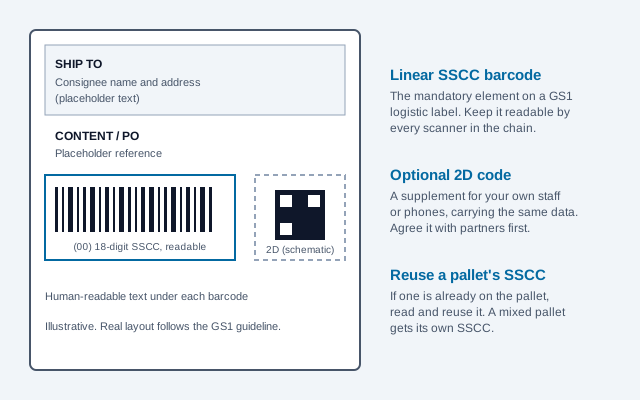
Inside your own four walls you have more freedom. An internal tote label can carry a short ID your WMS resolves, and a location label can be a QR code that handhelds read. Keep internal labels visually different from the GS1 logistic label so nobody mistakes one for the other at the dock.
Can a QR code be the whole label?
Seldom for goods that leave your control. Carriers, customers and customs systems read what they have agreed to read, and many of those readers are linear-only. The questions to settle in writing: which symbol the carrier's network accepts, which one the consignee's receiving dock decodes, and whether a regulator names a format. If any answer is "linear only", print the 1D code and treat the QR code as a second symbol for your own staff.
Very small or very curved items are the exception that argues the other way. If a readable QR will not fit, consider the Micro QR guide or ask whether DataMatrix suits your scanners.
How do QR codes help with returns?
Returns are one of the easier places to start because you control both ends. A return authorization code can open the order, the reason for return and restocking instructions, so the bench scans once instead of typing a number. For the customer, carriers offer label-free drop-off: for example, EasyPost's documentation describes USPS Label Broker, where a QR code presented at a participating Post Office location leads to the shipping label being printed there. That service needs a USPS Returns account, and availability depends on the carrier and service level. Carrier-generated codes of this kind are temporary and expire, unlike a code printed on your own packing slip.
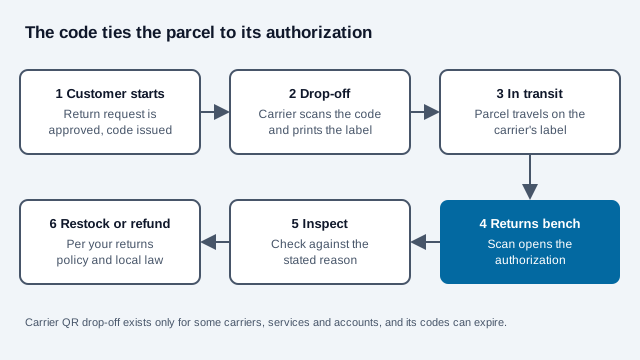
Refund decisions should still follow your returns policy and the consumer rules where you sell. The e-commerce guide covers the storefront side.
What does a QR code add to proof of delivery?
Vendors describe QR-based proof of delivery as capturing a timestamp, location and optionally a signature or photo when the driver scans a code at the drop point. We found no carrier-published standard confirming that, so treat it as a feature of a particular app. A scan on its own proves very little: it shows that a device read a label.
For international road freight, the electronic consignment note (e-CMR) rests on the 2008 Additional Protocol to the CMR Convention, which gives an electronic note the same legal effect as paper when its technical requirements are met, including an electronic signature and a defined way to confirm delivery. The sources we read describe QR codes as one way to reach the stored document, and none presents them as a legal requirement. They also mention Regulation (EU) 2020/1056 on electronic freight transport information. One vendor says that regulation makes e-CMR mandatory, which we could not verify, so confirm the obligations that apply to your lanes with your forwarder or counsel.
What happens in dead zones?
A plain-text QR code is decoded entirely on the device, so a short identifier or instruction is readable with no signal. Anything that opens a web page or looks a value up in the WMS needs connectivity, or a scanner app that queues and syncs. Trailers, cold stores and basements often have dead zones.
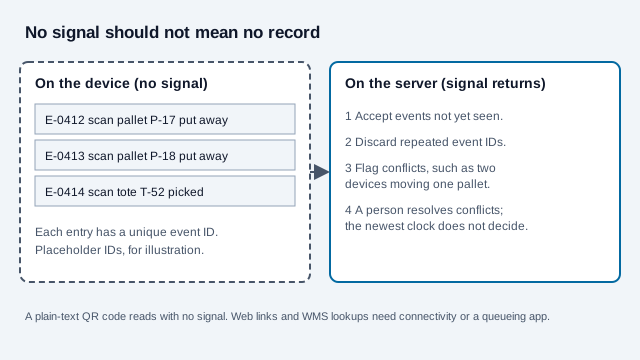
Give every queued scan a unique event ID so a retry does not record the same movement twice, and decide in advance who resolves a conflict, such as two devices moving the same pallet. Trusting the latest device clock is not enough, since handheld clocks drift. The asset tracking guide goes deeper on the event model.
Do the identifiers need protecting?
Anyone who photographs a label can decode it. Keep the payload to an opaque identifier or a controlled-record URL, never the full contents, value, consignee details or a guessable sequence such as consecutive numbers. If a scan opens a system, that system must sign the worker in and check permission for that shipment, because a decoded value is untrusted input. Sticker swaps are a known trick in public spaces (see the quishing guide), and dock labels deserve a lighter version of the same suspicion when a label looks re-stuck.
Shipping labels with a consignee's name and address are personal data in many places. Check privacy rules for what you print and keep.
Will the label survive the trip?
- Specify substrate and adhesive for the abrasion, cold, condensation and UV the label will meet. A lifted or scuffed code is a failed scan at the dock.
- Verify printed samples with an ISO/IEC 15415 2D verifier to the grade your customer requires, on the real stock and printer, before a production run.
- Keep the four-module quiet zone clear of the label edge, tape and fixings, and print the code in a single dark ink.
- Consider higher error correction for labels handled roughly, and test after simulated wear instead of straight off the printer.
- Use the scannability tester for early checks and generate batches with the bulk generator.
The print size guide covers scanning distance. Small cartons and large pallets need very different symbol sizes.
Pilot checklist: how should you run a pilot?
- Choose one flow with a clear pain, such as returns receiving or bin location checks.
- List the readers, the label stock, and which partners touch the label.
- Define the payload and keep it short. Use an ID.
- Print samples on the real stock and grade them.
- Run the pilot in one lane for a few weeks, logging failed scans and their causes.
- Measure first-pass scan success and time per transaction against your own baseline.
- Widen only when failures have a named fix.
What mistakes break logistics QR programs?
Look at a 3PL that prints a QR code on every outbound carton with the order number and customer name inside the code. A damaged label is photographed and posted in a customer forum, exposing names and orders. The same week, a trailer returning from a rural stop uploads fifty queued scans twice because nobody numbered them, and stock counts jump.
- Encoding personal or commercial detail in a code that anyone can photograph.
- Replacing the linear barcode without checking carrier and consignee readers.
- Skipping unique event IDs on offline scans.
- Using a label material that peels in cold or wet conditions.
- Treating a delivery scan as proof of receipt.
- Ignoring the quiet zone because the label template is crowded.
What a pilot cannot settle
Two open questions a pilot cannot answer for you: which symbols your carriers and customers will accept in the long run, and what your lanes' regulations say about electronic transport documents. Ask them in writing. This guide is general information, not legal or customs advice.
References
- ISO/IEC 18004:2024, QR code bar code symbology specification
- ISO/IEC 15415: 2D bar code print quality test specification
- GS1: Logistic Label Guideline
- GS1 Sweden: labeling the pallet
- GS1 UK: how to create SSCCs and logistics labels
- GS1: Digital Link standard
- GS1: application identifiers for batch, lot, and dates
- EasyPost support: USPS Label Broker QR code returns
- UNECE: e-CMR Additional Protocol material, as hosted by Unioncamere
- Racklify: how warehouses implement QR code labeling (vendor)