A restaurant needs between three and five QR codes, each with one job: open the menu, share the guest Wi-Fi, take an order or payment, collect a review, and sometimes show allergen details. A static code encodes a fixed link, so it never expires and carries no subscription. The part that takes work is keeping the page behind each code accurate and testing the printed code in your own dining room, under your own lighting, on a cheap Android as well as a new iPhone.
This guide covers which code belongs where, what diners think of QR menus (the numbers are less friendly than vendors suggest), how to build a Wi-Fi code that actually joins the network, the review and allergen rules that trip restaurants up, how to stop table codes being tampered with, and a rollout checklist you can finish in an afternoon.
Which QR codes does a restaurant actually need?
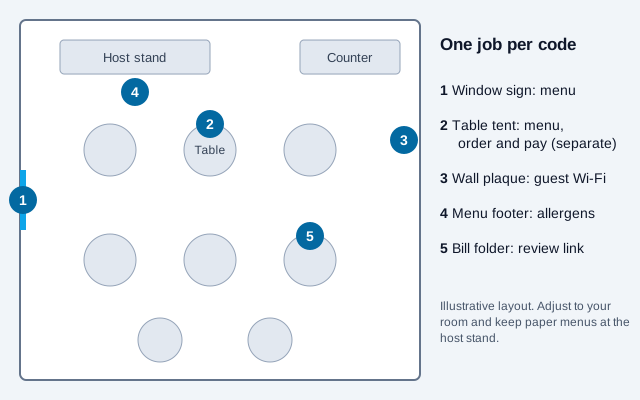
Start from the moment in the guest's visit, not from the tool. Each row below is a separate code with a separate destination. Mixing them (one code that shows the menu, asks for a review, and offers Wi-Fi) leaves the guest unsure what the scan will do, so they skip it.
| Where it lives | Code type | What the guest gets | Static is enough? |
|---|---|---|---|
| Table tent, window, A-frame | URL code | Mobile menu on your own domain | Yes, if the URL is stable |
| Table tent or wall plaque | Wi-Fi code | Joins the guest network in two taps | Always static; the password is inside the code |
| Bill folder or receipt | URL code | Your Google review page | Yes |
| Table tent, separate from the menu | URL code | Order and pay page of your ordering provider | Usually; depends on the provider |
| Menu footer, allergen board | URL code | Allergen matrix with revision date | Yes |
| Takeaway bag, flyer, delivery box | URL code with UTM tag | Direct ordering page or loyalty sign-up | Yes |
Do diners actually want to scan a menu?
Some do, many do not, and the split follows age. A Technomic consumer survey from May 2022 (about 1,000 respondents, reported by Restaurant Business) found 88% preferred paper menus, ranging from 82% of millennials to 95% of boomers. Toast, a restaurant software vendor, reported in 2024 that 81% of 850 US adults preferred a physical menu and that the figure rose to 90% for adults aged 55 and over. The Toast result comes from a company that sells digital ordering, so it is unlikely to be inflated in paper's favor.
Those surveys ask about preference, not behavior. Plenty of people scan a menu because the restaurant leaves them no other option, which is a different thing from liking it.
What follows for a small restaurant:
- Keep a few printed menus behind the host stand or bar and offer them without being asked when a table looks hesitant, especially for older guests and large groups.
- A QR menu saves the most money where the menu changes often. Printing a standard menu is commonly estimated at roughly $0.50 to $3.00 per copy (premium laminated versions cost more, per QRStuff's comparison), which adds up quickly if specials rotate weekly. A fine-dining room with a fixed list and an older clientele gains much less.
- Most venues end up with a hybrid: QR on the table, paper at the host stand.
What should a restaurant menu QR code link to?
Match the destination to the one action printed beside the code:
- Digital menu: a responsive web page on your own domain (
yourrestaurant.com/menu), not a photo of a printed menu and not an unformatted PDF. A photo blurs when zoomed and cannot be read by a screen reader. A PDF forces guests to pinch and drag across a six-inch screen. W3C's WCAG 2.2 reflow criterion expects real text that fits a narrow phone screen without side-scrolling. - Order and pay: a hosted checkout from an established provider. Keep it separate from the menu code so guests are not pushed into payment before they have decided.
- Guest Wi-Fi: covered in the next section.
- Reviews and feedback: covered below.
One habit pays for itself: encode a short, permanent address such as yourrestaurant.com/menu, and let that page redirect or display whatever the current menu is. When you move to a new website builder, redesign, or switch from PDF to HTML, the printed table tents keep working. If you encode the long link your website tool generated, you will reprint everything the day that tool changes its URL scheme.
Show the menu in the guest's likely language. If you serve tourists, a language switch at the top of the menu page costs less than losing a table that cannot read the dishes. For the page structure, see the restaurant menu QR code guide.
How do you make a Wi-Fi QR code for restaurant guests?
A Wi-Fi code contains the network name, security type, and password in a standard text format. Modern iPhone and Android cameras read it and offer to join the network, so the guest never types a password. The format, documented in the ZXing project, looks like this:
WIFI:T:WPA;S:CafeGuest;P:your-guest-password;;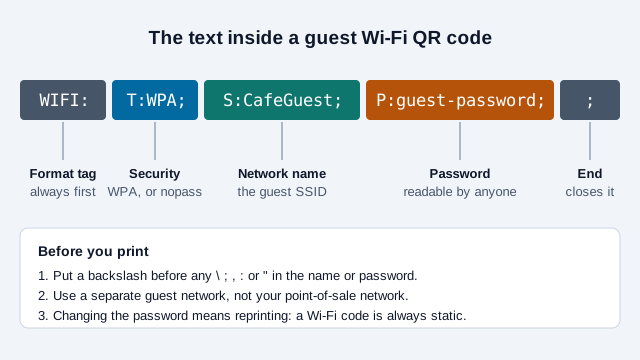
Field by field: T is the security type (WPA covers WPA2 and WPA3 personal networks, nopass for open networks), S is the network name, P is the password, and H:true marks a hidden network. Backslash-escape any \, ;, ,, : or " in the name or password, otherwise the code builds but joins nothing. The Wi-Fi QR code generator handles the escaping for you.
Five points decide whether a Wi-Fi code helps or causes a security problem:
- Create a separate guest network. Network installers consistently advise that a guest network should sit on its own VLAN with its own firewall rules, not just a different network name, because a name alone is only a label. Ask your installer or card processor to confirm your point-of-sale and kitchen devices cannot be reached from the guest side.
- Put the password in the code, not on the sign. Anyone can read the text anyway, so treat the password as public. A plain "Guest Wi-Fi: scan to connect" sign beats a handwritten password on a chalkboard.
- Remember that a Wi-Fi code is always static. The password is stored inside the symbol, so changing the password means reprinting. Pick a guest password you will not rotate often, and rotate on a calendar (for example each January) instead of whenever someone remembers.
- Keep a text fallback. Write the network name and the password in small print under the code for the guest whose phone does not offer the join prompt.
- Do not use the code to gate access behind a marketing sign-up unless you tell guests what you collect. If you do collect emails, that triggers privacy-notice duties in many places.
How should order-and-pay QR codes work?
Ordering and payment add a second system to your dining room, and it fails differently from a menu: a stale menu is an embarrassment, a broken checkout loses money and leaves a table waiting. Before putting a code on tables, confirm the following with your provider:
- The code identifies the table on the server side, so a guest cannot edit a URL and order for another table.
- Prices, taxes, service charge, and tips are shown before the final confirm button.
- Staff can see the order on a screen or printer in real time, and know what to do when the guest's phone dies halfway through.
- Payment happens on the provider's own domain and the domain is printed on the tent.
Be careful with revenue promises. Vendors report that tableside digital ordering raises average check size, with figures ranging from about 9% (ChowNow platform data) to 30% (a DoorDash case study of one restaurant), and some also report higher tips because the screen offers one-tap percentages. These numbers are self-reported by sellers, come from different kinds of restaurants, and use no common method. Run your own two-week pilot on a few tables before assuming a lift.
How do you collect Google reviews with a QR code?
Google lets you create an official review link and QR code from your Business Profile (Read reviews, then Get more reviews; Google notes this is currently available from a computer browser, not the mobile app). The code takes the guest straight to the review box for your restaurant.
- Offer the same link to every guest. Do not screen guests first and send only the happy ones to Google, with unhappy ones diverted to a private form. Google's policies treat this review gating as a violation. The FTC says its consumer reviews rule does not specifically prohibit selective solicitation, but that the practice could still violate the FTC Act.
- Do not offer a free dessert, discount, or entry into a draw in exchange for a review. Google's guidance prohibits incentives for reviews.
- Put the code where the moment is right: on the bill folder or receipt, with one line such as "Enjoyed your meal? A review helps small restaurants like ours." A tent at the table before the meal gets ignored.
- If you also want private feedback, offer it as a separate, equally visible option, not as a gate.
More detail is in the Google reviews QR code guide.
Do restaurant QR codes have to show allergen and calorie information?
A digital menu does not remove your labeling duties, and in several places a QR code cannot be the only way to disclose allergens.
In the US, the FDA lists nine major allergens (sesame joined in 2023), and dine-in disclosure is mostly set by state and local food codes. Chains with 20 or more locations must also post calories under 21 CFR 101.11. In the UK and EU, 14 allergens must be declared, and the Food Standards Agency says non-prepacked food needs a visible sign plus a verbal answer on request, so a code alone does not meet the rule.
The practical consequence: print a line beside the code telling guests with a severe allergy to speak to a server before ordering. The per-region table and the matrix method are in the food allergen QR code guide.
Are restaurant QR menus accessible?
Only if you build them to be. Blind and low-vision diners rely on screen readers, and restaurant digital tools have drawn accessibility complaints in the US, including online-ordering cases against national chains. No court ruling we could find addresses QR menus specifically, so the legal position is unsettled. The fix is cheap whichever way it goes:
- Use real text, headings, and lists. Never publish a menu as an image.
- Tag each price to its dish in the page structure so it is read out with the item.
- Make buttons and filters reachable by keyboard and labeled in words, not only icons.
- Let the page zoom to 200% without side-scrolling.
- Always have a staff-read or large-print alternative at the door.
How do you stop someone tampering with a table code?
The FBI's Internet Crime Complaint Center warned in January 2022 that criminals paste fraudulent stickers over real codes; fake parking-meter codes in Texas cities were the best-known case. A restaurant's exposure is the same: a sticker over your menu code that sends diners to a payment-harvesting page.
Print the code as part of the tent or card rather than as a sticker, so an overlay shows. Print your domain in text beside it so a guest can compare it with the camera preview. Have whoever sets the tables run a finger over each code before service, and check outdoor signs too, since those can be altered after closing. Details are in the menu guide.
Static or dynamic, and what about tracking?
For a restaurant, a static code pointing to a stable URL on your own domain is usually the right choice: nothing to renew, no vendor that can disable it, and you can still change the menu page's content freely. You cannot count camera scans of a static code, but you can add UTM parameters to the link and read visits in your own analytics. Give each location its own tag, for example ?utm_source=qr&utm_medium=table&utm_campaign=patio, and the UTM builder will assemble the link. Label the result "menu page visits", not "scans".
A paid dynamic code is worth it in only two situations: the printed destination itself must change often (a seasonal campaign on a window poster, say), or a reprint would be expensive, such as engraved signage or a large run of table tents. Our static vs dynamic guide walks through the trade-off. Remember that a dynamic code depends on a vendor staying in business and your plan staying active, so test the fallback before you print 200 of them.
What size should the code be, and where should it go?
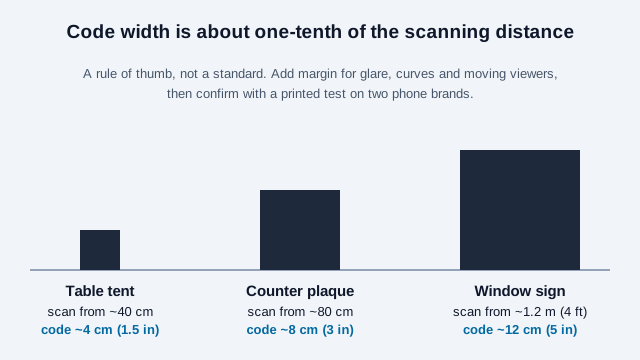
| Placement | Minimum width | Notes |
|---|---|---|
| Table tent, bill folder | 1.5 in (about 4 cm) | Leave a clear four-module border on every side |
| Wall plaque, counter sign | 2.5 to 4 in (6 to 10 cm) | Guests often scan from standing height |
| Window or A-frame | About one-tenth of the farthest scanning distance | A code read from about 4 ft away wants to be roughly 5 in wide; add margin for glare and movement |
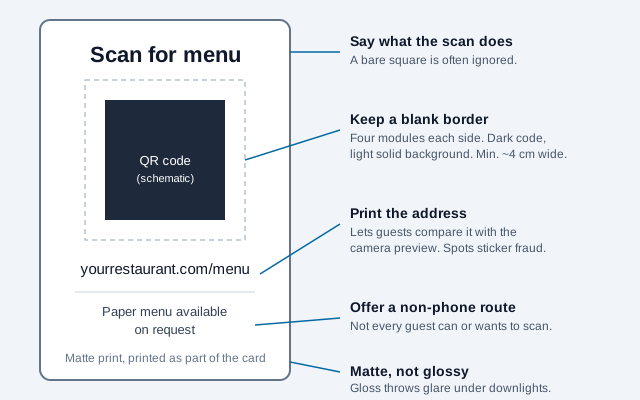
- Dark modules on a solid light background. Avoid coloured codes on photographs.
- Choose matte lamination. Glossy finishes throw glare under downlights, and a code that scans in daylight can fail at 8 pm.
- Export SVG for print so the modules stay sharp at any size.
- Put the instruction in words next to the code: "Scan for menu" works better than a bare square, because guests do not assume it is for them.
- Do not fix a code to the table surface where a glass or candle will block it. Angled tents at eye height scan best.
The 10:1 distance-to-size ratio is a widely shared rule of thumb, not a formal standard, so confirm every design with a printed test. The scannability tester and the print size guide cover that process.
What mistakes break restaurant QR codes most often?
Consider a 40-seat bistro that orders 300 glossy table tents on a Monday. The code scans fine on the owner's new phone at noon. On Friday at 8 pm, under warm downlights, the gloss throws a glare strip across the symbol, half the tables cannot scan, and the menu link points to a PDF in a shared folder that the owner's former web designer owns. Two guests walk out. Nothing about that was bad luck; each failure appears on the list below.
- Linking to the homepage, or to a file on someone else's account. Link to the menu page on your own domain, and test it signed out.
- Printing the whole run before testing one. Print a single tent, scan it in your dimmest corner on two phone brands, then order the rest.
- Letting the menu drift. A dish you dropped in March still listed in June costs trust at the table.
- Weak mobile signal in a basement or thick-walled room. Offer the Wi-Fi code first, and keep the menu page light.
- No owner. One named person checks every code monthly.
Rollout checklist: from zero to live in one afternoon
- Decide which of the five jobs you need now. Menu and Wi-Fi are enough to start.
- Publish a mobile-friendly menu at a short, permanent URL on your own domain and test it signed out.
- Create the menu code and the Wi-Fi code with the QR code generator. Download SVG.
- Print one table tent, matte, at final size. Scan it in your dimmest corner on an iPhone and an Android phone.
- Add the printed domain and a clear "Scan for menu" label beside each code.
- Stock a few paper menus and brief staff on offering them.
- Print the full run, then schedule a monthly test scan and a pre-service touch check.
What this checklist cannot settle
Two things this checklist cannot settle for you. Whether a menu behind a QR code counts as a public accommodation under US accessibility law has not been decided in any ruling we found, and your local food authority, not a QR code, decides what allergen information must be on paper. Check both before relying on the code alone.
This guide is general information, not legal advice. Food-labeling, accessibility, and review rules differ by country and locality and change over time.
References
- Restaurant Business: customer survey on QR menus (Technomic, May 2022)
- QRStuff: QR menu vs paper menu cost and preference comparison (cites Toast 2024 survey)
- ZXing project: barcode contents formats (Wi-Fi network config)
- Google Business Profile Help: create a link or QR code to request reviews
- Google: prohibited review solicitation practices
- FTC: reviews rule questions and answers
- U.S. FDA: food allergies (FALCPA and the FASTER Act)
- U.S. FDA: menu labeling requirements (21 CFR 101.11)
- UK Food Standards Agency: allergen guidance for food businesses
- FBI IC3: cybercriminals tampering with QR codes (January 2022)
- W3C WAI: WCAG 2.2 reflow