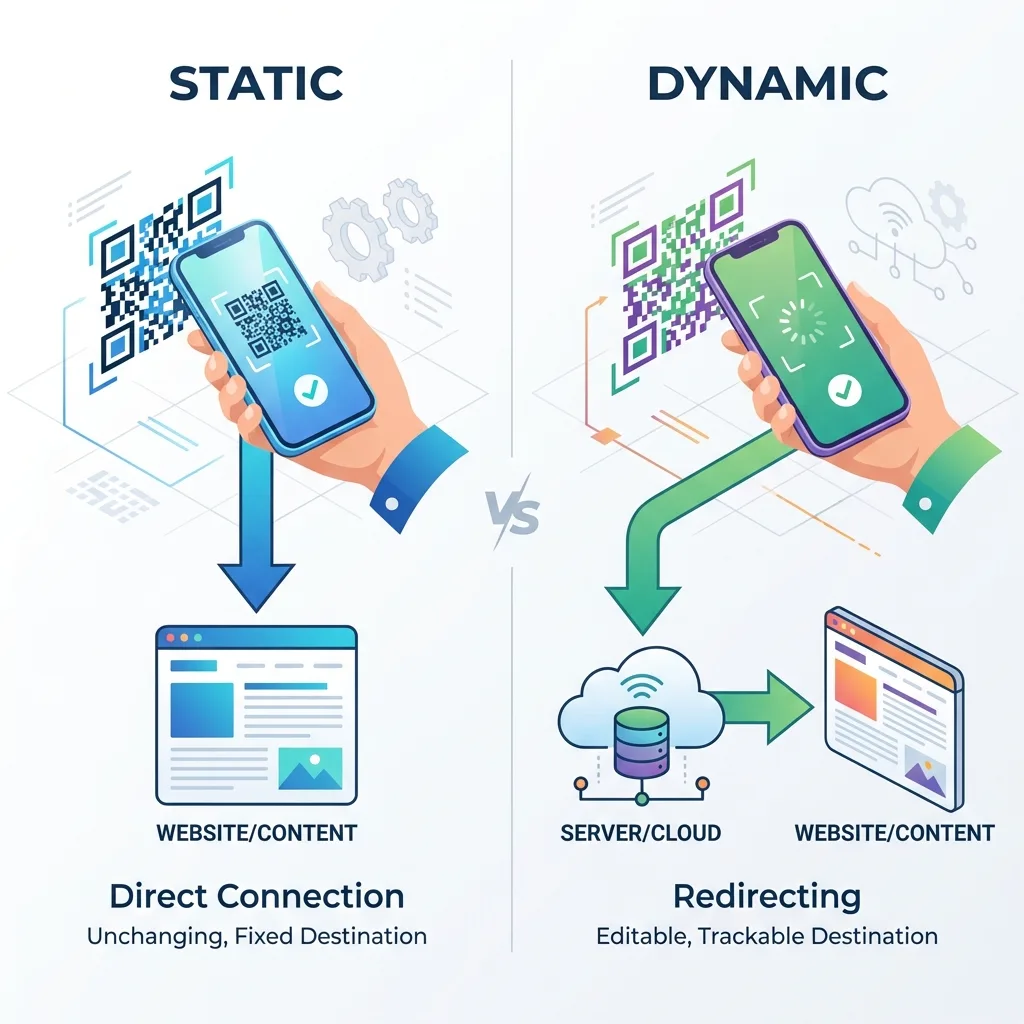
Getting a dynamic QR code right before you print it
Almost everything about a dynamic QR code can be changed after printing: where it goes, what the hosted page says, even how it looks on the next print run. Two things can't: the short link inside the printed pattern, and the company that answers it. Most of the planning worth doing happens before the print order, and this guide covers the decisions that are hard to undo later.
If you're still deciding whether you need a dynamic code at all, start with static vs dynamic QR codes. The rest of this page assumes you've chosen dynamic and want it to keep paying off for as long as the print is in circulation.
Should the code forward to your website or open a hosted page?
A Website code forwards each scan to a page you already run. A hosted type (PDF, menu, album, vCard Plus and the rest) opens a mobile page that QuickQRC stores for you. Choose based on who will keep the content current.
- Pick a Website code when the content already lives on your site and someone there keeps it updated. Your own analytics, cookie banner and checkout stay in charge, and the QR code is only a doorway.
- Pick a hosted page when there's no good page to send people to, or the only version is a PDF that would be awkward to read on a phone. A café with no website, a one-off event, or a product sheet that only exists as a print file are typical cases.
One code for everything, or one code per placement?
If the same code is on the poster, the flyer and the shop window, the scan count tells you how well the campaign did overall but not which placement worked. A separate code for each placement costs nothing extra to print and turns the statistics into an answer. Say the window got 140 scans and the flyer got 6, so next month's budget goes on windows.
Name each code after where it will be stuck ("Window - High St", "Flyer - October drop"), and keep a campaign's codes together in one folder in the dashboard. Six months later, when someone asks which code is on the delivery van, you'll be glad you did.
Think twice before giving a code a custom ending. You can choose the last part of the short link yourself, and it's printed in every copy for good. An ending like /r/spring-sale looks wrong the day you point the code at the summer range. Pick a neutral ending such as your shop name, or let QuickQRC generate one.
What does a "scan" actually count?
Scan numbers differ between providers because each one decides differently what to count. On QuickQRC:
- Bots aren't counted. Search crawlers and the link-preview fetchers that chat apps send when someone pastes your short link are recognised and skipped, so sharing the link in a group chat doesn't inflate your numbers.
- "Unique scanners" counts each visitor once per day. It's worked out from a one-way hash of the visitor's network address and browser that changes daily. The address itself is never stored, so the same person scanning again tomorrow counts as a new unique scanner.
- Location is approximate. Country and city come from an offline lookup of the network address. A phone on mobile data or a VPN can show up in a city its owner has never visited. Trust the country figures more than the city ones.
- A scan is counted when the code opens, not when someone does what you hoped. To see whether scanners went on to buy, book or sign up, add UTM tags to a Website code's destination, or connect your Google Analytics 4 or Meta Pixel ID to the code.
For the wider picture of what QR analytics can and can't tell you, see how QR code tracking works.
Why does the redirect type matter when you edit a code?
When someone scans a dynamic code, their phone asks the short link where to go, and the server answers with a redirect. There are two common kinds. A permanent (301) redirect can be remembered by browsers, as MDN's reference on HTTP 301 explains. A phone that remembers it may keep opening the old destination after you've changed it. A temporary (302) redirect is checked again on every scan.
QuickQRC answers every scan with a temporary redirect and tells browsers not to cache it, so an edit takes effect on the very next scan. If you're comparing providers, it's worth asking which kind they use. "Editable" doesn't mean much if returning visitors still land on last month's page.
Should a campaign code expire when the offer ends?
You can set a start date, an end date or a scan limit on any code, which suits ticket releases, limited giveaways and codes that shouldn't work before launch day. When a code is closed, scanners see a short "this QR code has expired" notice telling them to contact the organiser.
For most marketing, though, expiring the code isn't the best move. Posters stay on walls and flyers sit in drawers long after a campaign ends, and the people who scan them late are still interested customers. Rather than shutting the code off, point it at a page that says the offer has ended and shows what's on now. You keep the visitor, and the scan count tells you how long the print kept working. Save hard expiry for codes where a late scan would cause a real problem, such as a one-time discount or an entry pass.
What happens if you stop using the provider?
This is the question to ask before you print, because the answer doesn't change after you do. The printed pattern holds a link on the provider's domain, and only that provider can forward it. The short link can't be moved to another service, and a static code can't be pointed somewhere new either.
Many generators treat dynamic codes as a paid feature behind a free trial. QR Code Generator's help centre states that dynamic codes are deactivated when the free trial ends, and that scanners then reach a service page instead of the original content. Uniqode.s pricing page says dynamic codes become inactive once its free trial expires. That's how a restaurant ends up with table tents that went dead two weeks after printing.
On QuickQRC the free plan isn't a trial, and reaching its limits only stops you creating new codes. Codes you already have keep forwarding and counting scans. A code stops working only if you set an end date or scan limit on it, delete it, or delete your account. Still, any dynamic code relies on its provider staying in business. For something meant to last a decade with nobody looking after it, such as a building plaque, a memorial or a product printed in the millions, consider a static code that points at a page on your own domain. You can redirect that page yourself whenever you need to. Do QR codes expire? explains each way a code can stop working, and free vs paid QR code generators shows how to read a provider's terms.
How do you keep scanners safe?
Because the destination of a dynamic code can be changed, whoever controls your account controls every printed copy. Use a strong, unique password and turn on two-factor authentication in your account settings, especially if several people share the dashboard.
The other risk is physical. The US Federal Trade Commission has warned that scammers stick their own codes over real ones, parking meters being the classic example, and advises people to check the web address before opening it. Codes in public places should be checked every so often for stickers on top, and printing the short link in small text under the code lets scanners check that it matches the address their phone shows. More on this in QR code scams and quishing.
A checklist before the print order goes in
- The type is right for the long run: a Website code for content on your own site, a hosted page for anything you want QuickQRC to hold.
- Each placement has its own code, named after where it will go and filed in a campaign folder.
- Any custom ending is one you'll be happy with when the destination changes.
- Website destinations carry UTM tags if you want to see what scanners did next.
- End dates and scan limits are set only where a late scan would cause a problem.
- The code is printed large enough for the distance it will be read from, with a clear margin around it. The print size guide has the numbers.
- A printed proof has been scanned on at least one iPhone and one Android phone, and opened the right page both times.
- Your account has two-factor authentication turned on.
For codes that will never change, the free static generator needs no account at all.