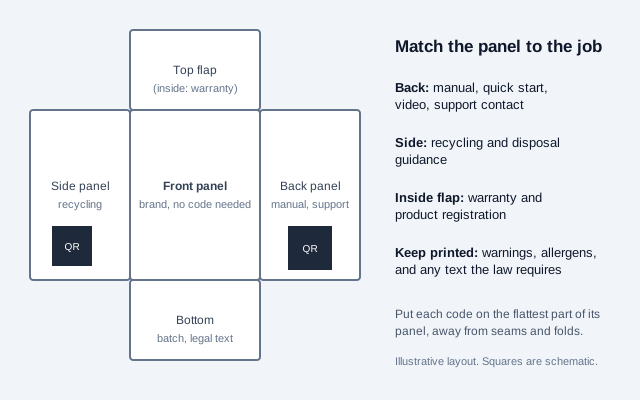
A QR code on packaging lets a box carry what its print area cannot: a full manual, a setup video, ingredient or material detail, recycling guidance, a warranty form, or a support page. Link it to a short, permanent address on your own domain, put it on the flattest panel, and keep every legally required warning and label statement printed on the pack. The code is fixed the day the box is printed, while the product may sit in a customer's home for years, so the page behind it has to outlive both your current website and your current host.
This guide covers what to put on which panel, whether shoppers scan packaging codes, QR code versus GS1 DataMatrix, which label content cannot move behind a code, the EU packaging rules that now mention QR codes, how to keep the linked manual alive, how to print and test the symbol on real substrates, and a rollout plan that catches problems before a million boxes are printed.
What should a packaging QR code link to?
Pick the job from the question a customer has at each stage of owning the product, then give the code one destination.
| Customer question | Destination | Needs to stay live for |
|---|---|---|
| How do I set this up? | Quick-start page with a short video | The product's supported life |
| Where is the full manual? | Manual for this model, in the visitor's language | Years after the last unit ships |
| Is it under warranty? | Warranty registration form | The warranty period |
| How do I get help? | Support contact page or chat | The product's supported life |
| What is in it? | Ingredients, materials, care, or allergen detail | Shelf life of the product |
| Where does this go when I'm done? | Recycling and disposal guidance for the local area | The pack's whole life |
| Is it genuine? | Authentication check (see the product authentication guide) | As long as the check is relied on |
Do shoppers actually scan packaging codes?
The evidence is mixed, and the figures measure different things. A 2025 GS1 US survey reported that about two-thirds (66%) of consumers would scan a QR code on food packaging for details such as freshness, ingredients and shelf life, which is stated willingness. Uniqode's 2026 State of QR Codes report put product packaging third among places people say they scan, at 40%, behind restaurants and websites. Scanova's 2026 benchmarks, on the other hand, found that the typical active QR code on consumer packaging earns only 21 scans. These come from vendors and trade bodies with an interest in QR adoption, so check the originals before quoting them.
The gap between "would scan" and "21 scans" points to one design rule: a packaging code gets scanned when it promises something the pack cannot show. "Scan for the full manual" and "Scan to register your warranty" offer a reason. A bare square, or a link to the brand's homepage, offers none.
Should packaging use a QR code or GS1 DataMatrix?
| Use | Carrier | Why |
|---|---|---|
| Consumer information on general retail goods | QR code with a GS1 Digital Link URL | One symbol works as a web link for a phone and as a product number for a 2D-capable checkout scanner; see GS1 Sunrise 2027 |
| Healthcare and regulated supply chains | GS1 DataMatrix, or whatever the regulator specifies | GS1 uses DataMatrix, not QR, for product identification and traceability in its healthcare framework; many serialization schemes name it |
| Very small marking areas | Micro QR or rMQR, after confirming scanner support | See the Micro QR code guide |
Ask each retail partner and your GS1 member organization which carrier and data syntax they accept before you commit artwork. Changing the carrier after plates are made costs far more than asking first.
What information must stay printed on the pack?
Treat the QR code as an extension of the label, not a place to move required content. We found no US rule that lets a code replace mandatory printed label text, and the main food rules point the other way. In the EU, Regulation (EU) No 1169/2011 requires the 14 allergens and other mandatory particulars to appear as the rule prescribes, so a code can add detail but cannot stand in for them. Medicines and medical devices have their own electronic-labelling regimes, and they differ by country, so follow the regulator that governs the product.
A practical split:
- Print on the pack: warnings, allergens, safety instructions a user needs before opening, regulatory marks, and anything an authority says must be on the label.
- Put behind the code: long manuals, translations, videos, troubleshooting, spare-parts lists, extended nutrition or sourcing stories, and registration.
- Always include: a printed support phone number or web address, for the customer without a phone or signal.
The food allergen guide and the labels and bottles guide cover the detail for those categories.
Which EU packaging rules now involve QR codes?
The EU Packaging and Packaging Waste Regulation, Regulation (EU) 2025/40, applies from 12 August 2026 and brings QR codes into several labelling duties. The dates below come from secondary commentary, and at least one source reported that implementing acts setting the label formats were still unadopted in early September 2026, so treat the later dates as floors and confirm them in the Official Journal.
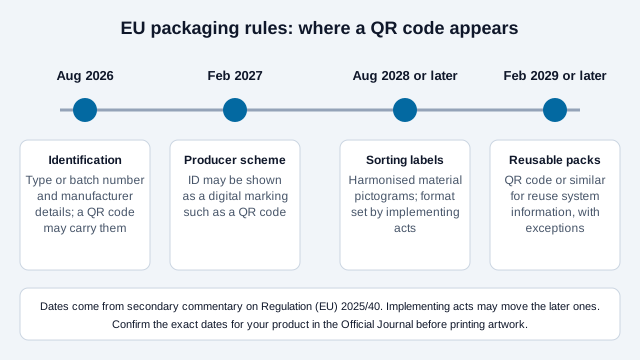
- From August 2026, packaging needs a type, batch or serial identifier and the manufacturer's name and postal address, and a QR code may carry them where the rule allows.
- From February 2027, a producer's responsibility-scheme identification may be shown as a digital marking, such as a QR code.
- Harmonised material-sorting labels follow from about August 2028 or later, depending on the implementing acts.
- QR codes for reusable-packaging system information follow from about February 2029 or later, with exceptions.
Products also face separate EU product rules. The Ecodesign for Sustainable Products Regulation, (EU) 2024/1781, creates the Digital Product Passport framework with product-group requirements to come, and batteries have their own earlier deadline for a prescribed QR code under Regulation (EU) 2023/1542. Our Digital Product Passport guide tracks those. Prepare identifiers and the data behind them now, and finalize printed carriers once the act that applies to your product group is settled.
How do you keep the linked manual alive for years?
A static code encodes a fixed URL, so the answer is to keep that URL working for the life of every box, wherever it sits.
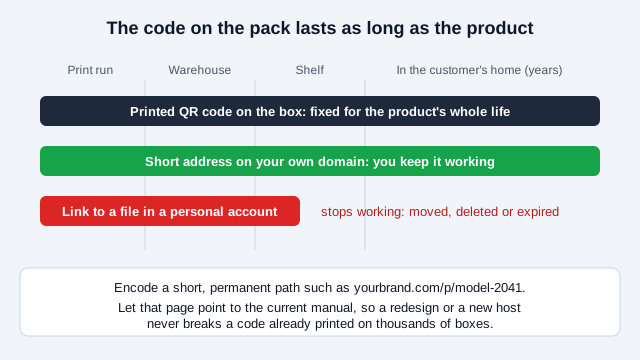
- Encode a short, permanent path on your own domain, such as
yourbrand.com/p/model-2041, then let that page point to the current manual. Never encode a direct link to a file in a personal cloud account or a free file host. - Renew the domain and certificate on a calendar with a named owner, and put them on the company's checklist for acquisitions or rebrands.
- If you move platforms, own the redirect so printed stock keeps working.
- Keep every model's manual online after the product is discontinued. A manual that returns a 404 for a product still in use is a support and, in some sectors, a compliance problem.
- Version your manuals so a customer with an older unit sees the right one, using the model or batch in the page path rather than in guessable parameters.
For a one-code-per-SKU print run, a static code is enough. Use a dynamic code only if the printed destination must change after printing and a redirect on your own domain cannot do the job. The static vs dynamic guide explains the trade-off.
One security note: a static code printed identically on every unit cannot prove authenticity, because anyone can copy it. Authentication needs a unique, server-checked code per unit, covered in the product authentication guide.
What should a digital manual page include?
- The model and a way to confirm it, shown at the top, so a customer with a similar product does not follow the wrong steps.
- A quick-start section a person can finish in two minutes, then the full manual.
- A download link for an accessible PDF as well as mobile-friendly text, and captions on any video.
- Language selection that defaults from the browser but lets the customer change it.
- Safety information repeated from the pack, not replaced by the page.
- A support route: phone, email, and a form, with typical response times.
How do you print a packaging QR code that scans?
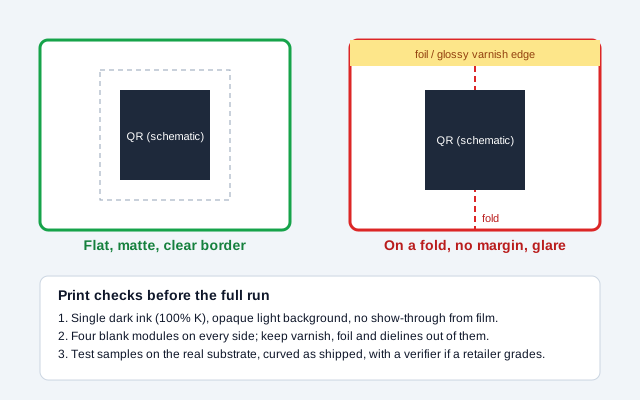
- Placement: the flattest available panel, away from seams, folds, and the edge of the carton. Test the code on a wrapped or curved pack, not a flat proof.
- Size: sources disagree. Packaging guides from vendors suggest about 20 mm for curved or round surfaces and 25 mm (about 1 inch) or more for glossy, flexible, or shrink-wrapped packs. Treat these as starting points and test.
- Ink and contrast: a single dark ink (100% K in CMYK) on an opaque light area, to avoid registration fringing that closes up light modules. Keep dark modules clearly darker than the background, and avoid transparent film or busy artwork showing through.
- Quiet zone: a four-module blank border on every side. Foil, spot varnish, die lines, and borders that intrude into it can break a scan.
- Finish: matte is safest. Glossy lamination and reflective foil throw glare under store lighting.
- Error correction: consider level Q or H for packs that are handled, creased, or shipped, which allows more of the symbol to be damaged and still read.
- Artwork: send the printer an SVG so the modules stay crisp at any size. See the SVG QR code guide.
- Grading: if a retailer requires it, grade printed samples with an ISO/IEC 15415 verifier on the real substrate. Ink spread, gloss, and lamination change the result versus a screen proof.
For flexographic or other plate processes, ask the converter about dot gain and plate resolution, since the guidance we found says little about them. The scannability tester and the print size guide help with checks before you contact the printer.
How should you test before the full print run?
| Stage | What to test |
|---|---|
| Artwork proof | Scan on screen to confirm the destination and tracking tag |
| Press proof or digital sample | Scan on a physical sample on two phone brands, in shop and home lighting |
| First production units | Scan on the real substrate, curved and creased as shipped; grade if required |
| Shipped samples | Pull boxes from a delivered pallet and rescan after handling |
| After launch | Check the page loads on mobile data and that the manual is current |
What about tracking and customer data?
Add a UTM tag, such as ?utm_source=qr&utm_medium=pack, from the UTM builder to see visits by pack or batch. Treat the result as page visits, not scans. A warranty or registration form collects personal data, so state what you collect, why, and for how long, and check local privacy law (such as GDPR in the EU and UK) before adding marketing sign-up. Do not require an account to read a manual.
What mistakes break packaging QR programs?
Look at a small appliance brand that prints 200,000 boxes with a code pointing at a manual in an employee's cloud drive. Eighteen months later that employee leaves, the account is closed, and every code returns an error. Meanwhile the matte-looking varnish on the back panel turns out to be glossy at the edge where the code sits, and a retailer's scanner rejects it. Both are common, and both appear on this list.
- Linking to a personal account or a free host.
- Printing a code over a fold, a seam, a foil stripe, or a curved corner.
- No quiet zone because the layout crowded it.
- Moving mandatory label text behind the code.
- No printed fallback for customers without a phone or signal.
- Forgetting that discontinued models still have users.
- Printing a copyable code and calling it authentication.
How do you launch a packaging code?
- Decide the single job for each code and the panel it sits on.
- Choose the carrier with your retailer and GS1 member organization.
- Build the page on your own domain, with a short permanent path and a named owner.
- Generate the symbol from the final URL and export SVG.
- Reserve a flat area with a clear border, and brief the printer on ink and finish.
- Test a physical sample on the real substrate, then first production units, then a shipped pallet.
- Add a domain-renewal reminder and a yearly check that every live model's manual loads.
What this checklist cannot settle
Two points this checklist cannot settle for you. Which label content may move behind a code depends on your product category and country, and the EU packaging dates may shift as implementing acts are adopted. Confirm both with your regulator or a qualified adviser.
This guide is general information, not legal advice. Labeling, privacy, and packaging regulations differ by country and change over time.
References
- EUR-Lex: Regulation (EU) 2025/40 (Packaging and Packaging Waste Regulation)
- EUR-Lex: Regulation (EU) 2024/1781 (Ecodesign for Sustainable Products Regulation)
- EUR-Lex: Regulation (EU) No 1169/2011 on food information to consumers
- GS1: Digital Link standard
- GS1: 2D barcodes at retail point-of-sale (Sunrise 2027)
- ISO/IEC 18004:2024, QR code bar code symbology specification
- Fresh Fruit Portal: GS1 US consumer survey on product information (June 2025)
- Scantrust: QR codes on packaging, print and placement guidance (vendor)