Construction sites use QR codes at gates, work areas and on plant and materials to open the current drawing set, method statements, safety data sheets, inspection forms and equipment records, at the point the information is needed. A code can make documents quicker to reach, but it cannot replace a warning or notice that must be posted, and it must always resolve to the current revision.
This guide covers what a code may and may not stand in for, how it fits with safety data sheet rules, how to keep drawings out of public hands and out of date copies off the floor, what to do where there is no signal, and how to build labels that survive a site. It is a planning aid for the site team, not a substitute for your safety officer.
Can a QR code replace a posted safety notice?
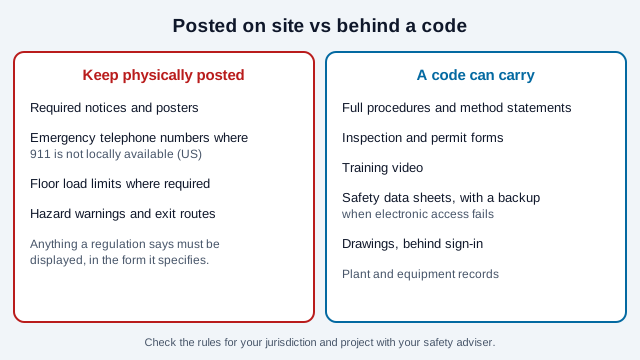
No. Warnings and notices that regulations require to be posted must stay physically visible. In the US, examples include the OSHA job safety poster, emergency telephone numbers where 911 is not locally available (29 CFR 1926.50), and posted floor load limits for storage floors (29 CFR 1926.250). OSHA's recent paperwork notices on those two construction posting rules show them still in effect, though the current regulation text should be checked directly.
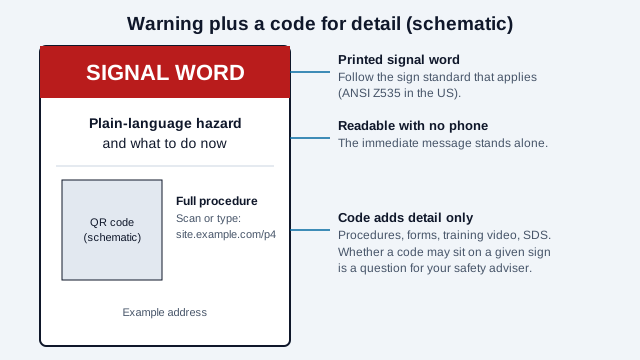
Design a sign as the warning plus a code for detail, never a code instead of the warning. The immediate message has to be readable without a phone, in the moment, by everyone, including a worker whose phone is in a locker. ANSI Z535 classifies printed signs by hazard severity with the signal words danger, warning and caution (and notice); follow it, or your jurisdiction's equivalent, for the printed part. Nothing found while preparing this guide addressed QR codes on safety signs specifically, so ask your safety adviser or sign maker whether a code can sit on a given sign.
How do QR codes fit with safety data sheets?
OSHA's Hazard Communication Standard requires safety data sheets to be readily accessible to employees in their work area during each shift. Construction employers are covered by 29 CFR 1926.59. Electronic access is allowed under the standard's alternatives to paper, provided it does not create barriers to immediate access, and summaries of OSHA's interpretations stress a reliable backup for power or system failure. OSHA interpretations have accepted paper copies, terminal access or other readable means on site. One 1998 letter addressed a telephone backup, with the sheet delivered within a stated time; that was specific to the letter and should not be assumed to apply today.
- A code on a container, store or chemical cabinet is a fast route to that specific sheet.
- The sheet behind it must be the correct, current one for the product on site.
- Keep a printed binder or offline copies for areas without signal, and make sure workers know where they are.
- State-plan jurisdictions may add rules, so confirm yours.
How do you stop out-of-date drawings reaching the work face?
Revision control is the best-documented use. Autodesk and other platforms describe version-specific codes on printed sheets: a scan shows whether the sheet is the latest revision and, if it is not, goes to the current one. A vendor of a revision-checking tool claims one in four drawings on site is out of date, but that is a marketing figure. A highway-construction study listed by the Pacific Northwest Transportation Consortium reported a benefit-cost ratio of 1.70 for QR codes in document control, and noted that paper remains the most common form of control there. Treat both as indications, not proof for a building project.
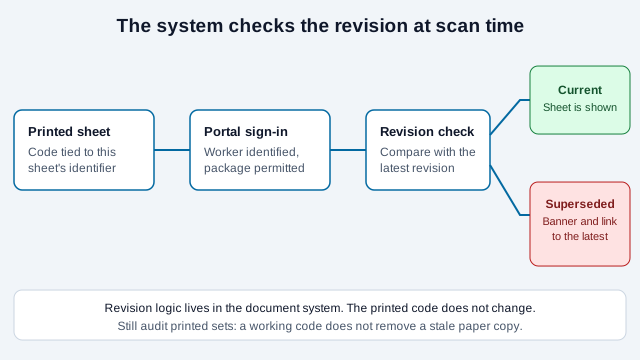
- Print a code on each issued sheet, tied to that sheet's identifier in the document system.
- On scan, the system confirms who is asking and whether they may see this package.
- It compares the sheet's revision with the latest and either shows the sheet or shows "superseded" with a link to the current one.
- Version logic lives in the system, not in the printed code, so a drawing issued last month still behaves correctly.
Printed sets also need a periodic physical audit; a code that works does not remove a stale paper copy from a pocket.
How do you keep drawings from the public?
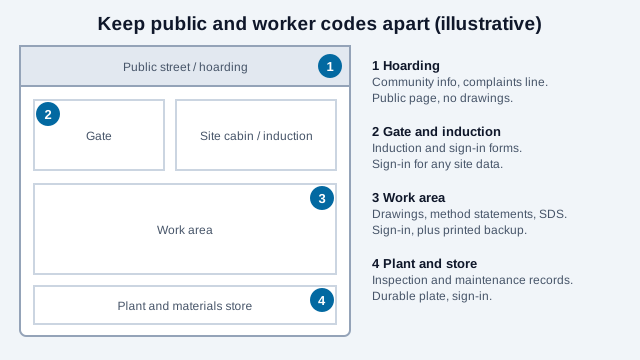
A code on a fence or a delivered package can be photographed by anyone. Do not point a public-facing code straight at a drawing set.
- Point site codes at an authenticated document portal where each worker signs in and the system checks project and package permissions.
- Use an opaque token in the link, not a guessable project or sheet number, and check authorization on the server for every request.
- Keep public-facing codes (community information, complaints line, delivery instructions) on separate, low-sensitivity pages.
- Be aware that stickers can be swapped; the guide to QR scams and the safety-check guide explain the risk on public hoardings.
What about sites with no cell service?
Much of a part-built structure has no usable signal.
- Provide site Wi-Fi at the cabins and key work areas, and post a Wi-Fi QR code for the site network, separate from the office network.
- For short instructions that must always be available, a plain-text QR code decodes on the device with no network at all. The character limit guide says how much text fits.
- Use an offline-capable app that syncs when connected, for inspection forms.
- Keep printed copies of the current drawings and critical procedures in the work area regardless.
How should labels be built and sized?
- Site signs and plant labels: at least 2 to 3 inches (5 to 8 cm) for a walk-up scan, larger for gate signage; the usual guideline is about one-tenth of the scanning distance. Dark on a solid light panel with the four-module quiet zone clear of fixings.
- Choose a sealed, UV-stable, abrasion-resistant label or an engraved plate. Vendor listings for adhesive vinyl signs cite outdoor lives of about 3 to 4 years, and red inks fade fastest under UV, so ask for a protective overlaminate. These are vendor figures; test your actual material.
- Test printed labels after abrasion, cold, wet and dust, not just fresh from the printer, with gloves on and a work phone.
- Export SVG for sign printing. The print size guide and the scannability tester support the testing, and the asset tracking guide covers plant records. For hosting a document set, see QR codes for a PDF.
Static or dynamic on a construction site?
Static codes cost nothing and never expire, so a label stays valid as long as the address does. Point each at a stable path on your own document portal and change what it shows. A paid dynamic code helps only when a printed destination changes between unrelated systems, and it adds a vendor between the worker and the document. Many sites need one code per plant item or work area; the bulk generator makes sets.
What mistakes break site QR programs?
Imagine a contractor that replaces the exit-route sign in a stairwell with a QR code that opens the evacuation plan. A worker with no signal cannot read it, and an inspector asks why the posted notice is gone. On the same site, a laminated paper code on a hoist cage peels in the first rain, and a drawing code opens a revision that was withdrawn two weeks earlier.
- Replacing a required posted notice with a code.
- Paper labels in wet, dusty locations.
- Codes that open withdrawn revisions.
- Pointing public-facing codes at drawing sets.
- Assuming signal where there is none.
How do you launch a job site code?
- List which notices must remain posted, and keep them posted.
- Pick two uses to start, such as SDS access and drawing revision control.
- Set up authenticated access and test with a worker account, not an administrator.
- Print one label in the real material, abuse it for a week, and scan it with gloves on.
- Check coverage in every area; add Wi-Fi or an offline fallback where it is missing.
- Assign an owner to audit codes and printed sets monthly.
Two points a checklist cannot settle. Whether a particular sign or notice may carry a code depends on the regulation and standard that apply to it, and electronic access rules for safety data differ by jurisdiction. Your safety officer, OSHA or the equivalent regulator, and your insurer have the final word.
This guide is general information, not safety, engineering or legal advice. Site safety and posting rules vary by country, state and project, and change over time.
References
- OSHA: standard interpretation (1998) on electronic access to safety data sheets
- Oregon OSHA: 2020 interpretation on electronic safety data sheets
- OSHA Federal Register notice (2022): construction posting of emergency numbers and floor load limits
- Autodesk: 4 ways QR codes can improve construction outcomes
- PacTrans: feasibility of QR codes for construction document control in highway construction
- MSC Direct: what are the ANSI Z535 safety signage standards?
- ISO/IEC 18004:2024, QR code bar code symbology specification