A standard QR Code can hold at most 7,089 numeric digits, 4,296 alphanumeric characters, 2,953 bytes, or 1,817 Kanji characters. Those headline limits apply only to the largest symbol, Version 40, using the lowest error-correction level. A practical QR code usually holds much less because its capacity also depends on the data mode, error-correction level, and character encoding.
For a reliable code, do not aim for the theoretical maximum. Shorter content produces a less dense symbol that can be printed larger per module and scanned more easily. For web content, a short, stable URL is normally better than embedding a large block of text.
What are the maximum QR Code capacities?
DENSO WAVE publishes the following maximum capacities for standardized QR Code. They describe Version 40 at error-correction Level L, not every QR code.
| Data mode | Theoretical maximum | What it contains |
|---|---|---|
| Numeric | 7,089 digits | Digits 0–9 only |
| Alphanumeric | 4,296 characters | Digits, uppercase A–Z, space, and a limited set of symbols |
| Byte | 2,953 bytes | General data, commonly used for URLs and mixed text |
| Kanji | 1,817 characters | Characters supported by the QR Kanji encoding mode |
The often-repeated claim that a QR code holds “4,296 letters” is incomplete. Lowercase letters, many punctuation marks, accented characters, emoji, and typical URLs generally require byte mode. In byte mode, capacity is measured in bytes rather than visible characters.
How do the maximums change at each error-correction level?
The figures above are for Level L. Each step up in error correction leaves less room for the payload. These are the Version 40 maximums at all four levels, confirmed by encoding test strings at each setting:
| Level | Numeric digits | Alphanumeric characters | Bytes |
|---|---|---|---|
| L | 7,089 | 4,296 | 2,953 |
| M | 5,596 | 3,391 | 2,331 |
| Q | 3,993 | 2,420 | 1,663 |
| H | 3,057 | 1,852 | 1,273 |
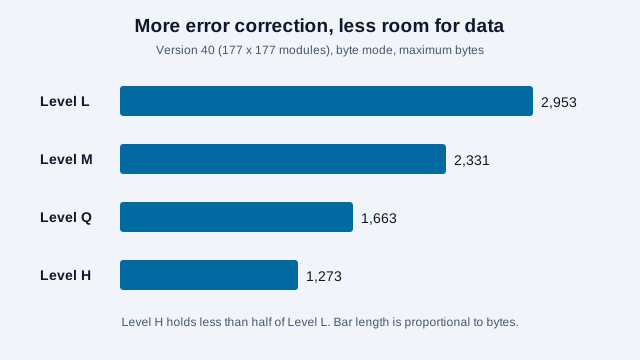
So the often-quoted 2,953 bytes drops to 1,273 at Level H, less than half. See QR code error correction levels for how to choose a level.
Why does the character limit change?
Capacity changes because a QR symbol must store the payload plus mode information and error-correction data. Three choices have the largest effect.
1. Symbol version
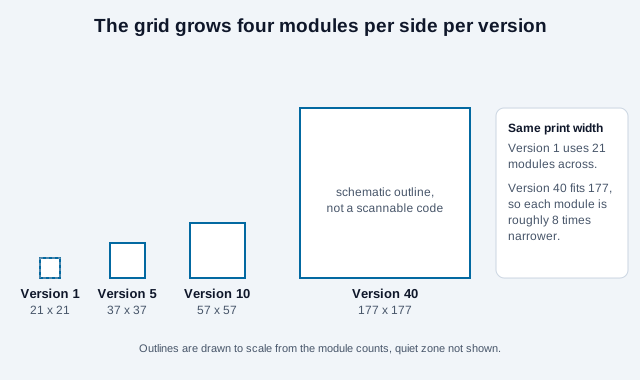
Standard QR Code has Versions 1 through 40. Version 1 is 21 by 21 modules. Each higher version adds four modules per side, ending with Version 40 at 177 by 177 modules. A module is one square in the grid, not one screen pixel.
A generator normally selects the smallest version that fits the content and selected correction level. Adding content can push the symbol into a higher version, making its pattern denser.
2. Error-correction level
Levels L, M, Q, and H add increasing redundancy. More redundancy can help recover data when some codewords are damaged, but it leaves less room for the payload. Therefore, the maximum figures above fall when Level M, Q, or H is selected.
3. Data mode and encoding
Numeric mode packs digits efficiently. Alphanumeric mode supports a defined, limited character set. Byte mode handles broader input but uses more space. Kanji mode efficiently represents a defined Japanese character set. Encoders may split suitable input into multiple segments to save space, so two strings with the same visible length can produce different versions.
How many characters should a practical QR code contain?
Use the shortest payload that completes the task. There is no universal practical character limit because print size, scanning distance, camera quality, contrast, and correction level all affect performance.
- For a website, encode a concise HTTPS URL on a domain you trust.
- Remove unnecessary tracking parameters when they are not needed.
- For contact details, include only fields the recipient needs.
- For Wi-Fi, double-check the network name, security type, password, and escaping.
- For offline text, test the exact final payload rather than estimating from its character count.
A URL shortener can reduce density, but it also creates a dependency on the shortening service and can obscure the destination. A short path on a domain you control is generally easier to govern over the lifetime of printed material.
How many characters fit in a small QR code?
Most printed codes are far smaller than Version 40. This table shows how many bytes fit in each of the first ten versions. For a typical URL made of ordinary lowercase letters, digits, and punctuation, one character is one byte.
| Version | Grid | Level L | Level M | Level Q | Level H |
|---|---|---|---|---|---|
| 1 | 21 × 21 | 17 | 14 | 11 | 7 |
| 2 | 25 × 25 | 32 | 26 | 20 | 14 |
| 3 | 29 × 29 | 53 | 42 | 32 | 24 |
| 4 | 33 × 33 | 78 | 62 | 46 | 34 |
| 5 | 37 × 37 | 106 | 84 | 60 | 44 |
| 6 | 41 × 41 | 134 | 106 | 74 | 58 |
| 7 | 45 × 45 | 154 | 122 | 86 | 64 |
| 8 | 49 × 49 | 192 | 152 | 108 | 84 |
| 9 | 53 × 53 | 230 | 180 | 130 | 98 |
| 10 | 57 × 57 | 271 | 213 | 151 | 119 |
As a worked example, https://quickqrc.com is 20 bytes. It fits Version 2 at Levels L, M, and Q (32, 26, and 20 bytes), but at Level H, which holds 14 bytes in Version 2, it needs Version 3. Accented letters, emoji, and other non-ASCII text use two to four bytes each, so they fill a code faster than their visible length suggests.
How big do real payloads get?
The table below uses sample strings written for this guide, with byte counts measured as UTF-8 and the smallest version read from the byte-mode table above at Level M. They are estimates for single-mode byte encoding. An encoder that splits a payload into numeric, alphanumeric and byte segments can sometimes fit it into a smaller version.
| Sample payload | Bytes | Smallest version at Level M | Grid |
|---|---|---|---|
https://quickqrc.com | 20 | 2 | 25 × 25 |
| Wi-Fi string with a 20-character password | 48 | 4 | 33 × 33 |
| MeCard with name, phone, email and company | 71 | 5 | 37 × 37 |
| Landing URL with four campaign tags | 112 | 7 | 45 × 45 |
| Compact vCard with title, mobile, email and website | 169 | 9 | 53 × 53 |
Thanks ☕😊 (10 visible characters) | 14 | 1 | 21 × 21 |
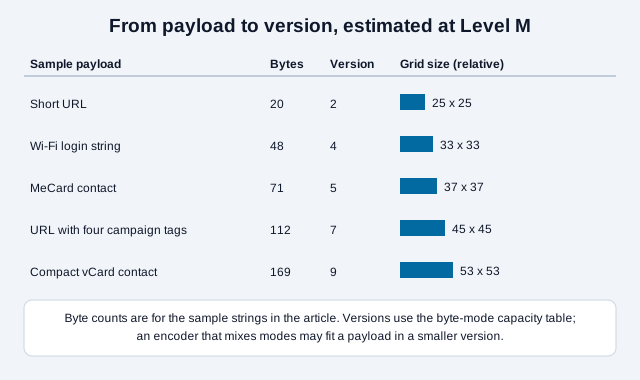
The last row shows why visible length misleads: ten characters cost 14 bytes because the coffee cup takes three bytes and the smiling face takes four. The contact rows also show why a compact format matters. A vendor glossary and Wikipedia both describe MeCard as more compact than vCard, though the byte counts for vendor samples vary, so measure your own payload. The MeCard generator and vCard generator let you compare them, and the payload decoder shows the exact string inside any code.
Campaign tags add up quickly. If you track scans with UTM parameters, keep names short, or use a managed redirect so the code holds a short link while the long destination lives behind it. The UTM builder and the QR code tracking guide cover the trade-off.
What is the smallest QR code, and what is Micro QR?
The smallest standard symbol is Version 1 at 21 by 21 modules. DENSO WAVE also defines Micro QR Code, a smaller format with a single position detection pattern instead of three. Its versions run from M1 at 11 by 11 modules to M4 at 17 by 17, and the largest, M4, holds 35 numeric characters, 21 alphanumeric characters, 15 bytes or 9 Kanji at the lowest correction level, less than Version 1 of regular QR Code.
Micro QR targets very small labels and part markings with short payloads. Scanner support varies, so test it on the phones your audience uses before choosing it, and see the Micro QR code guide first.
Capacity examples that avoid common mistakes
A string of digits can use numeric mode efficiently, but adding a single lowercase letter or an unsupported symbol may cause part or all of the payload to use another mode. Similarly, the visible length of a URL does not reveal its encoded size when it contains escaped characters or international text.
| Payload example | Likely mode | Capacity implication |
|---|---|---|
012345678901 | Numeric | Digits are packed more efficiently than general text. |
ROOM 12-A | Alphanumeric | Uppercase letters and supported symbols can use the compact alphanumeric set. |
https://example.com/check-in | Byte or mixed segments | Lowercase letters and URL syntax usually consume more capacity than the same number of digits. |
| International text or emoji | Usually byte | Count encoded bytes, not only the characters visible on screen. |
Capacity also should not be confused with the number of possible QR patterns. What matters is whether one standardized symbol can encode the exact payload at the chosen error-correction level. A trustworthy generator should reject content that does not fit rather than silently truncate it.
Why do emoji and international text use more space?
Visible characters and encoded bytes are not the same thing. UTF-8 represents common English letters with one byte, while many accented characters use more and most emoji require several bytes. Some emoji sequences combine multiple Unicode code points.
Consequently, a 100-character plain-English message and a 100-character emoji-rich message may require different QR versions. The safest method is to generate the actual content and inspect the selected version and final symbol rather than relying on a character counter alone.
Does more data make a QR code harder to scan?
More data generally creates a denser symbol. If the printed width stays fixed while the version grows, each module becomes smaller. Small modules are more vulnerable to blur, ink spread, glare, camera distance, and imperfect reproduction.
Preserve the required four-module quiet zone around a standard QR Code and use strong dark-on-light contrast. Do not stretch the symbol. Test a physical proof at the intended size, distance, lighting, and surface with several representative phones.
Error correction is not permission to cover arbitrary parts of a code. Logos, crops, and design overlays may damage functional patterns or concentrate damage beyond what the decoder can recover.
Can a QR code store a file or an entire document?
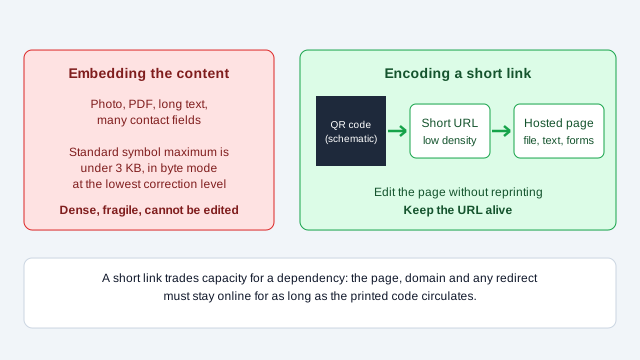
A Version 40 symbol stores less than 3 KB in byte mode at Level L, before practical usability concerns. That is far too little for a normal photo, PDF, video, or application.
For files, encode a URL to a maintained download or viewing page. This keeps the QR code simpler and lets you manage accessibility, file size, permissions, and updates at the destination. Remember that a static QR code will continue to contain the same URL, but the page behind that URL must remain available.
Web addresses have practical limits too, although they are rarely the constraint in a QR code. Search results describe 2,000 characters as a common rule of thumb, with older Internet Explorer documented at 2,083, and report that servers often impose tighter limits than browsers. The HTTP specification sets no fixed maximum. These figures come from secondary sources, so test the exact URL on the devices and servers you rely on. For hosted files, see QR code for PDF and the dynamic QR code generator.
How to reduce a QR code's data load
- Choose one clear action for the code.
- Shorten page paths and remove redundant query parameters.
- Move long explanations, files, and multiple links to a mobile-friendly landing page.
- Remove optional vCard or event fields that provide no user value.
- Generate the exact final payload and test the resulting symbol.
- Keep the destination stable for as long as the printed code will circulate.
What does a payload mistake look like?
Look at an event organizer who wants a ticket-holder's full itinerary in the code: name, three session titles, room numbers, a map note and a dietary line, about 600 bytes of plain text. At Level Q the encoder has to pick a version well above the ones in the table, the printed badge is 2 cm (0.8 in) wide, and the modules end up too small for the lanyard cameras at the door. Half the scans fail at arm's length.
The fix is to move the itinerary to a page and encode a short link with a ticket reference. The symbol drops several versions, the badge can stay the same size, and the organizer can correct a room change without reprinting. Check the real figures with a generator and a printed proof, because the exact version depends on the content.
What can a capacity table not settle?
- The largest payload your printed size and audience cameras can handle. Only a proof at the real size and distance answers that, and the print size guide shows how to plan it.
- How a particular generator segments mixed content. Two tools can produce different versions for the same string.
- Whether a shortened or redirecting URL will survive as long as the printed code. That depends on who owns the domain or service.
- How your Wi-Fi or contact payload behaves across phone makers. Format support varies, so test on iPhone and Android.
Capacity figures here are from DENSO WAVE and the byte-mode table already in this article, with sample sizes measured for this guide. Check the standard if you work in a regulated or industrial setting. When your payload is ready, generate the QR code, download it at its final size, and test the printed result where people will use it.
References
- DENSO WAVE: QR Code standardization and outline specification
- DENSO WAVE: information capacity and versions
- DENSO WAVE: error-correction feature
- DENSO WAVE: Micro QR Code
- ISO/IEC 18004:2024, QR code bar code symbology specification
- Wikipedia: MeCard (QR code)
- Rockerbox Help: Should I be concerned with my URL length? (vendor, secondary source)
- The Wiert Corner: Maximum URL lengths (2010 review, secondary source)