Museums and galleries use QR codes beside objects, at gallery entrances and on wall panels to open extended interpretation, audio, translations, transcripts, collection records or a virtual tour without crowding the label. Name what the code opens, make the linked page accessible, place the code within comfortable reach, and keep the core object information readable on the label itself.
This guide covers what to link and when a code is worth adding at all, how to build the label, how to keep audio and video accessible, what visitors' phones can and cannot do in a gallery, how to read scan data without profiling visitors, and where to place the code. It ends with a rollout checklist and a few questions the checklist cannot answer.
Is a QR code worth adding next to an object?
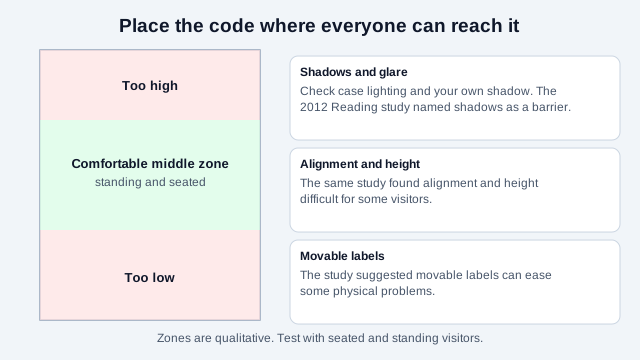
Sometimes. Early museum experiments give a mixed picture. A 2012 study at the Museum of English Rural Life in Reading, UK (Haworth and Williams), ran object trails with QR-labeled objects from January to July 2012. It reported practical barriers, including shadows over the code, trouble aligning the phone at the right height, and poor network access. It also concluded that QR codes on movable, symbolised labels in a layered information system might help modestly funded museums improve access, and that keeping the content behind the labels up to date is an ongoing job. The authors added that a museum needs to provide a device for visitors without a smartphone to be inclusive.
The Australian Museum surveyed 100 visitors in 2011 and found that 57% did not know what a QR code was, 25% knew but had not used one and 15% had scanned one and used it. That is old data and visitors today are far more familiar, but the museum's main conclusion still applies: how visitors are introduced to the codes matters, and a code should offer enough value to justify the scan. One practitioner article warns that a code beside every object turns walls into visual clutter. Add one where there is a genuine extra layer: a story that will not fit on the label, a recording, a translation, or a record of provenance.
What should an exhibit QR code link to?
| Destination | Why it earns a scan | Watch for |
|---|---|---|
| Extended label ("read more") | Context, related objects, curator notes | Page must be real text that reflows on a phone |
| Audio guide | Visitors use their own phone and headphones, with no hardware to lend or clean | Needs a transcript; audio does not play when the phone is muted |
| Translations | Label text in more languages | One page per language, with a visible language switch |
| Transcript, captions and audio description | Accessible equivalents of any media | Should not be hidden behind the media itself |
| Collection record | The object's public catalog entry | Stable address that survives a catalog update |
| Wi-Fi | Joining visitor Wi-Fi with one scan | Guest network only; see below |
Use a page on the museum's domain so content can be corrected and expanded without replacing the printed code. A static code pointing to a stable address, such as museum.example/obj/42, does the job at no cost. A dynamic code helps only if a printed destination must change without a stable address behind it. Weigh it with the static vs dynamic guide.
How do you build a label that works with and without a phone?
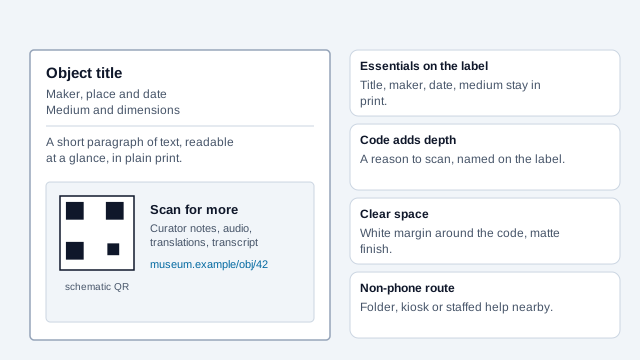
Keep the essential object information on the physical label: title, maker, date and medium, plus a short text that stands alone. The code is a second layer. Say in words what it opens ("Hear the maker describe the process", "Read in Arabic, Spanish or Mandarin"). A code with no stated reason gives visitors nothing to decide on, and the Australian Museum's write-up asked directly whether codes add value or only frustration.
Offer at least one non-phone route to the extended content, such as a printed folder, a gallery kiosk or staffed interpretation. A code is an extra route and never the only way to reach essential information, because not everyone carries a smartphone or wants to use one in a gallery. The Reading authors made the same point about providing a device.
How do you keep QR-delivered content accessible?
Accessibility is a legal duty for museums in many places. In the United States, the Department of Justice's guidance on effective communication says covered organizations need to provide auxiliary aids and services, such as electronic text that works with screen-reader software for blind visitors, or captioning and written materials for deaf and hard-of-hearing visitors. Equivalent obligations exist elsewhere. A code that only opens an audio file excludes deaf and hard-of-hearing visitors; one that opens tiny unstyled text excludes visitors with low vision.
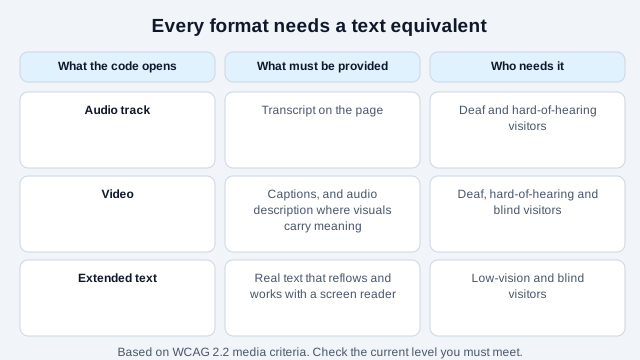
- Every audio track needs a transcript. Every video needs captions; WCAG 2.2 success criterion 1.2.2 requires captions for prerecorded audio in synchronized media, and audio description applies where the visuals carry information the soundtrack does not.
- Linked pages should be real text, reflow on a phone, meet contrast requirements and work with a screen reader.
- Give the transcript its own visible link on the page, not only inside the media player.
- Label the code so visitors know the destination before they choose to open it.
If you offer a video or sign-language track, also provide a way to view it without a personal phone, such as a gallery screen or a loan tablet. See the QR code accessibility guide for the destination side.
What about connectivity in the galleries?
Historic buildings and lower-ground galleries often have poor cellular coverage, and the Reading study listed network access among its barriers. A code that opens a page the visitor's phone cannot load is a frustration at the object. Test the page in each gallery, standing where a visitor stands, on mobile data and then on your Wi-Fi.
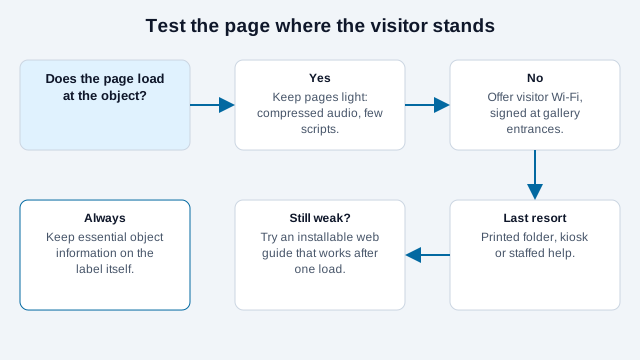
- Provide visitor Wi-Fi and sign it clearly at gallery entrances. A Wi-Fi QR code makes joining one tap; use it only on a guest network, since the password is readable by anyone who photographs the code.
- Keep linked pages light: compressed audio, few scripts, no autoplaying video.
- Consider an installable web app or on-device guide for the full audio tour so it works once loaded.
- Do not place codes where there is no signal and no offline alternative.
Can you see which exhibits are scanned most?
Yes, carefully. Point each code at a page you control with a distinct path or UTM value (the UTM builder makes the URLs) and read visits in your analytics. It is a useful signal for which objects draw curiosity. Treat it as page views, not visitor numbers, since one visitor may scan several codes, or the same one twice. Be conservative with tracking: a museum audience does not expect to be profiled. Do not add advertising trackers, minimize what you collect, publish a clear privacy notice, set a short retention period, and check your local privacy law. The QR code tracking guide explains what the numbers can and cannot show.
What size, height and finish work in a gallery?
- Object labels: roughly 0.8 to 1.5 inches (2 to 4 cm), dark on a light label, matte to avoid case-lighting glare.
- Position within comfortable reach for a seated visitor as well as a standing one; not above head height, behind a barrier or in a spot where the visitor's own shadow falls on the code.
- Keep the four-module quiet zone clear. A code crammed against the label border will not scan reliably.
- Export SVG so the code stays sharp if the label is resized. Test the printed label in the real light with the scannability tester and two phones. The print size guide gives sizing detail.
What mistakes cause problems in museums?
Imagine a small museum that puts a code beside all 80 objects in a gallery, each opening the same generic collection page. A visitor scans the first, finds nothing specific, and never scans another. In the next room the code sits behind a rope, and the Wi-Fi only covers the lobby. The codes decoded perfectly. The missing pieces were a reason to scan, a reachable position and a signal.
- Putting a code on every object, with no reason stated.
- Linking to a general page instead of the specific object.
- Offering audio with no transcript.
- Placing the code where seated visitors cannot reach it, or where a shadow falls on it.
- Skipping a signal test in the lower galleries.
- Leaving content behind the label out of date.
How do you launch a gallery code?
- Choose a pilot gallery and the objects where an extra layer is genuinely useful.
- Write the extended text, transcript and captions before the first label is printed.
- Build each page on a stable address on your own domain and test it on mobile data in the gallery.
- Print one label at final size and scan it from a standing and a seated position, in the real light.
- Add a non-phone route in the gallery and mention it on the label or at the entrance.
- Run a short visitor test with someone who uses a screen reader and someone who uses captions.
- Name a content owner and set a review date for every page.
Two matters this checklist cannot settle. The accessibility standard your institution must meet depends on its status and country, and how long scan data may be kept is set by local privacy law. Confirm both with the people responsible.
This guide is general information, not legal advice. Accessibility and privacy rules differ by country and change over time.
References
- University of Reading: Using QR codes to aid accessibility in a museum (Haworth and Williams, 2012)
- Australian Museum: QR codes in 2011
- UCL: QRator, a digital dialogue on museum collections
- U.S. Department of Justice: ADA effective communication
- W3C WAI: WCAG 2.2 captions (prerecorded)
- W3C WAI: accessible design tips
- ISO/IEC 18004:2024, QR code bar code symbology specification
- Absolute Product: interactive interpretation methods in exhibitions (practitioner article)