A static QR code holds the finished data itself, such as the full web address, the Wi-Fi details, or the contact card. A dynamic QR code usually holds a short link instead, and a redirect service forwards each scan to whatever destination is currently set. Choose static when the payload is stable and you want the printed code to work without a redirect provider. Choose dynamic when changing the destination after printing, or recording redirect events, is worth the added service dependency.
The visible squares do not reveal which type you have. The deciding factor is what the symbol contains and who controls the path after a scan. This guide shows how that distinction affects editing, analytics, privacy, print reliability, and long-term cost, and it ends with a checklist you can run before a print order goes out.
What is the difference between static and dynamic QR codes?
A static code contains the destination itself, while a dynamic code contains an intermediary address whose server decides where to send the visitor. Both symbols can conform to the same QR Code standard. “Dynamic” describes the redirect system around the symbol, not a separate barcode format.
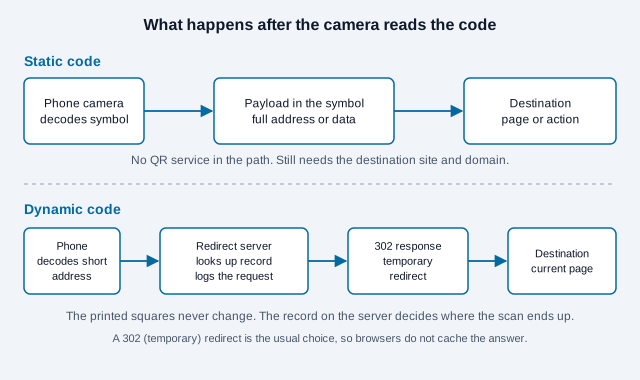
For example, a static URL code might contain https://example.com/menu. A scanner reads that address and offers to open it. A dynamic code might contain https://go.example.net/a7K2. The browser requests that short address, and the redirect server returns the current menu location.
How does the redirect work?
When someone scans a dynamic code, the phone sends a request to the short address. The server looks up the record for that code and replies with a redirect response. A QRStuff engineering post describes a 302 (temporary) response as the usual choice, because browsers do not store a 302 answer by default. A permanent 301 can be cached, so a phone may skip the server and keep going to an old destination after you edit it. Each request also reaches the server, which is how a provider can log it.
The printed modules in a dynamic code never change. The service changes the destination associated with the short link. If you operate the short domain and redirect yourself, you gain editability without a QR-code subscription vendor, but you then own the hosting, monitoring, security, and maintenance work.
How do static and dynamic QR codes compare?
Static codes favor independence and direct delivery. Dynamic codes favor post-print control and redirect-level measurement. Neither is automatically better. The right choice depends on the lifetime of the printed object, the cost of replacing it, and whether your team can maintain the destination path.
| Decision factor | Static QR code | Dynamic QR code |
|---|---|---|
| Encoded payload | Final URL, text, Wi-Fi settings, contact data, or another payload | Usually a short URL or identifier resolved by a service |
| Edit after printing | No; replace the code or keep the encoded URL stable | Yes, while the redirect remains under your control |
| Built-in scan events | None | Often available at the redirect server |
| Website measurement | Available for URL codes through first-party analytics and campaign parameters | Available through the provider and, optionally, destination analytics |
| Offline behavior | Text, contact, and Wi-Fi payloads can decode without internet; websites still need connectivity | The redirect normally requires internet access |
| Service dependency | No QR redirect service; URL codes still depend on the destination site and domain | Depends on the short domain, redirect record, hosting, and account policy |
| Symbol density | Can increase with a longer payload | A short link can produce a less dense symbol |
| Typical cost | No recurring redirect fee; reprinting may cost money if the payload changes | May require a subscription or internal hosting; can avoid reprints when destinations change |
| Best fit | Stable destinations, Wi-Fi cards, contact data, owned-domain links | Expensive print runs, frequently changing destinations, managed campaigns |
Density matters at the margin, but it should not decide the architecture by itself. A long static URL can be shortened on a domain you own or simplified by removing unnecessary parameters. Whatever you choose, test the exported artwork at its final size using the QR code print size guide.
What does each type depend on to keep working?
Count the links in the chain. A static URL code needs a readable print, a renewed destination domain, and a page that still exists. A managed dynamic code needs all of that plus the short domain, the redirect service, an active account and plan, and the redirect record itself. Every extra link is a place where a printed code can stop working without any visible change to the paper.
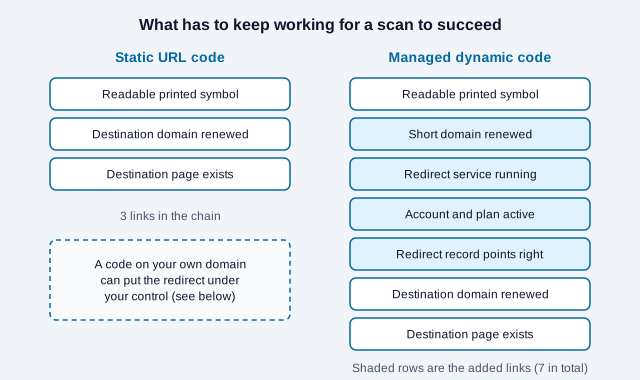
More links do not make dynamic a bad choice. They make it a choice that needs an owner, a renewal calendar, and an exit plan. The guide to whether QR codes expire walks through each layer and how to diagnose which one failed.
Which QR code type costs less over time?
Static is cheaper when the destination remains stable. Dynamic can be cheaper when one destination change would force an expensive reprint. Comparing only a vendor’s monthly price misses labor, hosting, migration, testing, downtime, and replacement costs.
Use this planning formula instead of relying on a generic five-year price table:
Expected total cost = setup + service/hosting + maintenance + expected reprints + expected outage impact
| Cost question | What to estimate |
|---|---|
| How long will the object remain in use? | A weekend flyer and a five-year equipment label carry different risks. |
| What would replacement cost? | Include design changes, approvals, printing, shipping, installation, and discarded stock. |
| How likely is the destination to change? | Consider domain changes, content migrations, campaign rotation, and regulatory updates. |
| Who controls the redirect? | Record the domain owner, hosting owner, billing owner, renewal method, and recovery process. |
| Can the code be migrated? | A vendor export may preserve reports but cannot rewrite a short URL already printed on physical items. |
A static code pointing to a durable page on your own domain is often the lowest-risk option. That page can remain stable while its content changes. A dynamic service earns its cost when the printed destination must switch among different URLs, when redirect-level reporting is essential, or when avoiding one reprint outweighs years of service and governance costs. The free versus paid generator guide goes deeper on plan terms, and the pricing page lists what this site’s plans include.
Can you track a static QR code?
You cannot count camera decodes from a static symbol alone, but you can measure visits that reach a tagged web destination. Add consistent UTM parameters before generating the code, then examine campaign sessions and outcomes in your analytics platform.
- Create one URL per placement. Use
utm_source=qr,utm_medium=print, and a campaign name your team recognizes. - Differentiate the physical asset. Use
utm_contentvalues such ascounter_cardandreceiptso reports do not merge unlike placements. - Generate the final static code. Paste the complete tagged URL into the free QR code generator.
- Test before printing. Scan from representative phones and confirm the landing page loads and campaign values appear in the acquisition report.
- Document the mapping. Keep a register connecting each asset, payload, owner, location, and review date.
Google documents utm_source, utm_medium, and utm_campaign as the core parameters for custom campaign URLs. Its help page also notes that parameter values are case sensitive, so utm_source=google and utm_source=Google appear as separate rows. Pick lowercase and stick to it. The result is website attribution, not a raw scan counter. It excludes scans where the person declines to open the link, the connection fails, analytics is blocked, or consent is not granted. It can also count repeat visits, so do not describe sessions as unique people.
Use the UTM builder to create consistent links, then read the deeper QR code tracking guide.
Are static QR codes safer or more private?
Static and dynamic describe routing, not trustworthiness. A static URL avoids a separate redirect operator, while a dynamic service can observe requests and can change their destination. Either route can still lead to a compromised, deceptive, or poorly secured website.
For a dynamic deployment, review which request data the provider records, where it is processed, how long it is retained, and who can edit destinations. Protect the account with strong authentication, least-privilege roles, audit logs, and renewal alerts. A short domain owned by a vendor also creates a continuity problem if you later leave that service.
For a static URL, control the destination domain, renew it for the expected print lifetime, restrict administrative access, and monitor the page. Do not encode passwords, reusable access tokens, private document links, or sensitive personal data merely because the symbol is static. Anyone who can photograph the code can copy its payload.
Readers face the same core check with both types: preview the address, confirm the expected domain, and stop if the scan produces an unexpected redirect or requests unrelated information. See the QR code safety guide for deployment and scanning checks.
How should you choose between static and dynamic?
Start with ownership and change risk, then consider analytics. If you control a durable destination and can keep that URL stable, static usually removes an unnecessary dependency. If a wrong or outdated destination would make an expensive print run unusable, a well-governed redirect may be worth maintaining.
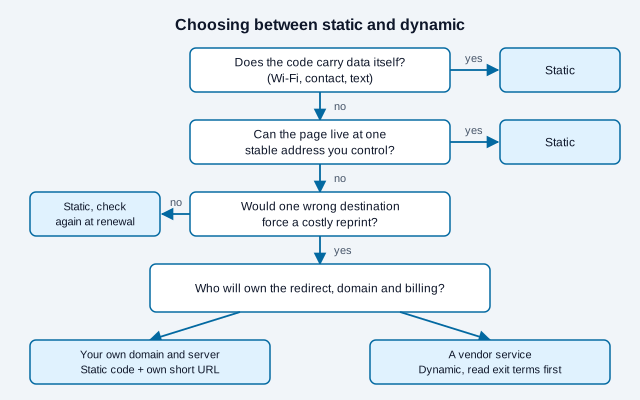
- Write down the final user action. Opening a menu, joining Wi-Fi, saving a contact, and submitting a form have different connectivity and privacy needs.
- Set the expected print lifetime. Include packaging already in warehouses and signs that may remain after the campaign owner leaves.
- Decide whether the destination must change. Updating content on one stable page does not require a dynamic code; changing to an entirely different URL might.
- Estimate failure and replacement cost. Compare redirect maintenance with the realistic cost of finding and replacing printed assets.
- Choose the owner. Assign responsibility for the domain, destination, billing, access, monitoring, and periodic scan tests.
Is there a middle path between static and dynamic?
Yes. A static QR code can point to a short URL on your own domain. The symbol remains static, while your organization controls the server-side redirect. This design is not maintenance-free, but it keeps the permanent printed address on a domain you own instead of a third party’s.
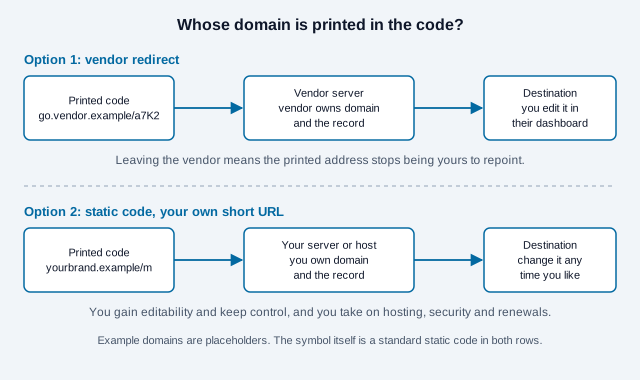
Vendor-managed dynamic codes still make sense when you need dashboards, team roles, or reporting you do not want to build. If you go that route, ask three questions before printing: can you attach your own branded domain, what happens to the links if you cancel, and can you export every destination? If you want to try an editable code, the dynamic QR code generator is here, and the comparison page shows how this site differs from a generic generator.
What mistakes should you avoid?
Imagine a small gym that prints 2,000 membership flyers with a code pointing at a vendor’s free-trial redirect. The trial ends in week three, the redirect pauses, and the flyers scan to a vendor notice. The symbol never failed. The gym had chosen a dynamic code for a flyer that never needed editing, on a plan nobody was watching. That scenario is an illustration, not a real case, but the pattern matches what vendor help pages say happens when trials end: qr.io’s help center, for example, states that dynamic codes are paused after its trial while static codes keep working.
The four problems below usually come from approving the artwork without checking ownership, renewal, or the complete task on a phone. Fix them before the print order goes out.
- Calling every static code permanent: the matrix does not expire, but paper degrades, domains lapse, pages move, and Wi-Fi credentials change. Schedule checks.
- Calling tagged visits scans: UTM reports measure visits observed by the destination analytics system. Label the metric accurately.
- Using a trial redirect on durable print: confirm what happens after cancellation, scan limits, non-payment, or provider closure before committing the address to print.
- Encoding the wrong layer: link durable print to a maintained landing page rather than a fragile file-sharing URL, temporary token, or retailer page you do not control.
What should you check before printing?
- Open the decoded address on two phones and write it down exactly.
- Confirm who owns the destination domain and the date it renews.
- For a dynamic code, confirm the plan, scan limits, export options, and cancellation behavior in writing.
- Tag each placement with its own UTM values and lowercase names.
- Check the artwork at final size against the print size guide, with the full quiet zone intact.
- Record the code in a register with owner, locations, and a retest date.
When your payload is stable, generate a free static QR code and test it at the final size before production. If you want help choosing, the help centre covers common setup questions.
Open issues this checklist cannot settle: how a particular vendor treats your links after cancellation, how long your registrar keeps an expired domain recoverable, and whether your analytics setup honors visitor consent choices. Those depend on contracts and settings you need to read. This article is general information and is not legal or privacy advice, so check the rules that apply where you operate.
References
- ISO/IEC 18004:2024, QR code bar code symbology specification
- IETF RFC 3986: Uniform Resource Identifier syntax
- Google Analytics Help: Collect campaign data with custom URLs
- DENSO WAVE: QR Code development story
- QRStuff: QR code temporary redirect mechanism
- QRStuff: dynamic QR codes no longer scannable
- qr.io Help: what happens when the free trial expires
- Hovercode Help: the difference between static and dynamic QR codes