A static QR code keeps scanning whether or not you pay anyone, because the data sits in the printed pattern. What a paid plan buys is the service around the code: a managed redirect you can edit, scan reports, team accounts, support, or automation. So the choice comes down to one question: after the code is printed, who keeps the destination working, and what happens if you stop paying them?
A code can stay perfectly readable while the website, domain, hosting account, or redirect behind it stops working. If that distinction is new to you, read the static-versus-dynamic explanation first. This guide covers what you are paying for, what happens when a trial or plan ends, how to test a “free” code before you print it, and how to compare total cost.
Is the QR Code itself free to use?
Yes. DENSO WAVE, which holds the QR Code patents, states on its patent page that everyone can use the QR Code freely as long as the code follows the JIS or ISO standards. Nobody owns a toll booth on the symbol. Any charge you meet comes from a service built around it: design tools, storage, hosting, analytics, support, or a redirect.
That framing helps when reading pricing pages. Ask which part of the offer is a standard symbol you could generate anywhere, and which part is an ongoing service you would be renting.
What are you paying for?
Turning data into a QR pattern is a one-off calculation that any generator can do. Keeping a link alive afterwards is ongoing work, and that is where the costs sit. Some providers charge for static extras too (batch export, design options, support), so a price tag does not tell you which kind of code you are getting. The table shows who maintains what in the four common setups.
| Workflow | What stays fixed | What needs maintenance | Questions to ask |
|---|---|---|---|
| Static vCard or Wi-Fi payload | The data in the printed symbol | The underlying contact details or network configuration | Will a data change require reprinting? Is the encoded information appropriate to share? |
| Static code containing your website URL | The encoded URL | Your domain, hosting, and destination page | Can you keep the URL stable while updating its content? |
| Code containing a redirect you operate | The redirect URL | Your redirect service, account security, and destination | Who handles outages and updates? |
| Vendor-managed dynamic service | The vendor or branded redirect URL | Provider service and account, including applicable plan terms | What happens after cancellation, a scan limit, or a domain change? |
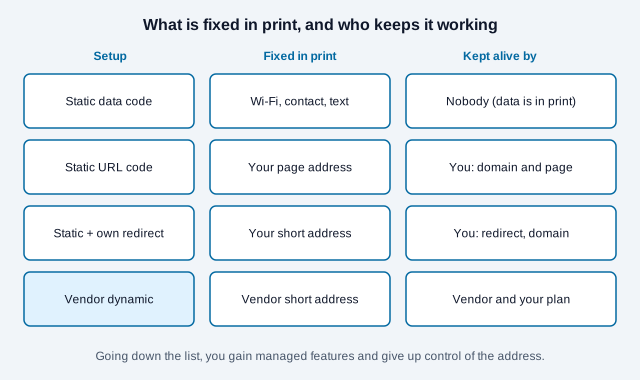
Note the third row: a static code can hold a redirect URL on your own domain, which gives you an editable destination without a QR subscription. “Static” only means the encoded text is fixed.
What happens when a free trial or paid plan ends?
That depends entirely on the provider. Some keep redirects running, some limit features, and some disable the links. A permanent free tier and a time-limited trial are also very different offers, even when both are advertised as “free”.
Vendor help pages show the spread. One generator’s help center says that when its free trial ends, dynamic codes are paused and scans and statistics are no longer available, that static codes “do not expire”, and that upgrading reactivates the paused codes. A QRStuff post describes a lapsed subscription or ended trial, a reached scan limit, a broken destination, and print damage as the common reasons dynamic codes stop scanning. Search summaries of other vendors’ help pages describe similar behavior with different trial lengths, though several of those pages returned an access error when we tried to open them, so we do not quote their terms. Treat every number you see in a comparison article as the vendor’s own claim until you read the current terms.
Read the cancellation and retention terms before you print, and check these points while you are there:
- Does the exported code contain your destination or the provider’s URL?
- Are there scan limits, forced branding, restricted export formats, or account limits? Who owns the domain in the code?
- Can you export your destinations and analytics, and can printed redirect URLs be moved to another service?
- Does the public destination still open when you are signed out of the dashboard?
Do free QR codes expire?
A free static code does not. No expiry timer is stored in the symbol, so it keeps decoding the same text for as long as it stays readable. What stops is the service behind it: a free trial of a managed redirect, an unpaid dashboard, or a domain that lapses. That is the fourth row of the table above.
If you want a code that outlasts any account, encode your own address directly instead of a provider’s redirect, and keep that address working. The guide to whether QR codes expire explains each way a code can stop working, and the comparison page shows where one generator draws the line between free and paid.
How can you tell whether a free code depends on the generator?
Scan the downloaded file and read the address before you print. A true static code shows your own address or data. A code that shows the generator’s domain, or a short link you did not create, routes every scan through that service, whatever the download page calls it. Some reviewers describe this as a hidden redirect behind “free” codes; the label on the page does not settle it, the decoded address does.
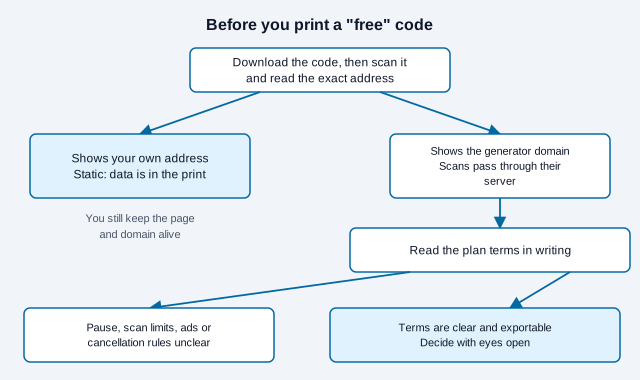
Look at the other limits at the same time: whether the download carries a watermark, whether free codes show an ad screen, and whether the plan counts scans. Vendor comparison pages report all three, and they change often, so verify each on the current plan page.
How do you compare the total cost?
Get current quotes for your country, currency, billing period, and expected volume. Then add the costs that sit outside the QR tool: domain renewal, hosting, staff time, optional analytics, printing, and a possible migration later. Compare like with like, since an annual promotional price and another provider’s monthly price are not the same figure.
As a worked example with made-up numbers, a plan at USD 12 a month comes to USD 144 in the first year and USD 432 over three years, before tax or price rises. Put that next to an actual print quote and the cost of keeping your own URL running.
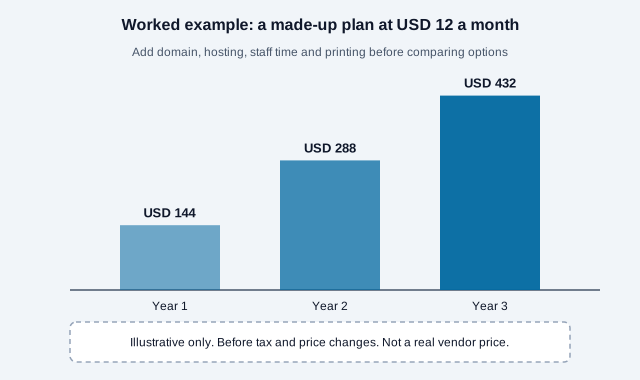
A restaurant that already maintains its menu page may only need a static URL code. A packaging campaign spread across many products and markets might reasonably pay for managed destination changes and access controls. In both cases someone still has to check the link after printing. For a feature-by-feature look at this site’s own plans, see the pricing page.
How can you check a generator’s data handling?
Generating the code in the browser means the payload does not have to be sent to a server. It does not guarantee that every feature and third-party script on the page keeps your data local. You can check this yourself:
- Pick a unique dummy string as the payload. Never test with a real password or a confidential document link.
- Open Developer Tools, select Network, turn on Preserve log, and look at every request type, not just Fetch/XHR.
- Go through the whole workflow: editing, generating, uploading a logo, downloading, and any optional safety check or account save.
- Search request URLs, bodies, and other channels for your test string. One clean capture covers that session only, so repeat the check if you use other features later.
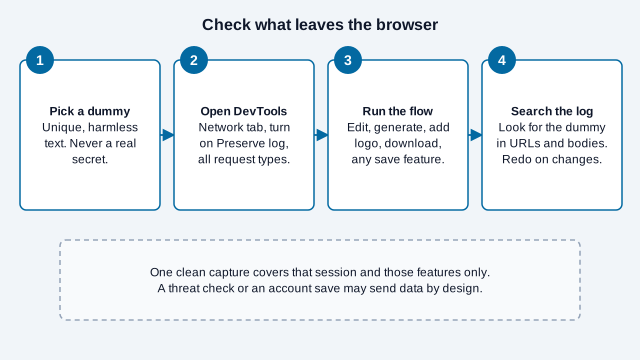
Read the provider’s privacy documentation as well. Some features send data by design: a URL threat check, for instance, may pass the decoded link to a server even when the image itself was decoded on your device. Chrome’s DevTools documentation explains the Network panel if you have not used it before.
How does a free generator choice go wrong?
Consider a landscaper who prints 300 yard signs with a code from the first “free QR code” result in a search. The download page never mentions a trial. Two weeks later the signs open a page asking for payment. The code was dynamic from the start, pointing at the generator’s short link, and the trial had a clock. This is an illustration, not a real business, but it is the failure that vendor help pages and trade write-ups keep describing.
The landscaper’s fixes were all available before printing: decode the file and read the address, check whether the offer says “static” anywhere in plain words, and print one sample sign for a week of testing. The loss came from skipping those three checks.
Which option fits your next print run?
For a batch of fixed payloads, the bulk generator is enough. When the linked content will change, you can keep a stable address on your own domain and update what it points to. A managed service is worth paying for when you have a specific need for its account controls, reporting, support, or redirect management. Whichever route you take, confirm who owns the destination, scan a physical proof, and write down who will maintain the link.
- Decode the downloaded file and write down the exact address.
- Read the plan terms for trial length, scan limits, branding, and export.
- Check domain and hosting renewal dates for the destination.
- Scan a physical proof on two phones before the full run.
- Record the owner and a retest date.
Open issues this checklist cannot settle: vendor terms change without notice, a free tier you rely on can be withdrawn, and how a provider treats your data depends on its privacy policy and your local law. Check current terms before you commit. This is general information, not legal or financial advice.
References
- ISO/IEC 18004:2024: QR code symbology
- DENSO WAVE: QR Code patent policy
- Chrome DevTools: inspect network activity
- qr.io Help: what happens when the free trial expires
- QRStuff: dynamic QR codes no longer scannable
- Bitly blog: the hidden cost of free QR codes (vendor viewpoint, seen in search results only)