QR codes for business connect something printed to something on a phone: a contact card, a payment page, a review form, a Wi-Fi network, a menu or a product page. A standard static code (ISO/IEC 18004) costs nothing to generate and has no subscription to lapse, so the ongoing costs sit in the page, payment service or support behind it.
This guide covers which payload suits which job, where codes fit along a customer's path, when static beats dynamic, how to measure visits with free tools, what to print and how, the security habits customers now expect, a short mistakes scenario, and a rollout checklist.
Which business jobs suit a QR code?
The codes that earn their place save someone typing: swapping contact details, leaving a review, ordering at the table, joining Wi-Fi or looking up a product. Pick the payload that matches what the person is trying to do at that moment and they are more likely to finish.
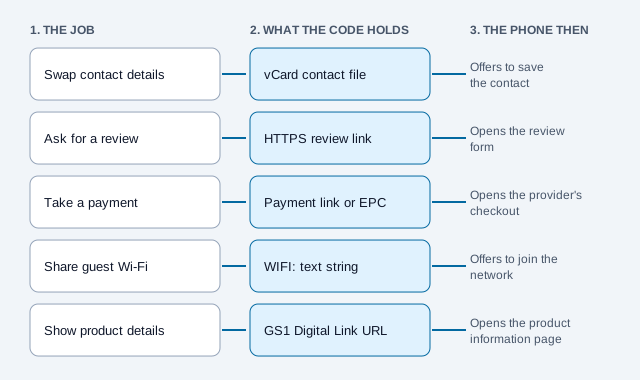
| Business use | Payload type | What happens on the phone | Starting error correction |
|---|---|---|---|
| Sales and networking | vCard 3.0 / 4.0 | Offers to save the contact into the address book | Level M (15%); vCards are dense, so avoid H unless needed |
| Reviews and local search | Direct HTTPS URL | Opens the Google Business Profile review form | Level M (15%) |
| Payments and invoices | Payment link or EPC QR | Starts a card, SEPA or wallet checkout | Level M (15%) or Q (25%) |
| Hospitality and menus | Responsive HTTPS URL | Opens the menu for that location | Level M (15%) |
| Guest Wi-Fi | WIFI: payload | Offers to join the network without typing the password | Level M (15%) |
| Packaging and provenance | GS1 Digital Link URL | Shows batch, allergen and origin information | Level Q (25%) or H (30%) for packs that get scuffed |
Error-correction levels here are starting points. A logo, rough handling or a small print size can justify a higher level, and the error correction guide explains the trade-off in module count. Sales teams can use a vCard QR code so a client's phone saves details exactly as written, and venues can print a Wi-Fi QR code on a table card instead of reading a password aloud. If the job is a business card, the business card QR guide goes deeper.
Next step: write down the one job each planned code does. If a code needs two jobs, it needs a landing page that offers both, or two codes.
Where do QR codes fit in a customer's path?
Codes work best when they sit at a point where the customer has a question your page can answer. The same business can use them before a sale (a window or flyer), at the sale (a table card, shelf tag or invoice) and after it (a receipt or packaging insert).
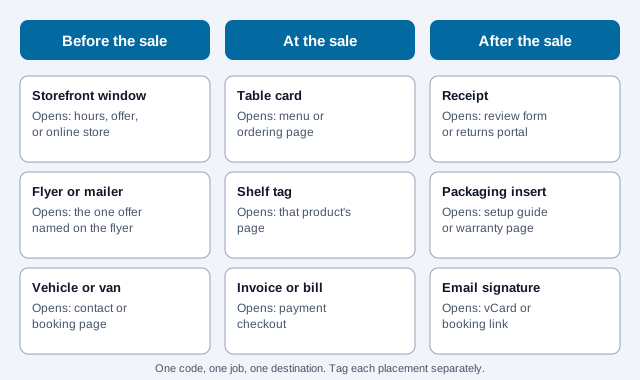
Vendor surveys give a rough sense of what people scan for. A QR TIGER report said menus (55%), payments (44%) and product information (40%) were the leading reasons, and that about 4 in 10 respondents had trouble scanning, mostly from poor placement, camera limits and pages not built for mobile. Both figures come from a vendor with a stake in QR adoption, so read them as direction, not measurement. They do point at the two things you control: where the code goes and what the page does on a phone.
For placement-specific advice, see the guides on storefront windows, flyers and brochures and retail stores.
Should a business use a static or dynamic QR code?
Choose static for long-lived print with a stable destination, and choose dynamic when you already know the destination will have to change after printing. A static code stores the destination in the symbol itself, so it never expires and needs no redirect server, although the page it points to still has to stay online.
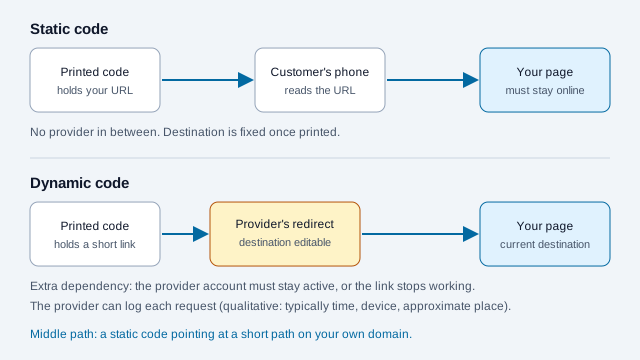
| Attribute | Static QR code | Dynamic QR code |
|---|---|---|
| Where the data lives | In the printed pattern of modules | On a redirect server the code points to |
| Recurring cost | None for the code itself | Usually a subscription; compare current plans, since prices and limits vary |
| What it depends on | Only the destination page and its domain | The redirect provider and your account with them, plus the destination |
| Changing the destination | Fixed when generated | Editable in the provider's dashboard |
| Measuring visits | UTM parameters read by your own analytics | The provider's redirect logs, plus your analytics if you add UTMs |
| Privacy | The visitor goes straight to your site | The provider sees each request, typically including IP address, device and time |
For anything that stays in service for years, such as vehicle graphics, engraved signs, packaging and equipment labels, a static code avoids vendor lock-in and links that break because a bill went unpaid. If you still want the option to redirect later, point a static code at a short path on a domain you own, for example yourbrand.com/go/menu, and manage that redirect yourself. The static vs dynamic guide covers the full comparison, and a dynamic QR code is worth it where the offer, menu or landing page changes more often than you can reprint.
How do you measure business QR code visits for free?
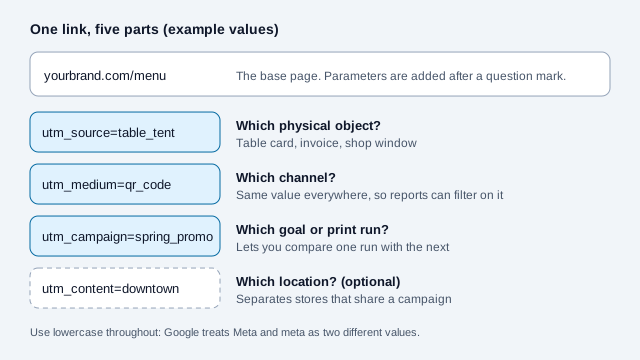
Add UTM parameters to the destination URL before generating a static code, and Google Analytics 4 reports the visits that arrive through that link. It counts page visits, not scans, so a scan that never loads the page does not appear. Google's help page lists utm_source, utm_medium and utm_campaign as the core three, and notes that values are case sensitive, which is why lowercase is the safe habit.
- Open the UTM builder to assemble the link.
- Set
utm_sourceto the physical object, such astable_tent,invoiceorstore_window. - Set
utm_mediumtoqr_codeeverywhere, so the visits are easy to filter. - Set
utm_campaignto the goal or print run, such asspring_promo. - Add
utm_contentfor the location if you run several sites. - Paste the tagged link into the URL QR code generator and export an SVG.
- In GA4, open Reports, then Acquisition, then Traffic acquisition, and filter by medium
qr_code.
Measurement is where many programs stall. A 2025 Uniqode marketer survey, reported through that vendor's own statistics page, put the share of marketers who connect QR scans to revenue at 12%. Tagging each placement is the cheapest way to avoid being in the other 88%, and the QR code tracking guide covers what analytics can and cannot tell you.
What should you print, and how?
Keep a four-module quiet zone on every side of the symbol, as DENSO WAVE describes, and print dark modules on a light background. The distance-to-width ratio below is a planning rule of thumb, not a standard, so scan a final-size proof on the real surface.
- Size: divide the scanning distance by 10 for a starting width. From 50 cm (20 in) away, start near 50 mm (2 in). From 20 cm (8 in), start near 20 mm (0.8 in). The print size guide has a longer table.
- Quiet zone: artwork, frames or text inside the border can stop a scanner finding the corner squares.
- Contrast: avoid inverted codes (light on dark), because some readers cannot decode them. If you must invert, test on the phones your customers use.
- File format: export SVG or EPS for print so the code stays sharp when enlarged.
- Logos: a logo is possible with Level H and a small overlay, but test every proof. The logo best practices guide sets limits.
- Accessibility: print the short URL or a phone number beside the code, so people who cannot scan still have a route. The accessibility guide and WCAG 2.2 apply to the destination page too.
Check a sample on matte stock with both an iPhone and an Android phone in dim indoor light before ordering the full run. The scannability tester can stress a digital version first.
How do you keep customers safe scanning your codes?
Customers are being warned to treat codes as links they should check. The FBI has warned that criminals tamper with physical and digital QR codes, and its advice includes checking the URL after scanning and inspecting physical codes for stickers. A business can make that easier for them.
- Print the destination domain beside the code so people can compare it with what their phone shows.
- Use a short, recognizable domain you own rather than a generic shortener when you can.
- Put codes where staff walk past them, and check them for overlays at opening time.
- Never ask for a password or card number on a page reached by a code. Use a hosted payment page instead.
The guides on quishing and checking a code's safety give customers the other half of the picture.
What goes wrong, and how do you avoid it?
Imagine a small bakery that orders 500 table cards with a code that opens its homepage. The homepage loads a large hero image, the menu is a PDF three taps down, and nothing on the card says what the code does. Staff approved the artwork from an on-screen preview, and the first delivery shows the code cropped into the card's edge with no border. Most guests ignore it. A few scan, wait, and leave.
Each of those problems has a cheap prevention.
- No label: add a short instruction such as "Scan to view the menu" or "Scan to pay this invoice."
- A desktop-first page: the code should open a page that loads quickly on mobile data, with large touch targets and no forced sign-up in front of what the code promised.
- A dynamic code from a free trial: it can stop working when the trial ends. Check the plan terms before printing, or use a static code or your own domain redirect.
- Approving from the screen: print a proof at 100% scale on the real stock.
Rollout checklist: how do you roll out QR codes across a business?
A dependable launch comes down to a checked payload, a tested proof and staff who know what the code is for.
- Decide the job and the one destination.
- Build the tagged URL.
- Generate the vector file with the free QR code generator, or in bulk with the bulk generator for many locations.
- Lay it out with the quiet zone and a text instruction.
- Print a proof and test on three phones from a few angles.
- Brief staff on what the code opens and who to ask if it fails.
- Launch, check GA4 for the tagged medium after a week, and compare with the outcome you care about.
What this checklist cannot settle
Open issues the checklist cannot settle: whether visits turn into sales depends on the offer and the page, not the code. How long a printed code stays in service depends on whether you keep the destination online. Privacy and marketing rules for any contact details you collect depend on your country.
This article is general information, not legal, tax or financial advice. Rules on payments, reviews, privacy and marketing vary by country and change; check current requirements for your business.
References
- ISO/IEC 18004:2024, QR code bar code symbology specification
- DENSO WAVE: determining the QR Code area and quiet zone
- W3C: Web Content Accessibility Guidelines (WCAG) 2.2
- Google Analytics Help: collect campaign data with custom URLs
- FBI IC3: cybercriminals tampering with QR codes to steal victim funds
- QR TIGER: 2026 QR code industry report (vendor survey)
- Uniqode: QR code statistics (vendor survey data)