Quishing is phishing delivered through a QR code: the symbol leads to a deceptive site, payment destination, app download, or other action chosen by the attacker. The safest response is to verify the sender and destination through a separate trusted channel before opening the link, entering credentials, approving a payment, or installing anything.
A QR code is not harmful merely because it is machine-readable. The risk comes from the payload and what happens next. Attackers use codes in emails, texts, PDFs, unsolicited packages, and stickers placed over legitimate signs. This guide covers the attack vectors and the defenses against them, with an emphasis on email-borne codes and on what organizations can control. For personal scam-spotting, see the QR safety guide and how to check QR code safety; for the technical view, can QR codes be hacked?.
What is quishing and how does it work?
Quishing hides a phishing route inside a QR payload so the recipient must decode it before seeing the destination. A camera normally previews a URL or action; harm is more likely after the person opens the destination, submits information, approves a transaction, grants permission, or installs software.
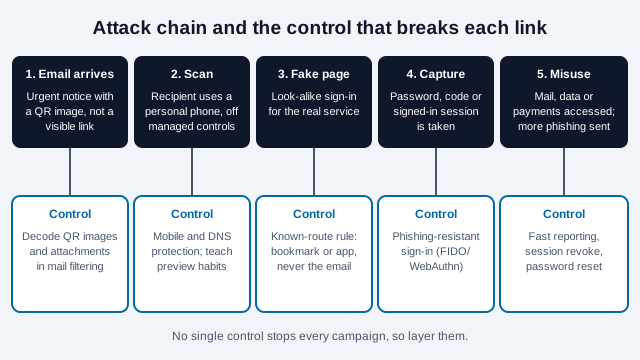
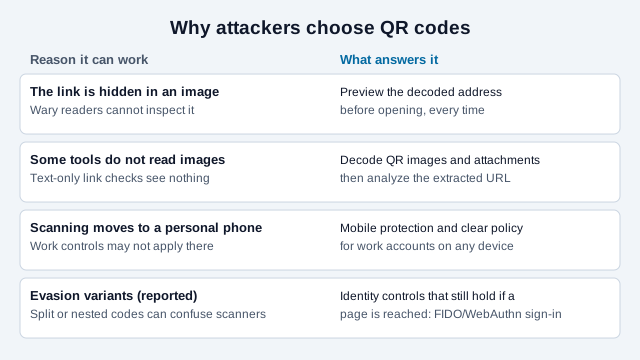
In an email campaign, the attacker may replace a visible hyperlink with a QR image and claim that payroll, multifactor authentication, a document, or an account needs urgent attention. The UK's National Cyber Security Centre gives three reasons attackers favor this: the code hides the link from recipients wary of suspicious or shortened ones, some phishing detection tools do not scan images, and people often scan on personal phones that lack the protections of a work computer. Scanning can therefore move the interaction from a managed computer to a device where corporate browser, DNS, or endpoint controls differ. It does not guarantee that security products are bypassed: modern defenses can decode images, analyze attachments, inspect mobile traffic, and enforce identity controls.
In a physical attack, a sticker can cover a legitimate parking, charging, payment, menu, or ticket code. The new symbol may lead to a convincing copy of the expected service. Familiar placement creates trust even though the encoded domain has changed.
Which QR scam patterns are documented by authorities?
US consumer and law-enforcement advisories document substituted physical codes, unexpected messages, fake account problems, payment diversion, malicious downloads, and unsolicited packages designed to provoke a scan. These sources establish the patterns, but they do not justify a universal growth percentage or claim that every public code is high risk. Vendor reports of daily block counts and growth rates exist, but this guide could not verify them against primary sources and does not repeat them.
| Pattern | Attacker's prompt | Safer verification |
|---|---|---|
| Sticker overlay | Pay for parking, charging, transit, or a meal | Inspect for tampering and use the operator's known app, typed address, or published payment instructions. |
| Unexpected email or text | Fix an account, reset MFA, review payroll, or reschedule a delivery | Open the service from a bookmark or known official site; contact the sender through a known number or address. |
| Payment diversion | Send funds to a wallet or complete a failed payment | Confirm the payee and amount inside the trusted service before authorizing; do not rely on the surrounding message. |
| Unsolicited package | Identify the sender, register a gift, or resolve a mystery delivery | Do not scan merely to satisfy curiosity. Check order history and contact the retailer or carrier independently. |
| App or profile installation | Install software needed to view content or receive a benefit | Search the official app store independently and reject unexpected configuration, device-management, or permission requests. |
How do attackers get quishing messages through?
Campaign reports describe several tactics. Netskope reported a campaign, covered by SecurityWeek, that used QR codes to send Office 365 users to pages imitating the Microsoft sign-in, hosted on Microsoft Sway, with Cloudflare Turnstile checks that help pages avoid automated scanners and near-copies of the genuine page's code. Cofense separately reported thousands of emails with malicious QR codes aimed at companies and impersonating a Microsoft sign-in. A security vendor write-up also describes split and nested codes that can create ambiguity for scanners and lead to false negatives; that is a vendor claim this guide could not confirm independently.
Hosting the lure on a legitimate platform matters because reputation-based filtering can trust the platform. Two practical consequences follow. A trusted domain in the decoded address does not prove the page is genuine, and a defense that looks only at the sender or the first domain can miss what happens after a redirect.
How is quishing different from phishing, smishing, and vishing?
The deception is similar; the delivery channel and inspection method differ. All four rely on impersonation, urgency, fear, curiosity, or a promised benefit to push someone toward an unsafe action.
| Method | Delivery | Useful check |
|---|---|---|
| Quishing | QR image in print, email, text, PDF, or package | Preview the decoded destination and verify the context separately. |
| Phishing | Email, website, document, or online message | Inspect the sender and link; open the known service independently. |
| Smishing | SMS or another mobile message | Do not trust the displayed sender; verify through a published channel. |
| Vishing | Voice call or voicemail | End the call and dial a trusted number yourself. |
A short URL, unfamiliar top-level domain, or redirect can reduce transparency, but none proves fraud by itself. Likewise, sharp printing and an official logo do not prove legitimacy. Attackers can produce polished artwork; legitimate small organizations can use ordinary shorteners.
How do you check a QR code before acting?
Separate decoding from trusting: preview the payload, identify the expected organization and action, then verify high-risk requests through a channel the QR message did not provide. Do not submit credentials or payment details merely because the page looks familiar.
- Inspect the setting. Look for a sticker placed over another code, mismatched branding, damaged seals, or instructions that conflict with the machine or venue.
- Preview before opening. Read the domain carefully for misspellings, inserted words, misleading subdomains, and unexpected shorteners. The registrable domain matters more than a familiar word elsewhere in the address.
- Ask whether the request was expected. Urgency, secrecy, threats, a failed-payment story, or an unsolicited parcel should trigger independent verification.
- Use the known route for sensitive tasks. Type a trusted address, use the official app, or call the number on a statement, card, meter, or official website.
- Review the final action. Confirm recipient and amount before payment; reject unrelated sign-in, download, notification, camera, contact, configuration-profile, or device-management requests.
Do not install a separate scanner solely because a message tells you to. The FBI notes that most phones have scanning built into the camera, and the UK's NCSC recommends the built-in scanner over third-party apps. For an unfamiliar URL, use the QR security scanner as one input, not as a guarantee that a destination is safe.
What should you do after scanning a fraudulent QR code?
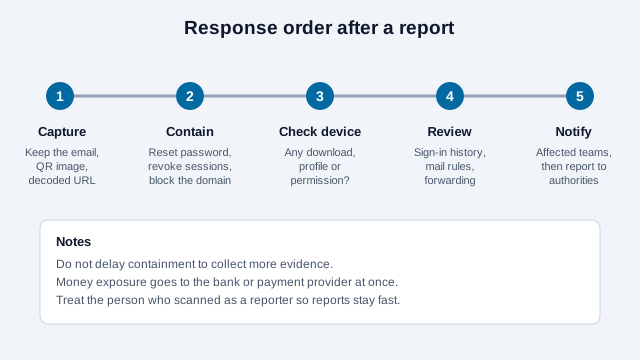
Match the response to what actually happened: decoding alone usually requires less action than entering a password, authorizing payment, installing software, or granting device control. Preserve useful evidence, but do not delay financial or account containment while collecting it.
| What happened? | Immediate response |
|---|---|
| You only previewed or opened a page | Close it. Do not interact. Check for unexpected downloads or permission prompts and update the device if it is behind on security fixes. |
| You entered a password | From a trusted route, change it, revoke active sessions, review recovery details and recent activity, and protect the account with phishing-resistant MFA where available. |
| You entered card or bank information | Contact the institution using a known number, explain exactly what was disclosed, follow its fraud instructions, and monitor transactions. |
| You approved or sent a payment | Contact the payment provider immediately. Recovery may be time-sensitive and is not guaranteed. Report the receiving account or wallet. |
| You installed software or a profile | Stop using the affected device for sensitive tasks, disconnect it if compromise is suspected, and seek qualified device or enterprise incident-response help. |
| It involved a work account | Notify the security or IT team promptly with the message, code image, destination, time, device, and actions taken. |
In the United States, reports can go to the FTC and FBI Internet Crime Complaint Center. Also report the message to the impersonated organization, email provider, platform, venue, or local authority as applicable.
How should organizations defend against quishing?
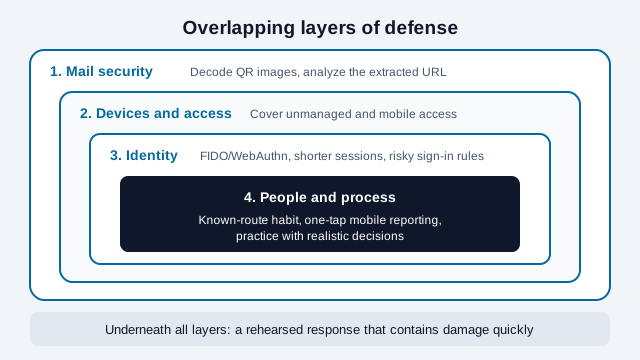
Use overlapping email, mobile, identity, payment, training, and incident-response controls rather than expecting one image scanner to stop every campaign. The goal is to prevent delivery, reduce unsafe actions, block account takeover, and contain damage quickly.
- Decode QR images and attachments in the mail-security pipeline where supported, then analyze extracted destinations, redirects, and downloaded content.
- Apply protection consistently to mobile and unmanaged-device access; do not assume a corporate email viewed on a phone receives the same controls as a workstation.
- Adopt phishing-resistant authentication. CISA identifies FIDO/WebAuthn as the only widely available phishing-resistant authentication and says the protocol blocks a sign-in attempt on a fake website.
- Limit session lifetime, risky sign-ins, legacy authentication, and unmanaged-device access according to business needs.
- Train with realistic decisions: previewing a domain, using a known route, reporting quickly, and refusing unexpected consent or payment prompts.
- Make reporting easy from mobile devices and preserve the original QR image, decoded URL, redirect chain, and message headers for investigation.
How should legitimate organizations protect public QR codes?
Give users enough context to recognize substitution and give staff a routine for finding it. A static code removes one managed redirect layer but does not prevent someone covering the print or compromising the destination website.
- Print the organization name, expected domain, and exact action beside the symbol.
- Use a first-party domain where practical and restrict who can change redirects or destination content.
- Place codes where staff can inspect them, use tamper-evident construction when warranted, and record inspection ownership and cadence.
- Offer a readable URL or official-app route so users can avoid scanning.
- Monitor destinations and certificates, renew domains, and remove obsolete codes promptly.
To publish a direct first-party destination without a vendor redirect, use the static QR code generator. The Google QR passkey guide shows how a provider adds a proximity check to a QR sign-in, which is the design goal behind phishing-resistant authentication.
What is a practical rollout for a small team?
- Write a one-page rule: no sign-in, payment or MFA change through a QR code in an email or text; use the bookmarked site or official app.
- Ask your mail provider or security vendor whether it decodes QR images and attachments, and test it with a harmless internal sample code.
- Turn on phishing-resistant sign-in for administrators and finance staff first, then widen it.
- Add a visible "report suspicious message" route that works on phones.
- Rehearse the response order shown below once, with a named owner for each step.
What common mistakes slow teams down?
Picture an office where an assistant receives an email saying the company's payroll portal needs re-verification, with a QR code to scan on a phone. She scans it, sees a sign-in page, and types her work password. Realizing it afterward, she waits two days before telling anyone because she fears blame. By then the mailbox has already forwarded messages elsewhere. The technical failure is small next to the delay.
That scenario is an illustration, not a real incident. It shows three mistakes worth designing against: treating the reporter as at fault, relying on a filter alone, and having no named person for containment.
What could this guide not verify about quishing?
- Vendor figures on volume and evasion could not be checked against primary sources and are not used here.
- Product behavior changes quickly, so confirm what your own mail and mobile tools decode.
- Legal duties after a breach, including notification, depend on your jurisdiction and contracts and need qualified advice.
This guide is for general information and is not legal or professional security advice. Check your local rules and consult qualified incident-response help for serious exposure.
References
- FBI IC3: Cybercriminals tampering with QR codes to steal victim funds
- FBI IC3: Unsolicited packages containing QR codes used to initiate fraud
- FTC: Scammers hide harmful links in QR codes
- CISA: More than a Password (phishing-resistant MFA)
- CISA: Implementing Phishing-Resistant MFA (October 2022)
- UK NCSC: QR codes, what's the real risk?
- SecurityWeek: Quishing campaign abuses Microsoft Sway to host phishing pages
- Open Systems: Understanding the quishing threat (vendor blog)
- Canadian Centre for Cyber Security: Security considerations for QR codes