QR code scams usually succeed by pairing an uninspectable code with a believable story: a sticker over a real code, a menu that wants your card, a parcel you never ordered, or an urgent message with a code instead of a link. This guide is about recognizing those stories. It leaves the step-by-step pre-scan routine to how to check QR code safety and the technical view to can QR codes be hacked?.
What is QR code phishing (quishing)?
Quishing is phishing done through a QR code. A criminal gets you to scan a code, often a sticker pasted over a real one or a code in an unexpected email, that opens a site built to steal your login details, card number, or personal data. The name combines QR and phishing. The FBI's Internet Crime Complaint Center warned about tampered QR codes in January 2022, the FTC issued a consumer alert in December 2023, and the UK's National Cyber Security Centre has published guidance on codes sent in emails. By then the pandemic had made scanning codes for menus, payments, and check-ins routine for many people.
Nobody can read a QR code by looking at it, so the only chance to judge where it leads comes after the scan. The checks below are about using that moment.
How much of a risk is this really?
The risk is real but uneven. The UK's NCSC describes QR fraud involving public codes as relatively small compared with other cyber fraud, mostly in open spaces such as train stations and car parks, and often backed by social engineering such as a caller posing as bank staff. It considers codes in pubs and restaurants probably safe to scan, and it reports an increase in quishing attacks, where the code arrives in an emailed message. The FBI described the unsolicited-package scheme as less widespread than other fraud types. None of these sources gives a number you could use to calculate your own odds, so this guide does not offer one.
How the attack works
- A criminal prints a fake QR code sticker.
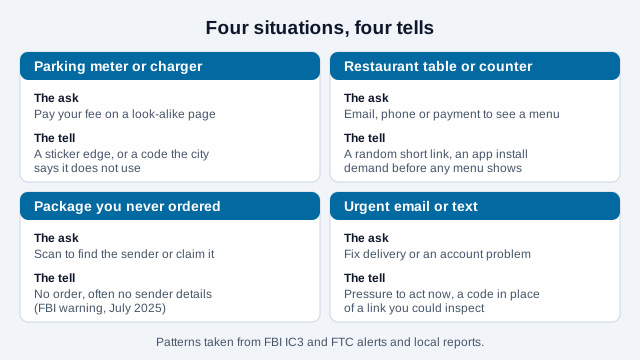
- They place it over a real code in a public place: parking meters, restaurant tables, delivery notices, posters, e-scooter docks, shared workspaces.
- You scan it without noticing it has been tampered with.
- The fake code opens a site that looks legitimate and asks for your card number, password, or personal information.
The same last two steps apply when the code arrives in a message instead. The FTC describes texts and emails that claim a package could not be delivered, that there is a problem with your account, or that suspicious activity needs a password change, each with an urgent reason to scan.
How do you spot a sticker placed over a real code?
Sticker overlays are one documented attack method. Run a finger over the code and look for a code covering another code, conflicting instructions, or a changed payment recipient. Legitimate businesses also use stickers; a raised edge alone does not prove fraud. If the placement looks altered, confirm it with the operator using a known contact route.
Read the URL preview before you tap
Modern phone cameras show the destination address in a small banner before opening it. Read it. The table below shows what to look for.
| Signal | Warning sign | What you would expect instead |
|---|---|---|
| Domain spelling | g00gle.com, paypa1.com, pay-pal.com | google.com, paypal.com |
| Protocol | http:// (no padlock) | https://, keeping in mind that HTTPS only encrypts the connection and does not prove who runs the site |
| Link shape | Random shortener such as bit.ly/x7k9m2 where a brand domain is expected | The organization's own domain |
| What the page asks for | Login or payment details immediately, "verification to continue", an app download | Shows the content (menu, info, form) with no upfront credentials |
What does a scam menu page look like next to a real one?
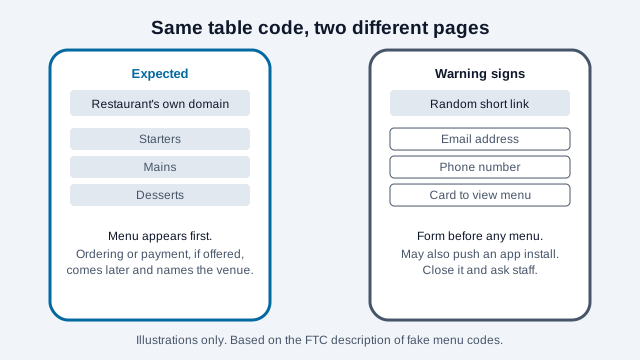
The FTC's description of fake restaurant codes is a good template for the general pattern: the legitimate page gives you what the sign promised, and the scam page asks for something first.
If you are a venue owner, the restaurant menu QR code guide covers printing the destination beside the code so customers can compare it.
Signs of a suspicious QR code
- The code is on a sticker placed over another surface.
- The URL preview swaps numbers for letters (0 for o, 1 for l) or uses an unfamiliar domain.
- The page asks for login credentials or payment details straight away.
- The code arrived in an unexpected email or text. Legitimate companies also send QR codes, so verify an unexpected request through their known website or app.
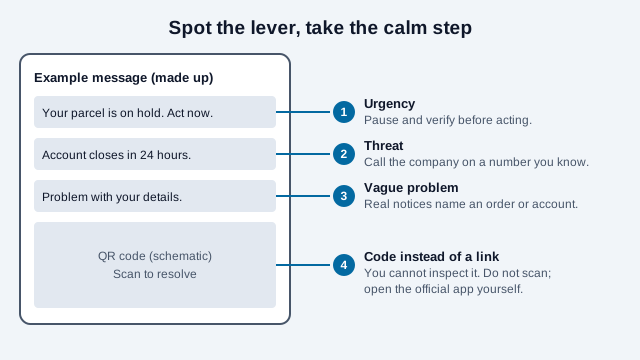
- The message pressures you: "Scan now or your account will be closed." Verify urgent requests independently instead of relying on the message.
Which pressure tactics should make you stop?
Scam messages tend to lean on the same levers, and spotting the lever is often easier than inspecting the code. An urgent deadline, a threat to an account, a vague problem with no order number, and a code that stands in for a link you could have checked are all reasons to step back. The calm response is the same each time: do not scan, and reach the company through its official app, a typed address, or a phone number from a statement or card.
Where may the source be easier to verify?
Context helps you verify the sender, but none of these placements guarantees a safe destination.
- Restaurant menus whose destination staff can confirm.
- Product packaging from a sealed box.
- Tickets or boarding passes sent to you directly by the issuer.
- Codes on an official government or institutional website you navigated to yourself.
How do static and dynamic codes change the risks?
A static code stores fixed data, which may be a direct URL or a redirect URL you control. The pattern cannot be edited after printing, but the website, redirects, and domain ownership can change. Using your own maintained domain reduces reliance on a QR vendor; it does not remove the need to secure the destination.
A dynamic QR service normally uses a managed redirect, hosted by a provider or by your organization. If that server is compromised, every printed copy of your code can be silently hijacked. See static vs dynamic QR codes for the full comparison, and generate a permanent static code with our free QR code generator or the Wi-Fi QR code generator; both run entirely in your browser.
Safety checklist: before you scan
- Is the code physically part of the sign or menu, or is it a sticker?
- Does the URL preview look strange, misspelled, or shortened?
- Are you being asked to download an app unexpectedly?
- Does the site demand urgent payment or a password login before showing anything?
- Could you do this in the operator's own app or on a site you type yourself?
Real-world QR code scams
Parking meter stickers (Austin, January 2022). In January 2022, Austin Transportation told CBS Austin that officers had found fake QR codes at more than two dozen of the city's 900-plus pay stations, and police were investigating. Similar stickers were reported in other Texas cities, but this guide did not verify those counts against a primary source and does not repeat them. It is unclear from the sources read how many drivers, if any, paid. Lesson: run your finger over any meter code; if it is a sticker, do not scan it and report it to the city.
Fake restaurant menu codes. The FTC's December 2023 alert describes table and counter codes covered with fakes that ask for an email, phone number, or payment "to view the menu", sometimes pushing an app download. The address is usually a random shortener rather than the restaurant's domain. Lesson: a menu code should show you the menu without asking for your personal details or an app install first.
Unsolicited-package codes (FBI warning, July 2025). The FBI's Internet Crime Complaint Center warned that criminals mail packages the recipient never ordered, often with no sender information, each containing a QR code that leads to a site asking for personal and financial information or to a malicious download. It is a variation of a "brushing" scam, and the FBI said it is less widespread than other fraud. Lesson: never scan a code from a package you were not expecting. The FBI also advises checking a free credit report if you think you are a target.
What common mistakes do people make?
Take a diner at a busy cafe who scans the table code, sees a page that wants an email address and card number "to hold the menu", and enters both because the cafe is crowded and the prompt looks routine. Nothing about the page said it was the cafe's. The diner trusted the setting and skipped the preview, and the page asked for payment details before showing a single dish.
That is an illustration, not a real report. Other common mistakes are scanning a package code out of curiosity, treating a padlock as proof of legitimacy, and paying through the first page that opens when a venue's own app or counter was available.
How to report a fake QR code
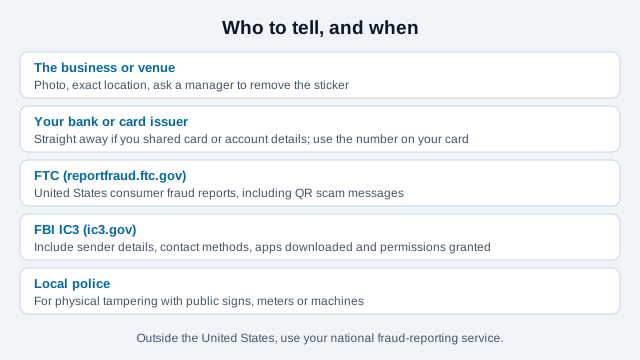
To the business: photograph the code, note the exact location ("Table 5, north wall"), tell a manager, and ask them to remove any sticker overlay.
To the authorities: FBI IC3 at ic3.gov (US), the FTC at reportfraud.ftc.gov, or your local police for physical tampering. Do not confront the scammer yourself.
What to do if you think you were scammed
- Do not enter anything else on the page.
- Close the browser tab immediately.
- If you entered a password, change it now, on that account and any other account using the same one.
- If you entered payment details, call your bank to block the card.
- Report the fake code to the location where you found it and to the authorities above.
The quishing guide covers what organizations can do about emailed codes, and the Google QR passkey guide explains why an authentication QR code someone sends you is not a prompt to approve.
What could this guide not verify?
- The Austin figure is from one local news report, and counts for other Texas cities differ between accounts, so they are not repeated.
- No source read for this guide gives a reliable rate of QR fraud, so the risk descriptions are qualitative.
- Reporting routes outside the United States and United Kingdom vary and are not covered here.
This guide is for general information only and is not legal or professional security advice. If you believe you have been a victim of QR code fraud, contact your bank and the reporting services listed above.
References
- FBI IC3: Cybercriminals Tampering with QR Codes to Steal Victim Funds (January 2022)
- FBI IC3: Unsolicited Packages Containing QR Codes Used to Initiate Fraud Schemes (July 2025)
- FTC: Scammers hide harmful links in QR codes to steal your information (December 2023)
- UK NCSC: QR codes, what's the real risk?
- CBS Austin: Austin Police investigating fraudulent QR codes found on parking pay stations (2022)
- Schneier on Security: Fake QR Codes on Parking Meters (January 2022)