Can QR codes be hacked? The symbol itself rarely hacks a phone just because the camera decodes it. The symbol contains data, such as a URL, text, Wi-Fi settings, contact details, or a payment instruction. The practical danger comes from what a person or device does with that data afterward.
This guide takes the technical view: it walks the path from printed symbol to backend, marks which stages carry documented risk, and separates those from exaggerated claims. Attackers use QR codes to hide phishing destinations, replace legitimate public codes, redirect payments, encourage unsafe downloads, hijack QR-based logins, and move a victim from a protected work screen to a less-managed phone. For the user-side routine, see how to check QR code safety; for everyday scams, the QR safety guide.
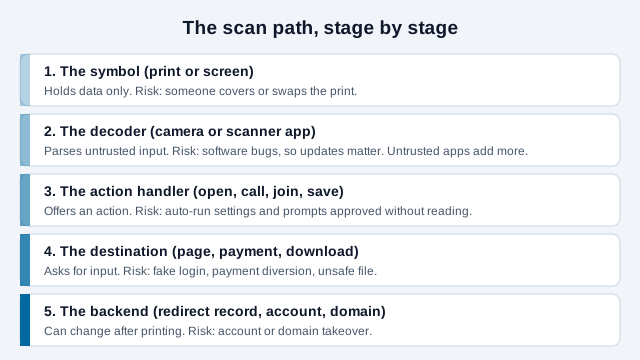
Can a QR code hack a phone just by being scanned?
Decoding a QR code normally reveals data; it does not automatically grant control of the device. The Canadian Centre for Cyber Security explains that the actions triggered by a code can expose people to phishing, malware, personal-data theft, or financial loss.
A software vulnerability could theoretically be reached through specially crafted input or a malicious website, which is why operating-system and browser updates still matter. Any program that parses input from outside, including a camera app or a third-party scanner, can contain bugs. This guide found no specific, current exploit to cite for ordinary phone cameras, so it treats that route as possible but uncommon. In ordinary scams, the attacker more often relies on a person tapping a link, entering information, installing an app, approving a payment, or granting permissions.
Example: a camera preview shows a login URL. Nothing has been submitted at the preview stage. The account becomes endangered when the user opens an imitation page and types credentials or approves an unexpected authentication request.
What does a QR code contain, and who can read it?
A QR code is an encoding of text or bytes, with error correction added so a damaged print can still be read. It is not an encrypted container. Anyone with a camera or an image of the code can recover exactly what it holds. The Canadian Centre for Cyber Security gives an example: a code generated from a completed form can give anyone who scans it access to the information it holds.
That has practical consequences for both sides:
- Never put a secret directly in a public code, such as a password, API key or private link that works like a key.
- A code on a flyer or a screenshot you post online can be scanned by anyone who sees the image.
- The same encoded text may be a web link, a Wi-Fi join string, a phone number or a contact card, so the risk depends on the payload type and what the phone offers to do. The QR Payload Decoder shows the raw text without opening it.
What is QR phishing or quishing?
Quishing is phishing that uses a QR code to deliver or conceal the malicious destination. The Federal Trade Commission warns that scammers may send codes by email or text and invent an urgent reason to scan them.
QR delivery can frustrate normal link inspection because a person cannot read the encoded address directly from the pattern. The UK's National Cyber Security Centre gives three reasons criminals use it: it hides links from people wary of suspicious or shortened ones, some detection tools do not scan images, and people often scan with personal phones that lack the protections of a work computer.
- Fake password-expiry or document-sharing notices
- Imitation parcel, toll, parking, or invoice messages
- False account-verification and multifactor-enrollment pages
- Unexpected payment or refund instructions
The quishing guide covers delivery methods and organizational defenses in depth.
How do sticker replacement attacks work?
A sticker attack places an attacker's code over a legitimate code in a trusted physical location. The FBI's Internet Crime Complaint Center has warned that criminals tamper with physical and digital codes to redirect victims to malicious sites or fraudulent payments, including by replacing a business's payment code so that a customer's payment goes to the criminal.
Parking signs, restaurant tables, payment terminals, posters, and public kiosks deserve extra inspection because a removable label can be added after the legitimate owner leaves. Look for raised edges, a second label underneath, inconsistent colors, or a destination unrelated to the organization.
If the scan requests money, compare the merchant name and amount in the payment app before authorizing. When possible, start from the official app, a typed address, or a bookmarked service rather than a public sticker.
Can a QR code install malware?
A QR code can lead to a malicious download, but a request to install or open the file is usually a separate step. The FBI advises against downloading an app from a QR code and recommends using the device's official application store.
A page may falsely claim that a special scanner, security update, parking app, or document viewer is required. Treat that as a warning. Modern phones already include common QR scanning capabilities, so an unfamiliar decoder is rarely necessary. The Canadian Centre for Cyber Security lists third-party scanner apps as an attack route in their own right, since some spread malware or gain access to device settings and storage, and the UK's NCSC recommends the scanner built into your camera or operating system over an app-store alternative.
Keep the operating system, browser, and security components updated. Do not bypass installation warnings, enable unknown-source installation, or grant accessibility, device-administration, camera, contact, or notification permissions without understanding why they are needed. Also avoid configuring a device to run QR actions automatically, which the Canadian guidance lists among habits to avoid.
Can a QR code steal passwords or payment details?
A QR code can direct a person to a convincing form that collects credentials or financial information. The code itself does not know the password; the imitation destination obtains it when the victim submits the form.
Before entering information, check:
- Is the full registered domain the one the organization normally uses?
- Did you independently initiate this task?
- Does the request make sense for the physical location or message?
- Can you complete it through the official app or a known bookmark instead?
- Does a payment screen show the intended recipient and amount?
HTTPS encryption is useful in transit but does not prove that the website belongs to the organization shown in the scam. A fraudulent site can also use HTTPS.
Can a QR-based login be hijacked?
Yes, when a service lets you sign in by scanning a code with its phone app, the code itself becomes the thing an attacker wants to relay. The technique is called QRLJacking (QR login jacking). OWASP documents it as a social-engineering attack that can hijack sessions in applications offering a "log in with QR code" option, and security press reported the research in 2016.
In outline, the attacker opens the real login page to obtain a fresh login code, places that code on a page the victim sees, and keeps it refreshed because well-built services expire codes. If the victim scans it with the service's app and approves, the service signs in the attacker's browser session. The sources describe it as a proof of concept and a social-engineering technique, and this guide has no current list of which services remain exposed. Whether a specific app is affected depends on how it shows the requesting device and location before you approve.
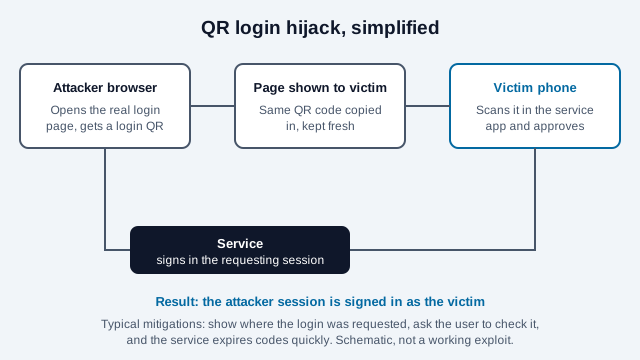
The practical rule for users: approve a QR login only if you started it on a screen you control and the app shows details that match. The Google QR passkey guide explains how a proximity check is added to cross-device sign-ins specifically to resist this kind of relay.
Are static QR codes safer than dynamic codes?
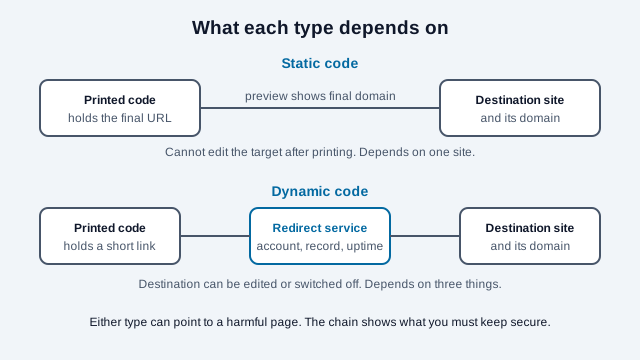
Static and dynamic describe data routing, not a universal safety rating. A static code contains its final data directly; a typical dynamic code contains a redirect controlled through an online service.
A static URL may let the camera preview show the final brand domain, reducing one layer of dependency. A dynamic redirect can support destination updates and abuse response, but it also introduces a provider, redirect record, and account that must remain trustworthy and available. If that account or the domain it uses were taken over, every printed copy would follow the new destination, which is a consequence of how redirects work rather than a reported incident here.
Either type can point to harmful content. Judge the displayed domain, ownership, redirect chain, destination behavior, and deployment controls rather than treating "static" or "dynamic" as a security certificate. The static vs dynamic comparison covers the trade-offs for publishers.
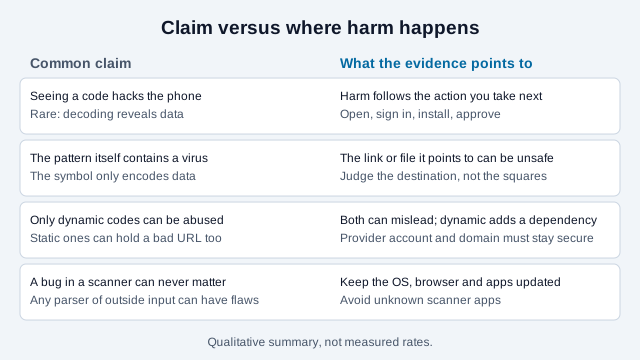
Which claims about hacked QR codes hold up?
Four claims come up repeatedly. The comparison below summarizes how they line up with the sources cited in this guide.
QR code safety checklist
Use the same caution you would apply to an unexpected link, with an extra check for physical replacement. The step-by-step safety check walks through each point in more detail.
- Use the device's built-in camera or a trusted scanner.
- Preview and read the domain before opening it.
- Inspect public codes for sticker tampering.
- Do not act on urgency alone.
- Avoid installing apps through scanned links.
- Verify payment recipient and amount before approval.
- Use a known contact method to confirm unexpected codes.
- Keep the phone and browser updated.
What should you do if you publish QR codes?
If you place codes where customers will scan them, you control several of the stages in the diagram above. A short rollout routine reduces what an attacker can change:
- Print the destination domain and your organization name beside the code so a swapped sticker stands out.
- Prefer a first-party domain you keep renewed, and limit who can edit redirect records or account settings.
- Use two-factor authentication on any QR or hosting account that controls a printed code, ideally phishing-resistant authentication where offered.
- Inspect public placements on a schedule, and keep a photo of each so you can spot a replacement.
- Offer a typed address or app route as an alternative to scanning for payments.
- Retire old codes by redirecting or removing them, and keep the domain registered while any print is in circulation.
What common mistakes do owners and users make?
Think of a small gym that prints a poster code linking to a membership offer through a free redirect account protected only by a reused password. Months later the poster is still up, the account is accessed by someone else, and the redirect now leads to a login look-alike. Nothing was wrong with the printed squares. The weak point was stage five: an account that outlived the campaign and a password that was already known elsewhere.
That is an illustration only. On the user side, the mirror mistakes are scanning from a sticker without checking it, installing a "required" scanner app, and approving a QR login that was not started on your own screen.
What should you do after scanning a suspicious code?
Your response depends on what happened after the scan. If you only previewed or opened a page and entered nothing, close it and clear any download it attempted. Do not revisit it to investigate.
If you entered a password, use a known-good device or official app to change it, end other sessions, and enable phishing-resistant authentication when available. If you disclosed payment information or sent funds, contact the financial institution using the number on the card or official website. Report impersonation to the affected organization and the relevant national fraud-reporting service.
Which hacking claims remain unproven?
- It cites no specific phone-camera vulnerability, and new ones can appear, so updates remain the control.
- The QRLJacking sources are older proof-of-concept research. Current exposure varies by service and cannot be summarized here.
- No source read for this guide measures how often each attack type occurs, so none of the risk descriptions are rates.
This guide is for general information only and is not professional security or legal advice. If you believe you have been defrauded, contact your bank and report the incident to the relevant authority.
References
- Federal Bureau of Investigation, "Cybercriminals Tampering with QR Codes to Steal Victim Funds," IC3, January 2022.
- Federal Trade Commission, "Scammers hide harmful links in QR codes to steal your information," Consumer Advice, December 2023.
- Canadian Centre for Cyber Security, "Security considerations for QR codes (ITSAP.00.141)."
- UK National Cyber Security Centre, "QR codes: what's the real risk?"
- The Hacker News, "QRLJacking: hacking QR code login," July 2016, reporting the OWASP QRLJacking research.
- GS1, "What security measures are in place for QR codes?"