Google uses QR codes in several security features, but they do not all mean "QR code two-factor authentication." A passkey flow can use a QR code to let a phone authorize sign-in on another nearby device. Android and Google Messages can also use QR-based key comparison to verify the identity behind an encrypted conversation.
Those workflows solve different problems and should not be confused with an SMS one-time code or with the QR code used to enroll an authenticator app. This guide explains what the QR code starts, what security comes from the underlying cryptography and proximity checks, and how to recognize an authentication prompt you did not initiate. For scam-side coverage, see QR code scams and quishing; for general pre-scan habits, how to check QR code safety.
Why does Google passkey sign-in display a QR code?
The QR code begins cross-device authentication when the passkey needed for sign-in is available on a phone rather than the computer showing the website. Google's help page describes the steps: on the computer, enter your username, choose "Try another way" and then the passkey option, scan the QR code that appears with your phone's camera, and approve the prompt on the phone with your fingerprint, face unlock or PIN.
The code is a handoff mechanism, not the passkey itself in a form that someone can photograph and reuse like a password. The phone and client participate in a FIDO cross-device protocol, and the user verifies the sign-in with the phone's configured unlock or authentication method.
Google's help page lists requirements for this flow: Bluetooth must be on, the phone needs a screen lock, the passkey must be on an Android device, an iPhone or iPad, or a FIDO2 hardware security key, and the computer's browser and operating system must support passkeys. After you have signed in once from a given computer and phone pair, later sign-ins should send a notification to your phone instead of asking you to scan.
Example: you open a supported account sign-in page on a borrowed laptop, choose to use a passkey from another device, and scan the laptop's code with your phone. The credential operation happens through the devices and service; you do not type a shared secret into the borrowed computer.
How does cross-device passkey authentication work?
FIDO cross-device authentication combines a QR-initiated connection with proximity verification and protected protocol messages. FIDO states that Bluetooth Low Energy is used to confirm the two devices are physically near each other, and that the sign-in does not depend on Bluetooth security properties for its actual security: the hybrid transport adds its own cryptographic protection.
- The user starts a passkey sign-in on the client device.
- The client displays a QR code for another device.
- The phone scans the code and recognizes the cross-device request.
- Nearby-device checks help establish that the devices are physically close.
- The phone asks the user to approve with its supported verification method.
- The relying service verifies the passkey response for its own domain.
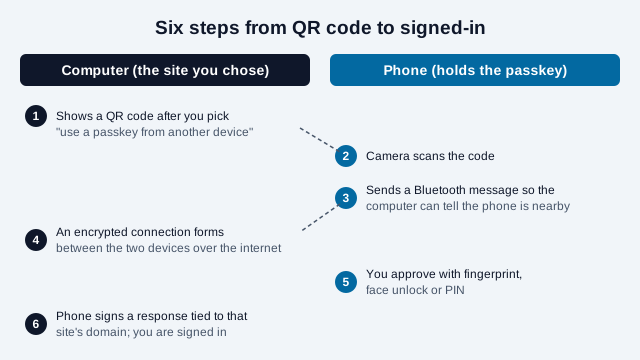
FIDO describes passkeys as public-key credentials bound to an online service, and phishing resistance as a core design goal. That binding is a key reason passkeys are designed to resist traditional credential phishing: a passkey response for one relying-party domain is not a reusable password for another. Google's security blog (May 2023) adds the reason for the Bluetooth step, according to a search-result summary of that post: the proximity check means a remote attacker cannot trick you into releasing a passkey signature by sending a screenshot of a QR code from their own device. The blog page itself could not be read in full for this guide, so treat that wording as secondhand.
The protocol is still evolving. A FIDO working draft titled Proximity Exchange Protocol describes splitting the proximity proof out of the older hybrid transport. It is a draft with no official standing, so this guide does not rely on its details.
Is the QR code replacing SMS two-factor authentication?
No single QR feature replaces every Google SMS verification flow. Passkeys, cross-device authentication, recovery methods, SMS one-time codes, authenticator applications, security keys, and administrative policies can coexist depending on the account and service.
It is more accurate to compare the underlying methods than the visual presence of a QR code. SMS sends a short-lived code through the telephone network, and that code works wherever it is typed, including on a phishing page. CISA's guidance on phishing-resistant MFA calls FIDO/WebAuthn the only widely available phishing-resistant authentication and says that if a user is tricked into logging into a fake website, the FIDO protocol will block the attempt. For organizations that cannot yet adopt it, CISA recommends number matching to block push bombardment and SMS-based attacks, and says any MFA is better than none.
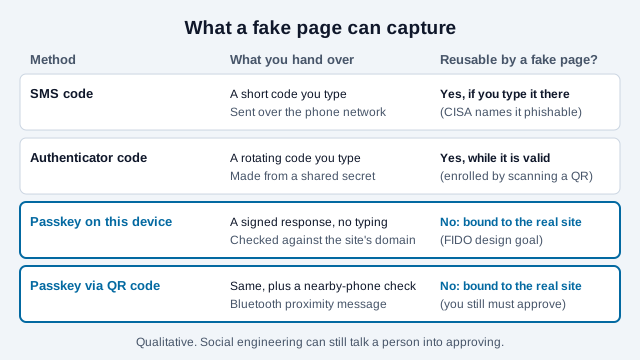
Do not claim that every QR prompt is automatically stronger than every SMS flow. Security also depends on whether the user initiated the request, verified the domain, protected the phone, and followed a legitimate interface.
What is the QR code when you set up an authenticator app?
Many sites ask you to scan a QR code to enroll an authenticator app. That code is a different thing again: it carries the shared secret the app uses to produce time-based codes. Treat the enrollment code like a password while it is on screen. Do not photograph it or paste it into a chat, and do not scan one that someone else sends you. The 2FA QR code generator explains what such an enrollment code contains.
What is QR key verification in Google Messages?
Message key verification helps trusted contacts compare identity information for an end-to-end encrypted conversation. Google's Key Verifier feature, which 9to5Google reported as launching in October 2025, lets contacts scan each other's QR code to confirm their encryption keys match and that they are communicating with the intended person. According to Google's help pages, you start in a conversation's details by choosing Verify encryption, or in Google Contacts under Verify keys, and both people complete the steps. It replaces an older method that compared an 80-digit code.
This is different from signing in to a Google account. The purpose is to detect an unexpected cryptographic identity mismatch in a supported encrypted chat. Google notes that verification only works for RCS chats with end-to-end encryption, not SMS or MMS, and that it is not supported on some device types such as tablets, wearables and Android Go devices. Google also says private keys are never sent to Google, and that a mismatch can follow when someone switches devices.
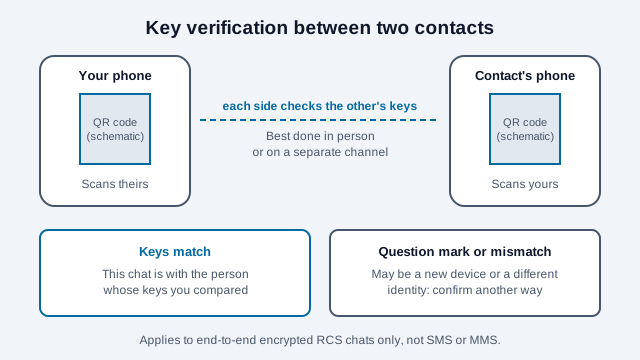
For a high-assurance comparison, contacts should verify in person or through a separate trusted channel. A code sent inside the same possibly compromised conversation offers weaker assurance than an independent comparison.
How to recognize a legitimate passkey QR prompt
A legitimate prompt should follow a sign-in you intentionally started on a domain you recognize.
- You navigated to the service yourself or used its official app.
- The browser address shows the expected registered domain.
- You selected passkey or another-device sign-in before the code appeared.
- Your phone describes the same service or request you are completing.
- The devices are physically near each other.
- No stranger, support caller, email, or chat message is coaching you to approve it.
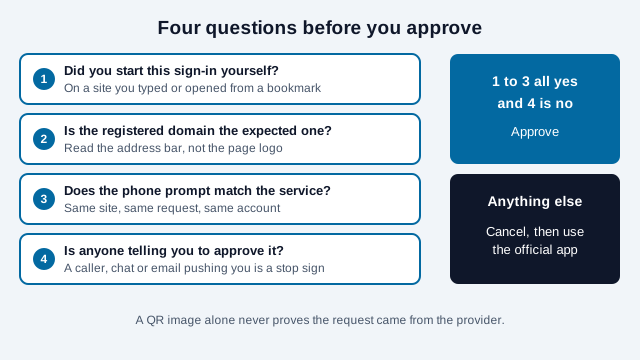
Stop if the request appears unexpectedly or if someone tells you to scan a code to "cancel fraud," "secure your wallet," "receive a refund," or "help support access your account." Contact the organization through its known app or independently typed address.
Can attackers abuse authentication QR codes?
Attackers can use social engineering to make a victim authorize the attacker's session, even when the legitimate protocol is cryptographically strong. A secure sign-in mechanism cannot protect a user who is deceived into approving an unintended request without checking the service and context.
Common warning patterns include:
- a code delivered unexpectedly in email, messaging, or a document;
- a fake support representative asking the victim to scan or approve;
- a lookalike domain that starts a real authentication flow for the attacker;
- pressure to ignore the phone's description or security warning;
- a request to share screenshots, recovery codes, or device-unlock information.
Custom QR login schemes that lack a proximity check are a different case. OWASP documents QRLJacking, in which an attacker relays a real service's login code to a victim; the hacked QR codes guide explains it. The QR image is not evidence that Google or another provider sent the request. The verified domain, user-initiated context, device prompt, and intended account action matter together.
Passkeys, authenticator codes, SMS, and message verification
These methods address different security tasks and should not be presented as interchangeable.
| Method | Main purpose | What the user handles |
|---|---|---|
| Passkey | Sign in with a service-bound public-key credential | Device approval, biometric, PIN, or other local verification as configured |
| Cross-device passkey QR | Use a passkey from a nearby phone on another device | Scan and approve an initiated request |
| Authenticator one-time code | Provide a time-based second factor | Short numeric code |
| SMS one-time code | Verify access to a phone number or add a factor | Code delivered over SMS |
| Message key verification | Compare identity keys for an encrypted conversation | QR or verification-code comparison with a contact |
What is a practical setup checklist?
- Open your Google Account security settings from a bookmark or the official app, and add a passkey if you do not have one.
- Confirm the phone has a screen lock and that Bluetooth works, since the cross-device flow needs both.
- Keep at least one backup method that you control, such as a security key or another trusted device, so a lost phone does not lock you out.
- Review signed-in devices every few months and remove ones you do not recognize.
- Use Key Verifier with the few contacts where identity matters, in person where possible.
What common mistakes lead to trouble?
Take a user who receives a chat message, apparently from "support," saying that their wallet is at risk and that scanning an attached QR code will secure it. The image is a login QR for the sender's session on a look-alike page. The user scans it, the phone shows a sign-in request, and they approve it because they believe it is the fix. No weakness in passkeys was needed: the user started nothing, checked no domain and followed a coach.
This is an illustration, not a real case. The same lesson applies to a lost-phone problem: someone who set up a passkey on one phone only and has no backup method can be locked out when it breaks.
What should you do if you scanned the wrong authentication code?
Cancel the flow immediately and review the account through a known-good route. If you did not approve anything, close the request. If you approved an unknown sign-in, open the official account security page, review recent sessions and devices, revoke unfamiliar access, and follow the provider's recovery guidance.
Change a password if it may also have been exposed, but remember that a passkey is not a password copied from the QR image. Report the phishing page or impersonation through the provider's official reporting channel.
Which sign-in details does Google control?
- Account options vary by Google product, account type and administrator policy, so check your own security settings for the exact choices offered.
- The details of the proximity step are still being specified in draft documents, and Google's blog post could only be summarized secondhand here.
- Key Verifier availability depends on device type, RCS support and carrier, and the feature can change after publication.
This guide is general information, not security advice for a specific account. Follow your organization's policy and the provider's current instructions.
References
- Google Account Help, "Sign in with a passkey instead of a password."
- Google Security Blog, "So long passwords, thanks for all the phish," May 2023.
- FIDO Alliance, "Passkeys: Passwordless Authentication."
- FIDO Alliance, "Proximity Exchange Protocol," working draft, July 2026.
- CISA, "More than a Password," and "Implementing Phishing-Resistant MFA," October 2022.
- Google, "Android System Key Verifier," Android Help.
- 9to5Google, "Google Messages Key Verifier launch," October 2025.
- OWASP, QRLJacking, as reported by The Hacker News: "QRLJacking: hacking QR code login," July 2016.