Gyms and studios put QR codes on equipment, class boards, the front desk and membership flyers to open exercise tutorials, class schedules and booking, waivers and join forms, each at the moment a member needs it. A code can open a waiver but cannot make anyone agree to it, and a code on a machine needs a durable label in a place that never touches a moving part.
This guide covers what to link where, how to place and protect equipment labels, why a scanned waiver still needs a clear acceptance step, what happens to the health details members type into forms, how to set up class booking and join pages, and how to keep tutorial videos accessible and current.
What should a gym QR code link to?
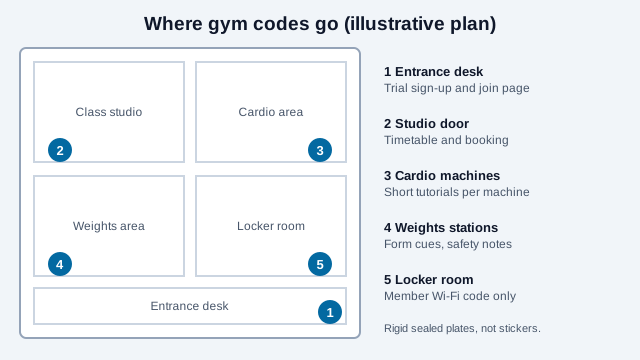
Members use phones on the gym floor, usually between sets, often on weak Wi-Fi and with sweaty hands. Each code should lead to one short thing.
| Where it sits | What it opens | Keep in mind |
|---|---|---|
| Machine or station | Short form-and-safety video plus a text summary | Host it on a page you control so you can re-record it |
| Class board or studio door | Timetable and booking page | Light page; it must load on a weak signal |
| Front desk | Trial sign-up and join page | Collect the minimum and say what you keep |
| Onboarding flyer | Waiver and health questionnaire | See the waiver and health-data sections below |
| Lockers and lounge | Wi-Fi code for the member network | Never the staff or payment network |
Gyms already do this. A public sports center in Seongdong-gu, Seoul, was reported in 2020 to have put codes on its equipment that open videos on machine use and safety precautions, and a wellness center using Technogym equipment lists codes that open setup and usage videos. Vendor blogs make bigger claims about member engagement, but those come from companies that sell QR products, so weigh them accordingly.
Where on a machine should the label go?
Treat the label like any other fitting on the equipment. It must not be on anything that moves, anything the user grips, or anything that hides a warning.
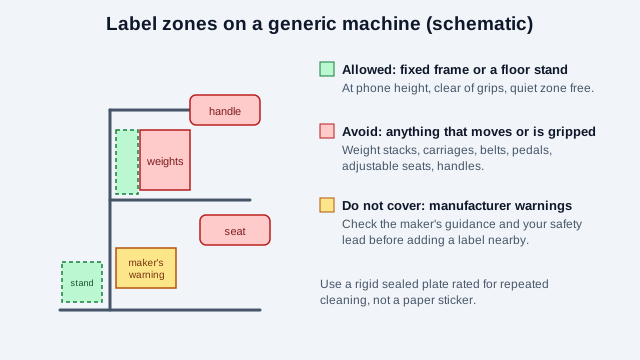
- Fixed frame or a floor stand next to the machine, at a height a standing user can aim a phone at.
- Not on cable carriages, weight stacks, belts, pedals, seats that adjust or handles.
- Not over the manufacturer's warning labels. Fitness equipment and facility signage is covered by a standard, ASTM F1749, that ranks hazards with the signal words danger, warning and caution and is aimed at users aged 13 and older. A QR label is not a safety sign under that scheme, so read your equipment maker's guidance and take advice from your safety lead before adding anything near a warning.
- On a rigid, sealed plate rather than paper. Surfaces get wiped many times a day, so ask your sign maker for a finish rated for repeated cleaning, and check your disinfectant's label directions for what it can touch.
- Away from where a towel is dragged. A faded or lifting code is worse than none.
Re-check the linked tutorial whenever a machine is replaced, re-cabled or reset. A video that shows the old setup is a safety problem, not a style problem.
Can a member sign a liability waiver by scanning a code?
A QR code can open a waiver, but scanning one does not equal agreement. For an agreement to stand up, the member generally needs a real chance to read it and a clear affirmative act to accept it, such as a checkbox with a typed name or signature, plus a stored timestamp and copy. Enforceability of fitness waivers varies a lot by state and country, so have your adviser confirm the wording and acceptance flow for each place you operate.
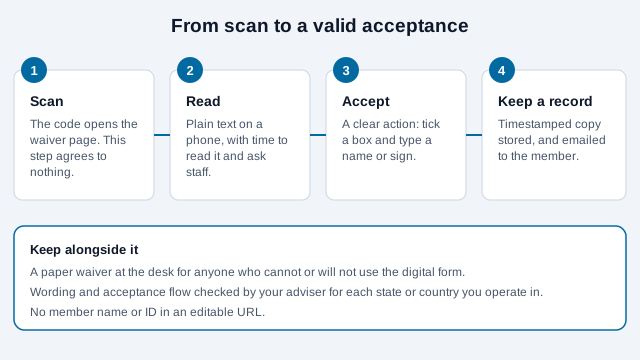
Keep a paper waiver at the desk for anyone who cannot or will not use the digital form, and email the member a copy of what they accepted.
What happens to health answers collected through a form?
Pre-activity questionnaires, body measurements and injury notes are health information, and a gym is often not covered by medical-privacy laws like HIPAA. Other laws can still apply. Washington's My Health My Data Act, which took effect March 31, 2024 for most businesses, covers consumer health data collected by businesses that serve Washington consumers, requires opt-in consent that is separate for collecting and for sharing, and can be enforced through the state's Consumer Protection Act, including private suits. Law-firm commentary notes that a gym recording a member's height and weight could fall within it. Separately, the FTC's Health Breach Notification Rule applies to certain health apps and similar products that are not covered by HIPAA. Whether either applies to you depends on your location, members and software.
- Collect only what the service needs. Ask for a medical flag, not a medical history, unless you have a reason and a safe place to keep it.
- Use a separate checkbox for marketing, unchecked by default.
- Say how long you keep answers and how a member can ask for deletion.
- Do not put a member's name or ID in a URL. A scanned link such as
?member=1042can be edited by anyone.
Check with counsel before building a form that stores health answers, especially if you serve members in several states or countries.
How do you set up class booking and join pages?
A code at the studio door should open the next available classes, not the full year. Link to the booking system's own page rather than a PDF timetable that goes stale, and keep the first screen to three things: class, time, book. A trial or join page works best when the offer, the price and the cancellation terms all appear before the payment step.
Cancellation terms need particular care. The FTC's "click to cancel" amendment to its Negative Option Rule was vacated by the Eighth Circuit on July 8, 2025, before it took effect, on procedural grounds. The FTC can still use other laws, and more than half of US states have their own automatic-renewal laws, some strict, so a gym that auto-renews memberships should check its state's rules and how easily a member can cancel. A vendor blog also reports a New York City cancellation rule effective October 2026; that was not confirmed against a city source, so verify it before relying on it.
Is the tutorial content accessible?
Which accessibility duties apply depends on your business and country. In the US, ADA Title III covers public accommodations, and the European Accessibility Act covers specified services, with exemptions. Do not assume every page has the same requirements. Some steps help in every case:
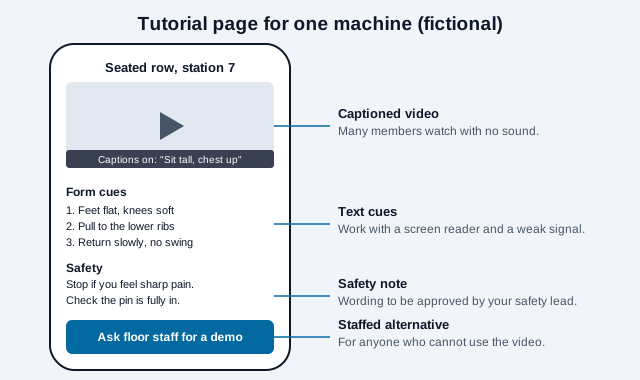
- Caption every instructional video. In a noisy gym, many members watch without sound.
- Add three or four text cues under the video, so the page works for screen readers and low bandwidth.
- Make schedule and booking pages real text, usable at high zoom (W3C WCAG 2.2).
- Keep a staffed alternative. A floor team member can demonstrate a machine for anyone who cannot use the video. The accessibility guide goes further.
Static or dynamic, and can you track scans?
Static codes suit most gyms. They are free, never expire, and you can swap the tutorial or restructure the timetable page without reprinting a sign. You cannot count scans of a static code, but UTM parameters from the UTM builder show which stations or boards drive tutorial views and bookings in your analytics. A paid dynamic code pays off only when one printed code must be repointed between unrelated destinations. See static vs dynamic. For hundreds of machines, the bulk generator creates one code per station, and one code per machine lets you see which equipment prompts the most questions. A printable program can sit behind a code too; see QR codes for a PDF. Gym lobbies and boards are public, so the guide to checking a QR code is worth a look for staff.
What mistakes break gym QR programs?
Picture a gym that prints paper stickers for forty machines on a Sunday. By Wednesday, wipe-downs have lifted a third of them. Six sit on cable carriages and tear off. The tutorial for a rower still shows last year's model, and the waiver page loads but has no checkbox, so nobody has actually agreed to anything. None of this needed new technology to fix.
- Paper stickers on high-touch, high-moisture surfaces.
- Labels on moving parts or over warnings.
- Treating a scan as consent.
- Asking for more health data than the service needs.
- Forgetting that members in a basement studio have no signal.
- Videos with no captions and no text version.
How do you launch a gym code?
- Start with ten machines, a class board and the front desk.
- Write the tutorial page for each machine: short video, captions, three text cues.
- Order rigid sealed plates, not stickers, and approve placement with your safety lead and the equipment maker's guidance.
- Build the waiver flow with an explicit acceptance step and a stored copy, and confirm it with your adviser.
- Test every code on weak Wi-Fi and mobile data, on an iPhone and an Android phone.
- Add a monthly review: do the videos match the equipment?
Two points a checklist cannot settle. Waiver enforceability and automatic-renewal rules differ by state and country, and health-data laws apply differently to gyms depending on where members live. Confirm both with local counsel.
This guide is general information, not legal advice. Consumer-protection, health-privacy, accessibility and equipment-safety rules vary by place and change over time.
References
- Asia Economy: Seongdong-gu public office produces gym workout instruction videos using QR codes
- NCHMD wellness center news: QR codes coming to Technogym weight machines
- ASTM F1749: fitness equipment and fitness facility safety signage and labels
- Stoel Rives: FAQ on Washington's My Health My Data Act
- Greenberg Traurig: Eighth Circuit vacates the FTC's click-to-cancel rule
- U.S. Department of Justice: ADA Title III (public accommodations)
- W3C WAI: WCAG 2.2 captions (prerecorded)
- EUR-Lex: Directive (EU) 2019/882 (European Accessibility Act)
- ISO/IEC 18004:2024, QR code bar code symbology specification