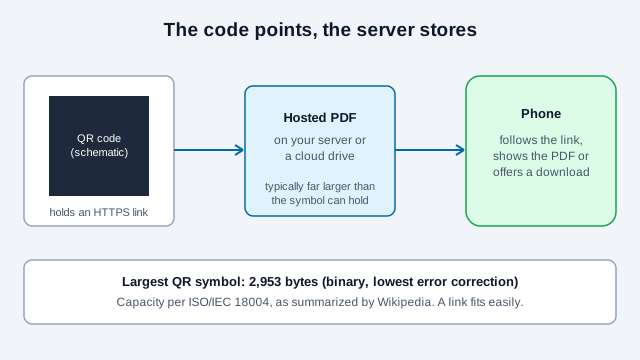
A QR code for a PDF does not contain the PDF. It contains a web link to the place where the document is hosted. When someone scans it, their phone follows the link and opens the PDF in the browser or offers to download it. That is the only practical way to do it, because a PDF runs to hundreds of kilobytes or more and a QR code holds at most a few thousand bytes. A link to a stable address also keeps the code small, quick to scan, and easy to update later.
This guide covers where to host the file, how to share a Google Drive PDF step by step, how to replace the file without reprinting, how to make a PDF that is pleasant on a phone, what the printed code needs, and the failures that appear most often once a code is in the world.
Can a QR code store a PDF file directly?
No. The QR Code standard (ISO/IEC 18004) caps a symbol at 2,953 bytes in binary mode, and only at the lowest error correction level; Wikipedia's summary of the standard gives the same figure for the largest version, 40-L. Even a one-page brochure PDF is typically hundreds of kilobytes, so it is hundreds of times too big. Host the file on a web server, a cloud storage service or a document repository, and encode its public HTTPS address in the code. The code just points the phone's browser at the file. The same limit applies to photos, which is why the picture QR code guide also ends up at a link.
Where should you host the PDF?
Choose a place that will still serve the file for as long as the printed code will be in circulation.
| Where | Link stability | What the visitor sees | Good for |
|---|---|---|---|
| Your own web server or CDN | You control it completely | The browser's built-in PDF viewer, on your own domain | Catalogs, manuals, property listings |
| Google Drive | Works as long as the file exists and stays shared | Google's mobile viewer, with a download option | Brochures, event schedules, resumes |
| OneDrive or SharePoint | Works as long as the share link stays active | Microsoft's online viewer | Documents in a Microsoft 365 workplace |
| Dropbox | Works as long as the file exists and stays shared | Dropbox's preview screen | Portfolios and proofs for clients |
| A QR code service that hosts the file | Tied to your subscription | The service's own viewer | Campaigns where you want scan tracking |
For most people, your own site or a cloud drive you control is the safest choice, since it does not depend on a subscription. Storage allowances and sharing options change, so check the provider's current terms.
Sharing settings differ in ways that matter for a public code. Google Drive offers Restricted, Your Organization (work and school accounts only) and Anyone with the link; the last one lets anyone open the file without signing in, as a viewer. Microsoft documents a similar Anyone setting for OneDrive, plus an expiration date and a password, both of which need a Microsoft 365 subscription and which your administrator can switch off. Dropbox links can also carry a password or an expiry date, though sources disagree on which plans include them, so check your own account. An expiry date is useful for a time-limited offer and a hazard for a printed code, so leave it off for anything meant to last.
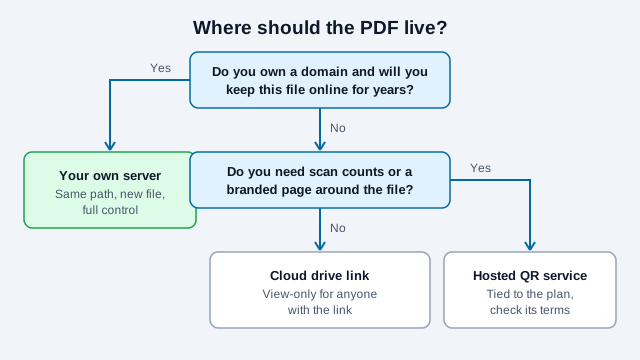
If you want scan counts or a branded page around the document without running a site, the dynamic PDF QR code hosts the file on a mobile page you can edit later. The static vs dynamic guide explains what you give up when the code points at a service you do not control.
How do you host a PDF on Google Drive and link it?
Set the file so that anyone with the link can view it, then encode that link.
- Open Google Drive, choose New, then File upload, and pick your finished PDF.
- Right-click the file and choose Share. Under General access, change "Restricted" to "Anyone with the link", and leave the role as "Viewer".
- Choose Copy link. It looks like
https://drive.google.com/file/d/FILE_ID/view?usp=sharing. - Open the URL QR code generator and paste the link.
- Export the code as an SVG or a high-resolution PNG, using error correction level M or Q.
Test the code on a phone that is not signed in to your Google account, or in a private browsing tab. If it asks for a Google sign-in, the sharing setting is still restricted. Older Drive links can behave differently: news coverage of a 2021 Google security update reported that links to older shared files needed a resource key, and that old links without one could fail for first-time visitors. Copy a fresh link from the Share dialog instead of reusing an old one, and keep the Viewer role, since the Editor role would let anyone change your document.
How do you update the PDF without reprinting the code?
Replace the file but keep the address the same. A static QR code holds a fixed link, so the code keeps working as long as the link does.
- On Google Drive, do not upload a new file with a new link. Select the existing PDF, open More, then File information, then Manage versions, then Upload new version. In practice the share link stays the same, though Google's help page does not state that, so open the link before and after the swap. Drive keeps older versions for a limited time: Google says a version might be permanently deleted after 30 days or after 100 newer versions unless you choose Keep forever.
- On your own server, upload the new PDF over the old one with the same file name and path. If the code points to
https://example.com/docs/menu.pdf, every later scan gets the new version.
Browsers and CDNs may cache the old file for a while after the swap, so check from a phone on mobile data a few minutes later. If a new file name is unavoidable, such as a dated price list, point the code at a stable page that links to the current file, or use a redirect you control.
How do you make a PDF that works on a phone?
The person scanning is standing up and holding a phone, usually on a mobile connection. A PDF designed for A4 or Letter paper can be hard to read there.
- Use a single column and a body size that reads without pinch-zooming. Wide tables and two-page spreads are the usual problem.
- Keep the file small. Save a compressed, web-friendly copy for the code and keep the large print-ready version for your printer.
- Turn on Fast Web View, Adobe's name for a linearized PDF, if you host the file yourself. It reorganizes the file so the first page can show before the rest arrives. It only helps when your server supports byte-range requests, so do not expect miracles.
- Tag the document for accessibility: real headings, reading order and alternative text for images. Accessibility guides from universities and public bodies agree that fixing the source document before exporting is more reliable than repairing the PDF afterward, and that a person still has to check tables and reading order by hand. See the QR code accessibility guide for the wider picture.
- Give the file a plain name without spaces or unusual characters. Forum reports describe Chrome on Android downloading a PDF instead of showing it when a server sends an attachment header, and filename quirks appear in some of those reports. Test on a real Android phone if you host the file yourself.
How should you print a PDF QR code?
Links from cloud storage are long because they include a file ID, so the code has more modules and needs a little more room than a short link would.
- Size the code for the scanning distance. A common rule of thumb is a code about a tenth as wide as the distance. Something read by hand, such as a flyer or table card, can be small, and a wall sign viewed from a meter away needs a much larger code. See the print size guide.
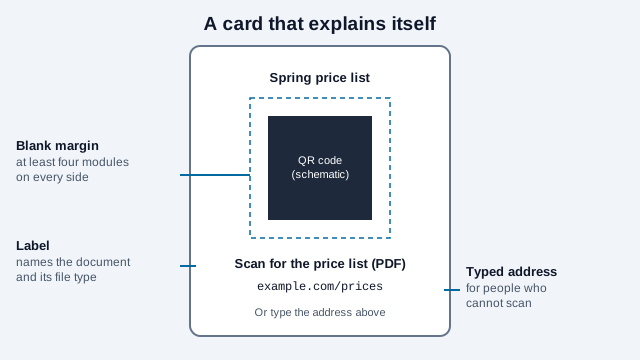
- Leave a blank border at least four modules wide on every side, with no text, lines or graphics inside it, as DENSO WAVE specifies.
- Give the printer an SVG rather than a small bitmap, so the module edges stay sharp.
- Choose a matte finish. Gloss reflects light into the phone's camera.
- Tell people what will open. Write the document name and type next to the code, for example "Scan for the price list (PDF)", and add a short address they can type. The flyers and brochures guide shows layouts.
What goes wrong with PDF codes?
Picture a landscaping company that prints a seasonal price list as a PDF on Drive and puts the code on 300 door hangers. In the shared folder, an office assistant tidies up and moves the file into a new folder owned by a different account. The link now asks visitors to request access, and nobody notices for two weeks because the owner's phone is signed in to the right account. A signed-out test each month, and a note on the file saying it is linked from print, would have caught it. This is an illustration, and the same causes show up repeatedly.
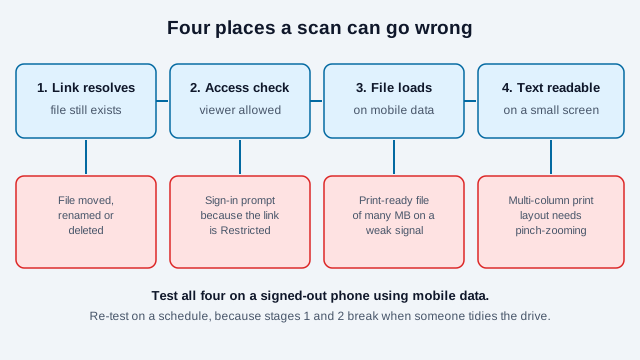
- Access denied or a sign-in prompt. The file is shared only with certain people or your organization. Change it to "Anyone with the link".
- Slow loading on mobile data. A print-ready PDF can be tens of megabytes. Save a compressed, web-friendly copy for the code.
- Text too small on a phone. A multi-column print layout is hard to read on a small screen. Build the PDF with a single column and a comfortable font size if phones are the main audience.
- The file gets deleted or moved. If someone tidies up the drive, the link breaks. Keep production files in a folder that is marked as not to be touched.
- The link was an expiring one. Time-limited links are fine for a campaign and wrong for permanent print. The do QR codes expire guide explains what ends a code's useful life.
Rollout checklist: how do you roll out a PDF code?
- Finish the PDF, then export a small web copy and keep the large print copy separate.
- Upload it somewhere you control and set it to view-only for anyone with the link.
- Generate the code from the final link and scan it on a phone that is signed out.
- Add the label, the file type and a typed address, then print one proof at full size.
- Scan the proof on an iPhone and an Android phone, on mobile data.
- Write the file location and the owner's name in a place the team will see.
- Re-test the link on a schedule, for example the first of each month, and after any change to the drive or site.
What this checklist cannot settle
The checklist cannot settle who will own the Drive account or domain in two years, whether a document that mentions prices or dates will be replaced on schedule, or whether the audience needs a translated version. Decide those before printing. Documents that carry legal, medical or financial notices have their own rules in many places, so check the requirements that apply to yours. This guide is general information, not legal advice. For related uses see resume QR codes and menu QR codes.
References
- ISO/IEC 18004:2024, QR code bar code symbology specification
- Wikipedia: QR code (capacity of version 40-L)
- Google Drive Help: share files from Google Drive
- Google Drive Help: manage file versions
- Microsoft Support: share OneDrive files and folders
- Dropbox Help: set or change shared link permissions
- W3C Web Accessibility Initiative: WCAG
- DENSO WAVE: determining the code area and quiet zone