Clinics and hospitals can use QR codes to point patients to public information, a booking page, a care-instruction sheet or the front door of an approved portal, as long as the printed code never contains a record, a credential or a reusable access token. Anything specific to one patient belongs behind a login, and every scan route needs an equal route that works without a phone.
This guide is the practical, patient-facing view: where codes help in a building, what small studies say about waiting-room use, how to design the poster, what to attach to each moment of a visit, and which tasks should never go through a poster. The legal and security framework behind those choices (risk analysis, vendors, tracking tools, incident response) lives in the companion healthcare QR codes governance guide, and you should read it before building anything that collects patient data.
Where in a clinic do QR codes actually help patients?
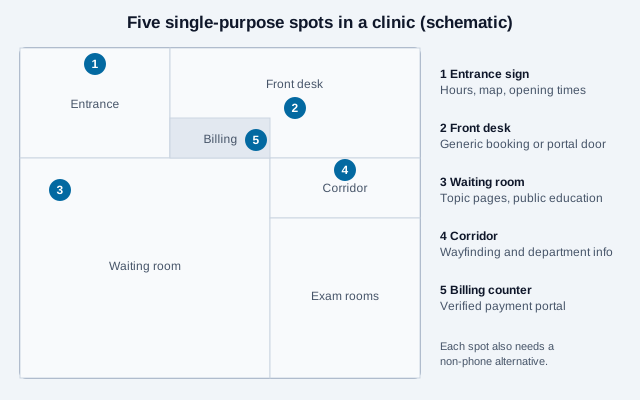
Pick spots where a patient has a question and a few spare minutes. Each location below gets one code with one job, and each has a way to do the same thing without scanning.
| Location | What the code opens | Sensitivity | Equal route |
|---|---|---|---|
| Entrance sign | Hours, directions and how to check in | Public | Reception desk, phone number on the sign |
| Front desk | Generic booking page or portal sign-in | Collects data after login or form | Staff-assisted booking |
| Waiting room wall | Topic pages, such as preparing for a procedure | Public | Printed leaflets at the desk |
| Corridor or lift | Department information and wayfinding | Public | Floor directory and staff guidance |
| Discharge sheet | General care instructions for a procedure | Public, unless personalized | Full text printed on the sheet |
| Billing counter or statement | Verified payment portal sign-in | Financial | Billing phone line, mailed payment |
For an address or directions page, a location QR code opens the map app directly. For a front-desk phone line, a phone QR code starts a call, which also serves patients who prefer talking to a person.
What does the evidence say about waiting-room codes?
The research is small and mostly about reach and convenience, not outcomes, so treat it as design input rather than proof. A 2024 mixed-methods study in Australian general practice waiting areas measured scans and interviewed visitors. It recorded 263 scans across two Melbourne clinics over a year and interviewed 12 people, concluded that codes may be an appropriate way to share health information in waiting areas, and listed barriers: the size and location of the code, short waits, privacy and security worries, and the risk of excluding people with low technology literacy. An Annals of Family Medicine report from a rural Iowa clinic described posting codes that link to topic-specific resources such as back pain or smoking cessation, and noted that data charges may apply when patients scan in the office, so the clinic also offers guest Wi-Fi. A Malaysian primary-care study reported that 58.0% of respondents accessed medical information on their smartphones and 67.0% were familiar with QR codes.
Three practical points follow. First, a code placed where people are already waiting gets looked at more than one in a hallway. Second, a patient with a limited data plan may skip the scan, so a guest Wi-Fi QR code next to the poster removes a hidden cost. Third, none of these studies shows that scanning improves health, so avoid claiming it on the poster.
How should a waiting-room poster be built?
A poster has a few seconds to answer three questions: what will this open, who is behind it, and what if I cannot scan it. Use one topic per poster, print the clinic name and domain beside the code, and add a short typed address and an offer of a printed copy.
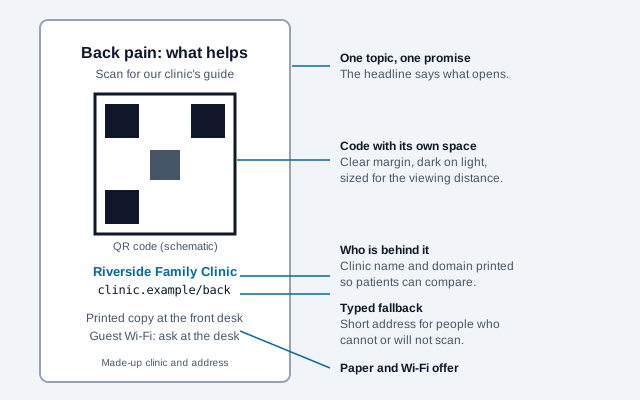
Size depends on viewing distance, so print a proof and test it from the chair where patients sit, using an older or cheaper phone as well as a new one. The print size guide explains the distance-to-size relationship, and the scannability tester checks a design under glare, blur and low contrast. Keep the quiet zone clear of frames and clutter, and leave out logos that shrink the pattern.
What goes with each moment of a visit?
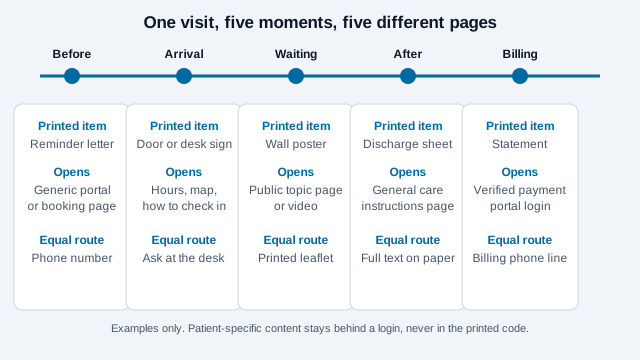
Think in the order a patient meets your materials: a reminder letter, the door, the waiting room, the discharge sheet, the bill. Each is a different page with a different risk.
Before the visit
A reminder letter can carry a code to a generic portal or booking page. Avoid putting the patient's name, appointment time or record number in the link. If a patient asks for records or messages by unencrypted email, HHS commentary summarized by law firms says the patient may receive them that way after being warned of the risks. That is a documented choice by the patient, so it does not belong on a poster or a mailing to everyone.
After the visit
General instructions, such as caring for a wound or preparing for a scan, work well as a public page that clinical staff have reviewed. Add a review date and the version on the page so that a patient holding an old sheet can see whether it is current. Printed medicine information is a separate regulated topic: in the United States, DailyMed has posted electronic prescribing information since 2005, but an advocacy group reports that a proposal to make electronic the default has been blocked in Congress, and Singapore ran a pilot linking carton codes to electronic inserts. Do not remove required printed material because a code exists, and ask your regulator what applies.
Billing
Payment pages attract fraud, so print the exact domain next to the code and tell patients you will never ask for a login or one-time code in an unexpected message. The quishing guide and the QR safety check give patients wording they can follow.
Which tasks should never go through a poster or leaflet?
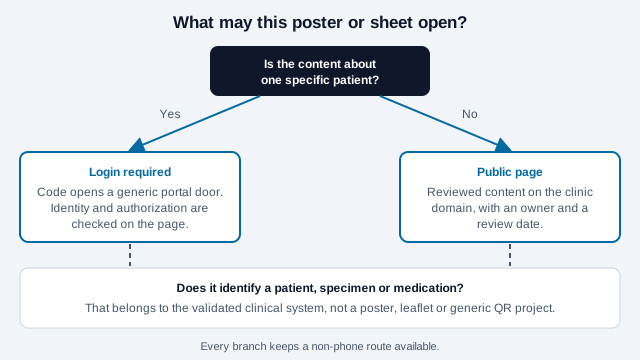
Use the question on the diagram: is the content about one specific patient? If yes, a printed code can only open a generic login door, and the page must verify who is asking. If the task involves identifying a patient, a specimen or a medication, a poster or leaflet is the wrong tool altogether, because those need the validated clinical system. The Joint Commission's patient identification goal calls for at least two patient identifiers, and a vendor blog on QR wristbands describes them as one layer of a wider identification process, with a second identifier checked after the scan.
Who gets left out, and what do you do about it?
Some patients have no smartphone, a low data allowance, limited vision or dexterity, or little confidence with scanning. Others read another language. A QR code can never be the only way to get care instructions, forms, results or bills. Provide staffed, telephone, paper or kiosk options, and make the destination pages real text that works with screen readers and zoom, following the QR code accessibility guide. HHS recipients should also check their own digital accessibility deadlines, which law-firm summaries report moved in 2026 (see the governance guide for the dates).
For language, offer a clear language switch on the destination page and consider separate posters rather than one crowded sign. If a translated page is machine translated, say so, because clinical wording matters.
A rollout checklist for a small clinic
- List the five or six places a patient has a question, and decide one code per place.
- Classify each destination as public, collects data, or patient-specific, and send the last two through your privacy review.
- Build or approve the pages, with a named owner, a review date and no third-party trackers unless your privacy team has approved them.
- Generate the codes from the final HTTPS address with the URL QR code generator. A static code never expires; use a dynamic code only if staff need to change the destination without reprinting, and review the redirect provider as a vendor.
- Print a proof, test it from the patient's seat on two phones, and fix size and glare.
- Add the clinic name, domain, typed address and printed alternative to every sign.
- Schedule inspection of public signs for stickers or overlays, and write down who removes one.
- Brief front-desk staff on what each code opens and how to help someone who will not scan.
How does a clinic code go wrong?
Take a physiotherapy clinic that prints one QR code for "your exercises" and tapes it to every treatment room. The code opens a shared folder of videos. Months later a staff member adds a patient's name to a file title, and the folder link is posted in a community group by a patient who found it helpful. The folder was never designed for the public, and nobody owns the review date, so the leak goes unnoticed.
The repair is dull and effective: one public page for general exercises with a named owner, a patient-specific plan delivered through the portal, a review date on both, and a quarterly check that nothing patient-identifying sits in a publicly reachable place.
Which clinic rules depend on your jurisdiction?
A checklist cannot decide whether a particular page counts as patient information under your local law, whether your portal vendor's analytics are acceptable, or how many patients will actually scan in your building. Measure scans cautiously, because a request to a redirect is not a patient visit, and talk to a privacy officer before adding any counter to a clinical page.
This article is general information, not legal, clinical or compliance advice. Confirm patient-data workflows with your privacy, security and legal teams, and follow the rules of your own regulator.
References
- CSIRO Publishing, Australian Journal of Primary Health: using QR codes to access digital health resources in the general practice waiting room (2024)
- Annals of Family Medicine: QR codes in a rural family medicine clinic
- Malaysian Family Physician (October 2024), via DOAJ: smartphone and QR code use in primary care
- Clinician.com: Joint Commission advisory on accurate patient identification
- QRStuff (vendor): QR codes on hospital bracelets
- Holland & Hart: HIPAA, emails and texts to patients
- Healthcare Leadership Council: prescription e-labels
- Pharmaceutical Society of Singapore: e-labelling for medicines
- HHS: HIPAA Security Rule
- HHS: minimum necessary requirement
- U.S. Department of Justice: ADA requirements for effective communication
- FBI IC3: cybercriminals tampering with QR codes (January 2022)