Churches use QR codes in the order of service, on pew cards, projection slides and lobby signs to open the weekly bulletin, an online giving page, event or volunteer registration, the livestream, or newcomer information. The code is static and free. What needs care is choosing a giving platform that issues proper receipts, labeling each action clearly, and keeping a route open for members who do not scan.
This guide follows a Sunday morning from the lobby to the exit, then covers the giving paperwork that catches congregations out, how to tell a real giving page from a lookalike, a safe way to share guest Wi-Fi, slide design, and how to keep an older congregation included.
Which QR code belongs at which moment of the service?
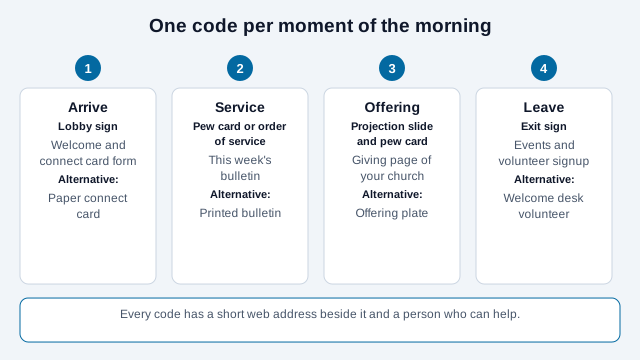
Attach each code to the place where a person would otherwise need to ask a question. A visitor in the lobby wants to know how to connect. A member in the pew wants the bulletin. During the offering a member wants a way to give. On the way out, a volunteer wants a signup.
| Code | Destination | Keep it fresh by |
|---|---|---|
| Giving | Your church's page on an established giving platform, or a page of your own that hands off to one | Checking the page each month; never use a personal payment handle |
| Bulletin and announcements | A mobile page or PDF at a stable address | Replacing the content weekly; the code stays |
| Events and volunteering | A registration form | Closing old forms with a clear message |
| Livestream | Your channel or watch page | Linking to a page you control, which can point to the current stream |
| Newcomers | A connect-card form and a welcome page | Naming who reads the replies and how fast they answer |
A single stable address, such as yourchurch.org/bulletin, lets a static code live on the pew card for years while the content changes every week. That is why most of these codes do not need a dynamic code. The static vs dynamic guide explains when one does help.
Does a giving QR code handle donation receipts correctly?
This is the detail congregations most often miss. In the United States, the IRS says a donor can deduct a single contribution of $250 or more only with a written acknowledgment from the charity, which the donor must have by the earlier of the date the return is filed or its due date. A charity must also give a written disclosure to a donor who makes a payment of more than $75 and receives something in return, such as an event ticket. Penalties apply to a charity that fails to make a required disclosure. IRS Publication 1771 sets out the exact content.
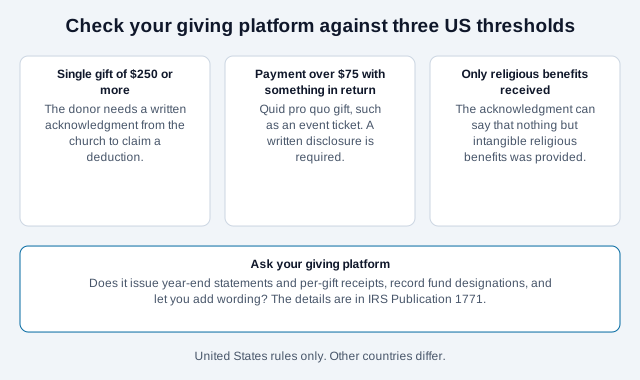
Churches have one wrinkle. IRS guidance and commentary on it say that when the only thing a donor receives is an intangible religious benefit, the acknowledgment does not have to describe or value those benefits and can simply state that only intangible religious benefits were provided; a written statement is still needed. Admission to a religious ceremony is an example. A concert ticket, a meal at a fundraising dinner or tuition would not be. If a giving page also sells event tickets, treat those payments separately.
Ask your giving platform these questions before printing a single code:
- Does it send a receipt for each gift and a year-end statement?
- Can you add the wording your finance team needs?
- Does it record fund designations such as general, missions and building?
- Can it separate a gift from a payment for a ticket?
UK churches that claim Gift Aid have their own rules. HMRC guidance, as summarized by charity-tax advisers, says a Gift Aid declaration can be made in writing, verbally or online, and that the charity must keep records of every declaration. Check the current GOV.UK guidance for the fields a valid online declaration needs.
Are QR-code donations secure?
The security comes from the platform, not the code. Direct givers to a hosted checkout run by a PCI DSS compliant provider so the church never handles card numbers. Print the church name and the expected domain beside the code, and repeat both on the landing page, so a member can tell a genuine giving page from a lookalike.
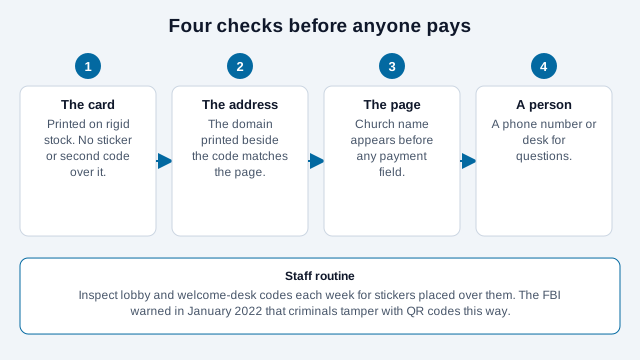
Inspect lobby and welcome-desk codes for stickers placed over them. The FBI's Internet Crime Complaint Center warned in January 2022 that criminals do exactly this to divert payments. Print giving codes on rigid cards rather than stickers, so an overlay shows, and ask the usher team to glance at the welcome desk before each service. A member who is unsure can follow the guide to checking a QR code or ask a volunteer. For giving-page mechanics, see how to accept QR code payments, and for fundraising more broadly, QR codes for nonprofits.
How much extra giving does a QR code bring?
There is no reliable independent figure. Several vendor blogs cite a rise of around 32% in digital giving after a church adds QR or digital options, but the sources differ on who produced the figure and we could not trace it to an original report, so do not plan a budget around it. The Church of England's giving guidance takes a modest line: place a poster or welcome card with a code linking to your giving page where it is easy to see, and hand out welcome cards so visitors can give later from home. That is a cheap test. Compare giving through the page in the months before and after, and treat the result as your own data.
Can you put the church Wi-Fi in a QR code?
Only a dedicated guest network. A Wi-Fi QR code encodes the network name and password in plain text, so anyone who photographs a projected slide has them. That is fine for a guest network that is segmented from the office, finance and AV systems and uses a password you can rotate. It is not acceptable for any network that touches church operations. The Wi-Fi QR code generator escapes special characters for you. Print the network name and password in readable text too, for members whose phones do not offer the join prompt.
How should a projected QR code slide look?
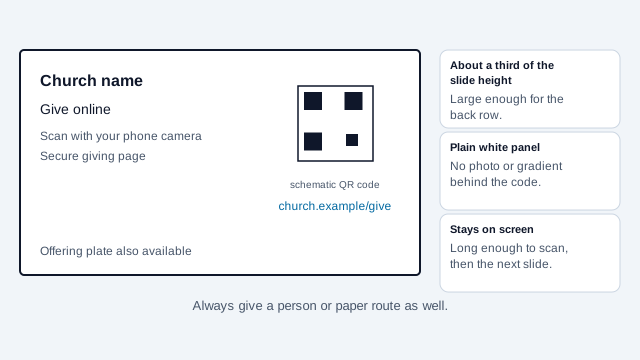
- Make the code roughly a third of the slide height on a solid white panel, with no photo or gradient behind it.
- Leave it on screen long enough to scan from the back row, and test from there with a real phone.
- Put the church name and a short web address beside it, so a member can tell where it goes.
- Check the projector. Some wash out light colors or crop the edges of a slide, which can cut into the quiet zone.
How do older members scan a code?
Assume a meaningful share of the congregation will not scan, and design so they are not excluded.
- Print a short readable web address and a text-to-give number, if offered, beside every code.
- Keep the physical offering plate and paper connect cards. Contactless card readers are another option, and the Church of England lists them among its giving tools.
- Add a sentence to the bulletin explaining, once, how to scan with the phone camera. The how to scan a QR code page can be linked or printed.
- Make linked pages large-text and screen-reader friendly (W3C WCAG 2.2). Giving forms especially need clear labels and instructions. The QR code accessibility guide covers the destination side.
- Have a volunteer at the welcome desk who can help someone scan or complete a form.
What size and placement work in a sanctuary?
- Order-of-service and pew cards: at least 1.5 inches (4 cm) square, dark on white, matte stock. Pew lighting can be low.
- Lobby signs: size to the distance a person stands from them, and test it with a phone held at chest height.
- Keep the four-module quiet zone clear. Export SVG for print and PNG for slides. The print size guide and the scannability tester help with checks.
What mistakes cause problems?
Take a congregation that prints "Give" codes on sticker sheets and sticks one over each of ten pew-back holders. A member scans one on a Sunday and lands on a page that looks right but carries no church name, and a week later one sticker has a second code beneath it. Neither problem was a technology failure. A rigid card, a visible domain and a weekly look would have caught both.
- Using a personal payment handle instead of an established giving platform.
- Printing giving codes as stickers.
- Selling event tickets through the same page as gifts without a separate receipt.
- Putting a code on a slide for three seconds.
- Posting an office Wi-Fi code on screen.
- Leaving the bulletin page unchanged for a month.
How do you launch a congregation code?
- Pick two jobs to start, usually the bulletin and giving.
- Confirm with your giving platform how receipts and year-end statements work.
- Print one pew card at final size and scan it in the pew with two phones.
- Test the slide from the back row on a normal Sunday morning.
- Name the person who updates the bulletin page and the person who checks codes each week.
- Add a paper alternative and a short web address next to every code.
- Review after a month with ushers and a few older members.
Two points this checklist cannot settle. Whether a particular payment counts as a quid pro quo contribution is a tax question for your accountant, and the safeguarding rules for collecting information about children or prayer requests differ by country and denomination. Confirm both with the right adviser.
This guide is general information, not legal or tax advice. Charity, tax and privacy rules differ by country and change over time.
References
- IRS: charitable organizations, substantiation and disclosure requirements
- IRS Publication 1771: Charitable Contributions, Substantiation and Disclosure Requirements
- IRS exempt organizations topic: charitable contribution substantiation and disclosure
- GOV.UK: Gift Aid declarations, claiming tax back on donations
- Church of England: giving guidance for parishes, including QR codes and contactless
- PCI Security Standards Council: PCI DSS
- FBI IC3: cybercriminals tampering with QR codes (January 2022)
- W3C WAI: WCAG 2.2 labels or instructions
- QR Codes Unlimited: QR codes for churches (vendor guide)