Real-estate agents put QR codes on yard signs, riders, brochures, window displays and open-house tables so a buyer can reach one property page, with photos, a tour and a viewing request, without typing a long address from a car window. Point every code at a page on your own domain, so a sold or withdrawn listing can be redirected instead of dead-ending the scan.
This guide covers what each placement should open, how to keep a sign code useful after the sale, open-house sign-in and consent, the fair-housing and local sign rules that still apply, and how to size and place a code so it scans from the curb.
What should a real-estate QR code open?
The destination depends on where the buyer is standing and what they can do next. A person parked outside a house wants photos and a price. A person holding a brochure at a kitchen island may want the floor plan. One page can serve both, as long as the first screen answers the question the placement raises.
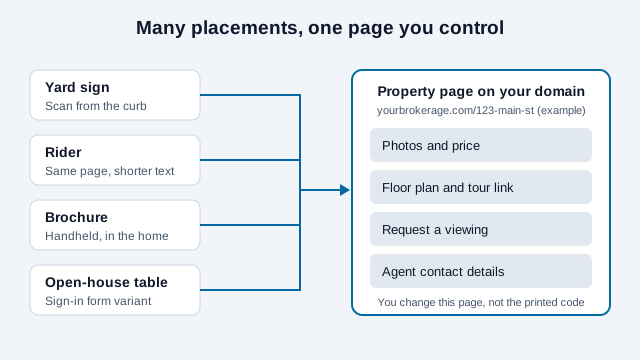
| Placement | Best destination | Why |
|---|---|---|
| Yard sign or rider | Single-property page on your brokerage domain | You control the address, so it can change after the sale |
| Open-house table | Sign-in form with a consent line | Replaces unreadable handwriting; keep paper as an option |
| Brochure or info tube | Same property page plus a neighborhood page | Handheld readers will tap through to more detail |
| Window display | Search page for your active listings | Passers-by are browsing, not looking at one home |
| Business card | vCard QR code | Saves your details to the contacts app; see QR codes for business cards |
Prefer your own page to a deep link into a portal listing. You do not control a portal's URL structure or its access rules, and a portal can change either without telling you. A property page on your domain also lets you add a short, plain "request a viewing" button above the fold.
What belongs on the property page?
Keep the first screen short. Buyers who scan from a car are on mobile data, often with one hand free.
- Price, bedrooms and bathrooms, and listing status, matching the MLS record.
- Six to twelve photos, then the floor plan, then the tour link. Virtual-tour hosts generally give you a share link you can place behind a button.
- One obvious "Request a viewing" button, and a phone number for people who would rather call.
- Your brokerage name and license details as your state or brokerage requires, and the fair-housing logo or statement if your brokerage uses one.
The page is advertising. Write it with the same care as a printed listing sheet, because the rules for advertising apply to it (see the fair-housing section below).
How do you keep a yard-sign code useful after the sale?
A static code never changes, but you decide what its address resolves to. Put each property on its own path, such as yourbrokerage.com/123-main-st, and change what that path shows as the listing moves through its stages.
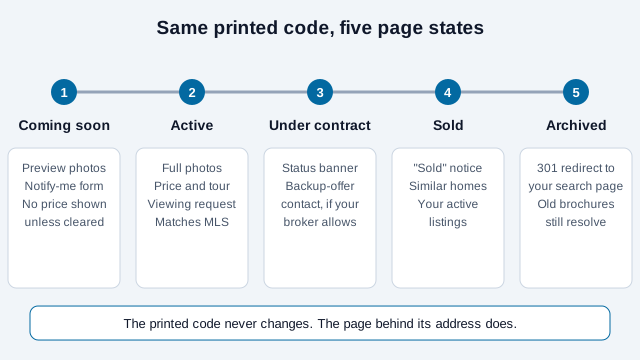
When the property sells, show "Sold" with a link to similar homes or your active listings, or 301-redirect the path to your search page. Every rider and brochure still in circulation keeps working, and a stale sign turns into a lead source. When the physical rider is reused for the next listing, give it a new path and print a fresh code rather than overwriting the old page, so earlier brochures do not suddenly show a different house.
Do this with a short path on a domain you own. If a vendor's short link carries the code and the vendor changes terms, you cannot move it. The static vs dynamic guide explains when a paid dynamic code is justified.
How big does a yard-sign code need to be, and where should it sit?
A common rule of thumb is that the code should be about one-tenth of the distance it is scanned from. A buyer standing 5 to 8 feet (about 1.5 to 2.4 m) from a sign needs a code of roughly 6 to 10 inches (15 to 25 cm) square. That is a guideline, not a measurement, so test a printed proof.
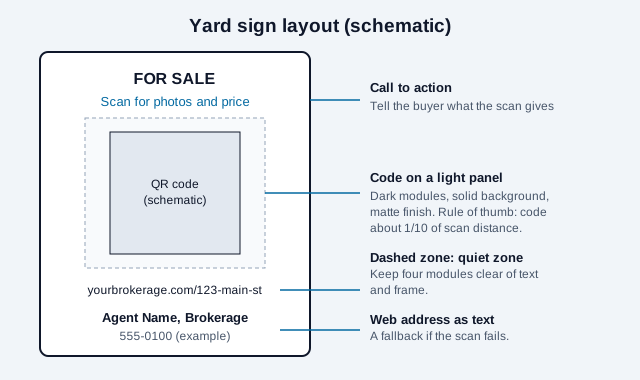
- Put the code on a solid light panel with dark modules and keep the four-module quiet zone clear of the frame, text and any rider hardware.
- Add a one-line call to action ("Scan for photos and price") and the short web address in text, for buyers who prefer to type or whose phone struggles in glare.
- Mount the code between roughly chest and eye height. A code at ground level forces a buyer to crouch.
- Export SVG for large-format printing and ask for a matte finish; glossy vinyl returns sun glare.
- Scan the finished sign from a parked car, at the angle a passing buyer would use, on an iPhone and an Android phone. The scannability tester and the print size guide help with the test.
Municipal sign codes limit size, number and timing, and they vary a lot. Search results for city codes show examples such as a cap of 4 square feet per side and about 3 feet in height in Dublin, California, and open-house signs limited to free-standing A-frames of 36 by 24 inches, at most four per open house, with no riders or attachments, in Pleasanton, California. Another Arizona town allows open-house signs only during the open-house hours. These are examples from the cities named, not rules that apply to you. Read your own city or county code, and check whether your brokerage or MLS has sign policies of its own, before you design the sign around a rider.
How should you run open-house sign-in with a QR code?
A code on a small stand at the entry opens a short form. That removes the clipboard, produces legible phone numbers, and lets you follow up the same day. Some vendor guides claim that following up within two hours converts best, but they cite no study, so treat the number as unverified and simply follow up promptly.
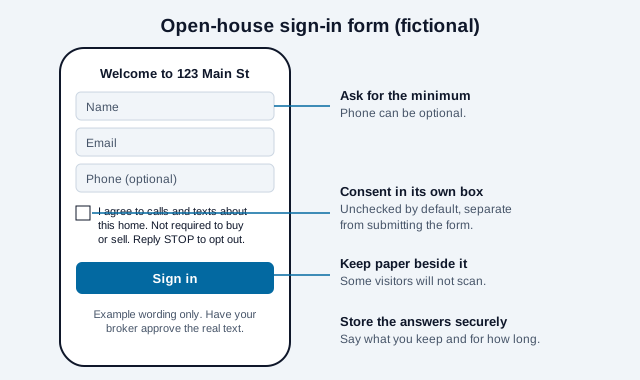
Three details matter more than the code itself:
- Ask for the minimum: name, email or phone, and whether the visitor works with an agent.
- Put marketing consent in a separate, unchecked box with plain wording. NAR's legal guidance on the Telephone Consumer Protection Act says consent for marketing calls and texts is best captured in writing (an electronic signature is enough), includes the number being authorized, and states that agreeing is not required to buy or sell. It also says visitors must be able to opt out later.
- Keep a paper sign-in beside the stand. Some visitors will not scan, and some will not want to give a phone number.
The same NAR guidance describes checking call lists against the national Do Not Call registry about every 30 days and keeping an internal do-not-call list for at least five years. Treat that as a starting point and confirm the current requirements and any state rules with your broker or counsel. Email follow-up is governed separately from texting.
What fair-housing and MLS rules apply to the page?
The QR code is neutral. The page it opens is advertising.
- Fair housing. The US Fair Housing Act and HUD's advertising rule at 24 CFR 100.75 cover statements in housing ads that indicate a preference or limitation based on a protected class. HUD issued guidance on April 29, 2024 applying the Act to ads on digital platforms, including targeting and audience tools. Whether that guidance remains in force could not be confirmed from a primary source here, so check HUD's current materials. Review the page copy, any generated "ideal buyer" text, and the photos.
- MLS and IDX rules. If the page shows MLS data, your MLS's rules decide which fields you may display, how attribution works and how often data must refresh. A page that falls behind the MLS record shows buyers a wrong price.
- Accuracy. Price, status and square footage on the page have to follow the listing. A buyer who scans a sign expects what the sign says, not yesterday's cache.
Rules differ by state and country. Your brokerage's compliance contact is the right person to approve landing-page copy.
Static or dynamic, and can you track scans?
A static code on your own domain costs nothing, never expires, and keeps routing in your hands. You cannot count camera scans of a static code, but adding UTM parameters (utm_source=yard_sign&utm_medium=qr) from the UTM builder shows page visits by placement in your analytics. Report them as landing-page visits, not scans. Google documents how analytics reads those parameters. For a longer look at what you can and cannot measure, see QR code tracking.
What mistakes break real-estate QR programs?
Look at an agent who prints twenty riders on Friday. One points to a portal listing URL that the portal reformats the next month, so scans land on a 404. Another rider's sign sits in the sun, glossy, and the code reads only from a steep angle. A third house sells, and the sign still advertises "Scan for photos" while the page shows a withdrawn listing from a different agent's feed. All three are preventable.
- Linking straight to a portal URL you do not control.
- Printing at final size without a scan test from the curb.
- Letting a sold page return an error instead of "Sold: see similar homes".
- Pre-checking the marketing-consent box on the sign-in form.
- Using a peel-off sticker for the code, which anyone can cover with their own. The guide to QR scams explains why a tampered sign is a real risk on public property.
How do you launch a real estate code?
- Create the property page and test it signed out, on mobile data.
- Choose a short path on your own domain and print it as text under the code.
- Print one proof at final size, matte, and scan it from a parked car on two phones.
- Confirm local sign rules for size, number and timing.
- Have your broker review the page copy and the sign-in consent wording.
- Set a reminder to change the page when the listing goes under contract and again when it sells.
- Add UTM parameters per placement so you can tell sign visits from brochure visits.
Two points a checklist cannot settle. Telemarketing and consent rules, and sign rules, vary by state and municipality and change. Whether digital-advertising guidance from HUD stays in its current form is also open. Ask your broker or counsel about both before launching in a new area.
This guide is general information, not legal advice. Fair-housing, advertising, consent and local sign rules depend on where you operate.
References
- U.S. HUD: Fair Housing Act overview
- FindLaw: 24 CFR 100.75, discriminatory advertisements, statements and notices
- HUD FHEO guidance on advertising through digital platforms (April 29, 2024), hosted copy
- NAR: Do you know who you are calling? (TCPA and Do Not Call)
- RISMedia: digital tips for open houses
- City of Dublin, California: real estate sign regulations
- City of Pleasanton, California: real estate signs handout
- Google Analytics Help: collect campaign data with custom URLs
- ISO/IEC 18004:2024, QR code bar code symbology specification