For a team business-card rollout, give every destination an owner, verify each person's public details, decode every code against the printed name, and approve a physical proof before the run. The risk with a team batch is administrative: the wrong person's code on a card, a page nobody maintains, or a stack of cards for someone who changed jobs.
This checklist is for whoever coordinates cards for several employees or places repeat orders. It covers who owns what, how to choose a destination per person, which details are reasonable to publish, how to catch swapped codes, and what to do when people change roles. For the one-person questions of vCard versus URL, sizing and print layout, start with the business-card design guide.
Who owns each contact destination?
Choose a destination the organization can still maintain after someone changes roles or leaves. A company-managed contact page can be edited without touching the printed URL. A static vCard holds the original fields and needs a replacement when they change. Both are workable; the failure is having neither a plan nor a named owner.
| Item | Record before printing | Who confirms it? |
|---|---|---|
| Public contact fields | Approved name, role, work email, phone and website | The employee and their manager |
| Destination ownership | Domain or account owner, renewal date, who can edit the page | The website or IT owner |
| Replacement process | How a role change, departure or broken link is handled | The person who places future print orders |
| Print asset | Approved payload, export, dimensions and proof version | The designer and the printer |
Write these four rows into a shared sheet before any artwork is made. If the person who owns the domain is a contractor or a former employee, fix that first, because every printed URL depends on it.
Should every employee get a personal vCard, or should the team share one page?
There are three common patterns, and a team can mix them by role.
| Pattern | How it works | Suits | Watch for |
|---|---|---|---|
| Personal static vCard | Each card carries that person's fields inside the code | Small teams with stable roles | Every change means a new code and a reprint |
| Per-person URL on the company domain | The code opens a page such as company.example/team/name | Mid-size teams where titles and numbers shift | The company must keep the domain and page structure |
| Shared team or office page | One code on every card opens a team contact page | Front-desk, sales-floor or high-turnover roles | Cards are less personal; clients still need a direct line |
The shared page is the lowest-maintenance option for roles with high turnover, because the printed card never names someone whose details will expire. Personal vCards give the quickest save-to-phone experience for people whose contact details are stable. If you produce many codes from a sheet, the bulk generator works from a CSV, so confirm its column format with a three-row test before running the whole team. For single codes, use the vCard generator or the URL generator. The static vs. dynamic guide covers when a managed redirect adds value.
Which details are reasonable to publish, and what do privacy rules say?
Use details approved for public distribution. Anyone holding the card can read a static vCard's contents; the symbol does not hide a private mobile number or a home address. Let each employee choose between a direct line, a desk line or the main number, and leave out anything they did not approve.
Work contact details are personal data in many jurisdictions. Commentary on the EU's GDPR notes that business data such as a work email is still ordinary personal data, and that an employer relying on legitimate interests must identify the interest and weigh it against the person's rights. The UK Information Commissioner's Office describes this as a purpose test, a necessity test and a balancing test. Law-firm commentary also says consent is rarely a safe basis in employment because of the imbalance between employer and employee, so it is better to inform staff clearly than to rely on a tick box. In California, employer summaries report that the exemptions for employee and business-to-business data expired on January 1, 2023, which brought workforce data into the state's privacy rules.
None of that is a ruling on your situation. The practical steps are modest: publish only work details, tell each employee exactly what will appear on the card and in the code, record that they saw it, and give them a way to ask for a change. Ask your legal or privacy contact to confirm what applies in the countries where your people work.
How do you prevent mismatched cards in a batch?
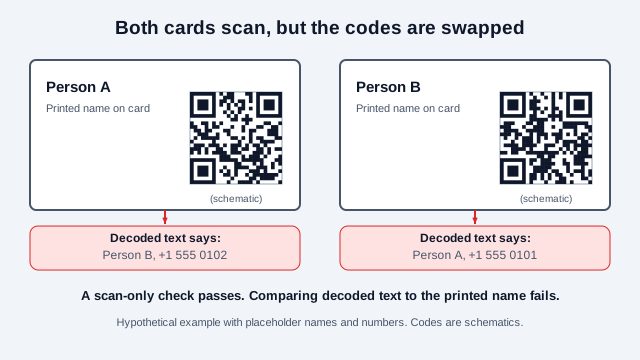
The most expensive team-card error does not look like an error. Two files get renamed during layout, each card carries the other person's code, and both scan perfectly. The only way to catch it is to compare what the code says with what the card prints.
- Create one source row per person with a stable internal identifier. Keep that identifier out of the public payload unless it is meant to be public.
- Have each person approve their public fields before any code is generated.
- Generate the code for each approved destination, and export files named by the identifier, not by the person's display name alone.
- Decode every exported image with a scanner such as the online QR scanner and compare the decoded text with that person's approved row.
- Check the final artwork again after the QR image is placed next to the printed name, because layout is where swaps happen.
One web-to-print provider that supports variable data describes the same discipline from the printer's side: proof merged samples, using real rows in the real template, and include the longest and shortest entries so nothing overflows. Add to that sample set at least one person with accented characters and one with a very long title. Those two rows break layouts and vCard imports more often than average ones. Clean the data first by removing duplicates and fixing capitalization.
What does a clean rollout pipeline look like?
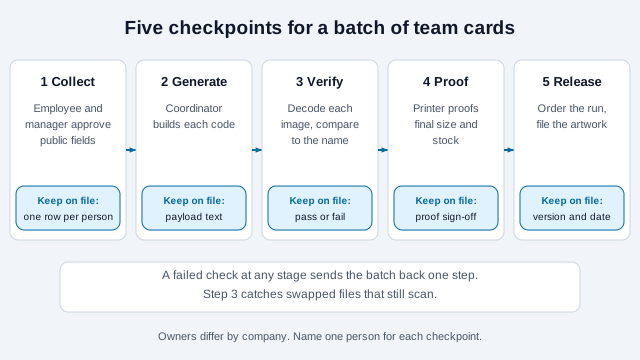
Treat the order as a pipeline with five checkpoints. Each checkpoint has a person responsible and leaves a record, so a repeat order in a year does not start from nothing.
Use one template so every card has the same code size, the same quiet zone of four modules on each side, and the same label text. A template also stops a designer from shrinking one person's code to fit a long job title. Set the code size from your densest payload, then use that size for everyone, so a person with a longer vCard is not the one whose card fails. The print size guide and printing guide cover export and sizing.
What should the print proof demonstrate?
A digital preview cannot show how ink, stock, coating or trimming will affect a code. Ask for a proof at final size with the intended finish, and test the whole card, including nearby text and artwork.
- Decode on representative iPhone and Android devices using the expected camera or scanner workflow. Apple documents the Camera app flow; on Pixel phones, Google notes that you may need to enable camera scan suggestions.
- For vCards, inspect the imported name, accented characters, phone labels and website before saving.
- For URLs, open the page while signed out and check mobile readability, contact actions and access permissions.
- Record the device, scanner, lighting, print size and result. These observations support that configuration, not a universal guarantee. The scannability tester can stress-test the file before it goes to print.
Include readable contact information beside the code so recipients can act without scanning.
What happens when someone changes roles or leaves?
This is the question that separates a rollout from a one-off print job. For a static vCard, the code is wrong the day the details change, and the printed stock has to be replaced. For a company-managed URL, you update or retire the page according to your privacy and staff-departure process.
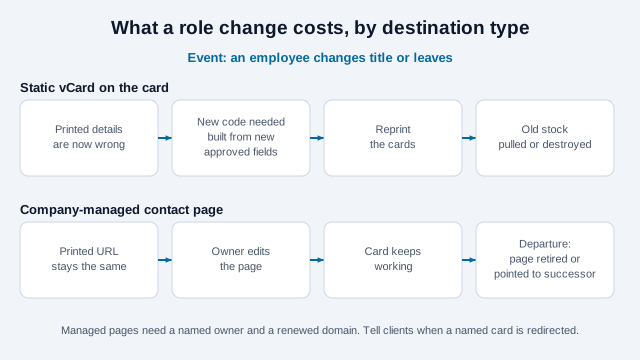
Offboarding guidance from universities and IT teams covers the neighboring tasks, which is useful because a card is only one place a departed person's details live. Common practice is to forward or redirect the phone number, forward email to a successor or shared inbox, send an auto-reply naming the replacement, and remove the person from public directories. Add printed cards and their QR destinations to that checklist. Avoid silently pointing a former employee's named card at an unrelated colleague without telling clients who the new contact is.
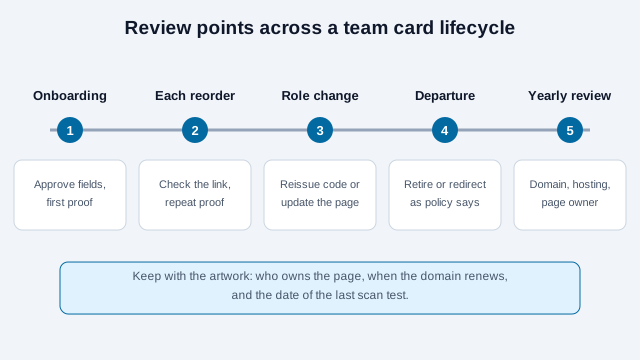
Schedule a link check before each reorder and after any domain, hosting or profile change. Keep the approved artwork, the owner of the next review and the date of the last scan test together. See do QR codes expire? for what actually causes a printed code to stop working.
What goes wrong in a real rollout?
Consider a 40-person regional office. The coordinator exports 40 PNG files named by first name, and the designer drops them into the layout by filename. Two employees share a first name, and their codes land on each other's cards. Separately, the company's marketing site is migrated in the second quarter, and the old /team/ paths stop resolving. Cards printed a month earlier now open a "page not found" screen.
Three checks would have prevented both: file names built from the stable identifier, a decoded-text comparison against the printed name, and a note in the migration plan that printed URLs on staff cards are redirects that must survive. The remaining errors tend to be smaller. Examples include a phone label that imports as "other," a department name that the sheet and the HR system spell differently, and a trimmed card whose quiet zone was cropped. If a code still misbehaves, the QR code troubleshooting guide works through the symptoms.
How do you roll out cards across a team?
- List the four ownership rows from the first table and name an owner for each.
- Choose a pattern per role: personal vCard, per-person URL or shared team page.
- Collect approved public fields and a record that each person saw them.
- Generate codes, name files by identifier, decode every one and compare it with its person.
- Lay out with one template, one code size and the full quiet zone.
- Order a proof with the final finish and test on iPhone and Android, including long and accented names.
- Release the order, file the artwork and the proof record, and set reminders for domain renewal and a pre-reorder link check.
If your cards also feed marketing reports, tagged URLs let you tell which team or event a visit came from; see the tracking guide for the options and their privacy limits. For broader programs, QR codes for business places cards among other uses.
Which team-card details need your IT lead?
Some questions depend on your company. Who may approve a mobile number on a card differs between organizations. Whether a former employee's page is retired, redirected or kept for a time is a policy choice that involves HR, legal and the account owner. None of the sources consulted test how different phone models import every vCard field, so your own proof is the evidence. And the privacy points above are a summary of publicly available commentary, not a statement of what applies to your staff.
This page is general guidance for planning printed cards. It is not legal advice. Check the data protection and employment rules that apply where your employees work before publishing their details.
References
- IETF RFC 6350: vCard Format Specification
- DENSO WAVE: QR code printable area and quiet zone
- Apple Support: scan a QR code with the camera
- Google Pixel Help: scan QR codes with the Camera app
- UK Information Commissioner's Office: legitimate interests
- Dudkowiak: are employees' official data subject to the GDPR? (law-firm commentary)
- Morgan Lewis: CCPA employee and B2B exemptions expire January 1, 2023 (law-firm commentary)
- 4OVER4: variable data on cards and materials (printer guidance)
- Adelphi University IT: technology offboarding for departing employees