A hotel can use QR codes at five moments of a stay: guest Wi-Fi on arrival, an in-room hub page for information and requests, dining menus, housekeeping and maintenance requests, and checkout feedback. Each code needs one job, a named owner, and a phone number beside it for guests who will not scan. Static codes cost nothing to keep and never expire, so the ongoing work is the pages behind them and the security of the one code that carries a password, the Wi-Fi code.
This guide follows the guest through a stay, then covers the decisions that go wrong most often: one hub code versus many, how to keep guest Wi-Fi away from hotel systems, payments and room numbers, accessibility for an older and international guest base, and how to catch a sticker placed over a real code.
Which QR code belongs at which moment of the stay?
Start with the guest's situation, not the technology. A guest at the front desk wants to get online. A guest in bed at 11 pm wants a towel. The right code is the one already in reach when the need appears.
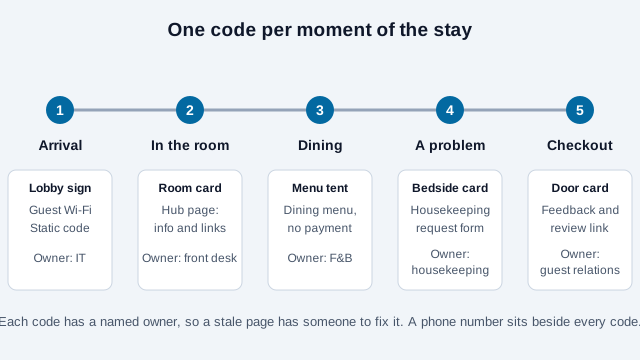
| Moment | Where the code sits | Destination | Static is enough? |
|---|---|---|---|
| Arrival | Front desk, lobby, key sleeve | Wi-Fi code for the guest network | Always static; the password is inside the code |
| In the room | Desk or bedside card | Hub page: compendium, hours, local guide | Yes, if the hub URL is stable |
| Dining | Minibar tent, restaurant table | Menu page, kept apart from payment | Yes |
| A request | Bedside card | Housekeeping or maintenance form | Yes, per-room codes if the room must be known |
| Checkout | Door card, receipt | Feedback or your Google review link | Yes |
Guests are used to this kind of help. A 2016 Zebra Technologies hospitality study (an older, vendor-run survey, so treat it as a direction, not a measurement) reported that 70% of guests wanted technology that speeds up getting what they want, while still expecting human service alongside it. That pairing is why every card should carry a front-desk number.
Should you use one hub code or several single-purpose codes?
Both work, and the choice depends on your room count and how many departments own pages.
| One hub code in each room | Separate codes per task | |
|---|---|---|
| Cards to print and inspect | One per room | Three to five per room |
| Guest effort | Scan once, then tap a labeled button | Scan the code that matches the need |
| Risk | An overloaded page nobody reads | Codes ignored because there are too many |
| Best for | Smaller hotels, one team maintaining content | Large properties where F&B, housekeeping and IT each own a page |
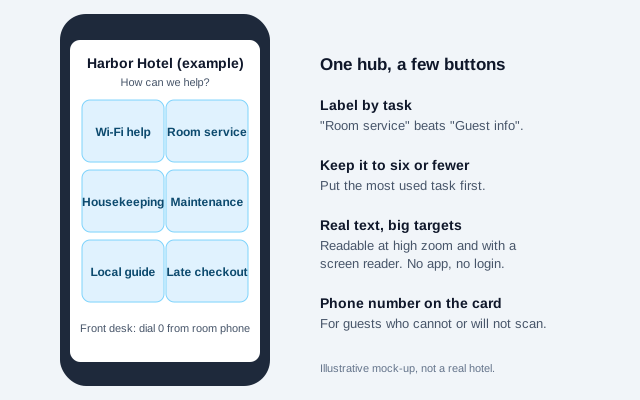
A workable middle path is a hub code on the desk and a Wi-Fi code kept separate, because the Wi-Fi code is the one guests need before they can use anything else. Keep the hub to six buttons or fewer and label them by task ("Room service", "Request towels") instead of by department ("Guest information").
How do you set up hotel Wi-Fi QR codes safely?
A Wi-Fi code stores the network name, security type, and password as plain text; phone cameras read it and offer to join. It follows the standard format used by the ZXing project:
WIFI:T:WPA;S:HotelGuest;P:your-guest-password;;Backslash-escape any \, ;, ,, : or " in the name or password, or the code will build but not connect. The Wi-Fi QR code generator does the escaping.
The code has no security of its own. Anyone who photographs the card has the password, which is acceptable for a network that only reaches the internet and unacceptable for anything else. Four decisions matter:
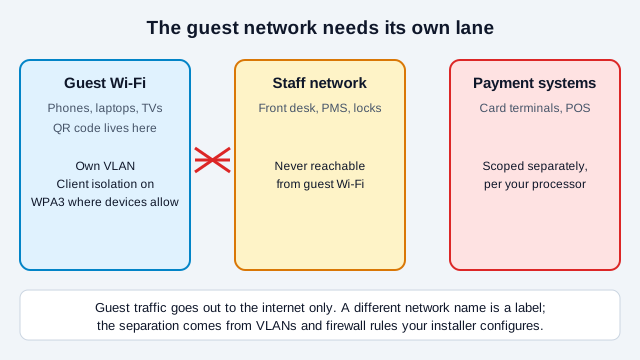
- Separate the guest network from everything else. Guest Wi-Fi should sit on its own VLAN with client isolation, and nothing on it should route to the property-management system, door locks, or payment terminals. Wi-Fi vendor guidance, such as Purple's hotel guides, also recommends WPA3 where guest devices support it. Ask your installer to prove the separation with a test, not a diagram. A different network name alone is only a label.
- Decide between one shared password and per-stay credentials. A single shared password printed in 200 rooms is cheap but gives every past guest a permanent key. Many properties instead issue a per-room or per-stay login through a captive portal tied to the reservation. If you use a portal, the QR code can open it directly.
- Beware lookalike networks. Security guidance describes "evil twin" access points that copy a real network name so devices join them. Tell guests the exact network name on the card, and ask staff to report duplicates they see in the lobby.
- Keep the text fallback. Print the network name and password in small type under the code for the guest whose phone does not offer the join prompt.
Because a Wi-Fi code always carries its password, changing the password means reprinting every card. If you rotate credentials monthly, put the QR code on a portal page instead of encoding the password directly.
What belongs in a digital compendium?
A digital compendium replaces the printed folder and is cheaper to keep current. Put the things guests ask the front desk most often at the top: Wi-Fi help, breakfast and restaurant hours, pool and gym hours, checkout time and late-checkout request, parking, and the front-desk number. Then add dining menus, a local guide, transport, and policies.
Three practical rules:
- Write a mobile page with real text and headings. A scanned PDF of the old folder is hard to read on a phone and invisible to a screen reader.
- Keep legally required safety notices on paper. Fire evacuation plans and similar notices have physical posting rules in many places; a QR code can add detail but should not replace what the law says must be displayed. Check your local fire and building rules.
- Put an "updated on" date on the page, and assign one person to review it each month. A compendium that lists a closed restaurant costs more trust than no compendium.
Hotels with international guests gain the most from a visible language switch at the top of the page. If you also run a guest messaging line, see QR codes for guest messaging.
How do room service and dining codes work?
Link the code to the menu page and nothing more. A menu is information; ordering and payment are separate systems with their own security. If an order flow is used, it should identify the room on the server side from your property-management system, show the full amount before confirming, and tell staff in real time. Include allergen information and a line asking guests with severe allergies to speak with staff, and keep a printed room-service menu in the compendium folder for guests who prefer it. For restaurant-specific detail, the restaurant QR code guide covers menu structure and allergen rules.
Are housekeeping and maintenance request codes safe to use?
They are convenient and easy to get wrong in one specific way: the room number. If the code opens hotel.com/request?room=412, any guest can change 412 to 413 and send a request for a neighbor, or read details meant for someone else. Two safer patterns:
- Print a per-room code with the bulk QR generator so guests never type the room, and have the server confirm the room against your reservation system before acting. Treat the number in the link as a hint, not proof.
- Ask for the room number and surname on a short form, and let staff verify at the door when something enters or leaves the room.
Keep forms short. Anything beyond a drop-down of common requests, a free-text box, and a room confirmation will be abandoned at midnight.
Is it safe to charge a room or card through a QR code?
Use a payment workflow your processor approves. A fully hosted checkout can reduce card-data exposure, but whether you qualify for the lighter PCI DSS self-assessment (SAQ A) depends on all the applicable criteria and your complete implementation, so confirm it with your processor. Never encode card credentials in a code. Show your real domain before the payment screen, and put the amount in front of the guest before they authorize.
Check-in and keyless entry belong in your property-management or lock vendor's authenticated app flow, not behind a plain QR link. A code that grants access to a room is a security control.
How do you stop fake QR stickers in a hotel?
Criminals paste their own code over a real one so scans open a fake Wi-Fi login or payment page. The FBI's Internet Crime Complaint Center warned about this tampering in January 2022, and consumer-security guides regularly name hotel lobbies and fake "free Wi-Fi" codes among the typical settings. Hotels have an advantage most venues lack: housekeeping visits every room daily.
- Print codes as part of a rigid card or tent, not as stickers, so an overlay shows.
- Add "check the card" to the room-attendant checklist: no peeling edges, no second code, no change in the printed address.
- Print the real domain under every code, and train front-desk staff to tell guests to verify against it.
- Review lobby, pool, parking, elevator and restaurant codes weekly, because public areas are easiest to tamper with.
- Give guests a way to report a suspect code, such as the front-desk number printed on the same card. Guests who want to check a code themselves can use our guide to checking a QR code.
What about accessibility and guests who will not scan?
Hotel guests range from teenagers to travelers in their eighties, with different languages, abilities and phones. A QR code must never be the only route to Wi-Fi, dining, or help.
- Print the Wi-Fi network name and password in readable text beside the code, and keep the front-desk and in-room-dining numbers on the same card.
- Build linked pages from real text with proper headings, usable at high zoom and with a screen reader, following W3C WCAG 2.2. The QR code accessibility guide covers the destination side.
- Where accessibility law applies, such as the ADA in the US or the European Accessibility Act for covered services like e-commerce and booking in the EU (subject to scope and exemptions), the digital service behind the code is in scope, not only the printed card.
- Offer a printed compendium on request. For guests with low vision, a large-print version stays useful long after the QR code is forgotten.
How should you handle guest privacy?
Never put a guest's name, reservation number, or room number in a URL that can be edited or shared. Collect only what a request needs, tell guests what feedback forms do with their answers, and keep Wi-Fi sign-in data to what the portal genuinely requires. If you track the hub page with UTM parameters, such as ?utm_source=qr&utm_medium=room-card from the UTM builder, the data shows page visits by card position, not individual guests. Check local privacy law (for example GDPR in the EU and UK) before adding analytics or marketing sign-up to a guest-facing page.
Static or dynamic QR codes for a hotel?
Wi-Fi codes are always static. For the hub, menus and feedback, a static code pointing to a short, permanent address on your own domain, such as yourhotel.com/stay, lets you change everything behind it without reprinting 200 room cards. A paid dynamic code pays off when a printed destination must change often (a seasonal promotion on lobby signage) or when a reprint is expensive, such as engraved plaques. Weigh it using the static vs dynamic guide.
What size should room cards be, and where should they go?
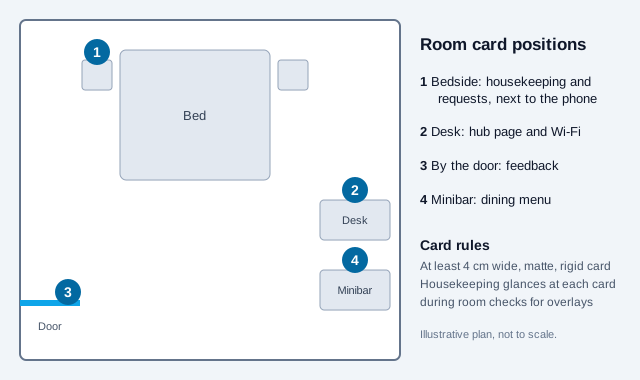
| Placement | Minimum width | Notes |
|---|---|---|
| Bedside or desk card | 1.5 in (about 4 cm) | Matte finish; bedside lamps cause glare on glossy stock |
| Lobby or front-desk sign | 3 to 5 in (8 to 12 cm) | Size for the real scanning distance; about one-tenth of it is a rule of thumb |
| Elevator, pool or parking signage | Larger, tested on site | Weather, glare and tampering risk are highest here |
Use dark modules on a light solid background, keep the four-module quiet zone clear, and export SVG for print. The print size guide and the scannability tester cover testing.
What mistakes break hotel QR programs?
Imagine a 120-room hotel that prints a card for every room on Friday. Saturday evening a guest scans the bedside card, gets a blank page because the compendium is still being edited, and calls the front desk, which does not know the new page exists. A second guest finds the Wi-Fi code points to last month's password. Both failures were preventable.
- Printing every card before testing one in a real room, under bedside lighting, on an iPhone and an Android phone.
- Launching codes the front desk has never seen. Staff should use the guest flow before guests do.
- Putting a Wi-Fi password on a card that is also published on the public website.
- Letting the compendium drift out of date. Assign a named owner and a monthly review.
- Using room numbers in links as proof of identity.
- Forgetting guests who cannot scan.
Rollout checklist: pilot on one floor first
- Pick the first two jobs, usually Wi-Fi and the hub page.
- Build and test the pages signed out, on mobile data and on the hotel's own guest Wi-Fi.
- Have your installer confirm guest Wi-Fi cannot reach staff and payment systems.
- Print one matte card at final size and scan it at the bedside on two phone brands.
- Run the whole flow as a guest: join Wi-Fi, request towels, open the menu, find the late-checkout button.
- Pilot on one floor for two weeks, and ask guests and housekeeping what failed.
- Add the card check to the room-attendant checklist, name page owners, and schedule a monthly review before rolling out to every room.
What this checklist cannot settle
Two points this checklist cannot settle for you. Accessibility law as applied to QR-based hotel services differs by country and is still developing, and your local fire and building rules decide which safety information must be on paper. Confirm both locally.
This guide is general information, not legal advice. Privacy, accessibility, payment and safety rules differ by country and change over time.
References
- ZXing project: barcode contents formats (Wi-Fi network config)
- PCI Security Standards Council: PCI DSS
- PCI SSC: outsourced payment and SAQ A criteria
- FBI IC3: cybercriminals tampering with QR codes (January 2022)
- Purple: hotel Wi-Fi safety guide (vendor guidance on shared passwords, evil twins, segmentation)
- Zebra Technologies: Hospitality Vision Study 2016
- W3C WAI: Web Content Accessibility Guidelines (WCAG) 2.2
- U.S. Department of Justice: guidance on web accessibility and the ADA
- EUR-Lex: Directive (EU) 2019/882 (European Accessibility Act)