To make a WhatsApp QR code, build a click-to-chat link in the form https://wa.me/ plus the full international phone number, optionally add a URL-encoded draft message, and encode that link. Scanning opens a chat on compatible phones. It does not send the message, save the contact or prove who owns the number.
This guide covers number formatting, prefilled text, the difference between a plain wa.me link and Meta's business short link, the 24-hour service window, signs and placement, fraud risks, and a rollout checklist. Publish only a number that is meant to receive public contact, because anyone who photographs the code can read the destination.
How do you format the number in a wa.me link?
Write the full international number as digits only: the country code followed by the local number, with no plus sign, spaces, brackets, dashes or leading zeros. The link is then https://wa.me/ followed by those digits.
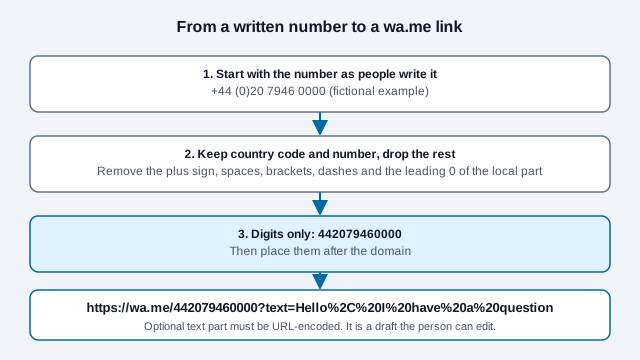
Guides that summarize WhatsApp's instructions agree on the same rule set, and the most common failure is a plus sign or a domestic trunk zero left in the path. A US number becomes https://wa.me/15551234567. If you copy a number from a business card, confirm the country's international form before you strip characters. The number must belong to an active WhatsApp account, or the visitor sees an error instead of a chat.
How do you add a prefilled message?
Add ?text= and then the message, URL-encoded:
https://wa.me/15551234567?text=Hello%2C%20I%20need%20helpEncode spaces, punctuation, line breaks, accents and emoji with a proper encoder, not by replacing spaces only. The draft appears in the chat box, and the visitor can edit it or delete it before sending. Keep the wording short and neutral. Never prefill account numbers, health details, or phrases that claim the person agreed to terms.
A short, honest draft helps your team see where a chat came from, such as "Hi, I scanned the window sign." Treat that as a hint only, since people can change it or open a new chat by hand.
Is a wa.me link or a business short link better?
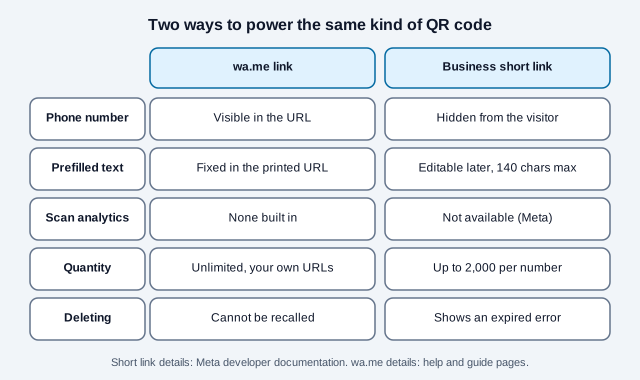
Use a plain wa.me link for a simple, free setup. Consider a business short link when you run a WhatsApp business number and want the phone number hidden and the draft message editable later. Meta's developer documentation describes the short-link feature, which this guide read directly.
| Point | wa.me link | Business short link |
|---|---|---|
| Phone number | Visible in the URL and in the QR payload | Hidden from the visitor, per Meta |
| Prefilled text | Fixed once printed | Can be changed or removed later; up to 140 characters |
| Scan analytics | None built in | Meta says analytics are not available |
| Quantity | As many URLs as you like | Up to 2,000 codes and short links per business number |
| If deleted | You cannot recall a printed number | Visitors see an expired error |
Meta's page also says these codes do not expire on their own, recommends SVG for print, and discourages recoloring the code because it can hurt readability. Menu paths for creating one in the WhatsApp Business app vary by version and were only described by third-party guides, so follow the in-app labels.
What happens after someone scans the code?
The chat opens with the draft in the box, if you set one. Nothing is sent until the visitor presses send. After that, your team can reply.
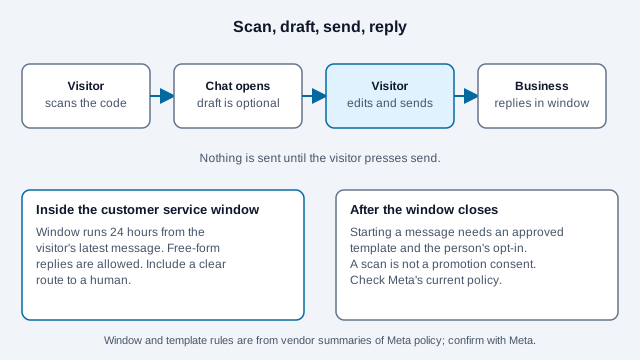
Vendor documentation that summarizes Meta's rules for the WhatsApp Business Platform describes a service window of 24 hours from the customer's latest message, in which free-form replies are allowed. Once it closes, starting a message generally needs an approved template and prior opt-in. Those summaries are secondhand, so read the current WhatsApp Business Messaging Policy before you build any automated follow-up.
A customer starting a chat does not give you permission to send unrelated promotions indefinitely. Record preferences, honor opt-outs, say who you are, and keep a human route available if you automate replies. Marketing and consumer-protection laws vary, so check your local rules.
Should you use a personal number or a business number?
Use a number the organization owns. A personal number ties a customer channel to one employee, exposes a direct identifier, and is hard to replace when that person moves on.
Decide before printing who answers, during which hours, how requests are escalated, how long chats are kept, who can access the device and what happens when staff leave. A QR code can raise inbound volume overnight. It does not supply a support process.
Where should you place a WhatsApp QR code?
Put it at the moment of need: a counter, a product box, a storefront window, a quote form, an event table. State what the chat is for and when someone will answer.
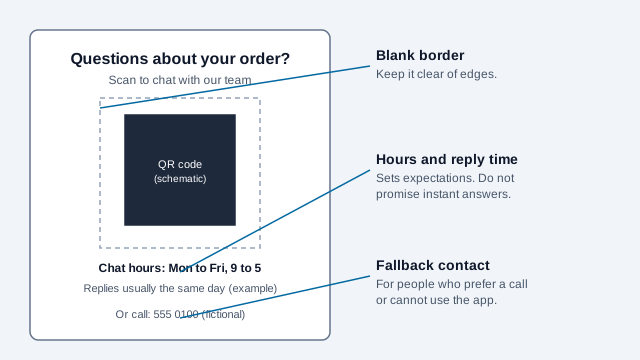
Good prompts name the task: "Scan to start a support chat," "Scan to ask about availability," "Scan to message the event team." Avoid "Scan to order" unless the chat shows the price, payment and a confirmation step. Size the code with the print size guide, and if the sign goes in a shop front, read the storefront window guide for glare and mounting. For packaging and labels see the labels and bottles guide.
Can you track how many people scan a WhatsApp QR code?
Not directly. A static wa.me code does not count scans, and Meta says scan analytics are unavailable for its business codes. A redirect on a domain you control can count page requests before forwarding the visitor to the chat, but it adds a dependency and a privacy notice to maintain.
If you want a rough comparison between placements, use a different short draft message per placement, or a separate redirect URL per placement, and read the totals as approximate. The tracking guide and the UTM builder help with the owned-page route, and the static versus dynamic guide explains when a code you can edit later is worth it.
What scams and privacy risks should you plan for?
- The phone number is visible in a wa.me link, so anyone can reuse it.
- Scammers clone a real business's name and logo with a similar number and send fake invoices or payment links, according to consumer-security coverage. Publish your official number on your own website so customers can compare.
- Stickers can be placed over a real printed code. Inspect public signs regularly. The QR code safety guide lists what to look for.
- Police and regulator advisories reported by search results describe fake sites that show a genuine WhatsApp linking QR code, where scanning links the victim's account to a scammer's computer. Click-to-chat codes are a different feature from linking a device, and a sign that asks people to scan a login-style code is a warning sign.
- Never share a six-digit WhatsApp verification code with anyone.
- Prefilled text can land in logs, history and screenshots.
Protect the business account with the security controls the app provides, review linked devices, restrict who holds the phone, and write a plan for a number takeover. Ask visitors to confirm your number against your website before they share payment or personal details.
What does a rollout checklist look like, and what goes wrong?
Picture a bakery that prints a code for custom cake orders using the owner's personal number and a draft that reads "I want to order." Weekend orders arrive at midnight, the owner's number is now in a supplier's contacts, and a customer pays a lookalike account after receiving a fake invoice. A business number, posted hours, a draft that says "Hi, I have a question about a custom order," and a note on the sign that payments are only requested from the official number would have prevented each problem.
- Choose a number the organization owns and confirm it has an active account.
- Format the digits and build the link. Test it on iPhone, Android and a desktop browser.
- Write a short, neutral draft, or leave it blank.
- Decide who replies, when, and how a chat is escalated or closed.
- Print one proof with the hours, the purpose and a fallback contact. Scan it on two phones.
- Log the encoded link, the number's owner and the date of the last test.
- Recheck when the number, the app or the staff changes. A WhatsApp QR code generator rebuilds the link quickly if you need a new one, and this troubleshooting guide helps when scanning fails.
If the chat reports an invalid number, recheck the country code and remove any leftover zero or punctuation. If the draft arrives garbled, re-encode it as UTF-8. If the code is not detected at all, inspect contrast, the blank border, size and glare separately. For other messaging apps, compare the Telegram guide.
What does WhatsApp control that this checklist cannot?
- Meta can change message-window rules, template requirements and short-link limits, so confirm them in current documentation before you automate anything.
- Behavior differs across phones, browsers, WhatsApp versions and linked-device setups. Test the devices your customers use.
- The 24-hour window and opt-in details here come from vendor summaries, not from Meta's policy text, which could not be read in full.
- Consent and marketing rules depend on country and sector. Check your local rules.
This guide is general information, not legal advice. Review WhatsApp's current terms, the Business Messaging Policy and the privacy rules that apply where you operate.
References
- Meta for Developers: WhatsApp QR codes and short links
- WhatsApp Help Center: how to use click-to-chat
- WhatsApp Business Messaging Policy
- WhatsApp Privacy Policy
- Bird: the WhatsApp customer service window
- Ireland NCSC: WhatsApp scam advice (PDF)
- Singapore Police Force: advisory on social media impersonation scams
- DENSO WAVE: QR Code area and quiet zone