To make a Telegram QR code, copy the official https://t.me/... link for a public username, group, channel, post, bot or invite, encode that URL, and test it on a device that is signed out of your own account. The code stores a link. Telegram decides what opens and whether the visitor must sign in, join or wait for approval.
This guide explains the link types a code can hold, how invite controls work, what a prefilled message can and cannot do, how bot links behave, and how to print and test a code without overpromising. It ends with a rollout checklist and the questions no checklist can answer.
What does a Telegram QR code actually contain?
It contains a plain web address on the t.me domain. Telegram's own apps also show a profile QR code (reported by guides to sit next to your name in Settings and to need a public username), but a code you print is just a standard QR code around a link you choose.
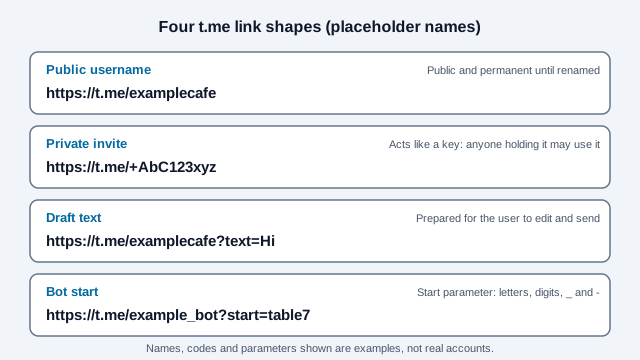
A public username produces links such as t.me/username. A private group or channel has no username, so it uses an invite link with a + code in the path. A scanned link may launch the Telegram app on a phone that has it, or open a web page that offers to open the app. Telegram decides, and it can differ between phones.
Which Telegram link should the code hold?
Use the link that matches what the visitor should do next. A public username suits open contact, an invite link suits a community you want to control, and a bot link suits a defined flow.
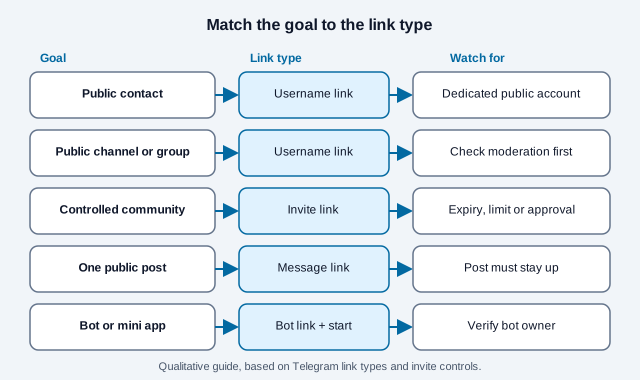
| Goal | Link type | Main consideration |
|---|---|---|
| Let people message a public account | t.me/username | The username is public and can receive unsolicited contact |
| Promote a public channel or group | Public username link | Confirm purpose, ownership and moderation before printing |
| Invite people to a private community | Exported invite link | Anyone holding the link can reshare it; use expiry, limits or approval |
| Open one public message | Message link | The post and channel must stay accessible |
| Start a bot flow | Bot link with a start parameter | Verify who runs the bot and what it asks for |
If a normal website link would serve the visitor equally well, you may not need Telegram at all. The URL QR code generator handles any web page, and the Telegram QR generator is quicker when the destination is t.me.
How do you make a Telegram QR code step by step?
- Open the user, group, channel, post, bot or invitation in Telegram.
- Use the copy-link or share control and confirm the address uses the expected
t.mepath. - Open that address in a private browser window to see its public behavior.
- Encode the complete HTTPS address in the Telegram QR code generator.
- Scan the preview with a phone that has Telegram and one that does not.
- Print one proof and scan that too.
A static code like this is free and does not expire. It keeps pointing to the same link for as long as the link works. A dynamic code only earns its place when you need to change the destination without reprinting.
Should you use a username link or a phone-number link?
Prefer a public username when you want to avoid printing a telephone number. Telegram documents t.me/+ phone links, but they expose the number and only work when privacy settings allow others to find the account by it.
For a business or project, use a dedicated username owned by the organization. Do not put an employee's personal phone-number link on long-lived public material without that person's informed approval and a plan for when they leave.
What is the difference between a public link and a private invite?
A public group or channel has a username link that anyone can find and print. A private group or channel is reached through an invite link, and Telegram's API describes controls on those links: an expiration date, a limit on how many users can join, and an option that requires an administrator to approve each joiner. Bot API documentation also describes revoking a link.
A QR code does not keep an invite private. It only makes the invite easy to copy with a camera, so treat the printed code as an access credential.
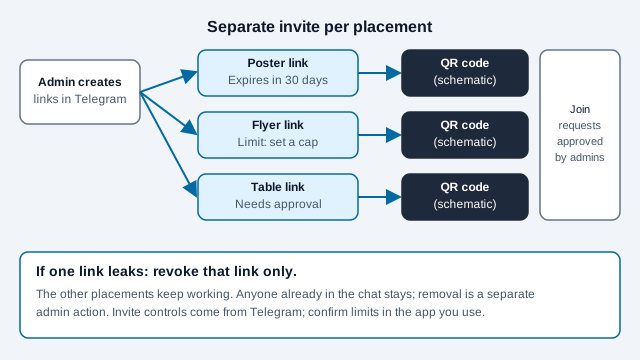
Create one invite per placement when your tools allow it, name each internally, and revoke only the one that leaks. Anyone already in the chat stays until an admin removes them, so revocation protects future joins and nothing else. Exact limits, such as the largest member cap, are set by Telegram and change over time, so confirm them in the app you use.
Can a QR code add someone to a group automatically?
No. A scan opens the invitation, and the visitor still goes through Telegram's current join or request step. Write "Scan to request access" or "Scan to open the public channel" and avoid promising automatic membership, guaranteed approval or access without an account.
Can a link prefill a Telegram message?
Telegram's deep-link documentation supports optional draft text on some links when the visitor can write in the chat. The draft is prepared for the person to read, change and send. It is not sent for them.
Encode the text with a proper URL builder and test spaces, punctuation, accents and emoji. Keep the draft short and neutral, and never prefill sensitive data or wording that claims the person agreed to something.
How do bot and Mini App links work?
A bot link can carry a start parameter, for example t.me/example_bot?start=table7, so the bot knows which sign was scanned. Bot library documentation reports that the parameter accepts only letters, digits, underscore and hyphen, up to 64 characters. That limit comes from library validation code and error names on Telegram's method pages. The official bot documentation could not be loaded here, so check it before you design around the exact limit.
The bot or Mini App is still software the visitor must judge. Show who runs it, explain what it asks for, request only the permissions it needs, validate the start value on your server, and never put secrets in the URL. A Telegram logo next to the code proves nothing about who runs the bot.
Where should you place a Telegram QR code?
Place it where people have a phone, a reason and time. A poster in a venue, a flyer for a local group and a slide at an event can all work. Say what scanning does in plain words.
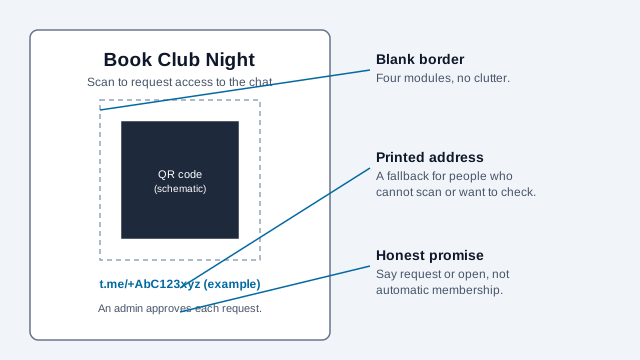
Use dark modules on a light plain background, leave a blank border of four modules on every side, and print the t.me address as text. Size the code for the real distance with the print size guide. For paper placements the poster guide and the flyer and brochure guide cover glare, folds and viewing distance. If you also plan a messaging channel on another app, compare the WhatsApp QR code guide.
Does a Telegram QR code expire?
The symbol does not. The link inside it can. A username can be renamed or released, an invite can be revoked, reach its limit or pass its expiry date, a post can be deleted, a bot can be shut down, and a group can change from public to private.
For long-lived print, check the destination on a schedule. If the destination may change, a redirect on a domain you control gives you room to repoint it, but you must renew and secure that domain for as long as the print circulates. The expiry guide has the wider picture.
What privacy and abuse risks come with it?
- Public usernames make an account easy to find and to message with spam.
- Private invite codes can be photographed and reshared well beyond the place you printed them.
- A sticker can be placed over a printed code. News coverage of QR scams, which this guide could only read secondhand, describes this on parking machines and posters, so inspect public placements regularly. The QR code safety guide shows what to check.
- Bot parameters and prefilled text can land in logs, history and screenshots.
- Telegram also uses a QR code to sign a new device into an account. That is a separate feature, and a sign that asks people to scan a login code is a red flag.
Use a dedicated contact account, set Telegram's privacy options deliberately and publish a second contact route for people who do not use the app.
What does a rollout checklist look like, and what goes wrong?
Take a local running club that prints 200 flyers with a code to a private group. The invite was created once, with no limit and no approval. A photo of a flyer reaches a public forum, the group fills with strangers and spam, and the organizer can only revoke the single link, which also kills every flyer still on notice boards. One invite per placement, an approval step and a text address that points to a fallback page would have contained it.
- Name the owner of the account or group and the person who approves requests.
- Choose the link type from the table above.
- Set expiry, limits or approval where Telegram offers them, one invite per placement.
- Test the link signed out, with and without the app installed.
- Write the label, then print one proof and scan it on two phones.
- Record the encoded address, owner and the date it was last tested.
- Retest after any username, privacy, invite or bot change.
Which Telegram behaviors can change without notice?
- How Telegram changes invite limits, menu labels or link behavior is outside your control, so confirm each step in the current app.
- Whether a given phone opens the app directly or a web page first depends on its settings.
- Groups that include children, health topics or workplace data have rules this guide does not cover. Check your local rules and your organization's policies.
- The official Telegram documentation pages could not be loaded while this guide was updated, so link syntax and limits were cross-read from search summaries and library documentation and should be rechecked.
This guide is general information, not legal or compliance advice. Check Telegram's current terms and the privacy rules that apply where you operate.
References
- Telegram FAQ: usernames and t.me links
- Telegram API: deep-link formats
- Telegram API: public usernames and private invite links
- Telegram API: messages.exportChatInvite
- Telegram API: messages.startBot (start parameter errors)
- aiogram documentation: deep linking payload rules
- Guiding Tech: Telegram profile QR code
- DENSO WAVE: QR Code area and quiet zone