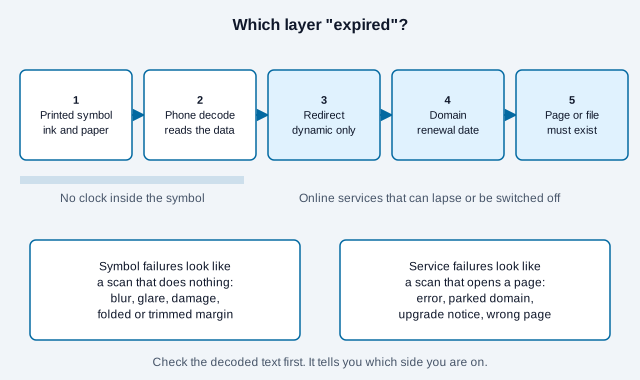
Static QR codes do not expire: the printed pattern has no timer. Dynamic QR codes can stop working, because they send each scan through a redirect service that can lapse, be paused or be set to end. In both cases the page behind the code can also disappear, which is the most common reason a code seems to have expired.
That distinction explains most reports that a QR code “expired.” The symbol may still decode perfectly while a webpage, file, domain, account, or redirect service has failed. This guide separates those layers, shows how to diagnose which one broke, and lists what to record so printed codes keep working for years.
Do static QR codes expire?
A standard static QR code does not expire by itself. QR Code is an ISO-standardized data symbol; its modules represent encoded data and error-correction codewords, not a remote countdown controlled by the image. For when that makes a static code the safer choice for print, see why static QR codes.
If a static code contains plain text, that text remains in the symbol for as long as the pattern can be read. If it contains a URL, the same URL remains encoded, but the website owner can move or delete the page, allow the domain to lapse, block access, or change the resource.
For example, a printed code containing https://example.com/menu may continue to reveal that exact address after the menu page is removed. The QR symbol worked; the HTTP destination did not.
Can dynamic QR codes stop working?
A dynamic code can stop reaching its destination when the redirect layer becomes unavailable or is deactivated. The visible symbol normally encodes the provider’s short URL rather than the final business URL, so each scan depends on that provider.
Possible dependencies include:
- the redirect provider’s servers and domain;
- the owner’s account status and service plan;
- the continued existence of the individual redirect record;
- any scan limit on the plan;
- the final destination page and its domain.
Providers differ on billing, limits, grace periods, and retention, so read the specific agreement. Vendor help pages show the range. One vendor’s help center says that after its free trial, dynamic codes are paused and static codes keep working, and that upgrading reactivates the paused ones. A QRStuff post on dynamic codes that stop scanning lists a lapsed subscription or ended trial, a broken destination, a reached scan limit, and physical damage as the usual causes, and says scans made during a lapse are not recovered afterwards.
Can a dynamic QR code be set to expire on purpose?
Yes. Many dynamic services let the owner add an end date or a scan cap, so “expired” is sometimes the intended result rather than a fault. Event tickets, limited offers and one-time downloads use this.
We checked how QuickQRC’s own redirect service handles it, because the order of checks decides what a scanner sees. A dynamic code on QuickQRC stops forwarding in these cases, each with its own page for the scanner:
- “This QR code has expired”: the end date the owner set has passed, a scheduled start date has not arrived yet, or the scan cap the owner set has been reached.
- “This QR code is unavailable”: the code is password protected and the owner’s plan no longer includes password protection, so the destination stays closed rather than opening to everyone.
- A suspension notice: the code has been taken out of service for abuse.
- A “page not found” error: the code has been deleted, or it is opened on a custom domain it does not belong to.
Removing the end date or raising the cap makes the same printed code work again, and so does restoring the plan feature behind a password-protected code. A deleted code cannot be brought back that way, which is a good reason to edit codes rather than delete them. If a code you did not mean to retire shows an expiry page, check its end date and scan cap before assuming the provider failed. Other providers add their own conditions, such as plan or trial status, as the vendor examples above show.
Static versus dynamic failure points
Static codes have fewer service dependencies, while dynamic codes trade added dependencies for an editable destination and provider features.
| Failure point | Static URL code | Managed dynamic code |
|---|---|---|
| Printed symbol damaged or distorted | Possible | Possible |
| Final page or file removed | Possible | Possible |
| Final domain expires | Possible | Possible |
| Redirect provider unavailable | Not applicable | Possible |
| Provider account or redirect disabled | Not applicable | Possible |
| Scan limit reached on the plan | Not applicable | Possible on limited plans |
| Destination editable after printing | No, unless you control routing at the encoded URL | Usually, while the service remains active |
Read the static versus dynamic comparison before choosing between permanence and post-print editing.
How to diagnose a QR code that stopped working
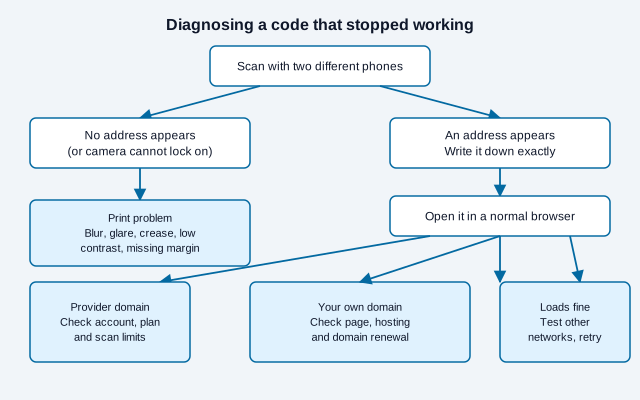
First determine whether the symbol fails to decode or the decoded destination fails to load. These are different problems with different remedies.
- Scan with two devices. If both display the same text or URL, the symbol is readable.
- Write down the exact decoded URL. A provider domain indicates a redirect dependency; your own domain indicates a resource you may control.
- Open the URL independently. Test it in a browser and record whether it returns a missing-page message, a domain error, an account notice, or a different destination.
- Check ownership and service status. Review the domain registration, hosting, file permissions, redirect account, and billing status that apply to that URL.
- Inspect the physical code. If it will not decode, look for distortion, glare, weak contrast, dirt, folds, trimming, or artwork in the quiet zone.
For print-side problems, DENSO WAVE lists three common causes of unreadable codes: modules distorted by enlarging or shrinking with an image tool, too little margin around the symbol, and text or pictures overlaid on the symbol that reduce contrast. The troubleshooting guide for codes that will not scan goes through those and others in more depth.
Can a domain expiry break a printed code?
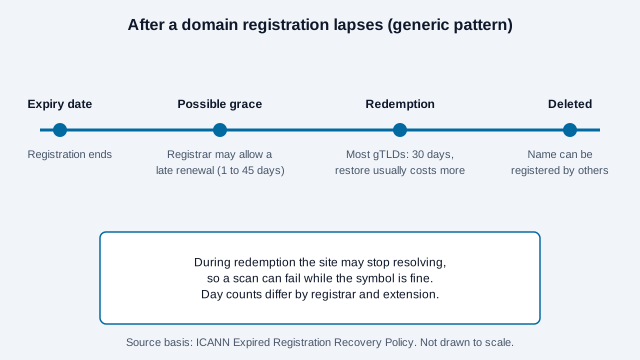
Yes, and it is one of the quietest failures. When a registration is not renewed, the site usually keeps resolving for a short time and then may stop. For generic domains such as .com, ICANN sets the general pattern in three steps:
- Optional renewal window. ICANN’s registrant guidance says a registrar may offer an auto-renew grace period of 1 to 45 days after expiry, on its own terms and fees.
- DNS interruption. Under the Expired Registration Recovery Policy, the registrar must interrupt the name’s DNS resolution before deleting it, for at least the last eight consecutive days it can still be renewed. That is when a printed code starts landing on an error.
- Redemption. After deletion, gTLD registries must offer a 30-day Redemption Grace Period. The policy requires registrars to publish their restore fees but does not set them. Once that window ends, anyone can register the name.
Country-code domains such as .uk or .de follow their own registry rules, and day counts and fees differ by registrar, so check your own registrar’s terms. The practical rule is simple: put a calendar reminder well before the renewal date, turn on auto-renew, and keep the payment card current.
A lapsed domain also carries a safety risk. If someone else registers it after deletion, your printed code can send scanners to a page you do not control. That is a good reason to renew domains behind long-lived print instead of letting them go.
What error correction can and cannot fix
Error correction can recover some encoded data from a dirty or damaged symbol, but it cannot repair an online destination. DENSO WAVE documents four levels (L, M, Q, and H) with increasing restoration capability and increasing code size.
The published approximate restoration rates are 7%, 15%, 25%, and 30% of codewords for levels L through H. Those figures describe codeword restoration under the QR specification; they do not guarantee that any arbitrary logo or damaged area of the same percentage will scan. A scratch across the finder patterns, for example, can defeat a code long before it reaches 30% damage.
Error correction cannot renew a domain, recreate a deleted page, reactivate an account, or restore a failed redirect provider.
Can a broken printed code be repaired without reprinting?
A printed code can be recovered without reprinting only when you can restore something behind its encoded data.
- Restore or redirect the missing page at the encoded URL.
- Renew the encoded domain if you still control it, or redeem it if it is in a recovery window.
- Restore a removed file or correct its permissions.
- Reactivate or reconfigure the managed redirect if the provider permits it.
- Repair a small physical defect with a correctly aligned replacement label, then test it.
If you do not control the encoded domain or provider redirect, you cannot alter where the existing pixels lead. Generate a replacement and update every deployed copy. When a few copies remain in public view, a sticker with the new code placed over the old one is a stopgap, as long as the new label leaves the old code fully covered and keeps its own quiet zone.
What does this look like in practice?
Picture a bakery that prints 500 box stickers pointing to a vendor redirect it set up on a free trial. Nine months later the owner changes jobs, the trial login is in the old inbox, and customers scan to a vendor notice. The bakery can reactivate the code only if someone can still sign in to that account. If nobody can, the stickers need replacing. This is an illustration, not a real business, but it shows why the account holder matters as much as the printed pixels.
Now picture the same bakery with a static code pointing to bakery.example/order. The stickers keep working for as long as the bakery renews its domain and keeps a page at that address, whoever runs the store.
Checklist: how to prevent future failures
Use stable destinations, document ownership, and test deployed codes on a schedule.
- Encode a URL on a domain your organization controls for long-lived materials.
- Use a stable path, then manage any necessary redirect on your own server.
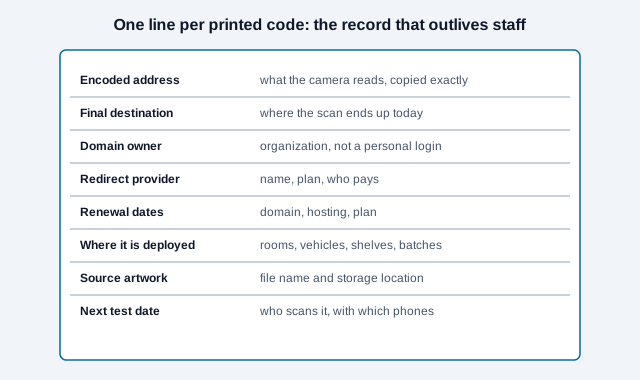
- Record each code’s encoded value, final destination, owner, provider, and physical locations.
- Set renewal alerts for domains, hosting, and paid redirect services.
- Test the final printed proof and periodically rescan high-value deployed materials.
- Keep the source artwork so a replacement can be produced quickly.
- Watch scan trends if your provider reports them. QRStuff suggests that a sudden drop is an early warning.
Who should own a long-lived QR code?
The organization named on the printed material should control the encoded domain and keep a record of the code. Avoid creating permanent client materials through an employee’s personal account or a contractor’s private redirect dashboard. Staff and suppliers change, but signs, packaging, manuals, and equipment labels may remain in use for years.
Assign a business owner for the destination, a technical owner for the domain or redirect, and a review date for the physical deployment. Store the source file and decoded URL with the project records. When responsibility changes, transfer the account and renewal contacts before removing the previous administrator, so nobody is left holding a working code that points at an account no one can log in to.
What is the short version?
The QR symbol itself does not age out, but a working scan depends on readable printing and every online component behind the encoded URL. Static codes reduce third-party dependencies; dynamic services add editability but require an active redirect layer. Identify which layer failed before deciding whether to restore a page, renew a service, or reprint the code. If you are about to print and want the fewest moving parts, create a static code that points at a page you own, and see print sizing before you send it to the printer.
What this article cannot settle for you
Open issues this article cannot settle for you: how your specific provider handles paused codes, how long your registrar lets you recover a lapsed domain, and how long your paper or sticker material survives sun, cleaning products, or weather. Check your provider and registrar terms, and test physical samples. This is general information, not legal or contractual advice.
References
- DENSO WAVE, “QR Code Standardization,” QRcode.com, accessed 2026.
- DENSO WAVE, “Error correction feature,” QRcode.com, accessed 2026.
- DENSO WAVE, “Examples of problems encountered in reading a code,” QRcode.com, accessed 2026.
- ICANN, “Expired Registration Recovery Policy,” updated 21 February 2024, accessed 30 October 2026.
- ICANN, “5 things every domain name registrant should know about ICANN’s Expired Registration Recovery Policy,” accessed 30 October 2026.
- QRStuff, “Dynamic QR codes no longer scannable.”
- qr.io Help, “What happens to my QR codes and account when the free trial expires.”