Authors use QR codes in and around a book to link print readers to a newsletter sign-up, a sample chapter or audio, bonus material, an errata page, or a retailer page. Point each code at a page on a domain you control, say what the reader gets, and test the code on the real paper at its final size.
A printed book can stay in circulation for years and change hands secondhand, so a link inside it has to outlast marketing campaigns. This guide covers where a code belongs, what to link to, how to plan around the barcode and trim rules of print-on-demand services, how to handle email sign-ups responsibly, and what to test. It suits self-published authors, small presses and anyone preparing a signing table.
Where can a QR code go in and around a book?
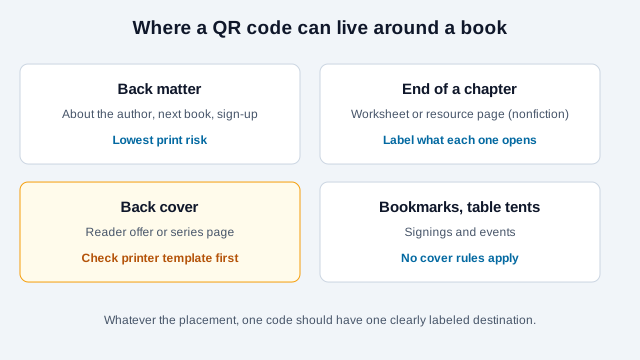
The interior is the lowest-risk place, because it avoids the cover rules that printers enforce. The back cover is possible but needs care.
| Placement | Suits | Watch for |
|---|---|---|
| Back matter ("About the author," next book) | Newsletter sign-up, series page, reviews request | A cream page lowers contrast, so use the darkest ink |
| End of a chapter | Nonfiction worksheets, templates, resources | Label each code so readers know what it opens |
| Back cover | A single reader offer or series page | Safe margins and the barcode area; check the printer's template |
| Bookmarks, table tents, banners | Signings, conventions and bookstore events | Size for the reading distance, not the page |
Publishers have used covers this way. Trade press reported that Simon & Schuster planned to add QR codes to the back of every new book jacket to grow newsletter subscriptions. Commentators were skeptical that readers would scan them, and no independent conversion data for print-book codes turned up in this research, so treat any promised result as unproven.
What should the code link to?
Use one destination per code. Kindlepreneur's author guide suggests targets such as a universal book link, a series page, a reader-magnet sign-up, an audiobook page, a review page or a single "Also By" page, and warns not to link to something you may change unless you can keep the address alive.
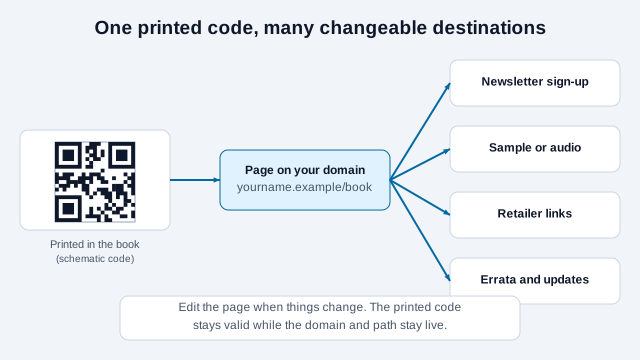
- A page on your author domain (
yourname.example/book-bonus) lets you change the offer without a new edition. It is also unaffected by a retailer changing its URL structure. - For retailer links, a universal book link such as Draft2Digital's Books2Read, described by author blogs as routing readers to a store in their own country, avoids picking a single retailer. Verify its current features on its own site before printing.
- If you link to a store with an affiliate tag, disclose the relationship as the FTC's endorsement guidance requires.
- For nonfiction, several codes can work: one per chapter, worksheets and updated references. See the PDF QR code guide if the bonus is a downloadable file.
Keep the code short in data terms too. A concise URL produces a coarser, more forgiving symbol; the character limit guide explains why.
Static or dynamic?
Use a static code pointing at a path on your own site. A book is read secondhand and shelved for years; a static code has nothing to expire and no subscription to keep paying. You keep flexibility by editing the page, or by redirecting the path on your own server if the content moves. A paid dynamic code adds a dependency without a benefit here, unless you cannot use your own domain. The static vs. dynamic comparison and do QR codes expire? cover the routing details.
You cannot count camera scans with a static code, but a tag on the link lets your analytics show which book, edition or placement drives sign-ups. Build the tag with the UTM builder, using a different value per title or per edition, and read it as a rough signal.
How do you plan the back cover around the barcode and trim?
Print-on-demand services publish exact cover specifications, and they change. Treat the numbers below as examples seen in their documentation and generate your own template for your trim size and page count.
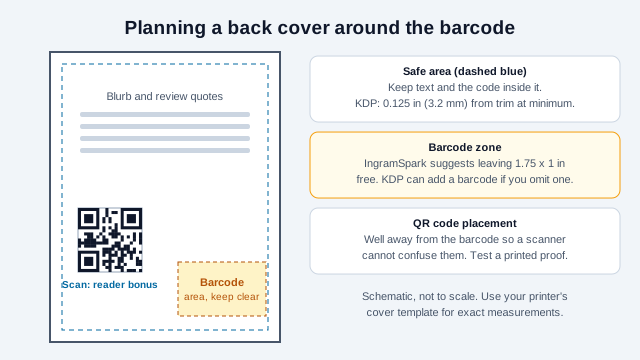
- Amazon KDP's print cover page asks for 0.125 in (3.2 mm) bleed, text at least 0.125 in inside the trim, images at least 300 DPI and type of at least 7 points. If you supply no barcode, KDP places one on the back cover. The page does not give barcode dimensions, so check its template or cover calculator for the exact box.
- IngramSpark's help article recommends leaving 1.75 x 1 in free for the barcode, and its title-processing guidance recommends a 0.25 in safety area for cover files. Both services offer template generators that show the safe zones for your book.
- Third-party design guides give different barcode sizes and clearances, which is a reason to trust the printer's template over a blog.
Keep the code clear of the barcode so a scanner at a shop till or a reader's phone does not confuse the two. If a code does not clearly fit the safe zone, move it inside the book. Order a physical proof and scan it before approving the files.
Can you link out from an ebook or a KDP interior?
Print and ebook rules differ. For Kindle books, secondary guides summarizing Amazon's guidance say external links are acceptable when they enhance the reader experience, that links to rival retailers or malicious sites are not, and that links to forms asking for customer information draw scrutiny. A community answer says a QR code in a print book pointing to an author website is allowed. None of this is an official statement about paperback interiors, so read the current content guidelines for your platform before relying on it, and ask support if the book depends on a link.
What about newsletter sign-ups?
A newsletter sign-up is a common destination, because a reader who has finished the book and scanned the code is already interested. Keep the promise small and specific.
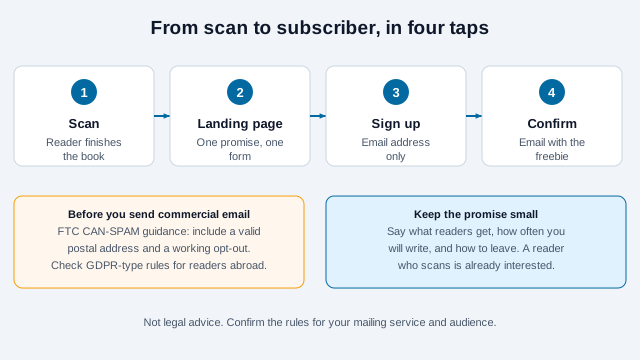
- Ask for an email address and nothing else.
- State what readers get, how often you will write and how to leave.
- Under the US CAN-SPAM rules, as summarized by FTC business guidance and compliance guides, commercial email needs a valid postal address and a working opt-out. Readers abroad may be covered by other laws, so check your mailing service's guidance and your own situation.
How do you print and test the code?
- Interior codes: start at about 0.8 to 1 inch (20 to 25 mm) square, dark ink on the page color, with the four-module quiet zone clear of text.
- Cream stock lowers contrast. Use the darkest available ink and test on the real paper; the contrast checker can compare your colors.
- Posters and signing-table displays: size from the reading distance using the print size guide.
- Export a vector file (see SVG benefits) and scan the printed proof, not the manuscript PDF, with two phones.
- Test again after adding a logo or cover image. Kindlepreneur's guide lists too-small codes, low contrast, stretched images and glare as common failures.
Create the code with the URL QR code generator and scan the result with the scannability tester before sending files to the printer.
How does a book code go wrong?
Picture an author who prints a QR code on the back cover of her 6 x 9 paperback, pointing to a free-chapter page on a link-in-bio service. She places it beside the blurb, near the lower right, where the printer then adds its barcode. The proof shows the two symbols cramped together, and the free-chapter page vanishes eighteen months later when the service changes its plan, leaving thousands of copies with a dead code.
The better path moves the code inside the safe area, away from the barcode, or into the back matter. It points to a path on her own domain (/book-bonus) that she renews with the domain, and it redirects to whichever offer is current. She also prints the plain address beside the code so readers can type it, and adds a line in her calendar to check the page every time she publishes a new edition. If the code still does not scan on a printed copy, the troubleshooting guide lists the usual causes.
What is the author checklist?
- One code, one label, one destination.
- A page on a domain you own, with the renewal date tracked.
- The plain address printed beside the code.
- The code inside the printer's safe area and away from the barcode.
- The darkest ink on the real stock, and a printed proof scanned on two phones.
- A newsletter page with a clear promise, postal address in email and an opt-out.
- Affiliate links disclosed.
What do the retailers and printers decide for you?
Printer specifications, content guidelines and email rules all change, and the sources consulted here are a mix of official help pages and secondary summaries, so confirm each against the current document. Whether a code on a cover suits your genre is a judgment call; some readers will never scan one. How long you can hold a domain, and what happens to the page if you stop writing, is a question for your estate or publisher.
This page is general information, not legal or publishing advice. Check the rules of your printer, retailer and mailing service, and the privacy and email laws that apply to your readers.
References
- Amazon KDP: paperback and hardcover cover guidelines
- IngramSpark Help: cover template generator
- IngramSpark Help: cover file creation
- Kindlepreneur: QR code generator for authors
- Quill & Quire: Simon & Schuster QR codes on book jackets (trade press, seen in search results only)
- U.S. FTC: Endorsement Guides, what people are asking
- U.S. FTC: CAN-SPAM Act compliance guide for business (archived copy)
- Draft2Digital: introducing universal book links
- DENSO WAVE: determining the code area and quiet zone