A store can put QR codes on shelf tags, endcaps, fitting-room signs, the checkout counter, receipts, bags, and the window, and each should open one specific thing: that product's page, a campaign, a size request, a loyalty sign-up, a review form, or a buy-online page. Use short links on your own domain, keep the code away from glare and folds, give every placement its own tracking tag, and inspect codes for stickers pasted over them. Static codes carry no subscription, so the running cost is the quality of the pages behind them.
This guide covers where each code belongs, what shoppers actually do with them, how to build a shelf tag that scans, the loyalty-signup and review rules that apply, what GS1's 2D barcode shift means at the register, how to cope with weak signal, and a pilot plan that tells you in 90 days whether the program pays.
Where should QR codes go in a store?
Place a code at the point where a shopper has a question, and make the printed prompt promise the answer. A shopper holding a jacket wants to know whether it comes in their size. A shopper at the till is deciding whether to join the loyalty program.
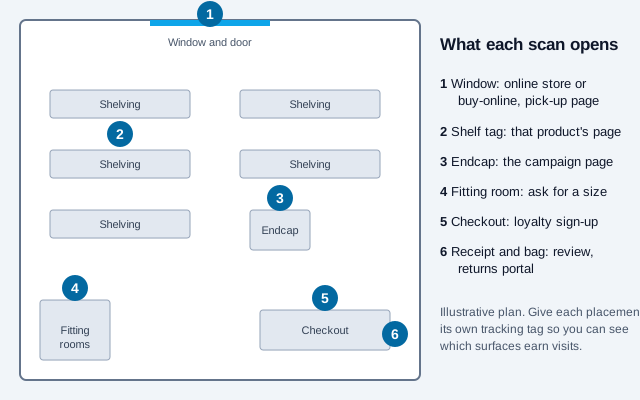
| Touchpoint | Destination | Prompt on the sign | Tracking tag (UTM medium) |
|---|---|---|---|
| Window or door (after hours) | Online store or buy-online, pick-up page | Scan to shop while we're closed | window |
| Shelf tag or hangtag | The exact product page | Scan for sizes and reviews | shelf |
| Endcap or display | The campaign landing page | Scan to see the full range | endcap |
| Fitting room | Request a size or color form | Need another size? Scan | fitting-room |
| Checkout counter | Loyalty sign-up page | Scan to join and save | checkout |
| Receipt or bag | Review request or returns portal | Tell us how we did | receipt |
Build each link with the UTM builder so your analytics can separate window visits from shelf visits. A link such as yourstore.com/p/2041?utm_source=qr&utm_medium=shelf&utm_campaign=autumn counts page visits for that placement.
Do shoppers actually scan QR codes in stores?
Many have, though the figures come mostly from vendors. A 1WorldSync 2024 consumer benchmark, widely repeated in industry coverage, found that 64% of shoppers had scanned a QR code on a product while in a store. A 2025 GS1 US survey reported that 66% of consumers would scan a QR code on food packaging for details such as ingredients and shelf life, which measures willingness, not behavior. Treat both as secondhand figures and check the originals before quoting them.
Bitly's analysis of 8.85 million product-tag scans across 18,339 accounts over 16 months adds a useful pattern for planning: December 2025 produced about 610,000 scans against a monthly average near 200,000. A holiday peak that size means seasonal content refreshes, such as updated gift guides and delivery cut-offs, need to be live before the rush, not during it. It is one vendor's data set, so use it as a prompt to check your own analytics.
Scan volume also concentrates. A Scanova benchmark reported by Retail Brew found about 95% of scans coming from 5% of codes, with purpose-built product pages drawing far more scans per code than links to a general website. The practical reading is to build pages worth scanning for a few products first, not to put a weak code on every tag.
How do you make a shelf tag that scans?
A shelf tag has little room, a price that must stay legible, and lighting you do not control. Design it around those limits.
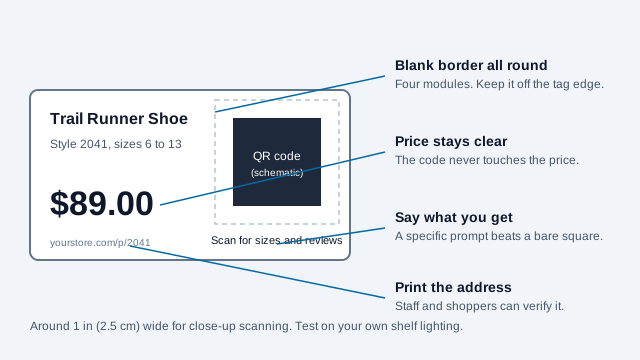
- Size: sources disagree, from about 0.8 inch to 1.5 inches for close-up scanning. About 1 inch (2.5 cm) is a workable start. Confirm with a printed test on two phones, because tag stock and shelf lighting change the result.
- Keep a blank border of four modules around the code, and keep it off the tag's cut edge and the price.
- Print the code as part of the tag, not as a sticker, so a pasted overlay shows.
- Link to the exact product page, never the homepage. If the shopper has to search again, you have lost them at the shelf.
- Put the dark code on a light solid background. Export SVG for print.
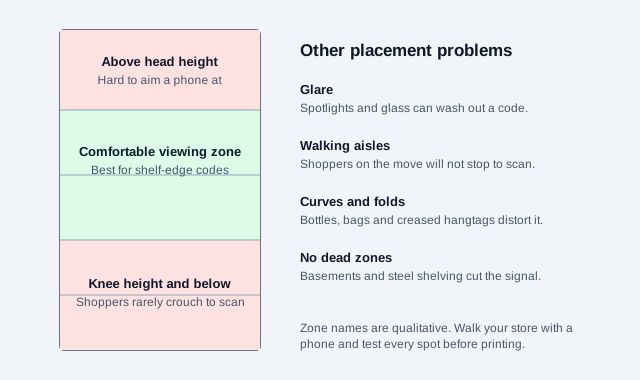
Placement advice from retail QR vendors is consistent on the problems: codes above head height or near the floor get ignored, codes in busy walking aisles are skipped because shoppers will not stop, and glare from glass and spotlights can defeat a scan. Curved packaging distorts a code, so keep it on the flattest panel. The scannability tester and the print size guide cover testing.
What should the product page contain?
A page opened from a shelf tag has one job: answer what a shopper cannot read on the shelf. A short list in the order shoppers need it works well:
- Name, price, and whether it is in stock in this store or online.
- Size, fit, color, or variant selector.
- Three or four photos and one video if you have it.
- Ratings and reviews from real buyers.
- Care, ingredients or materials, and warranty.
- A button to ask staff, reserve, or buy online.
The price on the page and the price on the shelf must come from the same source. A mismatch is a customer-service problem at best and, in places with price-accuracy rules, a compliance one. Check your local rules, and hold one price record that feeds both.
Is the checkout barcode becoming a QR code?
Gradually. GS1's Sunrise 2027 is an industry initiative for retail point-of-sale systems to be able to read 2D barcodes, such as a QR code carrying a GS1 Digital Link or a GS1 DataMatrix, alongside the familiar UPC/EAN barcode. It is a coordinated target, not a law, and sources differ on whether readiness arrives by end-2027 or into 2028. One symbol on the pack then serves two readers: the register reads the product number to find the price, and the shopper's phone opens a product page. During the transition packs carry both barcodes.
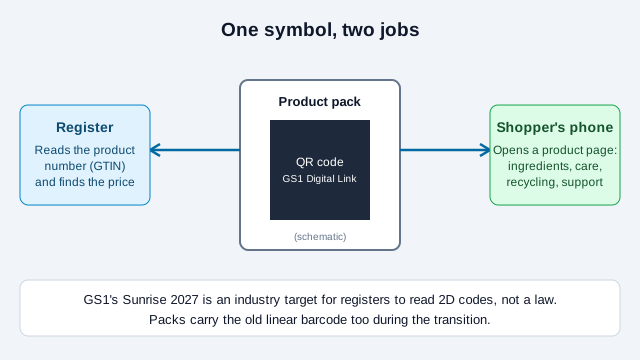
If you sell through grocery or big-box retail, expect trading partners to start asking for a 2D barcode. Vendor guides say GS1 expects such symbols to meet print-quality grades under ISO/IEC 15415, and quote their own minimum sizes. Check size and quality requirements in GS1's own General Specifications instead of relying on those tables. For the detail, see GS1 Sunrise 2027 and how to create a GS1 Digital Link QR code. For the packaging side, including EU rules, read the packaging guide and the Digital Product Passport guide.
How do loyalty and review codes work at the till?
A code on the counter or receipt turns a purchase into a relationship. It also collects personal data and invites reviews, and both are regulated.
- Loyalty sign-up: keep the form short (email or phone, and a consent box), say plainly what you will send, and make unsubscribing easy. Marketing texts and emails carry consent and opt-out rules that vary by country; in the US, text marketing is governed by the TCPA and email by CAN-SPAM, so have counsel confirm the wording of your consent line. A shopper who joined for points has not necessarily agreed to review-request texts.
- Reviews: the FTC's consumer reviews rule (16 CFR Part 465) took effect on 21 October 2024. It does not stop you asking for reviews. It targets fake reviews, paid or incentivized reviews, and suppressing negative ones, and the FTC has said selective solicitation could still violate the FTC Act. Send every customer the same link, offer no reward for a particular rating, and do not route unhappy customers elsewhere.
- Offers: if a code unlocks a discount, say what it is and when it ends. See the coupon and discount guide and the loyalty program guide.
The Google review QR code guide shows the receipt-and-bag placement that suits most stores.
What happens when there is no signal in the aisle?
A code that opens a page the phone cannot load is worse than no code. Interior aisles, basements and steel-framed stores often have weak reception.
- Offer in-store Wi-Fi and post a Wi-Fi QR code near the entrance, on a guest network separate from your point-of-sale systems.
- Keep product pages light so they load on a marginal connection, with the price and stock line at the top.
- Print safety, allergen and warning information on the pack. The code adds detail and does not replace the label.
How do you stop fake QR stickers in a store?
The FBI's Internet Crime Complaint Center warned in January 2022 that criminals paste fraudulent codes over legitimate ones. In a shop, the high-risk spots are the checkout, self-service payment stations, returns desks and promotion displays, where a fake can ask for card or login details.
- Print codes on the tag, strip or sign itself. Do not rely on peel-and-stick stickers.
- Print your domain in text beside every code so staff and shoppers can compare it with the camera preview.
- Add a code check to opening and shift routines: run a finger over each checkout and returns code, scan it, and confirm it lands on your domain.
- Replace damaged codes instead of layering new stickers over old ones.
- Tell shoppers where to report a code that looks wrong. Our guide to checking a QR code helps them verify first.
Static or dynamic QR codes for retail?
Static codes on your own domain suit most retail uses: no subscription, and you stay in control if a product page moves. For an item that will outlive a catalog redesign, encode a short permanent address and let your site redirect it. A paid dynamic code earns its cost mainly for expensive fixed signage whose destination rotates, such as a seasonal window campaign. The static vs dynamic guide explains the trade-off.
Read the results as page visits, not scans: one shopper may scan the same tag several times, and a scan that fails to load never shows up in analytics. Compare placements against each other instead of treating any single count as the truth.
What mistakes break retail QR programs?
Look at a boutique that prints 400 hangtags the week before a sale. The code scans fine on the owner's phone in the stockroom. On the shop floor, the spotlights glare off the glossy tags, the tag folds across the code when it is hung on a hanger, and every code links to the homepage, so a shopper who does scan lands on a banner for a different campaign. Nothing about that was bad luck.
- Linking to the homepage or a generic category page.
- Printing the whole run before testing a single tag under real lighting.
- Putting the code on a fold, a curve, or a glossy finish.
- A page price that disagrees with the shelf price.
- Leaving a campaign code live after the sale ends. Redirect old codes to a current page.
- Ignoring shoppers without a phone or signal. Staff should be able to answer the same question.
Rollout checklist: pilot one aisle or one endcap first
- Choose one department or endcap, and about 20 products with strong, finished pages.
- Build each page and test it on mobile data inside the store.
- Print one tag per design and scan it under real lighting on an iPhone and an Android phone.
- Add a unique UTM tag per placement and confirm visits appear in analytics.
- Brief staff on what each code opens and how to inspect it.
- Run the pilot for 90 days, reviewing which codes get visits and which pages shoppers leave, then expand the winners and retire the rest.
- Refresh seasonal pages before the peak and add the code check to opening routines.
What this checklist cannot settle
Two points this checklist cannot settle. Consent wording for loyalty messaging and the rules on price display differ by country and state, so confirm both locally. And the 2D barcode transition is still unfolding, so check GS1's current guidance before committing packaging artwork.
This guide is general information, not legal advice. Privacy, consumer-protection, and labeling rules change over time.
References
- GS1: 2D barcodes at retail point-of-sale (Sunrise 2027)
- GS1: Digital Link standard
- Bitly: analysis of 8.85 million product-tag scans (vendor data)
- Retail Brew: nearly 95% of QR scans come from 5% of codes (Scanova benchmark)
- FTC: consumer reviews and testimonials rule questions and answers
- FBI IC3: cybercriminals tampering with QR codes (January 2022)
- ZXing project: barcode contents formats (Wi-Fi network config)