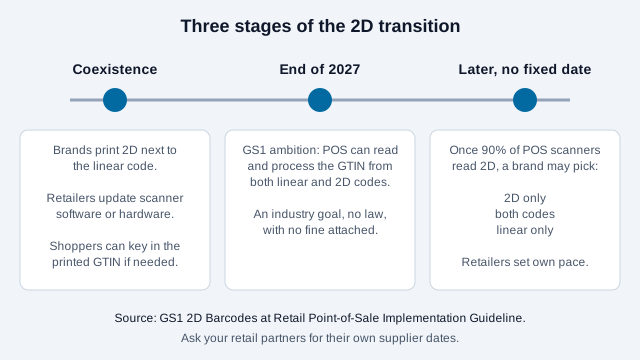
GS1 Sunrise 2027 is an industry goal, not a law: by the end of 2027, retail point-of-sale (POS) systems should be able to read the product number (GTIN) from 2D barcodes such as a QR code carrying a GS1 Digital Link, as well as from the UPC/EAN barcodes they read today. The linear barcode is not being switched off, and no regulator fines a brand for missing the date.
This guide explains what GS1 actually asked for, which 2D symbols retail scanners are expected to accept, how to print a 2D code beside the one you already have, and who can safely wait. It also separates the retail goal from the EU Digital Product Passport rules, which are law and run on a different calendar. The in-store view lives in the retail QR code guide and the on-pack view in the packaging guide, so this page stays on the transition itself.
What did GS1 actually commit to for 2027?
GS1's 2D implementation guideline for retail states the initial aim in narrow terms: POS scanning should be globally capable of reading and processing the GTIN from both existing linear barcodes and 2D barcodes by the end of 2027. The guideline adds that some scanners will need software or equipment upgrades to get there. GS1 US makes a similar point from the other side: a brand does not need to use every 2D capability by that date.
Notice what is missing from that wording. It does not say every product must carry a 2D code, it does not name a date for removing the UPC, and it does not require the code to carry batch or expiry data. For checkout, the GTIN is the only data element needed. Everything else a 2D code can hold (lot, serial number, expiry, a web address) is optional upside for later use.
GS1 organizations in several countries publish FAQs and playbooks under names such as "Ambition 2027" and "Sunrise 2027". The names vary by country, and the wording of timelines differs between member organizations, which is one reason to read your own national GS1 page instead of a third-party summary.
Is GS1 Sunrise 2027 a legal requirement?
No. GS1 is a standards body whose members are businesses, and Sunrise 2027 is a coordinated target agreed by that community. Nothing in it is enforced by a government. What creates pressure is commercial: as retailers upgrade checkouts, a buyer can ask suppliers for 2D codes in a supplier manual or listing form, and that request carries the real deadline for your products.
Separate from this, the European Union's Ecodesign for Sustainable Products Regulation, Regulation (EU) 2024/1781, does create legal duties for specific product groups. A GS1 Digital Link QR code can serve both purposes, but the two programs have different owners, scopes and dates. The Digital Product Passport guide covers the legal side.
Which 2D barcodes will retail scanners accept?
The GS1 guideline lists three 2D options for the POS, next to the two linear families (EAN/UPC and GS1 DataBar POS):
| Symbol | Data syntax | Typical fit |
|---|---|---|
| QR Code | GS1 Digital Link URI | Consumer goods where shoppers should also be able to scan with a phone |
| Data Matrix | GS1 Digital Link URI | Small packs where a square symbol is easier to fit |
| GS1 DataMatrix | GS1 element string syntax | Sectors with established practice, including regulated healthcare, where GS1 names it the approved 2D code |
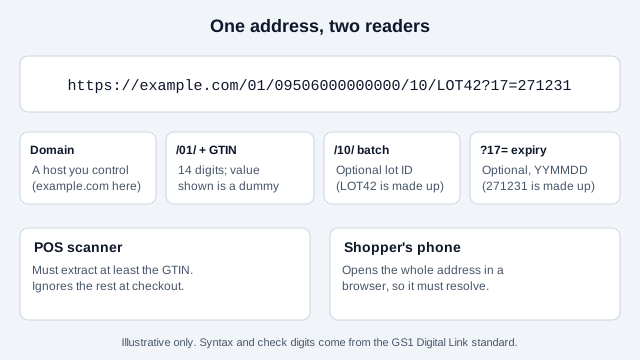
The practical difference is the data syntax. A plain marketing URL inside a QR code is not a GS1 code, because a POS scanner is looking for a GTIN in a specific structure. The GS1 Digital Link guide shows the structure in detail, and the diagram below shows the parts of an example address.
How do you print a 2D code next to the old barcode?
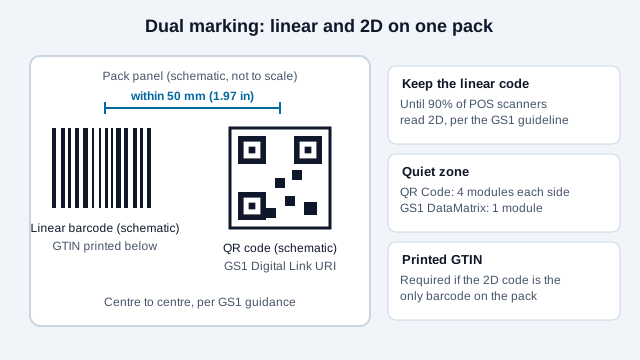
The GS1 guideline says that until 90% of POS scanning solutions can use GS1-compliant 2D barcodes and capture at least the GTIN, any product carrying a retail 2D code must also carry a linear POS barcode. That is the reason for dual marking: retailers who have not upgraded still scan the old code.
The same guideline gives concrete print numbers that you can hand to a packaging designer:
- 2D X-dimensions (the width of one module) are 1.5 times the matching linear X-dimensions allowed in the GS1 General Specifications. The guideline's worked example uses 0.495 mm.
- The quiet zone is four modules on every side for QR Code and one module for Data Matrix and GS1 DataMatrix.
- QR error correction can be L, M, Q or H. In the guideline's worked example at 0.495 mm, the QR width runs from about 20.3 mm (L) to about 28.2 mm (H), so a higher level costs real space. Logos inside a code use up error correction and reduce reliability.
- To reach the target checkout speed of 40 to 70 items per minute, the 2D barcode should sit within 50 mm (1.97 in) of the center of the linear barcode.
- If the 2D code is the only barcode on the pack, the 14-digit GTIN must be printed as human-readable text. A consumer-engagement QR code that is not meant for the POS needs no such text.
The normative size tables are in the GS1 General Specifications, so treat the numbers above as orientation and confirm them with your GS1 member organization before you finalize artwork. The error correction guide and the print size guide cover the general trade-offs.
Does my business need to do anything?
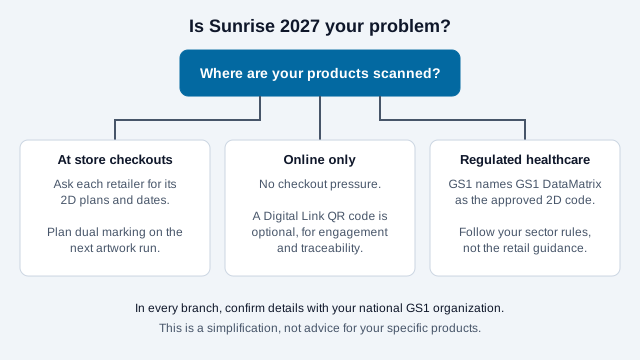
It depends on where your products are scanned. The GS1 Sunrise and DPP readiness checker asks about your channels and returns a structured answer. The short version:
| If you sell... | Then Sunrise 2027 is... |
|---|---|
| Packaged goods through supermarkets, pharmacies or big-box retail | Relevant. Ask each retailer what it will accept and when, and plan dual marking on your next artwork run. |
| Mainly direct to consumers online, with no store barcode | Optional. A Digital Link QR code still helps with engagement and traceability, but no checkout is waiting for it. |
| Regulated healthcare products | Governed by your sector rules. GS1 names GS1 DataMatrix, not QR Code, as the approved 2D code there. |
| Services, or goods that never carry a retail barcode | Not applicable. |
What happens at the register if the store is not ready?
GS1 Canada's FAQ for the retail 2D transition makes the fallback plain: if a retailer's scanner cannot read a 2D code, the printed GTIN can be keyed in by hand. That is slower than a scan and cashiers dislike it, which is why GS1 keeps the linear code on the pack during coexistence. It is also why a pack that shows only a 2D code during this period needs the printed GTIN.
Look at a small hot sauce brand that ships to three regional grocers. Grocer A says its checkouts already read 2D, Grocer B says "next year" and Grocer C does not answer. If the brand removes the UPC at the next reprint, Grocer B's cashiers type digits for every bottle until the upgrade lands. If it prints both, all three stores scan normally and the brand loses nothing but a little artwork space. This is an illustration, not a real account.
How do you roll out 2D without breaking checkout?
- Confirm your GTINs with your national GS1 organization. If you already print UPC or EAN codes, you hold them.
- Ask each retail partner in writing which 2D symbol and data syntax it accepts, and whether it publishes supplier dates.
- Choose the carrier. For consumer goods that is usually a QR code with a GS1 Digital Link URI.
- Decide the data. GTIN only is the simplest start, and lot and expiry are the next step for food, health and beauty.
- Put a working page behind the address. The URI should open something useful on a phone, not an error. A dynamic QR code is one route, but a Digital Link must keep its GTIN structure, so check how your platform handles that before relying on it. The static versus dynamic guide covers the trade-offs.
- Print both codes, with the spacing and quiet zones above, and the GTIN as text.
- Proof the real pack. Check the symbol on the final material with a verifier or at least several phones, and use the QR Code Validator to preview common print faults.
- Run a pilot at one retailer before the full print run.
What mistakes break a 2D rollout?
Take the same hot sauce brand. It buys a QR code from a generic generator that encodes a campaign link, prints it large on the label and drops the UPC to make room. The code opens a nice page on phones, but a scanner looking for a GTIN finds a web address with no GS1 structure, and the register shows nothing. The common slips, in order of how often they cause trouble:
- Treating a marketing URL as a GS1 code.
- Removing the linear barcode before the retailers confirm 2D scanning.
- Skipping the printed GTIN on a 2D-only pack.
- Squeezing the quiet zone to fit a busy label design.
- Adding a logo to a small code and lowering its scan margin.
- Using an address on a domain or service you may not control in five years.
What does the guidance leave open?
No rollout checklist can settle a few things. Each retailer decides its own date for accepting 2D and its own date for dropping the linear code, and GS1 does not coordinate a switch-off. The 90% scanner threshold is a condition in GS1's guideline, not a calendar date. Regional GS1 organizations may phrase their timelines differently, so the 2027 wording in your market can differ from the global text. Your own category may also carry labeling rules that sit outside GS1 altogether.
This article is an editorial overview and not legal or commercial advice. Confirm requirements with your national GS1 member organization and with every retail partner before you change packaging.
References
- GS1: 2D Barcodes at Retail Point-of-Sale Implementation Guideline
- GS1 US: Sunrise 2027
- GS1 US: GS1 Digital Link for retailers
- GS1 Canada: Retail 2D Transition Frequently Asked Questions (PDF)
- GS1: 2D Barcode Playbook for Retail POS Host and Backend Systems
- EUR-Lex: Regulation (EU) 2024/1781 (Ecodesign for Sustainable Products Regulation)