A GS1 Digital Link QR code is an ordinary QR code whose contents are a web address formatted to a GS1 standard, so the same symbol works as a product link for a phone and as a GTIN source for a retail scanner. It is the carrier format behind GS1 Sunrise 2027 and a common choice for EU Digital Product Passport labeling.
This page is the how-to for building and checking the link. For the retail deadline, who is affected and what stores will accept, read the GS1 Sunrise 2027 guide; for how the structure compares with a plain barcode, see QR codes vs barcodes in logistics.
What the URL looks like
A GS1 Digital Link URL puts identifiers into the path using GS1 Application Identifier numbers. The GTIN uses AI 01, batch/lot uses 10, serial number uses 21, and expiry date uses 17:
https://id.gs1.org/01/09506000134352
https://id.gs1.org/01/09506000134352/10/ABC123
https://example.com/01/09506000134352/10/ABC123/21/00001
Read that as: GTIN 09506000134352, lot ABC123, serial 00001. The GTIN is padded to 14 digits.
The GS1 Digital Link URI syntax standard describes the URL in two parts. The path carries the primary key (the GTIN) and its key qualifiers. The query string carries data attributes such as expiry date, written as ?17=180426 (a six-digit year, month, day value). For a GTIN, the qualifiers are consumer product variant (22), batch or lot (10) and serial number (21), and they may be left out but must keep that order. The standard gives /01/09520123456788/10/ABC123/21/12345XYZ as valid and the same values with serial before lot as invalid.
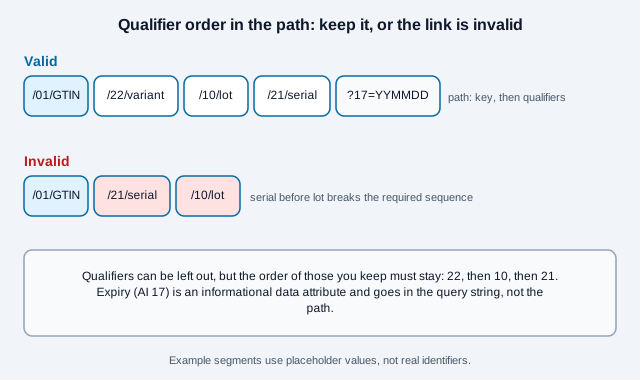
The standard also defines a canonical form: HTTPS, the domain id.gs1.org, no trailing slash, and query keys sorted in lexical order. Other URLs are still valid on a company's own registered domain. The standard adds that applications should not assume a Digital Link URL points to a resolver, and that a resolver advertises itself with a description file at /.well-known/gs1resolver. Special characters in values, such as / or &, must be percent-encoded.
How the one code does two jobs
- A phone camera sees a normal URL and opens it in a browser. Your resolver decides what to show: a product page, ingredients, a manual, a registration form.
- A 2D-capable retail scanner parses the GS1 path and extracts the GTIN (and lot, serial, or expiry if present) exactly as it would from a DataMatrix or an old linear barcode.
This is why a GS1 Digital Link replaces a plain marketing QR code plus the UPC/EAN barcode with a single symbol; during the transition you print it alongside the linear barcode, and the linear barcode can go only once your retail partners confirm they no longer need it.
Step by step
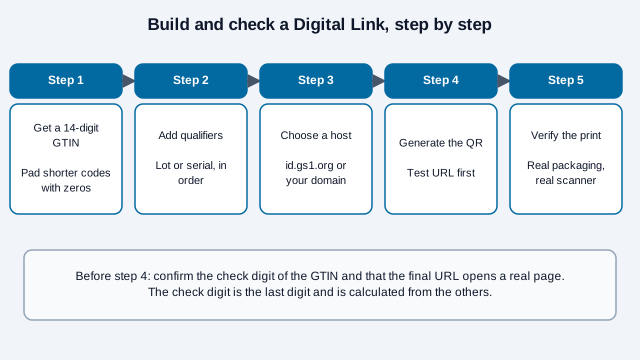
- Get your GTIN. License it through your national GS1 member organization. If your products already have UPC/EAN barcodes, use those GTINs.
- Decide the identifier level. GTIN only identifies a product model. Add lot (
10) for batch-level traceability, or serial (21) for item-level, needed for serialized authentication and some passport rules. Every extra identifier makes the symbol denser, so add only what a scanner or customer needs. - Pick a host. GS1 member organizations describe two routes: use the GS1 domain and its resolver, where you can change the destination later without reprinting, or use your own domain, which your web team has to set up and keep running.
- Build the URL in the AI path order:
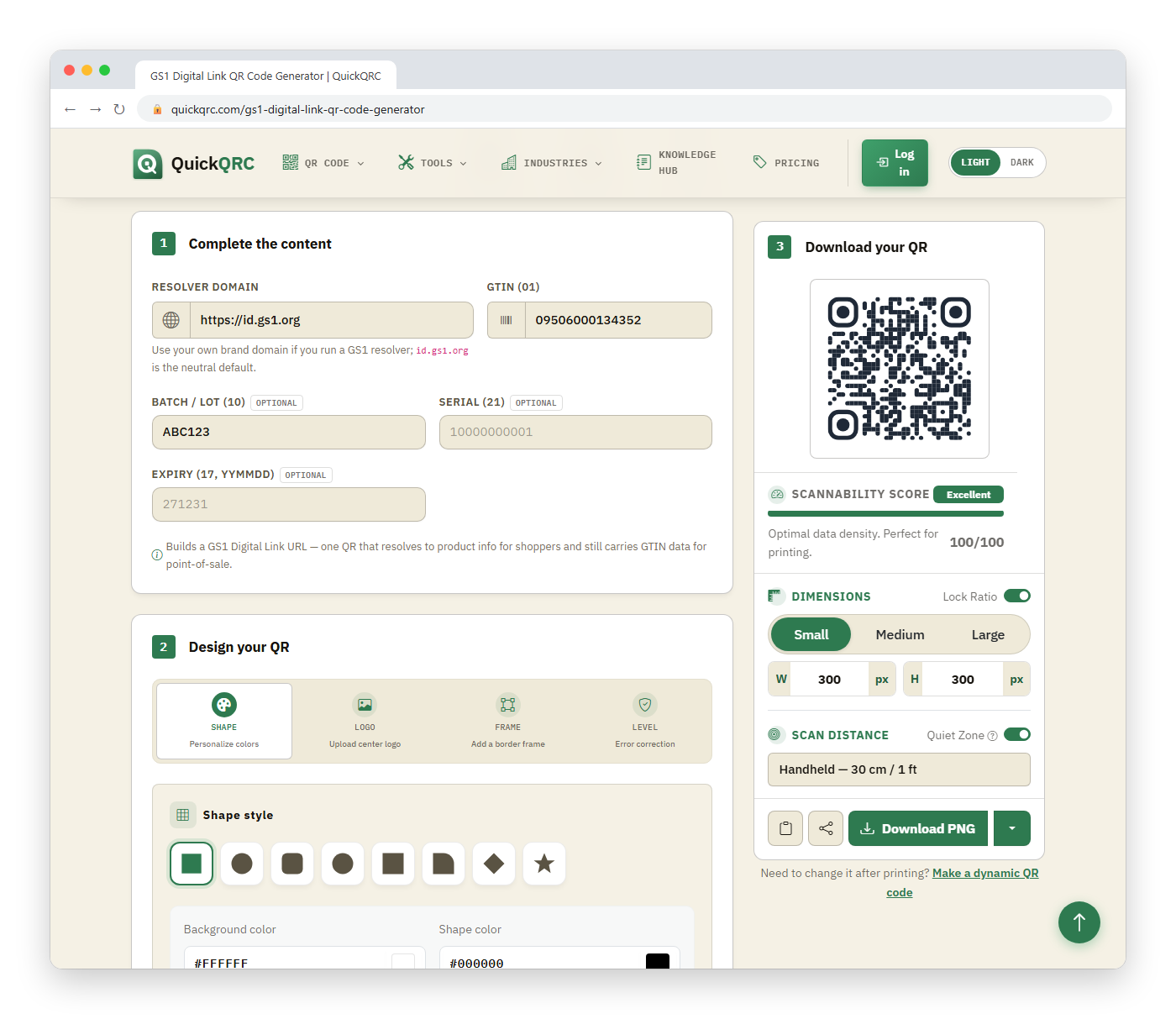
/01/{gtin}, then/22/{variant}if used, then/10/{lot}, then/21/{serial}, then?17={yymmdd}for expiry if used. - Generate the QR code from that URL. In QuickQRC, the free GS1 Digital Link QR code generator builds the Digital Link string for you from GTIN, batch, serial, and expiry fields, pads the GTIN to 14 digits, and draws the code in your browser. You can also paste a hand-built Digital Link URL into any URL QR generator.
- Set the error-correction level. Level M is a common default for clean packaging; the GS1 guidance read for this page does not mandate a level. Use Q or H if the code is small, on a curved surface, or near artwork, and read error correction levels first because higher levels make the symbol denser.
- Make the URL resolve. Point the host at a real page. A Digital Link that 404s in a shopper's browser undermines the whole point.
- Validate the print. Check the symbol on the real substrate before a production run. The QR Code Validator simulates blur, low contrast, small sizing, and curvature; the Scannability Tester lets you tune each condition.
What does a resolver do with the link?
A resolver is a web service that receives a Digital Link request and sends the visitor to the right place. GS1 resolver descriptions explain that a linkType parameter can ask for a particular kind of page, such as product information or sustainability information, and that a request for a link type that is not registered falls back to the default link. The default is what a plain scan opens. A request for all links returns the full set so software can choose.
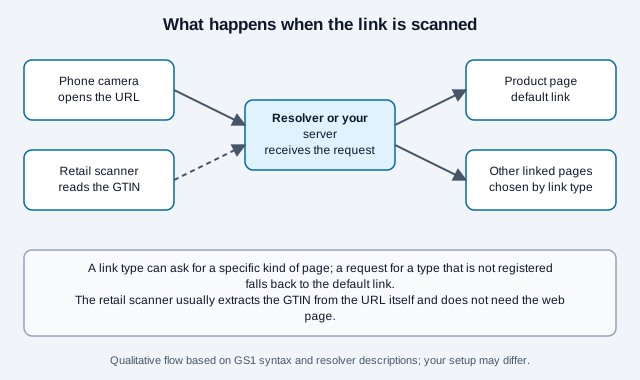
If you host your own domain, you are the resolver: you need the default page, any extra link types you promise, and a plan for what the page shows when a product is discontinued. Keep the identifiers in the URL stable even when pages change.
Example: from a GTIN to a scannable code
Take the GTIN 09506000134352 and the batch number ABC123. Enter them in the generator with the default resolver domain and it encodes https://id.gs1.org/01/09506000134352/10/ABC123, the same structure shown above.
If your product already carries a 12-digit UPC-A barcode such as 036000291452, pad it to 14 digits as 00036000291452. The check digit stays the same. Scan the printed code and confirm where it lands before you approve artwork. To see which retail and regulatory requirements apply to your products, use the GS1 Sunrise readiness checker.
How big should the printed code be?
GS1 member organizations publish sizing for QR Codes carrying a Digital Link on consumer units. The GS1 New Zealand quick-start guide gives an X-dimension (the width of the smallest square) of at least 0.396 mm, a target of 0.495 mm and a maximum of 0.990 mm, with a clear margin of 4X on all four sides. GS1 UK guidance, seen only through search summaries, lists the same range. Both advise placing the code within 50 mm of the centre of the EAN-13 to prevent double scanning, using dark on light (not inverted, avoiding red and orange), and keeping the linear barcode during the transition.
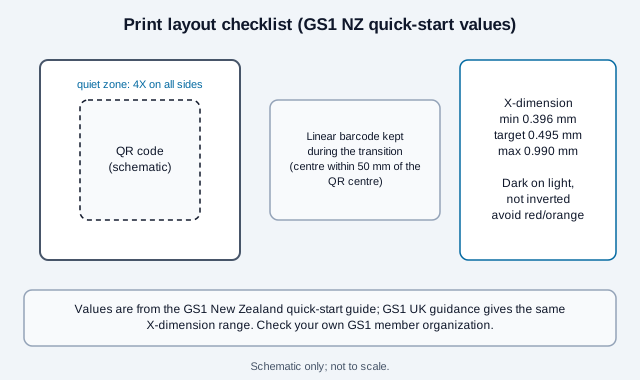
GS1 NZ also describes a free pre-check of artwork, an interim artwork verification, and a barcode verification report on a sample in its retail packaging, which it says many New Zealand retailers require. Ask your own GS1 member organization what it provides, since rules differ by country. A longer URL needs more modules, which shrinks each module at a fixed label size, so check that the finished X-dimension still meets the range.
Common mistakes
Look at a small sauce maker that prints 20,000 labels with a Digital Link built on a marketing short link, a serial before a lot, and a symbol shrunk to fit the corner. In-house phone scans open the page, so the team signs off. The distributor's scanner rejects the code because the path is out of order and the module size is below the range. The labels had to be reprinted. A ten-minute check with the steps above and a scan on real packaging would have caught both faults.
- Wrong path order. The AIs must appear in a defined sequence (
01, then22,10and21, in that order). A scanner that expects GS1 structure will reject a scrambled path. - A wrong check digit. The last digit of a GTIN is calculated from the others. The generator formats the GTIN but does not verify the check digit, so confirm it first. For
0950600013435the check digit is 2, which gives09506000134352. - Un-padded GTIN. The GTIN in the path is 14 digits; pad a 12- or 13-digit code with leading zeros.
- A redirect-only marketing link.
https://bit.ly/xyzis not a GS1 Digital Link, even if it eventually reaches your product page. The GS1 structure has to be in the URL a scanner reads. - No plan for the resolver. If you host the domain yourself, you own uptime, redirects, and the difference between "scanner wants GTIN" and "browser wants a page" (content negotiation, or separate paths).
- Dropping the 1D barcode too early. Keep the linear barcode until your retail partners confirm they no longer need it.
What this page cannot settle
Open questions this page cannot settle: which exact carrier and size each of your retail partners accepts, how long they expect the linear barcode to stay, and what your regional GS1 member organization requires for verification. Two GS1 pages blocked automated access during research (GS1 UK and the GS1 Digital Link overview), so their details come from search summaries. This is a practical overview, not legal advice. Confirm the exact carrier, identifier level, and data your retail partners or applicable regulation require before printing at scale.
References
- GS1: Digital Link standard
- GS1: Digital Link URI syntax reference
- GS1: Application Identifiers
- GS1 New Zealand: QR Code powered by GS1 quick-start guide
- GS1 UK: QR codes powered by GS1 design guidelines (page blocked automated access)
- GS1: Conformant Resolver standard
- GS1 UK: what is a resolver and why should I use one (page blocked automated access)