A QR code holds far more data than a 1D barcode and can be read from any angle, but it is the right label only if every scanner in your chain can decode it. Keep the linear barcode where your readers are laser-only or a partner specifies it, and add a 2D symbol where you need batch, serial or a web link on the same label. Most real warehouses end up printing both for a while.
This guide is about the symbol choice: what each format can store, what actually reads it, where GS1 standards draw the lines, and how to move from one to the other without stopping a dock. For the operational side (receiving, putaway, picking, shipping, delivery and returns) see the companion QR codes for logistics guide.
What is the technical difference between a 1D barcode and a QR code?
A 1D barcode encodes data in the widths of bars and gaps along one line, so a scanner has to cross every bar. A QR code encodes data across a grid of dark and light squares called modules, with position markers that let a reader find and orient it from any angle. The second dimension is what allows more data and recovery from damage.
| Feature | 1D barcode (Code 128, UPC-A) | QR code (ISO/IEC 18004) |
|---|---|---|
| Structure | Bars and spaces in a line | A square grid of modules |
| Numeric capacity | UPC-A is fixed at 12 digits; Code 128 suits short strings | Up to 7,089 digits (Version 40) |
| Alphanumeric capacity | Short strings in practice | Up to 4,296 characters |
| Binary data | Not designed for it | Up to 2,953 bytes |
| Scanning angle | The scan line has to cross all the bars | Readable at any rotation |
| Damage tolerance | A check digit detects errors but cannot repair them | Reed-Solomon correction recovers roughly 7% to 30% of codewords, by level |
| Readers | Laser scanners, linear imagers, 2D imagers | 2D imagers and phone cameras only |
| ISO standard | ISO/IEC 15417 (Code 128), ISO/IEC 15420 (EAN/UPC) | ISO/IEC 18004:2024 |
The capacity numbers are ceilings. A symbol near the limit has tiny modules that need a high-resolution printer and a good imager, so keep the payload as short as the job allows. The error correction guide explains the trade between recovery and density.
Which scanners read which symbol?
This question decides most migrations. A laser scanner sweeps one line across the code, so it reads linear symbols only. An area imager takes a picture of the whole symbol, so it reads linear and 2D codes, and sources we read note that imagers also cope better with degraded labels through image processing. A phone camera works as an area imager.
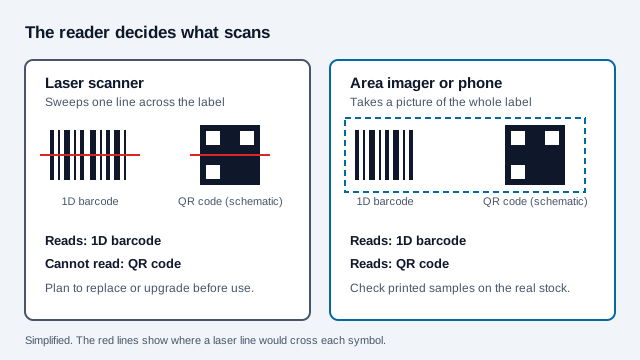
Before you change any label, list every reader that touches it: dock handhelds, fixed tunnel scanners, carrier devices, customer receiving systems, and checkout lanes if the item goes to retail. One laser-only device downstream is enough to stop the chain, and the owner of that device may not be you. Old laser fleets can usually be found by model number in a purchasing record, so start there.
Why would a warehouse choose QR for some labels?
Because the label can carry the details itself, so a scan does not always need a live lookup in the warehouse management system (WMS). Lot, expiry and a link to a certificate can sit in the symbol, and a square symbol often fits a small or curved surface better than a wide linear one.
| Factor | 1D barcode with a central lookup | QR code carrying more data |
|---|---|---|
| System dependency | Usually needs a WMS connection to say what the ID means | Basic details can be read from the label without a connection |
| Label space | Wide and short | Square and compact |
| Access for people | A phone camera cannot use it | A phone camera can open a manual or support page |
| Traceability | An item number, unless extended by GS1 element strings | Can hold GS1 Digital Link data with batch, serial and lot |
| Printing demands | Forgiving at coarse resolution | Needs enough printer resolution to render the modules |
A research report commissioned by GS1 US and run by VDC Research gives one view of the cost side. It found sites that depend on 1D codes had a 7% first-pass scan failure rate and a 1.5% relabeling rate, estimated their annual cost of shipment errors, rescanning and relabeling above $800,000, and projected savings of more than 60% (over $500,000 per facility) from moving to 2D. In its survey, 31% of respondents said several barcodes on one label raise the risk of scanning the wrong one. Those are modeled, sponsor-commissioned figures from a survey of 400 US organizations, so use the ROI as a prompt to measure your own scan failures first.
For heavy equipment and bins, see the asset tracking guide.
When is a 1D barcode still the better choice?
Where existing hardware and a named specification dominate. Laser scanners and linear imagers are cheap and quick, and many sorters and checkouts are built around them.
- High-speed sortation. Parcel hubs often use scanner arrays tuned for linear codes. Fixed-mount 2D imagers over conveyors are common in distribution centers, but check your own belt speed and read rate before you change the symbol.
- Older point-of-sale hardware. Lanes with 1D-only lasers cannot read 2D symbols until they are replaced or upgraded.
- Logistic labels. GS1 says the SSCC is the only mandatory element on a GS1 Logistic Label, and it is carried in a GS1-128 barcode under application identifier 00. A secondary summary of the current guideline says supplementary 2D symbols carrying the same data are now allowed, which we could not confirm in the guideline itself.
- Sector rules. Pharmacy and healthcare schemes often name a format, so check them before you change a symbol.
How do GS1-128, DataMatrix and QR relate?
GS1-128 is Code 128 constrained to GS1 element strings, marked by an FNC1 character in the first position. Plain Code 128 is not a compliant GS1 barcode, as GS1 UK states for medical device marking. GS1 DataMatrix uses the GS1 element string syntax, while a QR code or DataMatrix may instead carry a GS1 Digital Link web address. Two QR codes can therefore look identical and behave differently: a QR holding any old URL is not necessarily a GS1 Digital Link.
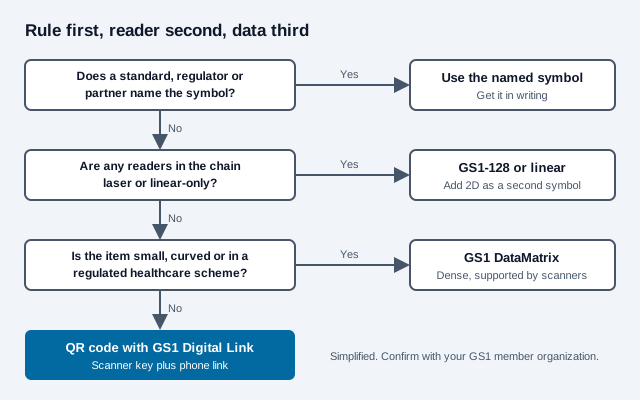
GS1 offers two 2D symbologies, GS1 DataMatrix and GS1 QR Code. GS1 groups for healthcare recommend DataMatrix or GS1-128 for product identification and traceability, and secondary sources note DataMatrix packs the same element string into less area. QR wins on phone support. Both can carry the same identifiers. Ask your GS1 member organization and trading partners which carrier and syntax they accept before you commit artwork. The GS1 Digital Link guide and the Micro QR guide cover the two nearest cases.
What is a GS1 Digital Link, and what does Sunrise 2027 change?
A GS1 Digital Link is a web address that carries GS1 keys in its path, so one symbol serves a scanner and a phone. GS1 Sunrise 2027 is an industry target, not a law, for retail checkout systems to read 2D codes alongside UPC and EAN. It concerns the retail point of sale, not the logistic label on a pallet, so a warehouse can ignore it for pallet labels while still planning for the cartons that end up on shelves. Our GS1 Sunrise 2027 article covers the retail side.
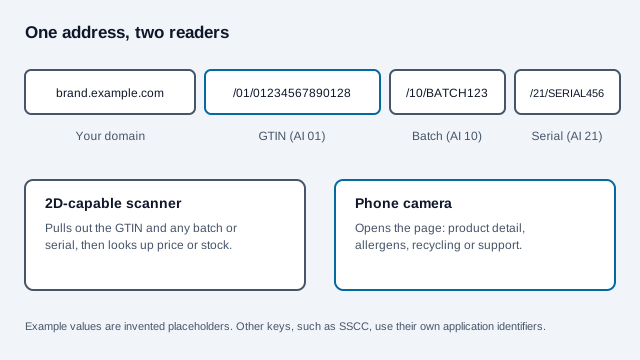
An example address looks like https://brand.example.com/01/01234567890128/10/BATCH123/21/SERIAL456: the GTIN follows /01/, the batch follows /10/ and the serial follows /21/. A 2D-capable scanner extracts the GTIN for price or stock lookup. A phone opens the page, which could hold allergen tables or a Digital Product Passport.
How do you migrate labels without stopping the line?
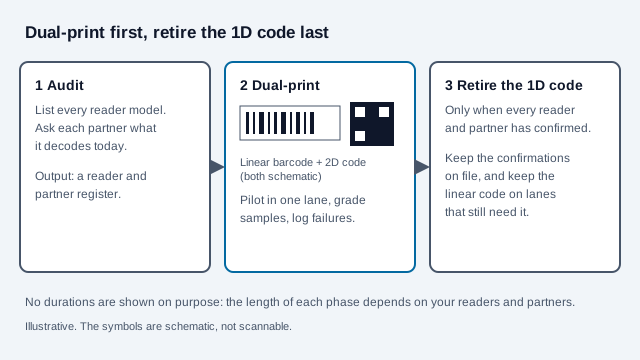
- Audit readers and partners. Record scanner models, firmware, and which partners decode what.
- Decide what the code holds. It can be plain delimited text, a GS1 element string, or a GS1 Digital Link. Keep it as short as the task allows.
- Choose the error correction level. Level M suits a clean indoor warehouse. Level Q or H suits outdoor freight, rough handling, or labels with a logo.
- Generate an SVG master with the QR code generator so the label printer never enlarges a small bitmap.
- Check printer resolution and margins. Thermal transfer printers need enough resolution to print the modules cleanly, with a four-module clear border.
- Grade samples. ISO/IEC 15415 print-quality verifiers measure contrast and other attributes, and can show whether a batch meets the grade your customers require.
- Run dual labels in a pilot lane, then widen. Retire the linear code only when each partner confirms.
What mistakes cause failed scans after the switch?
Picture a distributor that adds a QR code to every carton label and removes the linear barcode in the same release. The warehouse's new imagers read it fine, but a regional carrier's older laser handhelds cannot, and a customer's receiving dock rejects the cartons until the label is printed again with both codes. The cost was a week of manual relabeling that a dual-print phase would have avoided.
- Removing the 1D code before every reader is confirmed.
- Putting a plain marketing URL where a GS1 Digital Link is expected.
- Printing at a resolution too coarse for the module size.
- Placing the symbol on a fold, seam or label edge, without its quiet zone.
- Judging success from a phone scan alone, without trying the warehouse readers.
- Putting secrets or customer data in a code anyone can photograph.
Test with the scannability tester and your real scanners before a run.
Symbology checklist
- List every reader and partner that touches the label.
- Check whether a GS1 guideline, regulator or customer names the carrier.
- Decide what data the label must carry and how long the payload is.
- Pick error correction and printer settings to match the environment.
- Grade printed samples on the real stock.
- Dual-print during transition and record who confirmed what.
What this checklist cannot settle
Two points a checklist cannot settle: your retailers' own 2D timelines, and whether a regulated product category requires a particular symbol. Ask the partner or regulator in writing. This guide is general information, not legal or compliance advice.
References
- ISO/IEC 18004:2024, QR code bar code symbology specification
- ISO/IEC 15417: Code 128 bar code symbology specification
- GS1: Digital Link standard
- GS1: 2D barcodes at retail point-of-sale (Sunrise 2027)
- GS1: Logistic Label Guideline
- GS1 Sweden: labeling the pallet
- GS1 UK: GS1 QR codes vs ordinary QR codes
- GS1 Sweden: Data Matrix, GS1 DataMatrix and QR code
- Microsoft Learn: GS1 barcodes in Dynamics 365 warehousing
- Packaging World: GS1 US research on 2D barcodes in warehouses (sponsor-commissioned)
- Dynamsoft: laser scanners vs 2D imagers (vendor)