A nonprofit QR code should open one specific action page on a secure, branded mobile checkout: a donation form, a volunteer sign-up, an event registration or a petition. Print the organization name and web address beside it, and judge the placement by completed gifts, not by scans.
This guide covers what each code should link to, how to lay out an appeal card and a collection point, what the US receipt rules and state registration rules mean for a QR-linked ask, how to keep donors safe from sticker fraud, what to measure, and a rollout checklist. Fundraising law varies by country and state, so treat the legal parts as a starting list of questions for your adviser.
What should a nonprofit QR code link to?
Give every code a single job and say what that job is in the words printed next to it. A code that opens a homepage forces the supporter to hunt, and the moment of intent passes.
| Where the code sits | What it should open | Prompt to print |
|---|---|---|
| Appeal letter or reply card | Donation page with the suggested amount already chosen | Scan to give $25 |
| Poster at a shop or clinic | Volunteer interest form (3 or 4 fields) | Scan to volunteer this month |
| Event table or banner | Registration or a pledge page | Scan to sign up for Saturday |
| Collection tin or counter card | Short donation page that offers wallet payment | Scan to give by card |
| Annual report or newsletter | Impact page with the full financial statements | Scan to see where gifts went |
| Petition sheet | The action page, with the privacy notice visible | Scan to add your name |
Keep the address on your own domain, such as yourcharity.org/give, and tag each placement with campaign parameters. The UTM builder makes the tagged link and the QR code tracking guide explains what the numbers can and cannot show.
How does a donor get from the mailer to a receipt?
Picture a supporter holding an appeal letter at the kitchen table. They have about a minute of goodwill. Every extra field, slow load or unexpected login spends some of it. The journey below is the one to protect, with a check at each step.
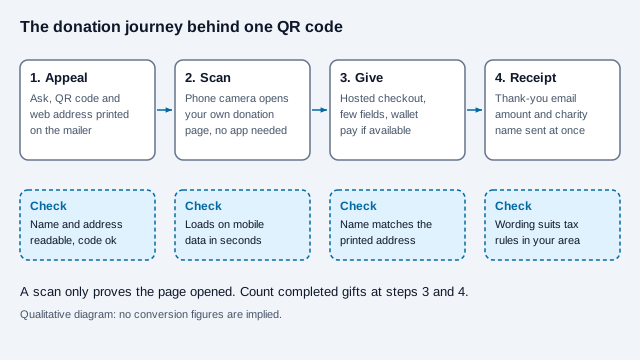
Digital wallets can shorten step three. A fundraising platform reported from its own observations that offering Google Pay lifted overall donation conversion by about 2.6% and Apple Pay by about 2%, with the largest effect on smaller gifts. It published no sample size or method, so treat the numbers as a direction, not a forecast, and test with your own page.
How do you lay out an appeal card or collection point?
A reply card has little room. The ask, the code and the address must all fit without crowding the quiet zone, the blank margin a scanner needs around the code.
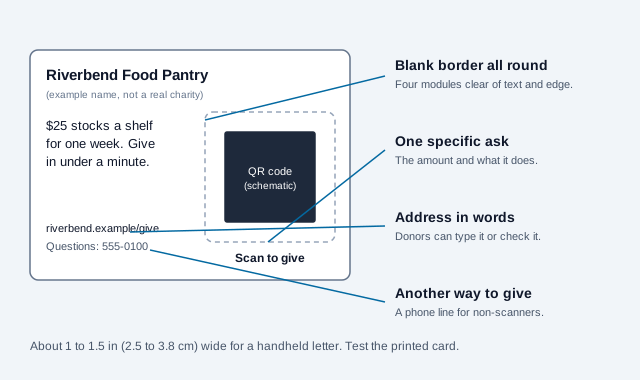
- Size: about 1 to 1.5 inches (2.5 to 3.8 cm) for a handheld letter. Posters need more, scaled to the viewing distance; see the print size guide.
- Contrast: dark code on a light, matte background. Gloss throws glare under event lighting.
- Format: export SVG so the code stays sharp at letter size and on a banner. A static URL code never expires and has no fee.
- Test the printed card, not the screen proof, with two phones. The scannability tester helps.
Collection tins and counter cards are the placement where evidence is thinnest. The Salvation Army added smart chips and QR codes to selected red kettle signs in 2019 so shoppers could give with Apple Pay or Google Pay, according to a payments trade report. Researchers writing about cashless giving in New Zealand were quoted as finding that people are less receptive to a card or QR ask when they are approached casually. No controlled study of collection tins turned up in our search, so pilot one location before you reprint a whole network. For in-person asks at religious venues, see QR codes for churches, and for banners and tables see trade show signage.
Which receipt rules apply to a donation made through a QR code?
The code adds no new tax rule. The donation page behind it carries whatever rules apply to any gift. In the United States, the IRS describes two thresholds that a fundraising page should be built around.
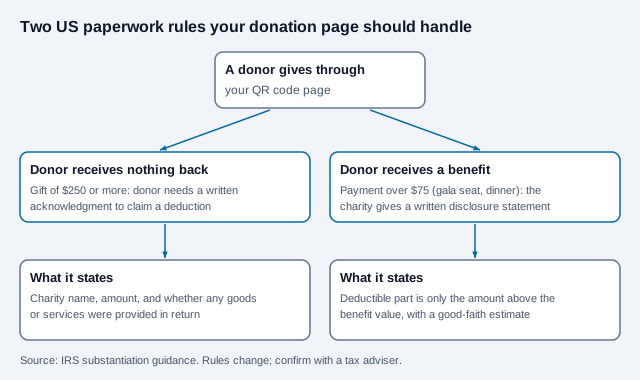
- A donor who claims a deduction for a single contribution of $250 or more needs a written acknowledgment from the charity, generally in hand by the time the donor files that year's return. It must say whether any goods or services were provided in return.
- If a donor pays more than $75 and receives something back, such as a gala dinner seat, the charity must give a written disclosure statement with a good-faith estimate of the benefit's value. The IRS lists a penalty of $10 per contribution, capped at $5,000 per fundraising event or mailing, unless reasonable cause is shown.
Most donation platforms email an acknowledgment automatically. Confirm that yours does, that it names your organization as it appears in IRS records, and that ticketed or auction-style asks produce the disclosure wording. In the UK, Gift Aid adds a declaration step with the donor's home address, and the Fundraising Regulator's Code of Fundraising Practice, which took effect on 1 November 2025, applies to charities that follow it. The regulator also lists guidance on handling cashless donations; check it for the exact requirements, because we could not read its full text.
Do you need to register before soliciting donations?
Often yes, and a QR code on a mailer or poster does not change that. Many US states require registration before a charity solicits their residents. For online giving, the Charleston Principles from the National Association of State Charity Officials are the usual reference, released in 2001 as non-binding guidance. A compliance firm's summary says only a minority of jurisdictions follow them and that a donation page reachable nationwide is generally treated as soliciting in every state with a registration requirement. Another source's summary mentions a one-third rule under which registration may not be required when contributions from a state stay below one-third of the total. We could not confirm that rule against a primary text.
The practical questions to bring to counsel:
- Which states require you to register given where your mailers, posters and website reach?
- Do annual renewals, financial reports or professional-fundraiser contracts apply?
- If a commercial partner prints your code on packaging for a cause promotion, who discloses what share of the sale goes to you?
How do you keep donors safe from fake codes?
Payment codes are an attractive target. The FBI's Internet Crime Complaint Center warned in January 2022 that criminals tamper with QR codes, including by placing stickers over legitimate ones, and that law enforcement cannot guarantee recovery of funds once they are transferred. Charity collection points are easy to reach and often unattended.
- Print the web address in words so donors can type it instead.
- Use printed or engraved signs and a covering panel at fixed collection points instead of loose stickers.
- Check each unattended code on a schedule and log the date; the QR code safety guide and quishing guide explain the tricks.
- Send donors to a hosted checkout from a payment provider that handles card data, so your staff never see card numbers. How to accept QR code payments covers the mechanics.
What should you measure besides scans?
A static code does not count camera scans at all. Your analytics counts visits to the tagged page, and those include bots, link previews and repeat views.
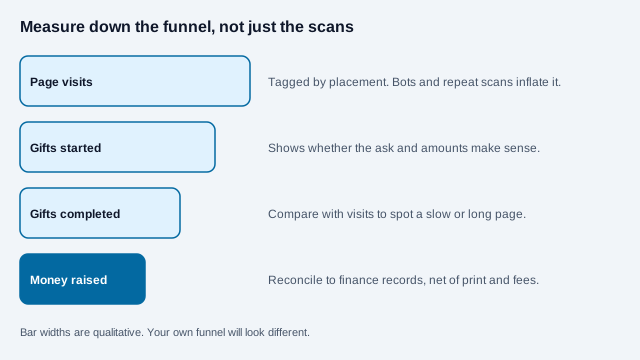
Report visits, gifts started, gifts completed, average gift and money raised per placement, then subtract print, postage and platform fees. A large drop between visits and completions points at the page: slow load, too many fields or an unclear ask. Use a dynamic code only where you need to change a printed code's destination later, and read static vs dynamic first. Whoever runs the redirect must be the organization itself, not a volunteer's personal account.
What is a good rollout checklist?
- Pick one action per placement and write the prompt in plain words.
- Build tagged links and put the plain address beside every code.
- Complete a test gift on iPhone and Android over mobile data, and check the acknowledgment email.
- Print a proof, scan it on two phones at the distance a donor would stand, then approve the run.
- Keep a register of every code: location, destination, owner, date checked.
- Decide who answers the phone number printed on the card.
- Set a review date, and retire or repoint codes after the campaign ends.
What usually goes wrong with a donation code?
Imagine a food pantry that mails 3,000 appeal letters in November, each with a code that opens the organization homepage. Supporters scan, find a menu, and many leave. Staff see traffic and assume the appeal worked, so nobody changes anything until the year-end report shows few gifts. The same mailer would have performed better with a code that opened the donation page with a suggested amount, a plain address on the card, and tracking by mail batch. The pantry also never checked whether its donation tool emailed an acknowledgment, so larger donors wrote asking for letters in January. This scenario is invented for illustration.
Other frequent problems are a code printed too small for a reply card, a page that asks for a street address when the donor only wants to give, and a code left on a poster after the campaign page was taken down. A code that dies is worse than no code, so keep the redirect alive.
Which fundraising rules depend on your region?
Whether you must register in a given state, how a cause-marketing partner must disclose the donated share, which cross-border tax rules apply to non-US donors, and what your regulator requires for contactless asks all depend on where you operate. A scan count cannot settle them, and neither can a checklist.
This article is general information, not legal, tax or financial advice. Fundraising, registration, receipting and data protection rules differ by country and state, and change. Check current requirements with your regulator, a qualified adviser or your counsel before launching an appeal.
References
- IRS: Substantiating charitable contributions
- IRS: Charitable contributions, written acknowledgments
- IRS Publication 1771: Charitable Contributions, Substantiation and Disclosure Requirements
- Harbor Compliance: Online fundraising and the Charleston Principles
- FBI IC3: Cybercriminals tampering with QR codes (January 2022)
- Fundraise Up: The impact of Apple Pay and Google Pay on donation conversion rates
- Mobile Payments Today: Salvation Army unveils donations via Apple and Google Pay
- Fundraising Regulator: resources and guidance
- GOV.UK: Gift Aid declarations, claiming tax back on donations