On the day of an event, QR codes work best as small signs that answer one attendee question each: what is on now, where is it, how do I sign up, who is this sponsor, and how do I give feedback. Admission tickets are a separate job for a ticketing platform that validates each ticket; the free generator here suits the schedule, map, form, calendar and badge-ID codes around the ticket.
This guide follows an attendee through the venue: the codes at the door, in corridors and session rooms, on badges and at sponsor booths, and after the event. It also covers pages that survive a crowded network, what to do when scanning fails, and how to count what was scanned. For the admission side, including duplicate tickets, transfers and door staffing, read the companion guide on event ticketing QR codes.
Which QR codes does an attendee meet during an event?
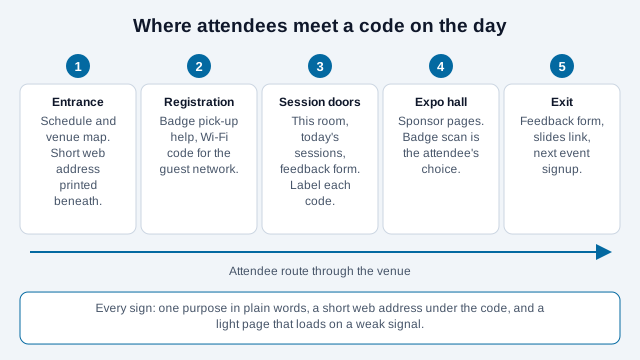
Start from the route, not the technology. Someone walking in wants the schedule, someone in a corridor wants a room, and someone leaving wants to be done. Put each code where that question arises.
| Code | Destination | Generate it yourself? |
|---|---|---|
| Admission | Unique ticket token checked by the ticketing system | No. Use a ticketing platform |
| Schedule and program | Mobile page you host, or a PDF | Yes |
| Venue or floor map | Page or compressed image | Yes |
| Registration, lead capture, feedback | Form that collects only what you need | Yes |
| Add to calendar | An event QR code with date, time, location and notes | Yes |
| Badge or networking | An ID that opens an approved attendee page, or a vCard | Yes, but never the full delegate record |
| Guest Wi-Fi | A Wi-Fi code for a network kept separate from your own systems | Yes |
Wayfinding advice for conferences has long recommended directional signs along the routes attendees take and at each intersection, and a 2012 GfK post on conference signage adds that attendees come to trust the event's own branded signs even when the venue has its own. Add the QR code to that signage and keep the room name and arrow readable without a phone.
How do you design for a venue where the network is overloaded?
At a busy event, hundreds or thousands of phones can reach for the same network as a session starts. A code that opens a heavy page can time out at exactly the moment everyone scans it. The printed symbol will decode fine; the page behind it is what fails.
- Keep landing pages small: a text schedule, a compressed map image and minimal scripts. Aim for a page that loads on a marginal connection.
- Let the schedule work offline once loaded. A static HTML page or an installable web app holds up better than a live database view.
- Do not put the only copy of critical information, such as room changes or safety instructions, behind a scan. Display it on signage too.
- Test during setup on the actual network, with mobile data switched on and Wi-Fi off, from where attendees will stand.
- If sessions can change, put a "last updated" time at the top of the schedule page so attendees know which version they hold.
What should an attendee do when a scan fails?
Some attendees will have a dead battery, an incompatible phone, no data, or little confidence scanning an unfamiliar code. Plan four steps, from easy to staffed, and make each one visible before it is needed.
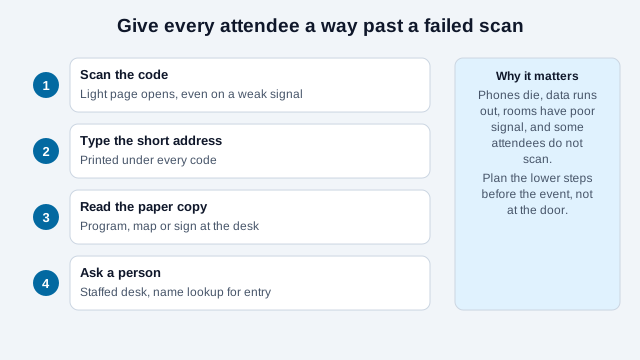
- Print a short readable web address beneath every code, for example
event.example.com/schedule. - Keep printed programs and maps at the registration desk.
- For entry, keep a staffed name-lookup lane, and mention it in pre-event instructions rather than only at the door.
- Meet accessibility expectations: pages in real text, support for screen readers and zoom, and an equivalent route for anyone who cannot use a camera. In the US, the Department of Justice explains that the ADA expects effective communication, and for covered EU services the European Accessibility Act may apply, subject to its exemptions. The QR code accessibility guide covers the destination side.
How do badge codes and exhibitor lead scanning work?
Many conferences print a code or barcode on the badge so exhibitors can scan it and receive the attendee's details. The rules differ by event, and the consent wording is where trouble starts. Event-technology providers describe it in different ways. One platform's privacy FAQ treats a voluntary badge scan as the attendee's opt-in to share profile data with that exhibitor only, with the organizer choosing the fields included. Exhibitor terms for one conference state that scanning is optional and that an attendee can decline, and a conference brochure for another says the same. Vendor blogs also describe the badge hand-over as equivalent to giving a business card, a looser standard that is not safe to assume where privacy law such as the GDPR applies.
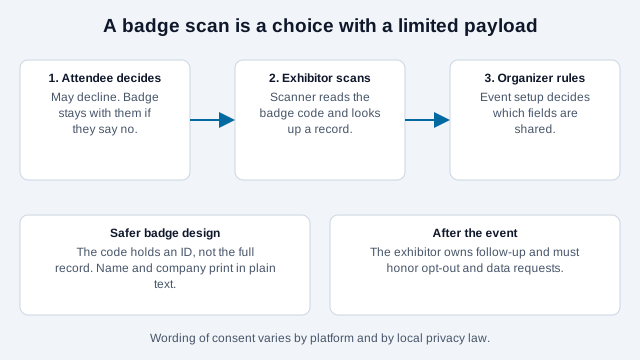
For a badge you design yourself, put an ID in the code and print the name and organization in plain text beside it. The code then opens a record you control, not a copy of the whole registration. Tell attendees in the registration email what a scan shares, with whom, and how to decline. Some organizers let delegates cover the code on their badge. The Drupal Association has said attendees can cover a badge barcode with stickers, and that a badge is scanned only with the attendee's consent.
What do sponsor, slide and feedback codes need?
Sponsors will ask for codes on banners and in the program. Hold them to the same rules as your own: one purpose per code, a destination that works on a phone, and a name on the sign saying whose page it is. Ask sponsors for the final URL in writing before printing, and check it again the week before.
Slides and feedback forms work best at the end of a session or at the exit, when people are already deciding whether to leave. Vendor blogs recommend placing feedback codes where attendees naturally pause, such as exits and session doors, and matching the landing page to the event's branding so people know they have scanned the right code. These are vendor opinions, so test the placement yourself in a small session first.
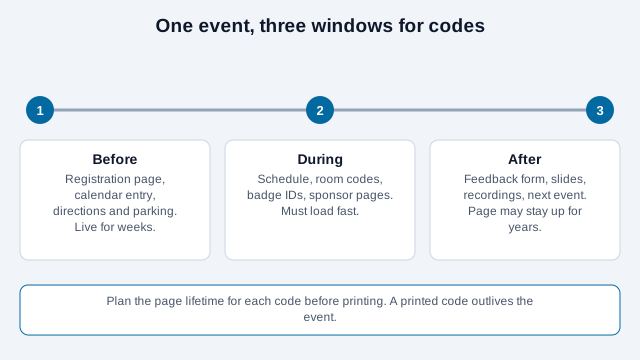
A printed code outlives the event. Slides, recordings and the next event signup can stay useful for months, so host them on a page you keep. If the destination must change after printing, a dynamic code avoids reprinting banners. For most schedule and map signs, a static code pointing to a stable page on your own domain does the same job at no cost. The static vs dynamic guide helps decide.
Can you tell how many people scanned the schedule code?
Not directly from a static code. Point it at a page you control, add UTM parameters with the UTM builder, and read visits in your analytics, as Google Analytics Help describes for campaign URLs. Give each placement its own value, such as utm_content=entrance, so you can compare signs. This counts page visits, not unique attendees, and repeat scans inflate it. A ticketing platform's own check-in reports are the reliable count of admissions. The QR code tracking guide covers the measurement limits.
What size and placement work for event signage?
| Placement | Starting size | Notes |
|---|---|---|
| Lanyard card or printed program | 1 to 1.5 in (2.5 to 4 cm) | Dark modules on a light, matte background |
| Table tent or desk sign | 2 in (5 cm) or larger | Test under the venue's lighting |
| Standing banner or stage sign | About one-tenth of the farthest scanning distance | A rule of thumb; test from the back row |
| Rotating screen or slide | Large, on a plain light panel | Keep it on screen long enough to scan |
Do not place competing codes so close that the camera picks the wrong one, and label each. Keep the quiet zone clear and export SVG for large-format print. The print size guide and the scannability tester help with sizing, and the meeting room QR codes guide covers session join links.
What mistakes break event QR codes on the day?
Imagine a two-day regional conference. The schedule code goes on 40 banners, and the destination is a heavy page that reads from a live database. On the first morning 600 people scan within ten minutes of the opening keynote; the page stalls, attendees queue at the registration desk to ask where the workshop is, and the printed programs ran out the evening before. Nothing was wrong with the codes themselves.
- Sending every code to a heavy page that fails on a congested network.
- Printing a code with no short address beside it.
- Printing the program last and running short of paper copies.
- Letting a sponsor change their destination after the banners are up.
- Encoding a whole attendee record in the badge code.
- Skipping a test from the back row and under the real lighting.
How do you launch an event code?
- List the questions attendees ask, and give each one a code or a sign, but not both when a sign is enough.
- Build the schedule and map pages as light, real text. Test on mobile data.
- Print a short web address under every code and check that each URL still resolves.
- Print a paper program and map in a quantity that matches your registrations.
- Write the badge-scan wording, and tell attendees and exhibitors what a scan shares.
- Test every printed code at final size, in the real room, on an iPhone and an Android phone.
- Staff a help desk with someone who knows every code and where it points.
- After the event, replace the feedback page with a thank-you or the next event page, not an error.
Two points this checklist cannot settle for you. The consent wording that satisfies your privacy regulator for a badge scan differs by country, and the venue's network capacity is something only a test on the day can show. Confirm both locally.
This guide is general information, not legal advice. Privacy, accessibility and consumer rules for events differ by country and change over time.
References
- Eventscribe: lead capture data privacy FAQ
- Drupal Association: badge scanning and attendee consent
- ESMO Congress 2024: lead system brochure
- Sched: lead retrieval (vendor page)
- NielsenIQ (formerly GfK): 6 navigation and signage tips for conference organizers
- U.S. Department of Justice: ADA effective communication
- Google Analytics Help: collect campaign data with custom URLs
- Tapsy: where to place event feedback QR codes (vendor blog)
- Eventbrite: preventing shared tickets