Event ticketing QR codes should contain a unique, hard-to-guess ticket token that an authorized check-in system validates against the event's current records. The system, not the black-and-white image, decides whether the ticket is valid, already used, transferred, refunded, revoked, or allowed to re-enter.
This guide is about admission control: what goes inside a ticket code, which ticket formats can be copied, how transfers and refunds change a ticket's status, and how to keep a door line moving when the network does not cooperate. If you are looking for the other codes at an event, such as the schedule, venue map, badge and feedback form, see the companion guide on QR codes for events on the day.
Which event QR codes should not be confused with a ticket?
For a paid or capacity-limited event, use a ticketing platform that issues and validates individual tickets. A free QR generator is useful for an event page, registration link, calendar entry, or low-risk badge identifier, but it does not by itself provide payment confirmation, admission control, duplicate detection, or attendee identity verification.
| Use | What the QR code does | What it does not prove |
|---|---|---|
| Promotion or registration | Opens an event page or checkout form | That the scanner bought a ticket |
| Calendar event | Offers date, time, location, and notes to a calendar app | Admission, payment, or attendance |
| Admission ticket | Presents a token to the organizer's validation system | Identity, unless the organizer performs a separate check |
| Badge or session code | Identifies a record or opens an approved attendee page | Permission for every room, purchase, or data set |
Use the event QR code generator when the goal is to share calendar details. Use the bulk generator for low-risk batches such as internal labels or badge IDs. Neither tool is a hosted ticket-validation service.
How does QR ticket check-in work?
- The ticketing system creates a distinct ticket record and an opaque token.
- The token is encoded in a QR code or another supported barcode.
- The attendee presents the ticket in the official app, a mobile wallet, a PDF, or print, depending on the organizer's delivery rules.
- An authorized scanner submits or looks up the token.
- The validation system checks the event, ticket type, time slot, payment and status rules.
- If accepted, it records the check-in. A later scan can be rejected, warned, or treated as re-entry according to policy.
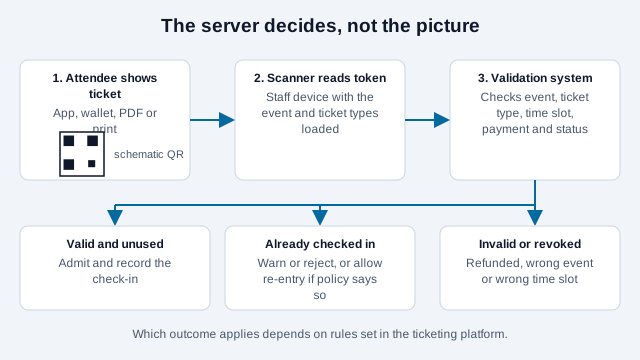
Eventbrite documents this stateful behavior: its organizer app displays an error when a ticket is already checked in or is invalid for the selected event. That differs materially from opening an arbitrary QR value with a normal camera app, which only shows what the symbol contains.
What should be inside the ticket code?
Prefer a random, opaque identifier or a provider-issued validation URL. Do not encode a predictable sequence such as EVENT-001, an attendee's email address, payment details, medical information, or the complete guest record. Anyone who can see or photograph a QR code can decode its contents, and a sequential number invites someone to type the next one.
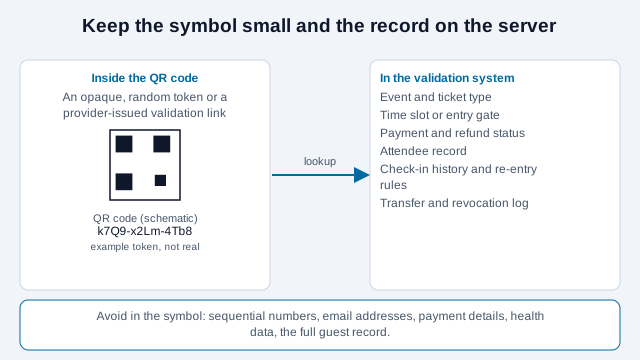
The server maps the token to the minimum record required for admission. Keeping personal data out of the symbol reduces exposure in screenshots, print waste, photographs, and lost badges. It also lets the organizer update status without changing the printed token.
Do not invent custom encryption or a signature scheme for a production event. Established ticketing systems have to handle key management, revocation, transfer, refunds, device synchronization, audit history, and staff permissions, which is far more than generating an image.
Can a QR ticket be copied or screenshotted?
A static QR ticket can be copied perfectly. Duplicate-scan detection limits reuse after one copy is accepted, but it cannot determine which holder is the rightful attendee when two people present the same static token. The first accepted scan may win unless an identity or transfer policy resolves the conflict.
Some providers use app-controlled rotating barcodes. Ticketmaster says its moving barcode refreshes automatically and that screenshots will not admit the holder, and venue pages that use the system describe a refresh about every 15 seconds. Ticketing vendors writing about timed barcodes quote refresh intervals anywhere from 15 to 60 seconds, and those figures come from vendor marketing, so treat them as descriptions of design rather than measured protection. This is a feature of a mobile ticket system, account controls, scanner infrastructure, and a validation service. It cannot be reproduced by changing a QR code's color, adding a logo, or placing a static code in an animated design.
Tell attendees exactly which formats are accepted. If mobile-only or rotating tickets are required, advise them to open the official ticket before traveling and use the provider's supported wallet option where available. Do not promise that a screenshot, PDF, printout, or third-party wallet will work when the ticket issuer forbids it.
Should tickets live in an app, a wallet, a PDF or on paper?
Each format trades copy resistance against convenience and fallback value. Google's developer documentation for event tickets notes that a wallet pass can show a static barcode for venues whose scanners read barcodes only, and can support NFC tap through its Smart Tap integration at venues with certified terminals. A static wallet pass is therefore easier for the holder to find at the gate, but it inherits the copy risk of any static code.
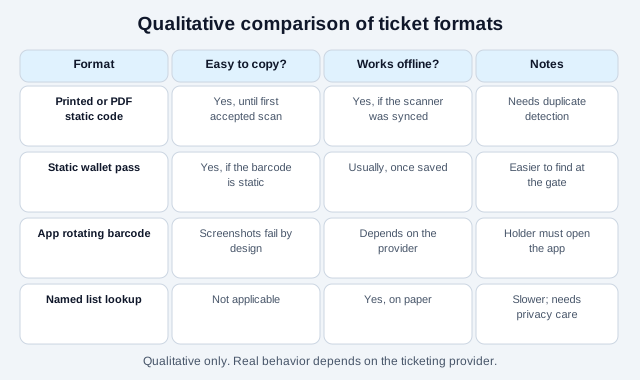
Choose by event type. A free community workshop with a modest crowd can accept printed or emailed tickets with duplicate detection. A stadium with a resale market tends to prefer an app-controlled ticket. Whatever you choose, publish it before sales open, and keep a name-lookup route for people whose phone has died.
What happens to a ticket when it is transferred, refunded or revoked?
Define the ticket lifecycle before sales open. A secure transfer should invalidate the sender's credential and issue or activate one for the recipient. Ticketmaster describes that behavior for supported transfers: after acceptance, the recipient receives a new barcode and the sender's ticket is no longer valid.
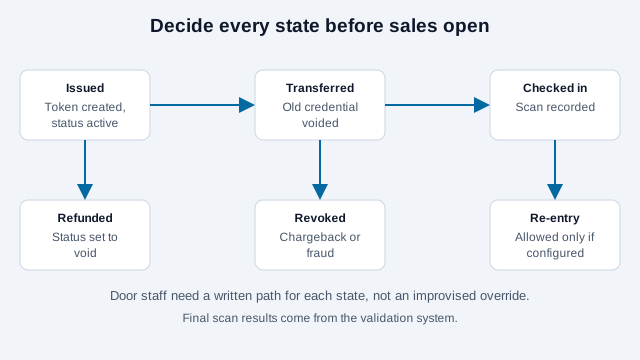
Refunded, canceled, charged-back, duplicated, or administratively revoked tickets should change status in the validation system. Door staff need a documented resolution path rather than an improvised override.
Also decide whether a check-in is final. Conferences and festivals may allow exit and re-entry, while a single-session workshop may not. Configure check-out or re-entry behavior in the platform, train staff, and communicate the rule to attendees. A warning for a second scan is not automatically fraud. It may indicate an accidental scan, a staff mistake, or a permitted return.
Does online or offline validation work better at the door?
Online validation can synchronize ticket status across entrances, but venue connectivity may be congested or unavailable. Offline mode can keep a line moving, yet multiple disconnected scanners may accept copies before their local records synchronize. The exact risk depends on the provider's design.
Ask the ticketing provider what data is downloaded, how long it remains on devices, how scanners reconcile conflicts, and what happens when connectivity returns. Before doors open:
- test the venue Wi-Fi and mobile networks at each entrance;
- fully charge scanners and provide power banks;
- download or synchronize the correct event and time slots;
- confirm device clocks and app versions;
- assign a controlled fallback lane for unresolved tickets; and
- prepare an attendee-list fallback consistent with privacy policy.
Eventbrite offers a printable attendee list and manual lookup as alternatives to electronic scanning. Treat any exported list as personal data: restrict access, avoid leaving copies at an unattended desk, and dispose of it securely after the retention period.
How should check-in staff be set up?
Give check-in staff only the access they need. Eventbrite, for example, documents dedicated check-in roles rather than requiring every worker to share an owner account. Use individual accounts where supported, enable strong authentication, remove former staff, and inventory every device that receives attendee data.
Train staff to read the validation result on their own scanner instead of trusting a green image or confirmation screen shown by the attendee. A convincing screenshot can imitate an interface. Staff should never ask an attendee to reveal an account password or one-time authentication code.
Create an escalation desk for name mismatches, accessibility needs, dead phones, transfer disputes, unpaid orders, and suspected duplicate tickets. Limit override permissions to supervisors and retain an audit trail where the platform supports it. Keep that desk physically away from the main scan line so one complicated case does not stop everyone behind it.
How many people can you get through the gate?
Do not rely on a universal "scans per minute" claim. Throughput changes with device autofocus, screen brightness, print quality, validation latency, bag checks, identity rules, staff training, and the arrival pattern. Measure the complete admission process in a rehearsal.
Estimate peak arrivals, time a realistic sample, then provide enough lanes and reserve capacity. Ask guests by signage and in pre-event emails to open the right ticket and raise screen brightness before reaching the scanner.
For printed tickets, preserve the QR code's quiet zone, use high contrast, avoid folds and reflective laminates, and test the actual production sample. For screens, test common brightness levels and cracked or privacy-filtered displays. The print size guide and the scannability tester cover those checks.
What do ticket sellers have to disclose, and what about identity?
A valid ticket is not necessarily proof of a person's legal identity. If an event requires named admission, age verification, membership, or regulated access, define a separate lawful identity-check process and explain it before purchase. Collect only what is necessary, protect it, and set a retention schedule.
Pricing and resale rules also touch ticketing. In the United States, the FTC's rule on unfair or deceptive fees took effect on May 12, 2025 and covers live-event tickets: a seller that advertises a price must show the total, including mandatory fees it can calculate in advance, and must describe fees truthfully. Other jurisdictions have their own rules on resale and refunds. These rules apply to the organizer or seller, not to the QR code, so check which ones cover your event.
Offer an accessible alternative to camera-only or smartphone-only entry. Examples include staffed name lookup, a supported printed credential, venue box-office assistance, or another accommodation appropriate to the event. Make the fallback visible in pre-event instructions rather than forcing attendees to discover it in a crowded line. See the QR code accessibility guide for the destination side.
What goes wrong at the door?
Think of a 400-person evening workshop. The organizer exports registrations from a spreadsheet and prints a unique-looking number as a QR code on each ticket, but the numbers run in sequence and nothing checks them. Two guests arrive with the same printout, a friend of a registered attendee has photographed a neighbor's ticket, and the volunteer on the door has no way to see which scan came first. The line stalls while three people argue over one seat.
- Using a sequential or guessable number as the ticket.
- Treating a generator's image as proof of payment.
- Letting one shared admin login run every scanner.
- Skipping the venue-network test and discovering poor signal at the door.
- Promising screenshots will work when the platform rotates its barcode.
- Having no agreed answer for a second scan, a refund, or a dead phone.
Event-day acceptance checklist
- Every admission ticket has a unique, non-predictable provider token.
- Refund, transfer, revocation, time-slot, and re-entry rules are tested with real test tickets.
- Each scanner is assigned to the correct event and ticket types.
- Duplicate and invalid-ticket messages are understood by staff.
- Online, offline, and synchronization behavior has been rehearsed.
- Staff accounts use least privilege; shared administrator credentials are avoided.
- A supervisor handles overrides and records resolutions.
- A privacy-controlled manual list or lookup path is available.
- Accessible entry and dead-phone alternatives are communicated.
- The final printed and on-screen tickets are tested at the actual venue.
Two points this checklist cannot settle for you. How long a provider's offline scanners take to reconcile after reconnecting is something only that provider can answer for your setup, and the consumer-protection rules for resale and refunds differ by country and state. Confirm both before you sell the first ticket.
This guide is general information, not legal advice. Check your local rules on ticket pricing, resale, privacy and accessibility.
References
- Eventbrite: prevent attendees from sharing tickets
- Eventbrite: scan and check in attendees
- Eventbrite: print a check-in list
- Eventbrite: roles and permissions
- Ticketmaster: moving ticket barcodes
- Ticketmaster: ticket transfers
- Google Wallet developers: event tickets
- FTC: Rule on Unfair or Deceptive Fees, frequently asked questions
- Ticket Fairy: timed barcodes and offline scanners (vendor blog)
- DENSO WAVE: QR code area and quiet zone