Agencies use QR codes to make offline work measurable: each print ad, mailer, banner and package gets its own QR code pointing at a tagged page on a domain the client owns, and results are reported as actions on that page, not as scans.
This guide covers how to tag and attribute placements, how to choose between static and dynamic codes for client work, who should own the destination, which consent and disclosure rules touch the landing page, how to deliver files, and a launch and wind-down checklist. Privacy and advertising rules differ by country, so the legal parts are prompts for your client's counsel, not advice.
How do you attribute an offline placement to a result?
A static QR code does not count camera scans, because the phone goes straight to the address inside the code. Attribution comes from the page the code opens. Google Analytics reads campaign parameters added to the address and files the visit under them. Google's help page says to always use utm_source, utm_medium and utm_campaign, and lists utm_content as the way to tell creatives apart. It also states that values are case sensitive, so Print and print become two rows, and recommends lowercase.
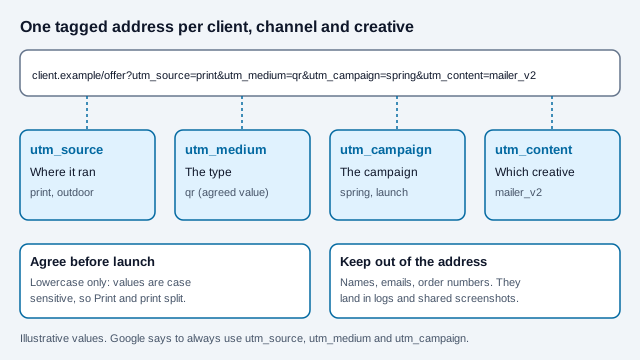
Agree a naming convention once, in writing, before any artwork is approved. A common set-up uses one fixed medium for every code, a source for the channel family, a campaign name, and a content value that names the exact asset. The UTM builder assembles the address, and the QR code tracking guide explains what scan counts can and cannot tell you.
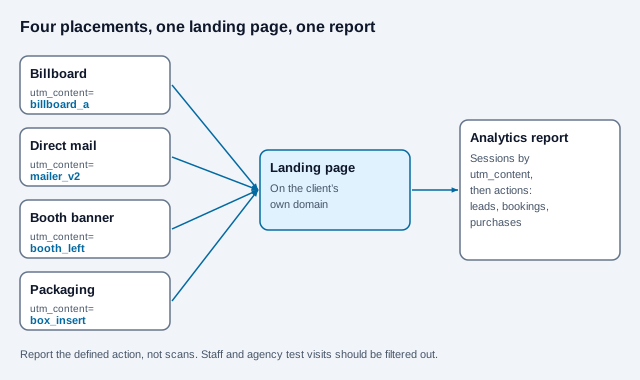
Report a defined action rather than traffic: a lead form, a booking, a purchase or a coupon redemption. Visits include link previews, bots, staff testing and people who scan twice, so a raw count will flatter the campaign.
Should client campaigns use static or dynamic codes?
Both appear in agency work, for different reasons. A static code holds the final address itself, never expires and carries no subscription. A dynamic code points at a short redirect address that can be changed after printing, and usually adds scan counts.
| Situation | Better fit | Why |
|---|---|---|
| Packaging or signage that outlives the campaign | Static, to a client-owned address | No third party sits between the customer and the page |
| Short promotion where the offer page may move | Dynamic on a client-controlled redirect | Destination can change without reprinting |
| A/B test of two landing pages from one print run | Dynamic | One code, two destinations over time |
| Hundreds of unique codes for serialized items | Static, made in bulk | Use the bulk generator and unique tagged addresses |
Read static vs dynamic QR codes and, if a client asks about paid tools, free vs paid generators before choosing. A vendor survey from Bitly in 2025 reported that 40% of marketers who use QR codes had used them in print ads and 69% updated or redirected dynamic codes at least monthly; those are one vendor's figures and the method was not published on the page we read.
Who should own the destination and the redirect?
The client. A code is printed once and read for months or years. If it resolves through an agency-owned domain or a redirect on the agency's account, the client's packaging, signs and mailers stop working when the contract ends or a payment lapses.
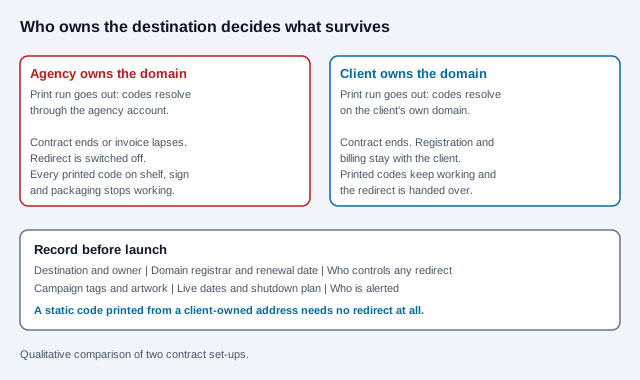
- Put domain registration and billing in the client's name, with the agency as a named contact.
- If a redirect layer exists, write down who controls it, how it renews and how it transfers.
- Never commit a permanent print run to a free link service or a trial account.
- Add the code, address, owner and renewal date to a register the client keeps.
The same logic applies to short links on a vendor's branded domain: the vendor owns the domain, so the client cannot take it with them. See do QR codes expire for how and why printed codes stop working.
What consent and disclosure rules touch the landing page?
The code is only a pointer. The rules attach to what the page does and says.
- Cookies and analytics (EU and UK audiences). GDPR.eu's cookie guide states that you must get consent before using cookies other than strictly necessary ones, and that consent has to be informed, documented, and as easy to withdraw as to give. Exemptions and details differ between member states and the UK, and the UK rules were being amended, so ask counsel what applies to your analytics set-up.
- Personal data in the address. Keep names, emails and order numbers out of tagged links. Addresses are stored in analytics, server logs, browser history and shared screenshots.
- Endorsements and affiliates. If the code leads to influencer content, the FTC's endorsement guidance says a material connection, including free product or an affiliate commission, should be disclosed clearly where the audience will notice it. It also notes that enforcement usually focuses on advertisers, ad agencies and PR firms.
- Reviews. The FTC announced a final rule in 2024 banning fake or purchased reviews and testimonials, including AI-generated ones, with civil penalties available for knowing violations. A QR code that asks customers to review should not reward only positive ratings.
- Claims. The offer on the page is advertising and carries the same substantiation duties as any other ad.
How do you hand over files and white-label the code?
A QR code follows an open standard, ISO/IEC 18004, so there is nothing to credit and no watermark in a code made here. Branding belongs around the code, not in it. Heavy color, gradients and a large logo reduce contrast and hide data modules, and each one is a scan risk on a rough print surface.
- Supply SVG to printers so the code scales cleanly; see SVG QR code benefits.
- Keep a modest logo, high error correction and a four-module quiet zone; see logo best practices.
- Name files by placement and version, such as
booth_left_v2.svg, matching theutm_contentvalue. - Size by viewing distance with the print size guide, and check each placement with the scannability tester.
Format-specific advice lives in billboards, newspaper and magazine ads, flyers and brochures and trade show signage.
What should the call to action and landing page promise?
A bare square on an ad gives the viewer no reason to scan. The printed prompt should name the reward, and the landing page should deliver that exact reward within one screen. Match the prompt to the placement, because the viewer's time and hands differ.
| Placement | Viewer situation | Prompt that fits | Landing page action |
|---|---|---|---|
| Magazine or newspaper ad | Seated, unhurried | Scan for the full range and a sample | Sample request form |
| Billboard or transit | Moving, seconds only | Short address in words, code only if stopped traffic | One tap to the offer |
| Trade show banner | Standing, glancing | Scan to book a demo | Calendar booking |
| Packaging insert | At home, post-purchase | Scan to register your warranty | Registration form with order number |
| Direct mail | At the table, with the offer in hand | Scan to claim your offer | Pre-filled claim page |
Moving traffic is the weak case. A driver cannot scan a billboard safely, so treat the code there as a secondary route and put the memorable address first. Whatever the placement, load the page on a mid-range phone over mobile data before sign-off, because the person scanning is rarely on office Wi-Fi.
What is a good launch checklist?
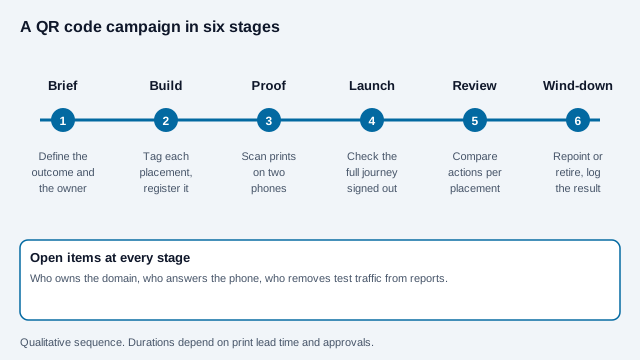
- Write the outcome in one line, name the owner and agree the naming convention.
- Give every placement a unique tagged address on the client's domain and add it to the register.
- Test the full journey signed out on iPhone and Android over mobile data: scan, page, form or checkout, confirmation.
- Scan a printed proof at final size and in the real material, on two phones.
- Exclude agency and client test traffic from reports.
- Set a review date and a decision rule, such as keep, repoint or retire.
- At wind-down, send the visitor to something useful. A retired offer page should explain and link on.
What goes wrong in agency QR work?
Picture an agency that prints 20,000 flyers with one shared code, then reports 900 "scans" to the client. The client asks which neighborhood produced leads and the agency cannot say, because every flyer carried the same address. A later spot check finds half the flyers were bundled with a partner's mailing and the partner's version used a code that was never tested at print size. If each batch had its own utm_content and a test scan had been done on the printed proof, both questions would have had answers. This is an invented illustration.
Other repeat errors include mixed-case tags that split reports, a landing page built for desktop, and a code printed on a glossy panel where glare defeats the camera. QR code statistics collects the vendor numbers circulating in decks; check the source before you quote one to a client.
What does this checklist leave open?
Whether consent is needed for your analytics set-up, how long to keep campaign data, what a client's contract requires if a code is retired early, and how to value a lead that began on a poster and closed on a phone call all depend on the client, the market and the law. Settle them in the brief.
This article is general information, not legal advice. Privacy, advertising and endorsement rules vary by country and change over time. Confirm your obligations with the client's counsel or your regulator.
References
- Google Analytics Help: collect campaign data with custom URLs
- Google Analytics Help: URL builders and campaign reports
- GDPR.eu: cookies and consent
- U.S. FTC: Endorsement Guides, what people are asking
- U.S. FTC: Disclosures 101 for social media influencers
- U.S. FTC: final rule banning fake reviews and testimonials (August 2024)
- Bitly: QR code statistics, including its 2025 marketer survey
- ISO/IEC 18004:2024, QR code bar code symbology specification