SVG is usually the best QR Code download format for logos, packaging, signs, and professional print layouts because its vector geometry scales without becoming pixelated. It does not automatically make a QR Code readable: the payload, module geometry, quiet zone, color, physical size, and production process still need validation.
PNG remains convenient for websites, email, and office documents at a known display size. Choose SVG when the artwork will be resized or handed to a designer, and keep a tested PNG fallback for software that does not handle SVG reliably. This guide covers how SVG works, where it helps, what designers can and cannot change, and how to handle SVG files from people you do not know.
What is an SVG QR Code?
SVG stands for Scalable Vector Graphics. W3C defines it as an XML-based language for describing two-dimensional vector and mixed vector/raster graphics. A QR Code SVG typically represents modules as rectangles or paths inside a defined coordinate system.
Because the shapes are mathematical rather than a fixed pixel grid, the file can be rendered at many sizes. A well-formed SVG stays sharp on high-resolution displays and large-format print without requesting a new raster export.
SVG versus PNG for QR Codes
| Need | SVG | PNG |
|---|---|---|
| Resize repeatedly | Strong choice; geometry is resolution-independent | Can blur when enlarged beyond native pixels |
| Professional layout | Easy to place in vector design tools | Works if exported at sufficient final resolution |
| Simple web image | Supported by modern browsers, but security policy matters | Very broadly supported and inert |
| Edit colors | Possible in compatible tools without tracing | Possible, but raster editing can soften edges |
| Known fixed size | Works | Often simplest |
| Unknown recipient workflow | Send SVG plus a tested PNG or PDF proof | Useful fallback |
Why does vector scaling help?
A raster QR Code assigns modules to pixels. Enlarging with interpolation may create gray or softened boundaries; shrinking may map modules unevenly to too few pixels. SVG lets the renderer redraw the shapes at the requested resolution.
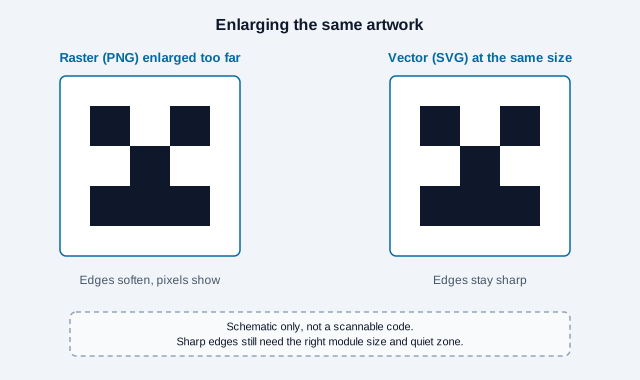
Vector scaling prevents pixelation, but it does not solve a symbol printed too small for the viewing distance. After sizing the layout, verify that each module is physically large enough for the printer and scanner. Include the four-module quiet zone in the total dimensions.
How big does a PNG need to be instead?
If you do use PNG, work it out from the physical size. Pixels equal inches times the dots per inch. A 2 in (about 5 cm) code at 300 dpi needs about 600 pixels across, and at 600 dpi it needs about 1,200. A raster that was exported at 300 pixels and then enlarged to 2 in will look soft, which is the situation SVG avoids. Resolution targets vary by printer, so ask yours.
How large should the modules be in print?
DENSO WAVE, the inventor of the QR Code, gives a worked example for sizing from the printer. At 400 dpi, a module made from 4 printer dots is 25.4 mm divided by 400, times 4, which is 0.254 mm. A Version 3 symbol has 29 modules per side, so the symbol is 7.366 mm wide. DENSO WAVE then adds the four-module margin on each side, 8 modules in all, for a total of 9.398 mm. That is a minimum for the machine, not a comfortable size for people scanning from a sign, so use the print size guide for realistic dimensions by viewing distance.
The same page notes that if the area is too large for the space, you can use a lower symbol version (less data), make the module size smaller, or split the data across symbols. Shrinking a vector file in a layout tool does not change those limits. It just makes the modules smaller, and a printer that cannot hold the dots will smear them.
Can designers safely edit a QR Code SVG?
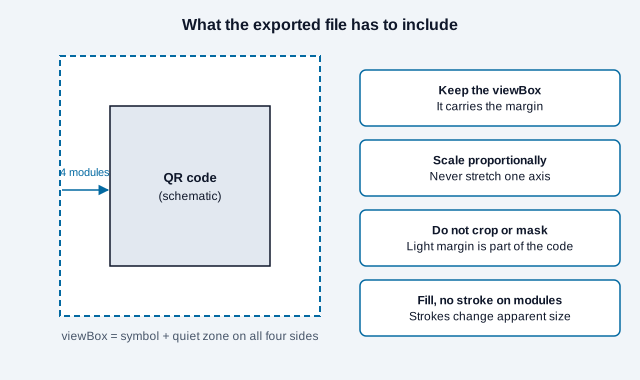
Edit document-level properties, not the encoded grid. Changing overall size or a well-tested foreground color can be safe. Moving modules, rounding them aggressively, deleting “unimportant” squares, stretching one axis, clipping the quiet zone, or tracing the image can break decoding. DENSO WAVE lists distorted modules, too little margin, and text or pictures over the symbol as typical causes of unreadable codes.
Use these handoff rules:
- lock the QR artwork as a single object;
- scale proportionally;
- keep the viewBox and full quiet zone;
- avoid filters, transparency, shadows, and effects on modules;
- do not convert it through an image-trace workflow;
- retest after any color, size, or layout change.
Logos and colors have their own limits, covered in the logo best practices and color design guide.
Does SVG guarantee perfect print quality?
No. The file may be mathematically sharp while the press output suffers from ink spread, registration errors, low contrast, reflective finish, curvature, or insufficient module size. Some print workflows rasterize placed SVG files or handle unsupported features differently.
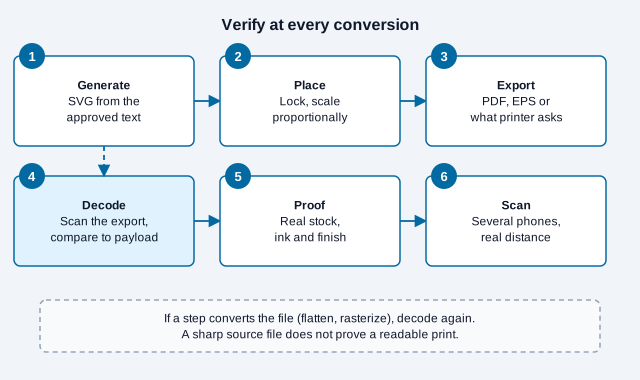
Ask the printer whether native SVG is accepted. PDF/X or EPS may be preferred in some production systems. If the file is converted, inspect the converted proof and scan a physical sample rather than trusting the source file alone. The print proof checklist covers what to check on that sample.
How should colors be handled in SVG?
Use a consistently dark foreground on a light, solid background. Avoid transparency that makes the effective background unpredictable. Screen RGB colors may shift during CMYK conversion, so test the production values and material.
For multi-ink printing, registration differences can create fringes at module edges. A single dark ink is often more robust. Preserve an opaque light panel beneath the code when the surrounding design is dark or photographic.
Should QR modules be separate shapes or one path?
Either representation can render correctly. Many separate rectangles are easy to inspect, while a combined path can reduce markup. What matters is that every module aligns exactly to the intended grid and the renderer does not introduce strokes, gaps, smoothing artifacts, or transforms.
Avoid adding outlines to module shapes because stroke width can expand or shrink their apparent geometry. Use filled shapes aligned to integer module coordinates, and retain a viewBox that includes the entire light margin. W3C describes the viewBox attribute as a convenient way to design an SVG so it scales to fit an arbitrary viewport, which is why it must keep the margin inside it.
Hairline seams are a known annoyance: two adjacent modules drawn as separate shapes can show a thin light line in some renderers because of anti-aliasing at the shared edge. If you see seams in a proof, ask whether the generator can merge adjacent modules into one path, and always check the file in the real print software, not only in a browser.
Is an SVG file safe to upload or embed?
SVG is XML and can contain more than static shapes, including links, external references, animation, or script in some contexts. Treat an SVG from an untrusted source as active content rather than assuming it is equivalent to a PNG.
MDN documents that when an SVG is shown through an img element, browsers disable JavaScript and block external resources. Those limits apply only in image contexts. They do not apply when the file is opened directly or embedded with iframe, object, or embed. That difference explains why a file that looks harmless in a web page can still be a problem when someone opens its URL.
Applications that accept user SVG uploads should sanitize files with a maintained, allow-list-based processor; block scripts and unsafe external resources; and consider rasterizing untrusted input. OWASP’s file upload guidance adds that the content type a client sends is trivial to spoof and should not be your security control, that XML parsers can be attacked (for example with XML bombs), and that uploaded files are better stored outside the web root or on a separate host. Public sanitizer projects commonly strip script elements and event-handler attributes and reject files containing a DOCTYPE declaration. A QR generator’s own download can be intentionally limited to static geometry.
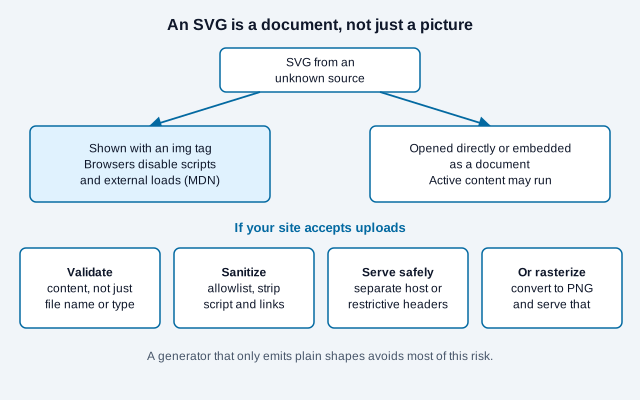
If you are only receiving an SVG QR code from a designer or a vendor, open it with design software or a text editor first. A QR SVG should contain shapes and nothing else. A script tag, a foreignObject, or links to other addresses are reasons to ask where the file came from.
How to inspect a QR SVG before production
- Open the file in a browser and the intended design application.
- Confirm that it decodes to the exact approved payload.
- Check that width and height scale proportionally.
- Verify that the quiet zone is included inside the exported artwork.
- Confirm no clipping mask, effect, or background removes modules.
- Export the final layout to its delivery format and decode again.
- Print a proof with the real process, stock, and finish.
- Test multiple representative phones at realistic distance and lighting. The scannability tester can stress a screen version first.
When is PNG the better choice?
Use PNG when the target software rejects SVG, when the image will remain at one known size, when an inert upload is safer, or when a nontechnical recipient needs a simple drag-and-drop file. Export with enough pixels so modules map cleanly and disable smoothing during QR generation.
Do not repeatedly resave or screenshot a PNG. Keep the original generated asset, and create a new correctly sized export for each major use.
Recommended delivery package
For important print work, supply the original SVG, a tested high-resolution PNG, and a PDF proof showing intended size and placement. Include the destination URL in text, the minimum approved dimensions, color values, and a warning not to crop the quiet zone.
This package helps designers verify appearance while preserving a known-good reference. Any changed payload requires a newly generated code and a fresh test cycle.
How does an SVG code go wrong in production?
Imagine a freelance designer who receives a QR SVG, drops it into a brochure, and tidies the layout by dragging one handle to fit a column. The code is now 6% wider than it is tall. It looks fine on screen and fails on half the phones in the printer’s test. The SVG was sharp. The proportions were wrong. This is an illustration, not a real project, but it is the reason the handoff rules say to lock and scale proportionally and the proof step says to scan before the full run.
Open issues a checklist cannot settle: how your specific printer’s RIP treats placed SVG, whether your color profile shifts the dark ink toward a lower contrast, and what your own site’s upload pipeline does with SVG files. Ask the printer, test a proof, and review the upload code. This is general information, not security or legal advice.
To get a vector file now, open the QR generator, download SVG, and run the inspection list above before sending it on.