A QR Code can use color, but its modules must stay clearly darker than the background across the whole symbol. The safest design is still black on white. For a branded code, use one dark foreground color on a light, solid background, keep the quiet zone clear, and test the finished print.
This guide explains why color affects scanning, why a web contrast ratio is only a screening tool, how to handle dark designs, gradients, transparent materials and print effects, and how to approve a branded code in stages. A worked comparison of color pairs shows how a pair that looks fine can still be weak for some scanners.
What color combinations are safest?
Choose a dark foreground and a light background. Reliable starting combinations include black or very dark navy, green, brown or charcoal modules on white or a very pale neutral.
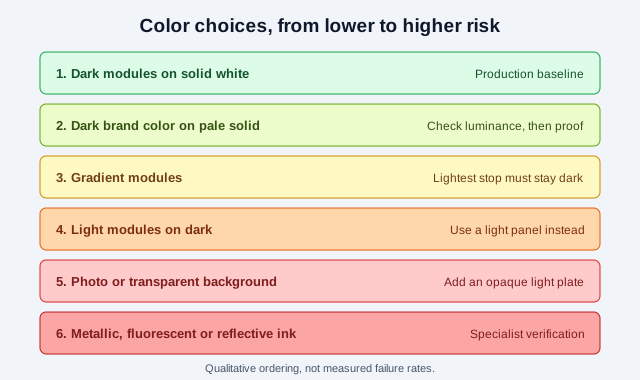
| Design choice | Risk | Safer approach |
|---|---|---|
| Dark modules on solid white | Lowest | Use as the production baseline |
| Dark brand color on pale solid background | Moderate | Check luminance and test printed samples |
| Light modules on dark background | Higher | Place a normal dark-on-light code in a light panel |
| Gradient modules | Higher | Ensure the lightest foreground area remains clearly dark |
| Photo or transparent background | High | Add an opaque, light panel including the quiet zone |
| Metallic, fluorescent or reflective ink | High | Use ordinary high-contrast ink or arrange specialist verification |
Why does color affect scanning?
A reader must tell dark modules from light ones, find the three corner finder patterns, read the timing and alignment information and decode the data grid. If foreground and background reflect similarly in the reader’s effective imaging channel, module edges disappear.
DENSO WAVE’s FAQ explains that QR Code scanners use red light, so if the background and the code both reflect red light, or both absorb it, the code cannot be detected. It gives white background with a red code as an example that cannot be read, says “detailed experimentation is necessary” before using colored codes, and advises printing black on white. Phone cameras use different sensors and image processing from the dedicated scanners that page describes, but they also need stable light-dark separation and clear module edges.
Verification equipment measures this directly. Cognex describes grading 2D symbols on eight parameters under ISO/IEC 15415, and describes symbol contrast as the difference between the darkest and the lightest modules. The search results did not give a QR-specific pass threshold, so this guide does not quote one.
Is there a required QR Code contrast ratio?
The QR Code sources cited here do not define one web-style contrast threshold that covers every scanner and production process. Claims such as “4:1 always works” should not be treated as a conformance guarantee.
A relative-luminance checker is still a useful screen. A larger light-dark difference is generally safer than a smaller one. WCAG defines contrast for web text and meaningful graphics, but those success criteria are accessibility rules for web content, not a QR decoding specification. Passing a WCAG ratio does not prove that a print will scan.
To see why, the table below computes the WCAG 2 contrast ratio for four dark-on-white pairs, and a rough red-channel difference between the foreground and white (0 means identical red value, 255 is the maximum). The red-channel number is a simple proxy from sRGB hex codes, not a measured reflectance.
| Foreground on white | WCAG contrast ratio | Red-channel difference (0 to 255) | Reading |
|---|---|---|---|
| #000000 black | 21.0:1 | 255 | Strong on both measures |
| #0F2A4A navy | 14.5:1 | 240 | Strong on both measures |
| #C00000 dark red | 6.5:1 | 63 | Passes common web thresholds, weak in the red channel |
| #FFC107 amber | 1.6:1 | 0 | Fails on both |
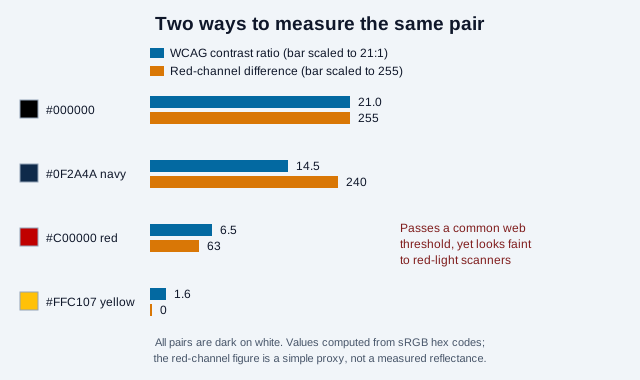
This is one reason DENSO WAVE’s advice to test colored codes matters. Use the contrast checker to reject obviously weak pairs, then validate real output under real conditions, including with the scannability tester.
Can a QR Code be white on black?
Some modern decoders read inverted symbols, but support is not universal enough for critical public material. Vendor guides found in search describe light-on-dark codes as a common cause of scan failure. Inversion can also interact badly with surrounding artwork and automatic detection.
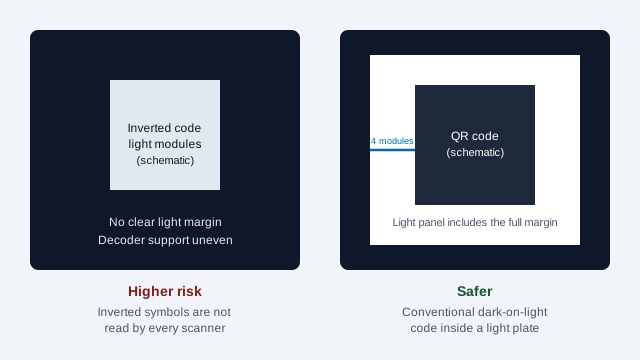
The safer solution for a dark design is a white or very light panel holding a conventional dark code. The panel must include the whole quiet zone and should not stop at the outermost dark module.
Can QR Codes use gradients?
A gradient introduces many foreground values instead of one. The lightest part may approach the background, and print conversion can change the result. Gradients crossing finder patterns are especially risky because those patterns help the reader locate the symbol.
If a gradient is unavoidable:
- keep every part of the foreground substantially darker than the background;
- keep finder, timing and alignment patterns dark and visually intact;
- avoid gradients with transparent stops;
- test after CMYK conversion and final printing;
- keep a plain high-contrast version for critical uses.
What is the quiet zone and what color should it be?
A standard QR Code needs a clear margin four modules wide on all sides, which DENSO WAVE calls the quiet zone. It lets the reader separate the symbol from neighboring text, borders, patterns and images.
The quiet zone should match the light background behind the code and stay free of decoration. A colored border, textured pattern, photograph or text inside it can interfere with detection even when the data modules have good contrast. The QR code frame guide shows how frames can respect the margin.
Can a colored background, photograph or transparent material work?
A uniform pale background may work when it stays clearly lighter than every module. Photographs and patterns vary locally, so one section may erase modules or create false edges.
DENSO WAVE’s FAQ notes that reading a code on transparent material is generally difficult because the white areas do not reflect enough light, that glossy vinyl can interfere, and that bags are often skewed. Its suggested remedies include printing a white background behind the dark areas, printing the code on a label, and flattening the bag. In practice, use an opaque light plate beneath the entire code and quiet zone, and test glare at several viewing angles.
How do printing and materials change color?
- CMYK conversion: screen colors can shift when separated into print inks.
- Ink spread: absorbent stock can enlarge dark modules and close light gaps.
- Registration: building modules from several process inks can create colored fringes if plates misalign.
- Finish: gloss, foil, metallic ink and lamination can cause angle-dependent reflections.
- Substrate: kraft paper, colored plastic, fabric and transparent film change the apparent background.
- Fading: sunlight and abrasion can reduce contrast over the service life of the code.
DENSO WAVE states there is no restriction on the printing method, so offset, gravure and inkjet can all work. A single dark ink can reduce registration risk compared with a mix of process inks, though no source reviewed for this guide tested that claim. Ask the printer for a production proof rather than approving only an on-screen PDF, and see the printing guide and print size guide.
If you need a vector file for a print workflow, the SVG QR code guide explains what it does and does not solve. SVG keeps edges sharp but does not fix a weak color pair.
How should a brand team approve QR Code colors?
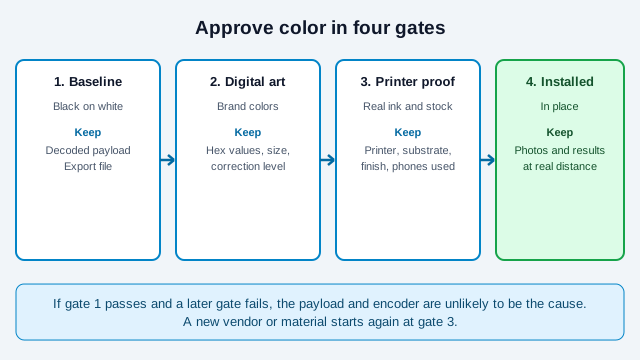
Approve color in stages: a plain black-on-white control, a digital brand-color candidate, a printer proof and a finished installed sample. This makes failures traceable. If the control works but the branded proof does not, the payload and encoder are unlikely to be the cause.
| Approval gate | Evidence to retain | Reject when |
|---|---|---|
| Baseline | Decoded black-on-white export and exact payload | The source payload is wrong or the baseline cannot be decoded. |
| Digital artwork | Color values, symbol version, error-correction level, dimensions and export file | The foreground becomes lighter than part of the background or the quiet zone is altered. |
| Production proof | Printer, ink system, substrate, finish, date and tested devices | Ink spread, registration, glare, transparency or color conversion hides module boundaries. |
| Installed sample | Photographs and results at intended distance, angle and lighting | Placement conditions differ materially from the approved proof or representative phones fail. |
Record these details in the job specification. A reprint from a different vendor or on a different material is a new production condition and needs a fresh proof.
How should a colored QR Code be tested?
- Verify the decoded payload before styling.
- Check that every module is consistently darker than the background.
- Preserve finder patterns and the four-module quiet zone.
- Export at sufficient resolution, or use SVG where the print workflow supports it.
- Produce a proof with the actual printer, ink, material and finish.
- Scan with several representative iPhone and Android devices.
- Test at the expected distance, angle and lighting, including glare.
- Test after folding, curving, laminating or mounting if that applies.
- Confirm that the destination is correct, safe and mobile-friendly.
- Retest whenever color, size, payload, vendor or material changes.
If a test fails, the QR code not scanning guide helps you find the layer at fault. Branded codes with logos have extra rules in the logo best-practice guide.
What goes wrong when a brand color is approved on screen only?
Consider a coffee roaster whose brand color is a mid-tone orange. The designer approves a QR Code in that color on a laptop, and 2,000 bag labels are printed on kraft-colored stock. At the roastery the code scans on one phone out of four. The orange is only slightly darker than the kraft paper, and the matte ink spreads into the pale gaps.
A baseline test and a one-label proof would have shown the weakness before the run. The fix would be a dark brown or black code on a white label panel, with the orange kept for the surrounding artwork. Color identity can live around the code instead of inside it.
Is a scannable code the same as an accessible one?
A scannable symbol is not automatically an accessible experience. Add a readable label saying what the code does and provide a short URL or another route when practical. Do not communicate purpose through color alone. The destination page should support keyboard access, zoom, screen readers and clear error handling. The QR code accessibility guide covers this in detail.
Create a branded code with the QR code generator with logo and color options, then compare it with a black-on-white version before release.
What can a color guide not settle?
- Which exact brand colors pass on your printer and stock. Only a proof answers that.
- Whether your audience uses dedicated scanners with red illumination, which care more about red-channel contrast, or only phone cameras.
- How long a printed color will hold up outdoors. Fading depends on ink, coating and exposure, and no figure was verified for this guide.
- Whether a given ISO/IEC 15415 grade is required. Check with your customer, retailer or standards body.
This is general design guidance. Packaging, retail and industrial labeling may carry additional rules, so check your local requirements.
References
- DENSO WAVE: printing colors and transparent materials (FAQ)
- DENSO WAVE: code area and quiet zone
- W3C: Web Content Accessibility Guidelines 2.2
- Cognex: ISO/IEC 15415 2D barcode verification (vendor)
- Keyence: ISO/IEC verification items and their meanings (vendor)
- GS1: 2D barcode creation and printing playbook
- QR Tiger: 25 reasons your QR code is not working (vendor guide)