A QR code frame is the border, label and call to action printed around a QR code, such as a box that says "Scan to order" under a table-tent code. The frame does nothing for the camera. It works on the person, telling them what the code is for before they decide whether to lift their phone. It only pays off if the code inside still scans, and that comes down to one rule frames tend to break: a light margin around the code. Below we cover what to write on a scan me QR code frame, which frame styles suit which jobs (with examples from our own collection), and what we found when we ran all 61 of our frame templates through a decoder.
- What is a QR code frame?
- Does a frame make people scan more?
- What should a scan me QR code frame say?
- Which frame style fits your use?
- Can a frame stop a QR code from scanning?
- Design rules for a framed QR code that scans
- How do you add a frame to a QR code?
- How should you test a framed code before printing?
What is a QR code frame?
A QR code frame is everything you add around the code itself: an outline, a colored card, a speech bubble, a ticket shape, and usually a short line of text. The code in the middle stays a normal grid of black and white squares (modules). The frame sits outside it.
The search term "QR scanner frame" means two different things, so it's worth separating them:
- The frame printed around your code. That's what this guide is about. Designers also call it a QR code scanner frame, a CTA frame or a "scan me" frame.
- The viewfinder box in a scanner. When you open a mobile QR scanner or a QR scanner app, it often draws a square or four corner marks on screen to show where to aim. That's part of the app, not something you design. If that's what you're after, our guide on how to scan a QR code covers it, and our online QR code scanner reads codes from your camera or an image.
A good printed frame answers three things at a glance: what this is, why it's worth scanning, and what opens when you do.
Does a frame make people scan more?
A frame helps people notice the code and trust it. It doesn't help the phone read it. A camera decodes the modules, the three corner squares and the blank margin; it ignores your border and your slogan. So any gain from a frame comes from human behavior, not from better decoding.
That human side is real. A bare code on a busy flyer looks like part of the background, and people hesitate to scan something when they can't tell where it leads. A frame that reads "Scan for the wine list" turns the code into an obvious next step and sets an expectation the landing page can meet.
Be wary of precise numbers here. Several QR code vendors publish figures for how much a frame lifts scans, but none we found explains how the number was measured, what it was compared against, or how many codes were tested. Treat those as marketing claims. The honest way to know what a frame does for your audience is to run two versions and compare scans, which needs a dynamic QR code with scan tracking.
What should a scan me QR code frame say?
"Scan me" beats no label, but it only says how to use the code. It doesn't say why. The text that works names what the person gets, in a few words, starting with a verb. Most text fields in our frame templates are capped at 15 to 25 characters, which is a useful discipline: if the promise doesn't fit, it's probably too vague.
| Where the code is | Weak label | Better label |
|---|---|---|
| Restaurant table tent | Scan me | Scan to order |
| Business card | QR code | Save my contact |
| Product packaging | Learn more | Recipes inside |
| Event poster | Scan here | Scan to RSVP |
| Shop counter | Follow us | Scan for 10% off |
| Hotel room card | Wi-Fi | Scan to join Wi-Fi |
| Checkout or receipt | Feedback | Rate your visit |
Two more things to get right:
- Keep the promise exact. If the frame says "Scan for 10% off", the scan should open the offer, not the homepage. A mismatch teaches people that your codes aren't worth scanning next time.
- Add a second line only when it removes doubt. A small subline such as "Opens our menu, no app needed" or the destination domain helps people who are cautious about QR scams. Our guide to checking whether a QR code is safe explains why people look for that.
Which frame style fits your use?
Our generator has 61 frame templates in 20 categories, from plain borders to boarding passes. They fall into three broad groups.
Basic "scan me" frames are an outline, a bubble or a card with one line of text. They suit business cards, invoices, manuals, office signs and anywhere the design around the code is already busy. They add the least visual weight and are the hardest to get wrong.
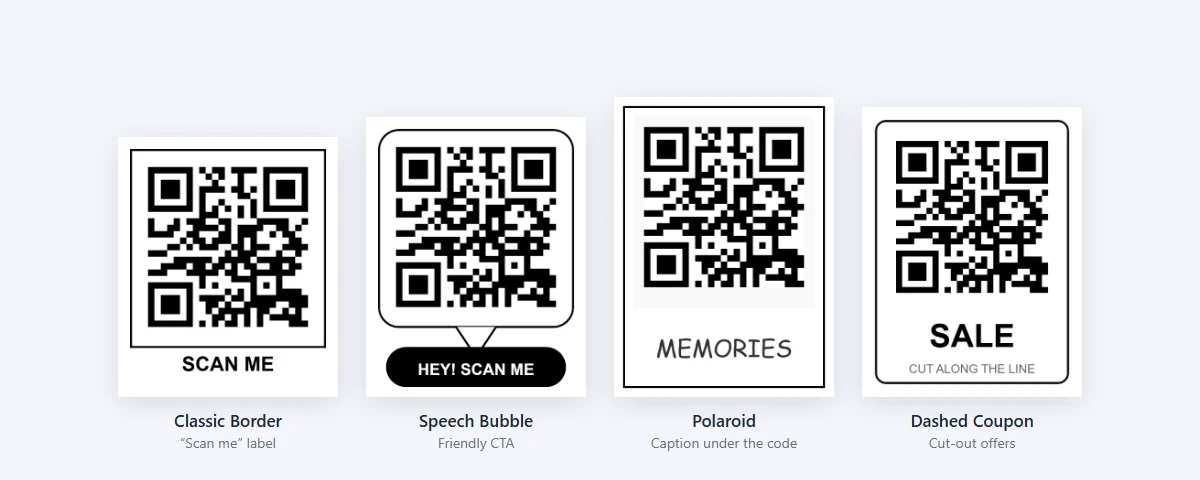
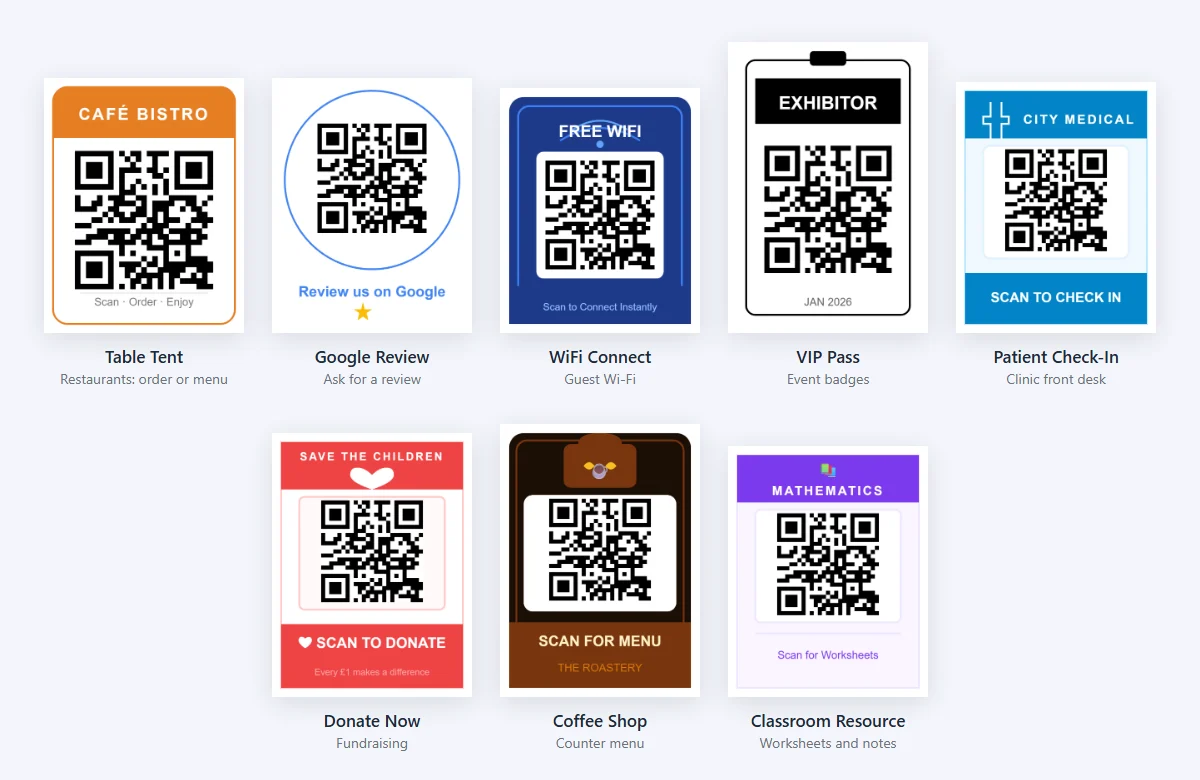
Use-case frames carry the context for you: a table tent for a café, a "Review us on Google" ring, a Wi-Fi card for a hotel room, a lanyard badge for an event. They make sense when the frame is the whole printed piece, such as a counter card or a sticker, rather than a small part of a larger design.
Promotional frames (vouchers, sale tags, offer bursts, gift cards) are built to grab attention on retail displays and flyers. They're also the riskiest group, because bold colored backgrounds can crowd the code. More on that in the next section.
| Job | Frame types in our collection | Label ideas |
|---|---|---|
| Restaurants and cafés | Table Tent, Menu Board, Order & Delivery, Coffee Shop, Bar & Pub | Scan for menu, Scan to order |
| Retail and offers | Modern Voucher, Dashed Coupon, Sale Tag, Price Tag, Gift Card | Scan for 10% off, Redeem here |
| Reviews and social | Google Review, Trustpilot Review, Instagram Post, LinkedIn Profile, TikTok Profile | Review us on Google, Follow us |
| Events | VIP Pass, Concert Ticket, Premium Ticket, Wedding Invite | Scan to RSVP, Your ticket |
| Hotels and venues | WiFi Connect, Hotel WiFi Card, Virtual Tour | Scan to join Wi-Fi |
| Business | Minimal Business, Corporate, Real Estate Agent, Clipboard | Save my contact, View listing |
| Healthcare and education | Patient Check-In, Rx Info, Classroom Resource, Campus Tour | Scan to check in, Worksheets |
| Apps, audio and video | App Download, Google Play, Watch Video, Listen Now, Episode Drop | Get the app, Watch now |
| Packaging | Product Info, Eco / Sustainability | Care tips, How to recycle |
Seasonal frames (holiday artwork, snowflakes, hearts) follow the same rules as any other: decoration lives outside the code's margin, never inside it.
Can a frame stop a QR code from scanning?
Yes, and in a predictable way. We rendered every one of our 61 frame templates with the same test code (a short URL at error correction level M), placed exactly where the generator places it, then tried to decode each result with jsQR, an open-source QR decoder, at five widths from 120 to 600 pixels.
- 49 of 61 frames decoded at every size.
- 9 frames never decoded at any size. All 9 had the same feature: a dark panel running right up to the edge of the code, so there was no light margin at all between the code and the frame.
- 3 more frames missed at one or two of the smaller sizes but decoded at 300 and 600 pixels. At those tiny sizes a module is only a few pixels wide and borderline results are expected.
We then gave the 9 failing frames a white margin four modules wide around the code, inside the same space. All 9 decoded at 300 and 600 pixels, and 8 of them decoded at every size we tested. Nothing else about the frame changed: same colors, same text, same layout.
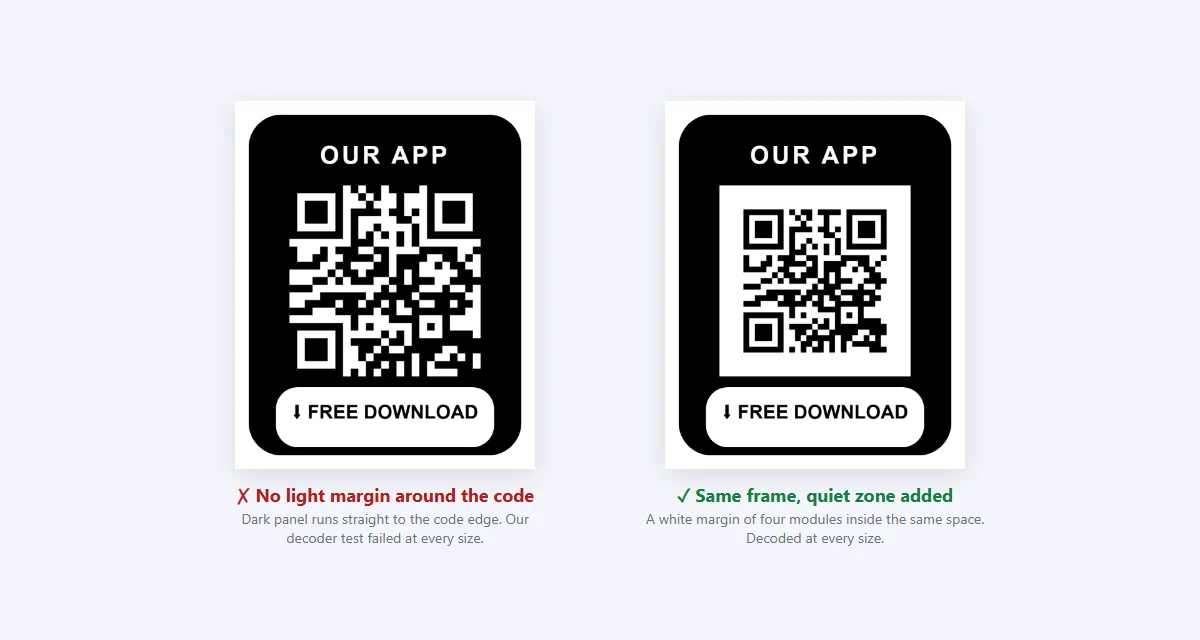
The reason is the quiet zone. A scanner finds a QR code by spotting its three corner squares against a light background. ISO/IEC 18004, the QR code standard, calls for a blank margin at least four modules wide on every side. When a dark frame touches the code, the corner squares merge into the frame and the scanner can't tell where the code starts.
One caveat on our test: it used a single decoder. Phone camera apps use their own decoders, and some will read a code with a thin or missing margin when the light is good. That's not something to rely on. People scan at angles, in dim light and with older phones, and a code that only works on a good phone in good light will fail for some of your audience. Light frames with white space around the code passed comfortably, which matches the standard's advice.
What we changed in our generator
Those 9 failures were our own templates, so we fixed them. The generator now measures how much light space a frame leaves around the code. If it's less than four modules, it draws a white box in the code's spot and shrinks the code inside it until the margin reaches four modules. The test also showed that most of the other templates left less than four modules, some with the code touching the border, so they get the same treatment. Their colors, text and layout are unchanged, and the code is just a little smaller inside the frame. The 5 templates that already had a full margin look exactly as they did. The check runs every time a frame is drawn, so it also covers a frame you've recolored or a code you've moved.
We then ran the test again on all 61 templates, this time with the generator's default code style (rounded modules, error correction level Q) at 150, 300 and 600 pixels wide:
- Before the fix: 47 frames decoded at every size, 9 never decoded and 5 missed at one size.
- After the fix: no frame failed at every size. All 61 decoded at 300 pixels, 56 decoded at all three sizes, and the other 5 missed at a single size (150 or 600 pixels).
- With a longer, denser URL (37 modules across instead of 25), all 61 still decoded at 300 pixels and none failed outright.
Design rules for a framed QR code that scans
- Keep a light margin around the code. Aim for four modules of blank space on every side, between the code and any border, text or artwork. On a dark frame, put the code on a white or very light panel with that margin built in.
- Use dark modules on a light background. Most phones read dark-on-light best. If your brand color is mid-tone or light, use it for the frame and keep the code itself dark. Our QR code color guide and contrast checker help you pick safe pairs.
- Keep text outside the code. The label belongs on the frame, above or below the code, never across the modules.
- Don't put patterns or photos right behind the code. Textures and gradients near the margin confuse detection the same way a dark border does.
- Size for the scan distance, not the frame. The frame adds width but no readability. Size the code itself for how far away people will be; our print size guide has the distance rule and a table.
- Watch logos and frames together. A center logo already uses up some error correction. If you add a logo as well as a busy frame, test more carefully, and see our logo best practices.
- Mind the finish and the surface. Gloss lamination, curved bottles and fabric all add glare or distortion that a flat screen proof won't show. The printing guide covers paper, ink and proofing.
How do you add a frame to a QR code?
In the QuickQRC generator, the frame is part of the design step:
- Open the QR code generator, pick your QR type (website, Wi-Fi, vCard and so on) and enter the content.
- In the design step, open the Frame tab. Filter by Basic, Social, Discount, CTA, Event or Review, or scroll through All to see every template.
- Click a frame. Its text fields appear under Customize Frame, where you can rewrite each label and change its color, font and alignment.
- Use Master Color to recolor the frame's borders and shapes to match your brand in one go.
- If the layout needs it, adjust the code's position and size with the sliders. If you enlarge the code, keep a light gap between it and the frame edge.
- Download the result and test it (next section). Discard Frame removes the frame without touching your code.
For printed pieces that will be around for months, make the code dynamic. With a dynamic QR code generator the printed code points to a short link you can redirect later, so a frame that says "Scan for this week's specials" keeps telling the truth after the specials change.
How should you test a framed code before printing?
Test the finished artwork, frame included, not the bare code you exported first.
- Scan with more than one phone. Use the built-in camera on an iPhone and an Android phone, plus a separate QR scanner app if your audience is likely to use one.
- Scan in realistic conditions. Try from the distance people will actually stand, at an angle, in dim light and under bright overhead light. Print a proof on the real material if you can.
- Stress-test the file. Our QR scannability tester applies blur, low light, glare and damage to your image and reports which conditions still read. The QR code validator checks the decoded content.
- Preview it in place. The QR mockup placer lets you drop the framed code onto a photo of a poster, menu or package to check that it stands out at the size you plan.
- Follow the scan through. Check that the page opens quickly on mobile and delivers exactly what the frame promised. If scans are low after launch, our QR code not scanning checklist covers the usual causes.
Test figures on this page come from our own decoder run against the 61 frame templates in the QuickQRC generator in October 2026, before and after we added the automatic quiet zone. We'll update the numbers if the templates change. Questions or a frame that won't scan? Tell us through the contact page.