If a QR code is not scanning, first work out where the journey stops: camera detection, decoding, the phone action or the destination page. That one observation tells you whether to fix the artwork, the lighting, the encoded text or the website. Do not reprint a batch until the digital file, a physical proof and the destination have been tested separately.
This guide gives you a symptom table to find the failing layer, then covers each layer in turn: detection and decoding faults in the artwork, why one phone behaves differently from another, payload and handler problems, destination errors, screen-specific problems and a test sequence to run before any print order. It closes with the questions a checklist cannot answer.
How do you isolate a QR code failure?
Test the same payload in controlled stages and record the first stage that fails. A camera preview, decoded text, browser response and completed task each prove something different, so a code can pass one and fail the next.
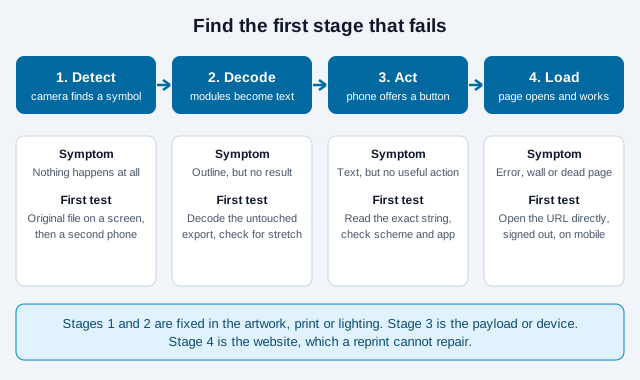
| Observed symptom | Likely layer | Next test |
|---|---|---|
| No outline, banner, link or vibration appears | Detection, camera, lighting or print | Test the original file on a screen and try a second phone. |
| The scanner recognizes a symbol but reports no result | Decode, or a damaged symbol | Decode the unmodified export and inspect overlays, distortion and resolution. |
| Text appears but no app or useful button opens | Payload format or device handler | Inspect the exact decoded string and test the intended app on another device. |
| A URL appears, but the page errors or asks for access | Destination, network, permissions or redirect | Open the decoded URL in a browser and check the response. |
| The page opens, but the user cannot finish | Mobile UX, accessibility, sign-in or application logic | Complete the task on a representative phone while signed out. |
If only one phone fails, inspect that device before redesigning the code. If every phone fails on the print but succeeds on the source file, suspect production or placement. Keep a note of which phone, scanner path and lighting you used each time, because the pattern across tests is the evidence.
Why can’t the camera detect the QR code?
Detection fails when the camera cannot separate the square modules and the three corner patterns from their surroundings. DENSO WAVE, the inventor of the code, lists non-standard or indistinct printing, distorted modules, text or pictures that crowd the margin and text or pictures that overlap the code as typical causes.
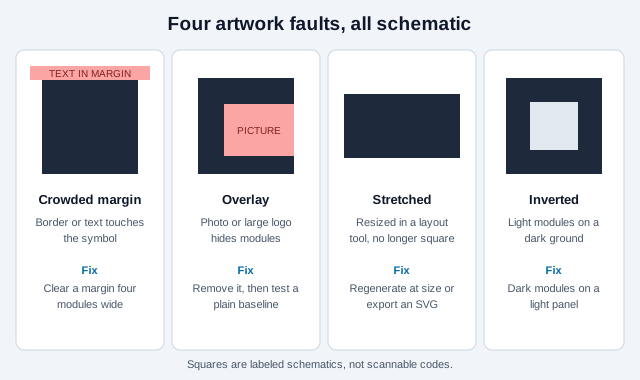
- Restore the quiet zone. The specification calls for a clear margin four modules wide on every side. Remove borders, text, photos and neighboring graphics from that area.
- Use dependable light-dark separation. Dark modules on a light panel is the safest diagnostic design. Some scanners read light-on-dark codes, but vendor guides advise against relying on it, so put the code on a light panel when the surroundings are dark.
- Move, then refocus. Back away if the phone is inside its minimum focus distance. Move closer if the code fills too little of the frame. Wipe the lens, which vendor troubleshooting guides name as a frequent cause, and hold still.
- Change the light angle. Tilt the phone or the sample to move glare off the corner patterns. Matte stock and a matte laminate reduce reflections.
- Check the size. A common vendor rule of thumb is to make the code about one tenth of the expected scanning distance. Treat it as a starting point that a physical proof must confirm, not as a guarantee.
Use the contrast checker for digital colors, the print size guide to plan module size and distance, and the QR color guide for branded palettes.
Why is the QR code detected but not decoded?
Decode failure means the scanner sees a QR-like structure but cannot rebuild a valid payload. Distorted modules, resampling, a large overlay, damage, ink spread or non-standard styling can exceed what the decoder and the error-correction data can recover.
DENSO WAVE warns that resizing in an image editor distorts the modules. Avoid dragging a raster image to arbitrary dimensions in a layout application, and regenerate at the required size or use an SVG export that keeps square geometry. Rounded modules, gradients and heavy logos are also common triggers, so strip them and test a plain baseline first.
- Verify the export has not been cropped, stretched, blurred, recompressed or given rounded corners.
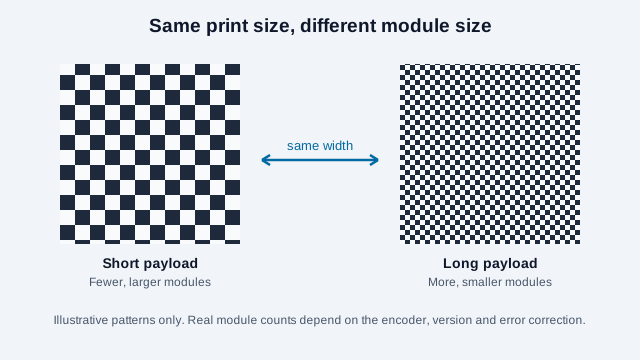
- Shorten an unnecessarily long URL so the encoder produces a less dense symbol. The data capacity guide explains how payload length drives version and module size.
- Increase physical size instead of assuming a higher correction level will make up for a large overlay.
- Read the error-correction guide: the published L, M, Q and H percentages are approximate codeword restoration rates, not safe logo-area limits.
- If you add a logo, follow the logo best-practice guide and test again.
Why does a code scan on one phone but not another?
Scanner behavior differs by operating system, model, app and settings, so a single passing phone proves little. Apple documents two routes on iPhone and iPad: point the Camera app at the code and tap the link that appears, or add the Scan Code control to Control Center and open it from there.
Android varies more. Search summaries of consumer guides say the stock camera on Android 9 and later often detects codes automatically, that some manufacturers switch this off by default, and that Google Lens or Google Photos can decode a code from the camera or a saved image. For Pixel phones, one guide reports that “Camera scan suggestions” must be enabled for the camera to offer a QR result. User reports from 2023 and later describe a blank Quick Settings scanner on some Pixel models and scanning problems after an Android 15 update. These come from news articles and support threads, not official documentation, so check your own device’s current behavior before telling anyone to change settings.
- Test at least one recent iPhone, one recent Android phone and one older phone.
- Try the live camera, a second scanner path (Control Center, Lens or a saved photo) and a dedicated scanner such as the online QR scanner.
- Check whether the failing phone is a managed work device, since policies can restrict apps or links.
- Print a readable URL beside the code so an unsupported phone does not strand the user.
Why does a decoded QR payload show no useful action?
A valid decoded string may still lack a compatible or permitted handler on that device. Website URLs, Wi-Fi settings, contacts, email, telephone, SMS, payments and app-specific deep links do not behave the same way across operating systems and installed apps.
Inspect the exact string with the payload decoder. Check spelling, delimiters, escaping, country codes, email addresses, network security type and the required scheme. A scanner showing plain text may be correct if the payload is plain text, and a proprietary deep link may do nothing when its app is absent. If the code is meant to join a network, compare it with a fresh code from the Wi-Fi QR generator.
Test the saved-image route separately from the live camera. Some devices expose different controls in Photos, Lens, a quick-settings scanner and the camera viewfinder. Provide a readable alternative whenever the action matters.
Why does a QR link fail after scanning?
If the browser receives a URL, the code has decoded. A 404, certificate warning, sign-in wall, disabled redirect or network timeout is a destination problem, so preserve the printed payload and repair the web path when you control it.
| Browser result | What to check | Possible remedy |
|---|---|---|
| 404 or missing page | Path, capitalization, migration, deletion and query string | Restore the page or create a deliberate redirect from the printed URL. |
| Certificate or unsafe-site warning | Certificate validity, hostname coverage, redirect chain and compromise | Have the site owner fix the HTTPS configuration. Do not tell users to bypass the warning. |
| Access denied or sign-in required | Audience, sharing policy, account tenant and link permissions | Use an approved public destination or state the sign-in requirement on the sign. |
| Dynamic service notice or disabled link | Account status, scan limits, billing, provider policy and redirect ownership | Restore the managed route if appropriate. Printed third-party URLs cannot be changed in the ink. |
| Desktop-only or broken mobile page | Viewport, consent layer, app requirement, scripts and form controls | Repair and test the complete mobile task, not only the landing response. |
A static URL symbol has no built-in expiration, but its page and domain can fail. A dynamic link can keep working after cancellation or be disabled, depending on the provider. Document who owns each redirect, and see do QR codes expire and the static versus dynamic comparison for the trade-offs.
If a browser or phone warns that a scanned page looks unsafe, treat the warning as real until proven otherwise and read how to check QR code safety.
Why won’t a QR code scan from a screen?
Screen brightness, reflections, scaling, animation, low resolution and scanning from the same phone that displays the code can all interfere. Raise brightness, pause motion, remove overlays and display the symbol at a larger, whole-number scale where possible.
If the code is on the same phone, use the operating system’s photo or image-recognition route instead of pointing the camera at itself. Keep an ordinary tappable link beside QR images in websites, emails and PDFs so a second device is never mandatory.
How do you test a QR code before printing thousands?
Validate the payload, artwork, physical proof, placement, destination and complete task in that order. A simulator can expose weaknesses, but it cannot reproduce every printer, coating, fold, camera, network or user.
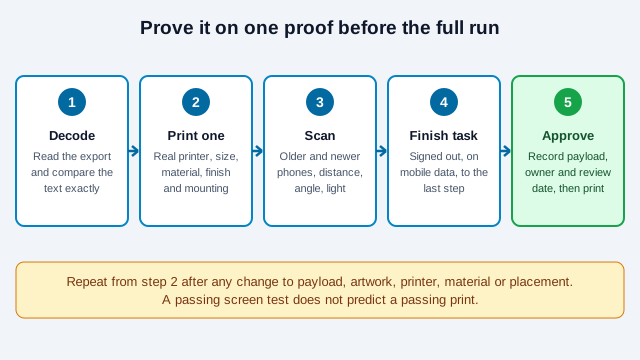
- Decode the final digital export and compare the payload character for character with the approved source.
- Run the artwork through the QR Code Validator and the scannability tester as screening checks, not production guarantees.
- Produce one proof with the actual printer, size, colors, material, finish, cutting and mounting method.
- Test several current and older phones using normal user scanning paths.
- Test expected distance, angle, lighting, glare, curvature, folds and motion.
- Open the destination signed out, on mobile data, and complete the intended action.
- Verify the readable fallback and record the payload, owner, location and review date.
- Repeat acceptance testing after any change to payload, artwork, printer, material, finish or placement.
What does a typical failure look like?
Imagine a community group that prints 500 flyers with a code in a decorative frame, stretched slightly to fit the layout. On the designer’s laptop it scans. On the printed flyer, two of five test phones read it and the rest show nothing. The group blames the printer and reprints on glossy stock, which adds glare. The second batch fails on more phones.
The cause was upstream. The stretch distorted the modules, the frame ran into the quiet zone, and the long tracking URL made the symbol dense. A regenerated square export with a clear margin, a shorter URL and matte stock would have passed a one-sheet proof. The diagnosis table above would have pointed at stage 1 or 2 within a minute.
What can’t a troubleshooting list settle?
- Which scanner paths your audience uses. Phone models, OS versions and enterprise policies vary, so test the devices your users carry.
- How much damage a worn or sun-faded code tolerates. It depends on size, correction level and where the damage falls, and only a test of the actual sample answers it.
- Whether inverted or heavily styled codes work for your audience. Support is uneven, and the sources reviewed do not give a reliable pass rate.
- Who will keep the destination alive. A printed code outlives the staff member who set it up, so name an owner and a review date.
This guide is general troubleshooting advice. Device menus and behavior change with software updates, so confirm settings on current versions.
References
- ISO/IEC 18004:2024, QR code bar code symbology specification
- DENSO WAVE: Examples of problems encountered in reading a code
- DENSO WAVE: Point for determining the code area
- Apple Support: Scan a QR code with iPhone or iPad
- 9to5Google: Google Pixel QR code scanner report (2023)
- Google Pixel Community: QR scanning after the Android 15 update (user thread)
- QR Tiger: 25 reasons your QR code is not working (vendor guide)
- Flowcode: Why your QR code is not working (vendor guide)