QR Code error correction adds redundant data so a decoder can recover information when part of the symbol is dirty or damaged. Standard QR Code offers four levels: L, M, Q, and H. DENSO WAVE describes their approximate restoration capabilities as 7%, 15%, 25%, and 30% of total codewords, respectively.
Higher is not automatically better. More correction data reduces payload capacity and can force a larger, denser version. Choose a level for the real environment, then test the finished code rather than treating the percentages as a guarantee.
What do Levels L, M, Q, and H mean?
| Level | Approximate restoration | Typical decision |
|---|---|---|
| L | About 7% of codewords | Maximum capacity in a clean, controlled use |
| M | About 15% | Common general-purpose balance |
| Q | About 25% | Greater exposure to dirt or damage |
| H | About 30% | Highest standardized redundancy or carefully tested logo use |
DENSO WAVE notes that Level M is most frequently selected and suggests considering Q or H for environments such as factories where symbols may become dirty. These are design inputs, not universal prescriptions.
How does QR error correction work?
QR Code uses Reed–Solomon error-correction codewords derived from the original data. The decoder uses that redundancy to reconstruct missing or incorrect codewords within its available correction capability.
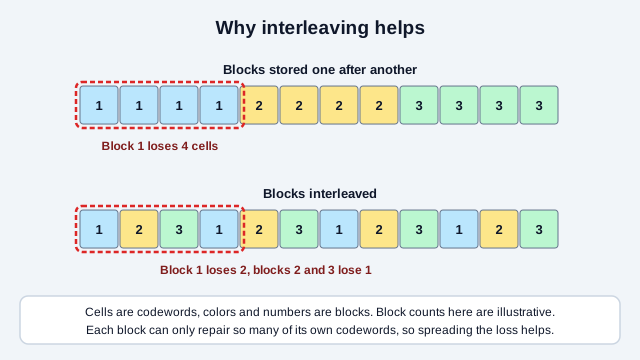
In more detail: the data and error-correction codewords are 8-bit values treated as elements of the finite field GF(28), built on the primitive polynomial x8 + x4 + x3 + x2 + 1. The encoder divides the data polynomial by a generator polynomial to produce the parity codewords, which are then interleaved across the symbol so that a single physical smudge damages several blocks a little rather than one block completely. On the way back, the decoder computes syndromes and locates and corrects errors (for example with the Berlekamp–Massey algorithm). Within one Reed–Solomon block it can fully recover the data as long as 2e + t ≤ d − 1, where e is the number of unknown errors, t the number of known erasures, and d − 1 the number of parity codewords in that block.
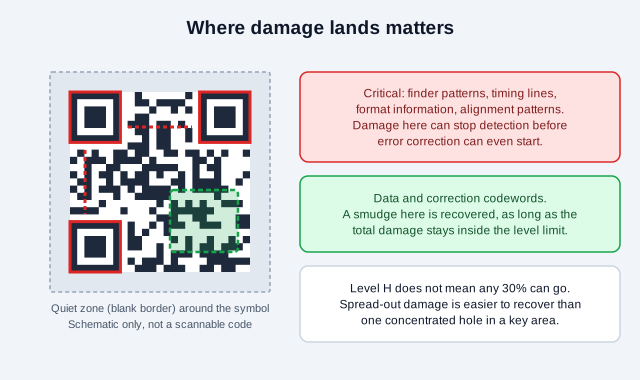
The symbol also contains functional patterns used to locate, orient, time, and interpret it. Damage to a visually small but critical region (a finder pattern, timing pattern, or the format information) can stop detection entirely, before any payload recovery is possible. Damage distribution matters too: a cleanly missing area, scattered defects, blur, glare, and geometric distortion do not behave identically.
This is why “Level H survives 30% damage” is an unsafe production rule. The published percentage is an approximate codeword restoration capability across the whole symbol, not permission to erase any chosen 30% of the image, and it does nothing for damage that lands on a functional pattern.
Interleaving is the reason scattered or compact smudges are easier to survive than they look. The data is cut into blocks, each with its own correction codewords, and the codewords are stored alternately across blocks. A coffee ring that covers four neighboring codewords therefore costs several blocks one or two codewords each, instead of destroying one block outright.
What is the trade-off when correction increases?
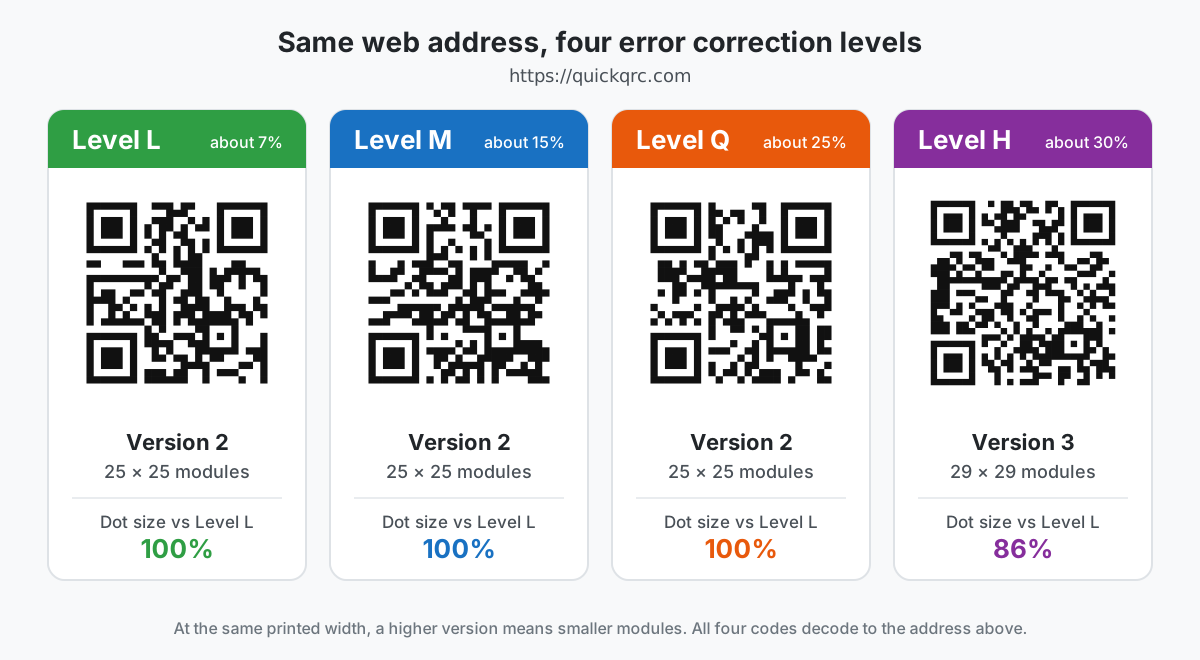
Higher error correction consumes more of the symbol's available codewords. With the same payload, the encoder may need a higher QR version. If the physical print size does not also increase, every module becomes smaller.
Smaller modules may be harder for a camera to resolve at the intended distance (the print-size guide shows how to work out module width for a given print). The extra redundancy can therefore be offset by a denser print. A good design balances payload length, correction level, symbol version, physical dimensions, surface, and viewing conditions.
A worked capacity example
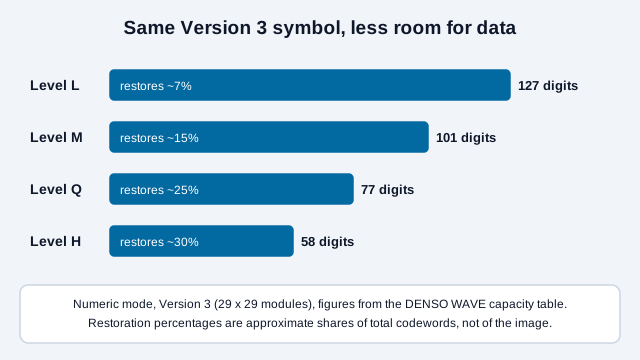
DENSO WAVE's capacity table shows the trade-off with a fixed Version 3 symbol. In numeric mode, Version 3 holds up to 127 digits at Level L, 101 at M, 77 at Q, and 58 at H. The outside dimensions remain 29 by 29 modules, but a higher level allocates more capacity to correction and less to the payload.
If a 90-digit payload fits Version 3-M but not Version 3-Q, selecting Q requires either a higher version or a shorter payload. At the same printed width, moving to a higher version makes each module smaller. That is why raising correction without checking the resulting version can make a marginal print harder, not easier, to resolve.
Which level should you choose?
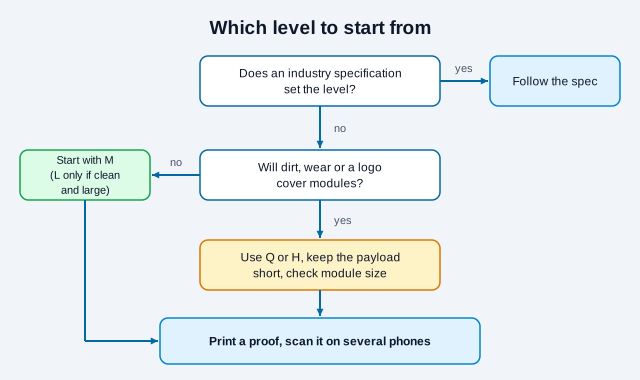
- Use M as a sensible starting point for ordinary, clean print and screen uses when no special requirement applies.
- Consider Q or H for labels exposed to dirt, wear, or partial obstruction, provided the resulting modules remain large enough.
- Consider L only when capacity is important and the symbol will remain large, clean, high contrast, and carefully controlled.
- Follow an applicable industry specification when a supply-chain, payment, healthcare, or other regulated system defines the carrier and quality requirements.
The correct final choice comes from verification in the intended environment. A screen-only code in a controlled interface has different risks from a shipping label, outdoor sign, product package, or curved bottle.
| Question | If yes | Design response |
|---|---|---|
| Will the symbol stay clean and large? | L or M may preserve useful capacity | Confirm the actual payload, version, and module size. |
| Will dirt or wear obscure modules? | Consider Q or H | Also improve material, protection, placement, and replacement cadence. |
| Will artwork deliberately cover modules? | Start by testing H | Reduce the overlay, avoid functional patterns, and test every output. |
| Does an industry application specification apply? | Follow its required level and quality grade | Do not substitute a generator default or this general guide. |
One practical way to get higher correction without a bigger symbol is a shorter payload. A dynamic QR code encodes a short redirect address instead of the final long URL, so even Level Q or H can stay at a low version with large modules. A static code that carries a full address with tracking parameters needs a higher version at the same level. The character limit guide shows how much each version holds.
What level should a QR code with a logo use?
Level H provides the most redundancy, but it does not make every logo overlay safe. A centered logo intentionally destroys modules. It can also hide alignment patterns, format information, or too much data in one concentrated area.
- Keep the payload short so the symbol does not become unnecessarily dense.
- Start with a high correction level when deliberate obstruction is unavoidable.
- Keep the logo modest and away from the three large finder patterns.
- Do not crop the quiet zone or recolor modules to low contrast.
- Export at adequate resolution or use a vector format for print.
- Test the exact final artwork after printing, not only the generator preview.
Research on artistic codes shows a similar pattern. In one paper on diffusion-generated QR art (DiffQRCoder), the authors reported scanning success of 96% at Level L and 100% at M, Q and H for their own method and test set. That result comes from one paper's own samples and promises nothing for your artwork. It does fit the practical advice: when a design will disturb modules, do not start at L. The AI QR art reliability guide covers how to test such designs.
A decorative white plate behind the logo creates a predictable obstruction but still removes code data. The only dependable acceptance criterion is successful, repeated scanning across representative devices and conditions.
What error correction cannot fix
Error correction repairs encoded symbol data within limits. It cannot fix:
- a deleted page, expired domain, or disabled redirect;
- a malicious or incorrect destination encoded from the start;
- severe blur, glare, low contrast, stretching, or perspective distortion;
- a missing quiet zone that prevents reliable symbol detection;
- a symbol printed too small for the scanning distance;
- damage beyond the decoder's recoverable amount or concentrated on critical patterns.
If a code fails, first determine whether the scanner detects it at all. Then inspect contrast, quiet zone, module size, focus, surface, and encoded destination separately.
Damage, dirt, and poor reproduction are different problems
A scratch or missing printed patch changes some modules. Dirt may cover modules temporarily. Blur and ink spread can make module boundaries merge across the entire symbol, while glare can remove contrast differently as the camera moves. Error correction may help with some incorrect codewords, but it does not replace adequate optical quality.
For outdoor or industrial labels, design for the full lifecycle: abrasion, cleaning chemicals, fading, condensation, curved surfaces, and replacement procedures. Increasing the correction level is only one control. A larger symbol, shorter payload, protective placement, suitable material, and routine inspection may produce a more reliable result.
What does a common mistake look like in practice?
Take a small bakery that prints 500 window stickers. The owner adds a large logo to the middle of the code, leaves the generator at Level L to keep the pattern simple, and tests only the on-screen preview. On the finished stickers the logo hides a block of modules, rain spots add a few more defects, and some phones need several tries. Nothing was wrong with the link. The level suited a clean, unobstructed symbol, and the real sticker was neither.
The repair is a short sequence. Regenerate at Q or H, shrink the logo, check how many modules the new symbol has, reprint one sticker at the real size, and scan it on an older phone through the window glass. The QR code not scanning checklist and the logo best practices cover the rest.
Should the generator choose the level automatically?
Automatic defaults are useful for ordinary users, but the generator cannot see the final substrate or scanning distance. Record the selected level in production specifications and avoid assuming that two generators with different defaults will produce symbols of identical density. When replacing software, regenerate a proof and repeat acceptance testing.
How to test a production QR code
- Generate the final payload with the intended correction level.
- Place it in the final artwork at the exact production size.
- Produce a proof using the real printer, material, finish, and color process.
- Test several current and older phones using their normal camera apps.
- Test at the expected distance, angle, and lighting.
- Check glare, folds, curves, ink spread, lamination, and expected wear.
- Verify the decoded content and destination, not merely that a notification appears.
- Retest whenever payload, artwork, printer, material, or size changes.
The QR scannability tester applies blur, low light and damage to an image of your code, which is a quick way to compare Level M and Level Q versions of the same artwork before you print. Packaging teams can pair this with the packaging guide and the print production guide. Download print files as vectors from the QR code generator, since SVG keeps module edges sharp at any size.
Some questions no checklist can settle. Decoder behavior differs by phone model and software version, the damage a given label will suffer is unknowable in advance, and an industry application standard may override everything above. If your use is regulated, such as pharmaceutical, food or transport labeling, check the rules that apply where you operate. This guide is general information, not engineering or legal advice.
References
- ISO/IEC 18004:2024, QR code bar code symbology specification
- DENSO WAVE: error-correction feature
- DENSO WAVE: QR Code versions and capacity
- DENSO WAVE: determining the code area
- DiffQRCoder: diffusion-based aesthetic QR code generation (arXiv 2409.06355)
- Reed, I. S., & Solomon, G.: Polynomial Codes Over Certain Finite Fields (1960)