There is no credible universal failure rate for AI-generated QR code art. Scan success depends on the generation method, payload, QR version, error correction, image structure, output size, decoder, camera, print process, lighting, distance, and test protocol. A percentage measured on one model or a handful of examples cannot predict production reliability.
This guide explains why generated art loses the code, what published research actually measured, how to test a design before it goes on paper, and when to skip artistic codes entirely.
Why do AI-generated QR codes fail?
A QR code is a precise grid with finder, timing, alignment, format, error-correction, and data modules. Generative image models optimize visual plausibility, and nothing in an ordinary image model preserves every required cell.
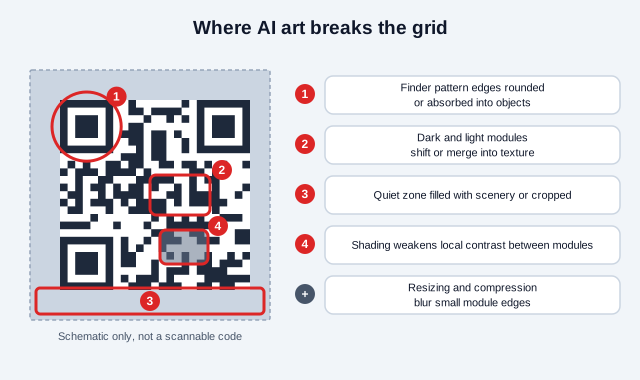
- Finder-pattern edges become rounded, interrupted, or absorbed into objects.
- Dark and light modules shift position or merge into textures.
- The quiet zone is filled with scenery or cropped away.
- Local contrast becomes too weak after color and shading are added.
- Resizing or compression blurs small module boundaries.
- The generated pattern decodes to the wrong payload or nothing at all.
- Damage is concentrated in a critical area rather than distributed within recoverable limits.
Community guides describe the common workflow: a QR code image is fed to a ControlNet model for Stable Diffusion, and the control strength decides how much of the grid survives. One guide reports that only the control weights 1.5 and 1.7 produced scannable results in its single-model test, and that a lower end step for the control makes a code more scannable but less blended into the picture.
Does error correction make QR art safe?
Error correction helps recover some damaged codewords. It is no license to redraw arbitrary parts of the symbol. Levels L, M, Q, and H add increasing redundancy but also reduce payload capacity, and a higher level can force a denser version when the content stays the same. The full trade-off is in the error correction levels guide.
AI modifications may damage functional patterns that the scanner needs before payload correction can even begin. They can also create systematic errors that exceed the assumptions behind a simple "percentage covered" rule. Use high correction as one control, not as proof.
The DiffQRCoder paper tested its own method across levels and reported 96% scanning success at Level L and 100% at M, Q, and H. That is one research system on its own test set. It suggests that starting at L leaves less margin for artwork, and it says nothing about what a prompt-driven generator will do on your payload.
What do the published numbers show?
Researchers do measure scanning success, and their numbers vary widely by tool and setup. Table 1 of the DiffQRCoder paper (arXiv 2409.06355) compared several systems under the authors' protocol and reported a scanning success rate of 90% for QR Code AI Art, 96% for QR Diffusion, 56% for QRBTF, and 99% for the authors' own method. The same paper reports that a ControlNet-only baseline sat near 60% in an ablation and that its method still "sometimes does not guarantee 100% scannability".
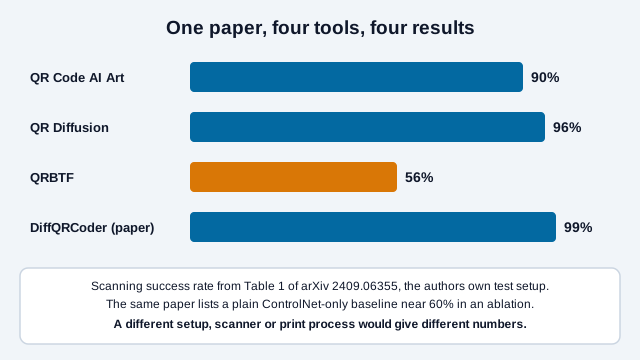
The same paper also found that results shifted with the scanner: its tests reported 97% with an iPhone 13 and 88% with a Pixel 7, and lower success at steeper angles. A figure with no device, angle, or payload attached tells you very little.
What does research do differently?
Scanning-robust aesthetic QR research treats appearance and decoding as competing objectives. ArtCoder introduced sampling simulation and module-based loss functions. Text2QR uses an aesthetic blueprint and latent refinement intended to improve scannability. GladCoder likewise includes a grayscale-aware process.
These papers demonstrate specialized methods and experimental results. They show no universal compatibility across every prompt, payload, printer, or consumer camera. The lesson is that reliable systems measure QR structure during generation and refinement instead of hoping a visually similar image will decode.
Why is "it scanned on my phone" not enough?
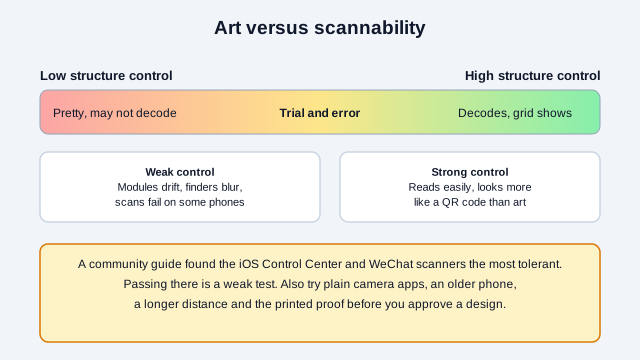
Scanners differ in tolerance. A community guide on AI QR codes found the iOS Control Center scanner and the WeChat scanner to be the most tolerant it tried. A pass on a forgiving scanner is a weak test, because a customer with a strict camera app, an older phone, or poor light may fail a design that passed yours.
How should AI QR reliability be measured?
Measure the complete user scenario with a declared test matrix. "It scanned on my phone" is a useful smoke test but not a production acceptance standard.
| Variable | Examples to test |
|---|---|
| Devices | Representative current and older iPhone and Android models |
| Decoders | Built-in camera apps and any required specialist app |
| Distance and angle | Expected use plus realistic off-axis positions |
| Lighting | Bright, dim, warm, cool, glare, and outdoor conditions |
| Output | Screen, office print, production press, coated and uncoated stock |
| Lifecycle | New, folded, curved, worn, dirty, faded, or laminated |
| Result | Detection time, successful decode, and exact payload match |
Record attempts, not only successful examples. A useful rate states the sample count, devices, conditions, number of repeated scans, and whether failures were excluded during selection. The QR scannability tester can add blur, low light, and damage to an image of your design as a quick first stress pass, and the QR code validator confirms what the code decodes to.
A safer workflow for stylized QR art
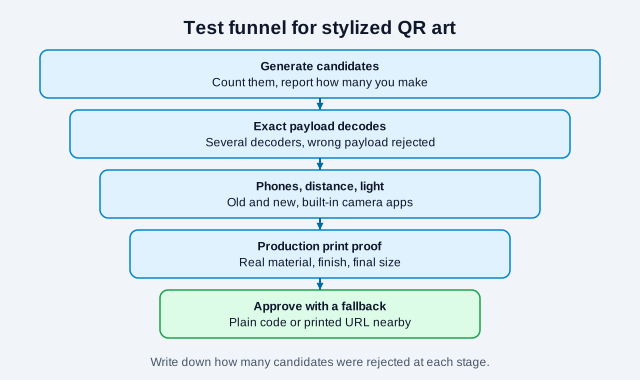
- Create the final short payload with a conforming QR encoder.
- Select an appropriate error-correction level and keep the payload stable.
- Generate art around or under structural constraints rather than redrawing an imagined code.
- Keep finder, timing, alignment, and format areas clear.
- Preserve a four-module quiet zone around standard QR Code.
- Decode every candidate automatically and reject any wrong payload.
- Choose a candidate only after multi-device visual testing.
- Place it in the final layout and test at final dimensions.
- Produce a physical proof using the real material and finish.
- Maintain a plain high-contrast fallback for critical access.
Before the proof stage, compare the artwork against the color and design guidance, since added shading and texture are where module contrast tends to drop. Print production details such as vector files, black ink, and finishes are in the printing guide, and size at distance is in the print size guide.
Can automated validation guarantee success?
No single software decoder represents every phone. Automated validation is useful for rejecting obvious failures and confirming the exact payload, but a candidate that passes one library may still be slow or unreadable elsewhere.
A stronger pipeline uses multiple independent decoders, simulated blur and perspective, size changes, color conversions, and physical-device tests. Set a minimum acceptance result before selecting artwork rather than lowering the threshold after seeing an attractive candidate.
Selection bias can make results look better than they are
Generating dozens of candidates and publishing the one that scans can be sound creative iteration, but it does not prove the generator has a high success rate. Report how many candidates were produced and rejected. Otherwise, a showcase measures curation rather than generation reliability.
Also separate first-attempt detection from eventual success after zooming, rotating, changing brightness, or trying a specialist app. Someone scanning a poster in passing may give up if the normal camera does not respond quickly, so measure time to detection as well as the final pass or fail.
What does a typical mistake look like?
Consider a boutique that commissions a watercolor-style code for a shop-window poster. The designer generates forty candidates, picks the prettiest one that scanned on two team phones, and sends it to print at the size of a coaster. On the street, afternoon sun adds glare, passers-by hold older phones at an angle, and the modules are only a couple of millimeters wide. Some people give up after one try. The code was never tested at the real size, in real light, on phones outside the team.
The fix costs little. Print the poster size proof, scan it from the pavement at different times of day, and put a plain code or a short printed address in the corner of the poster so nobody leaves empty-handed.
What should never be compromised?
- The decoded destination must exactly match the approved payload.
- The three finder patterns must remain detectable.
- The quiet zone must remain clear.
- The symbol must retain sufficient module contrast.
- The code must not be cropped, stretched, or compressed into a different aspect ratio.
- Users need a readable description of the action and an alternative route when practical.
When should AI QR art not be used?
Use a plain standard QR code for payments, authentication, safety instructions, medical information, transport, emergency access, compliance labels, or any workflow where a delayed or failed scan has serious consequences. Reliability and clear recognition outweigh novelty. The QR code safety guide explains why people also hesitate to scan codes that look unusual.
AI art is better suited to optional promotional experiences where a human-readable URL and conventional fallback are visible. Even then, avoid making the code so camouflaged that users cannot recognize the invitation to scan. A frame with a clear call to action helps, provided the quiet zone stays intact. For printed brand pieces, the logo best practices show a lower-risk way to add personality.
How to report a scan-success claim honestly
State the generator and version, payloads, number of candidates, selection rules, decoders, devices, output size, print process, conditions, and repeated-attempt method. Separate digital-image results from physical-print results.
Do not publish a universal "AI QR codes fail X% of the time" figure from an undocumented test. The defensible statement is narrower: a specified set of outputs achieved a specified result under a reproducible protocol.
Open issues remain. Generators change quickly, published scanning rates come from research prototypes and not always from the commercial tools people use, and no source we found measured printed AI codes across a representative range of consumer phones. Treat any numbers, including the ones above, as examples of method. This guide is general information and makes no guarantee about any specific tool or design.
References
- DiffQRCoder: Diffusion-based Aesthetic QR Code Generation with Scanning Robustness Guided Iterative Refinement (arXiv 2409.06355)
- Diffusion-based Aesthetic QR Code Generation via Scanning-Robust Perceptual Guidance (arXiv 2403.15878)
- Anthony Fu: AI QR code 101
- CVPR 2021: ArtCoder
- CVPR 2024: Text2QR
- IJCAI 2024: GladCoder
- DENSO WAVE: QR Code error correction