To scan a QR code, open the built-in Camera app, place the complete square inside the frame, and select the link or action that appears. You normally do not need a separate scanner app. Apple documents native scanning through Camera and Code Scanner, Microsoft includes code scanning in Windows Camera, and Android offers camera or Quick Settings options depending on the device.
This guide covers live camera scans on each platform, laptops, codes saved as screenshots or photos, codes that are already on your own phone screen, common failures, and the safety check to make before opening a destination. Menu names can change between operating-system releases, so use the closest equivalent on your device if a control is labeled differently.
How to scan a QR code on your phone
Open the Camera app, point it at the code, and tap the link that appears. That works on current iPhones and most Android phones. If nothing appears, use the platform-specific steps below: iPhone and iPad or Android. The right method depends mostly on where the code is, as the chart shows.
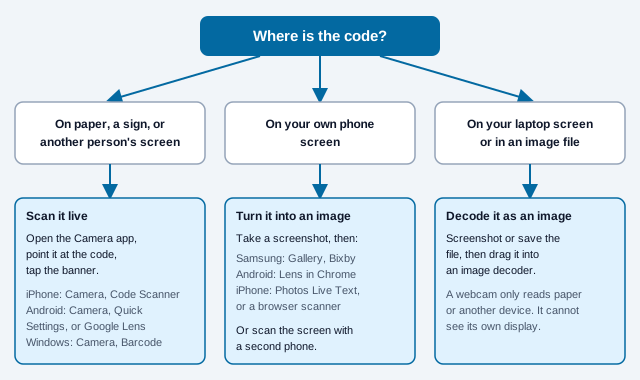
If you only remember one rule, remember that a camera needs light bouncing off a surface it can see. Anything that is already inside the same device as the camera has to be converted to an image first.
How to scan a QR code on an iPhone or iPad
On an iPhone or iPad, use the Camera app or Apple's Code Scanner control. Apple Support instructs users to place the code in the camera view and tap the detected link; no photo needs to be taken.
- Open Camera from the Home Screen, Lock Screen, or Control Center.
- Use the normal photo view and point the rear camera at the code.
- Keep the complete code visible and hold the device steady.
- Read what the banner shows, then tap it only if it is expected. If it does not show the website address, check the address bar after the page opens before you enter anything.
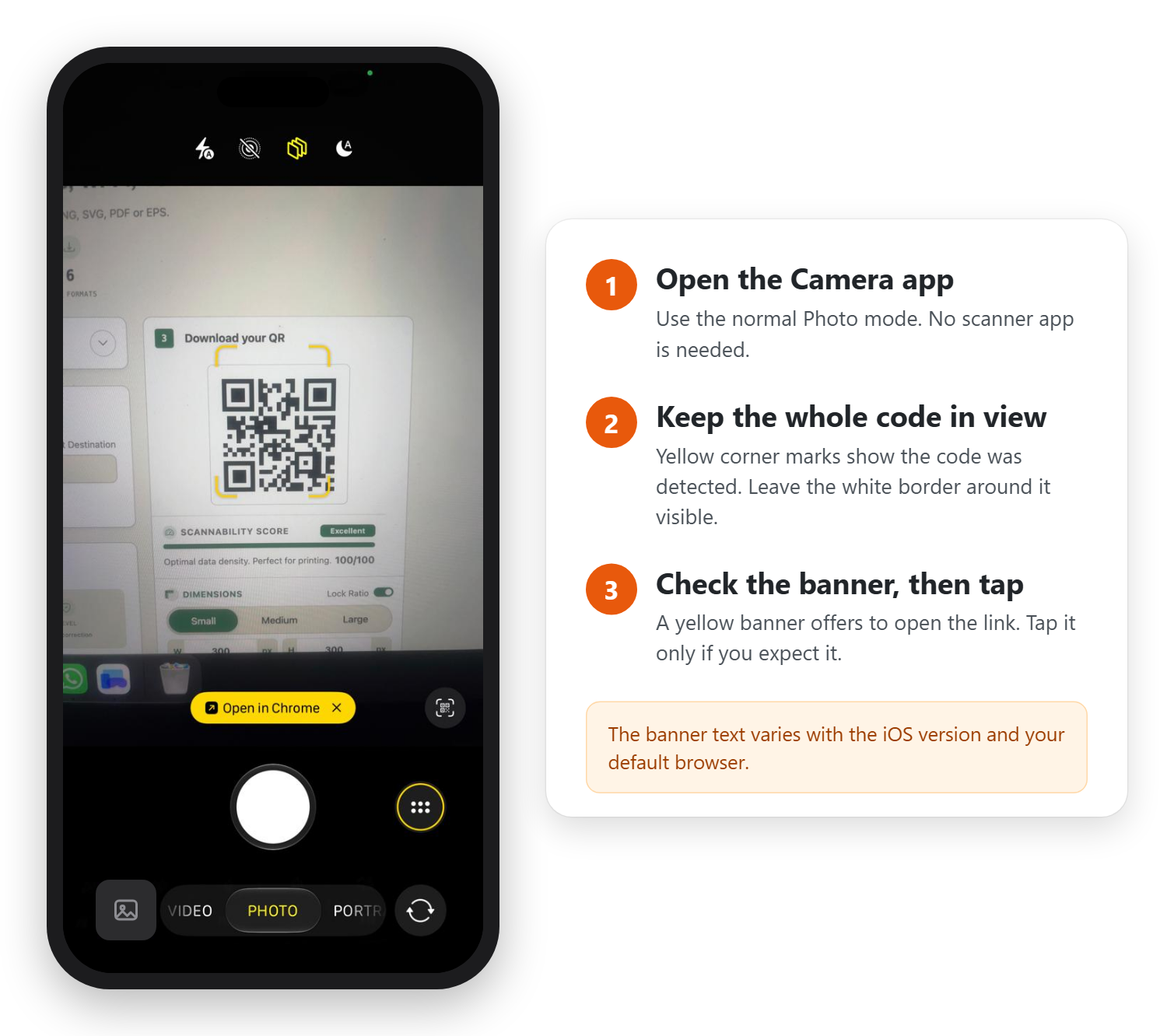
If Camera does not react, open Control Center and use Code Scanner. Apple also explains how to add that control from the Control Center gallery. In dim conditions, add light or use the scanner's flashlight control rather than moving so close that the camera cannot focus.
How to scan a QR code on Android
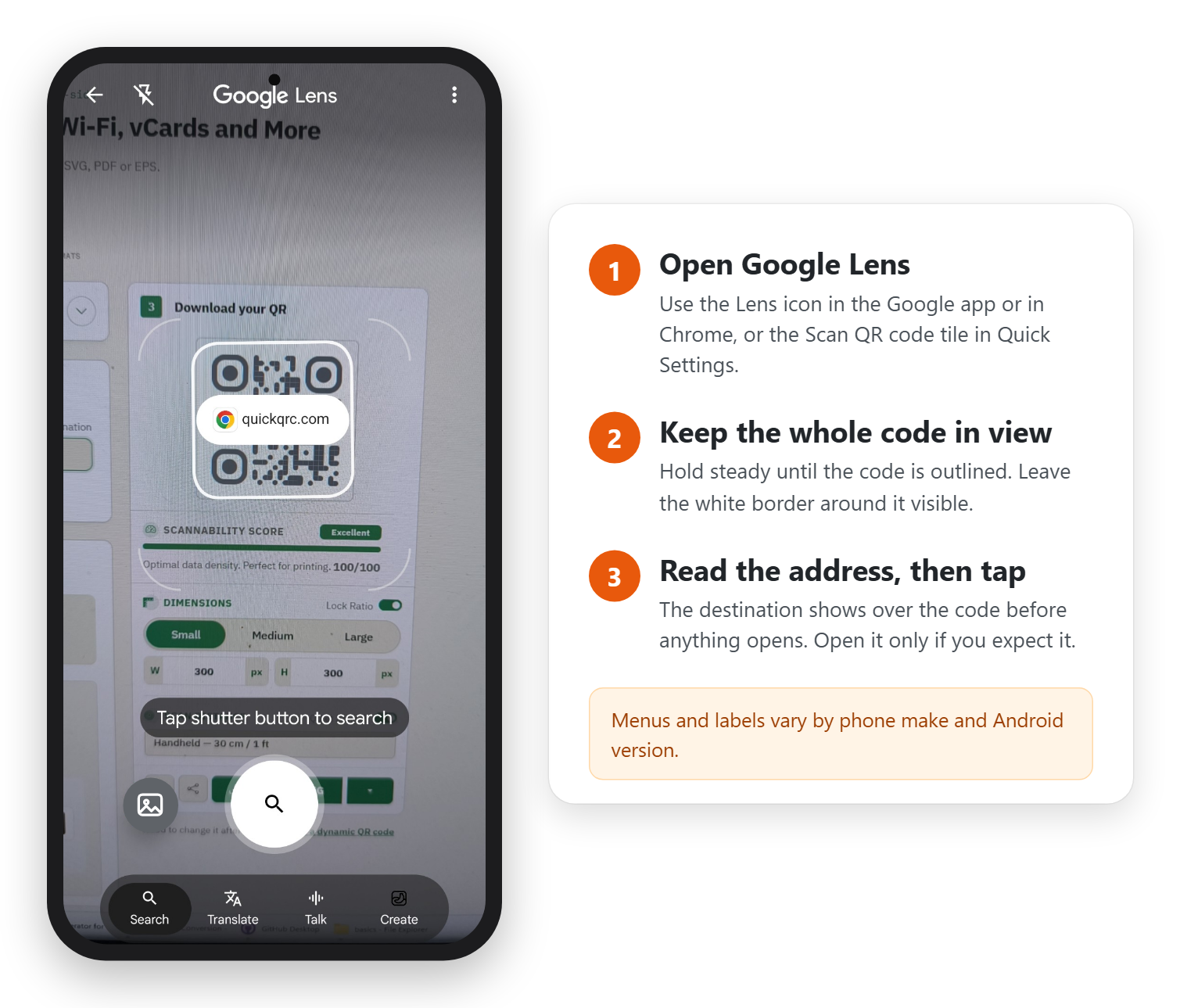
On Android, try the default Camera app first, then use the QR Scanner Quick Settings control or Google Lens if necessary. Google notes that default-camera support varies between device models, so a Pixel, Samsung, or other manufacturer's interface may not behave identically.
- Open the device's Camera app in its standard photo mode.
- Point it at the code and wait for a URL or action card.
- If nothing appears, open Quick Settings and look for Scan QR code.
- If that control is unavailable, open Google Lens and scan through its camera view.
On a Samsung Galaxy, check the camera setting first. Samsung's support page says that if the camera ignores a code, the scanner may simply be switched off: open Camera, tap the settings icon, and turn on Scan QR codes. Galaxy phones also have a Scan QR code tile in Quick Settings.
On a Pixel, look for Camera scan suggestions. Google's Pixel help page lists three routes: the Camera app with Camera scan suggestions turned on (under Settings, then More settings), the Scan QR code button in Quick Settings, and Google Lens. If the Quick Settings button is not in the first panel, swipe left or use the pencil icon to add it.
Do not install the first unfamiliar scanner advertised in an app store simply because the camera did not respond. The FBI's public service announcement on tampered codes makes the same point: a phone camera usually has a built-in scanner, so a separate scanner app adds permissions without adding much.
What does the camera need in order to read a code?
A scan is a vision problem first and a software problem second. The reader has to find the three large corner squares, work out the grid between them, and sample each small square as dark or light. Our guide to what a QR code is walks through that process in detail. For you, holding the phone, it comes down to five things.
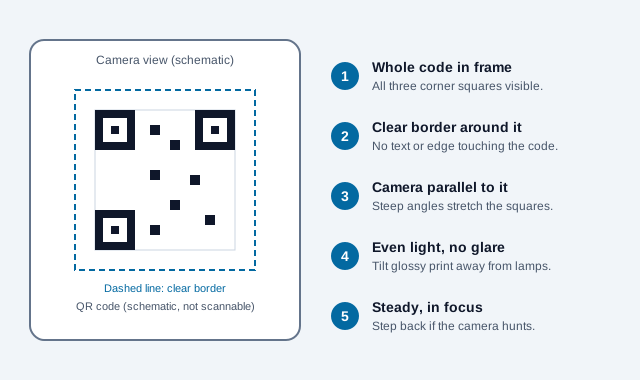
Phones differ in what they tolerate. A recent flagship with a wide sensor may read a code held at a slant under a restaurant's warm lamps, while an older budget handset struggles with the same print. That gap is why anyone who makes codes tests on more than one phone, and why a code that fails for you may work for the person beside you. Stepping back a few centimeters (an inch or two) usually helps more than moving closer, because most cameras cannot focus on a code that fills the whole frame.
Once the code is read, the phone decides what to do with the text inside. A string that begins with https:// becomes a link banner, a WIFI: string becomes an offer to join a network, and a contact card becomes an offer to save a person. The reading happens on the phone, so it works without a connection. Opening a web page afterwards does need one.
How to scan a QR code in Windows
A Windows computer with a supported camera can scan QR codes through the Windows Camera app. Microsoft Support describes a Barcode mode that automatically reads a focused code and displays its link or text.
- Open Start, search for Camera, and launch the Windows Camera app.
- Select the Barcode control on the side of the camera view.
- Hold the printed code in front of the webcam until it is sharp and evenly lit.
- Select the resulting link or copy the decoded text.
For a code already saved as an image, use a reputable image-based decoder rather than pointing the webcam at the monitor. Our browser QR scanner is designed for this workflow: camera or upload, decoded locally, nothing sent to a server.
How to scan a QR code on a Mac
The dependable Mac method is to scan the code with a nearby iPhone or Android phone, or to decode a saved image in the browser. If the code is in a screenshot or document, drag the file into an image decoder such as our online QR scanner. Never upload a code containing private Wi-Fi credentials, payment data, or confidential contact details to a service you do not trust.
Can you scan a QR code with a laptop?
Yes. A laptop can scan a printed code through its webcam, and it can decode a code that is already on screen by reading it as an image. Pick the method by where the code is, not by which computer you own. A code that is already on your screen needs an image decoder, because a laptop cannot point its webcam at its own display.
| Where the code is | Windows laptop | Mac |
|---|---|---|
| On paper or another device | Windows Camera, Barcode mode | Scan it with your phone, or use a browser scanner with the webcam |
| In an email, PDF, or web page on screen | Screenshot it, then decode the image | Screenshot it, then decode the image |
| Saved as an image file | Upload or drag it into an image decoder | Upload or drag it into an image decoder |
The online QR scanner covers both rows on any laptop: it can use the webcam once the browser grants camera permission, or read an image you upload or drag onto the page. Decoding runs in the browser, so the image is not sent to our server, which matters for codes that hold Wi-Fi passwords or contact details.
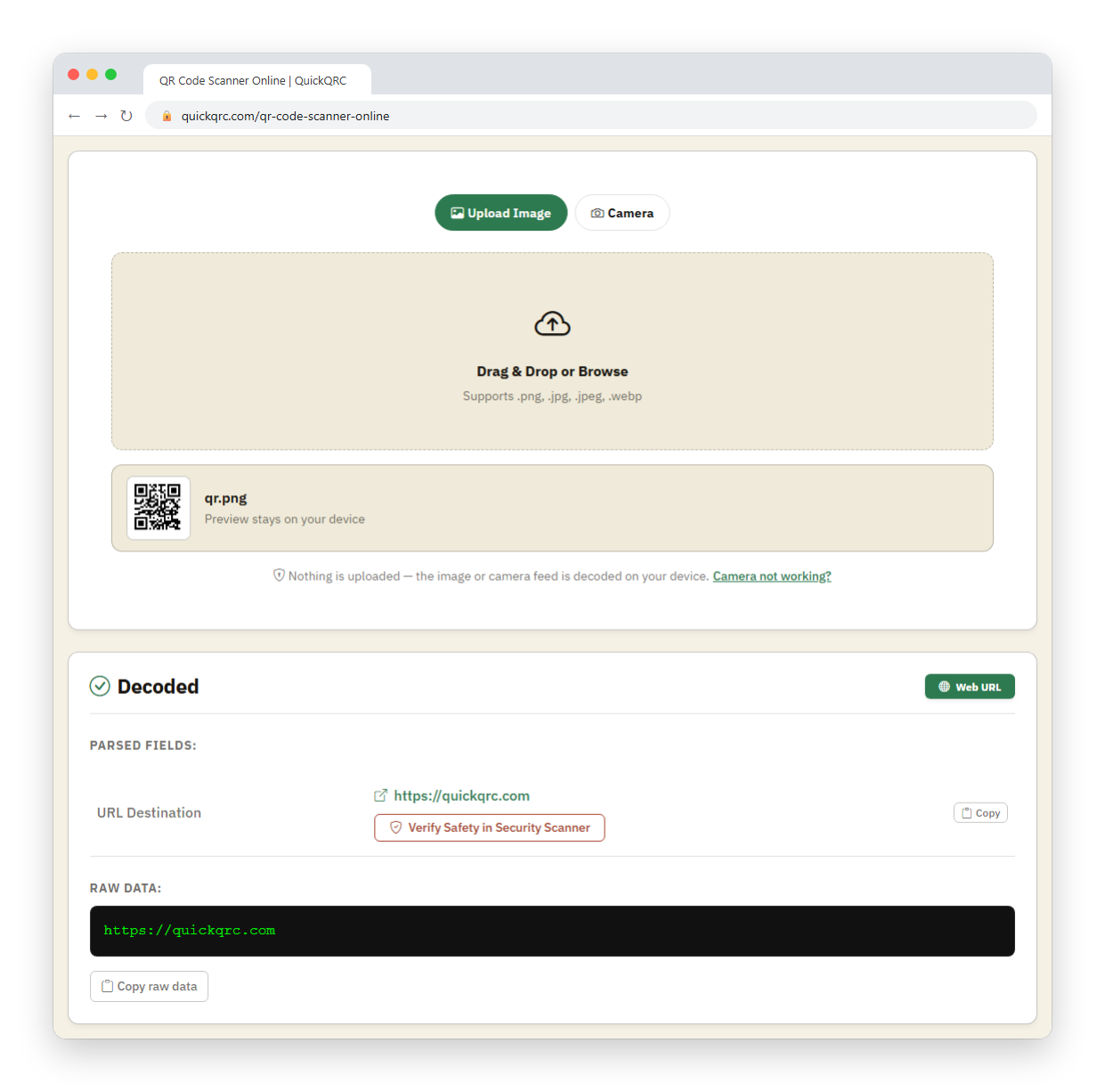
How to scan a QR code from a screenshot or saved photo
A screenshot or photo has to be decoded as an image. Open it in a tool that looks for codes inside pictures, then select the detected result. Which tool to use depends on the device.
- Samsung Galaxy: Samsung documents this one directly. Open the image in the Gallery app and tap the Bixby Vision button; the phone reads the code and offers to open or copy the link. Bixby Vision is not available on every model.
- Other Android phones: open a new tab in Chrome, tap the Google Lens icon in the search bar, and choose an existing screenshot or image instead of taking a photo. Google's Chrome Help describes both QR scanning and choosing a screenshot from this screen.
- iPhone or iPad: open the image in Photos and touch and hold the code, or tap the Live Text button. Apple documents Live Text quick actions for links in photos but does not list QR decoding there, so if nothing is detected, use a browser decoder instead.
- Any computer: upload or drag the file into the QR scanner, which shows the decoded content before anything opens.
How to scan a QR code from your camera roll or photos
On an iPhone, open the picture in Photos and touch and hold the code, or tap the Live Text button; if nothing is detected, upload the picture to the online QR scanner. On a Samsung Galaxy, open it in Gallery and tap Bixby Vision. On other Android phones, choose the picture from Google Lens in Chrome.
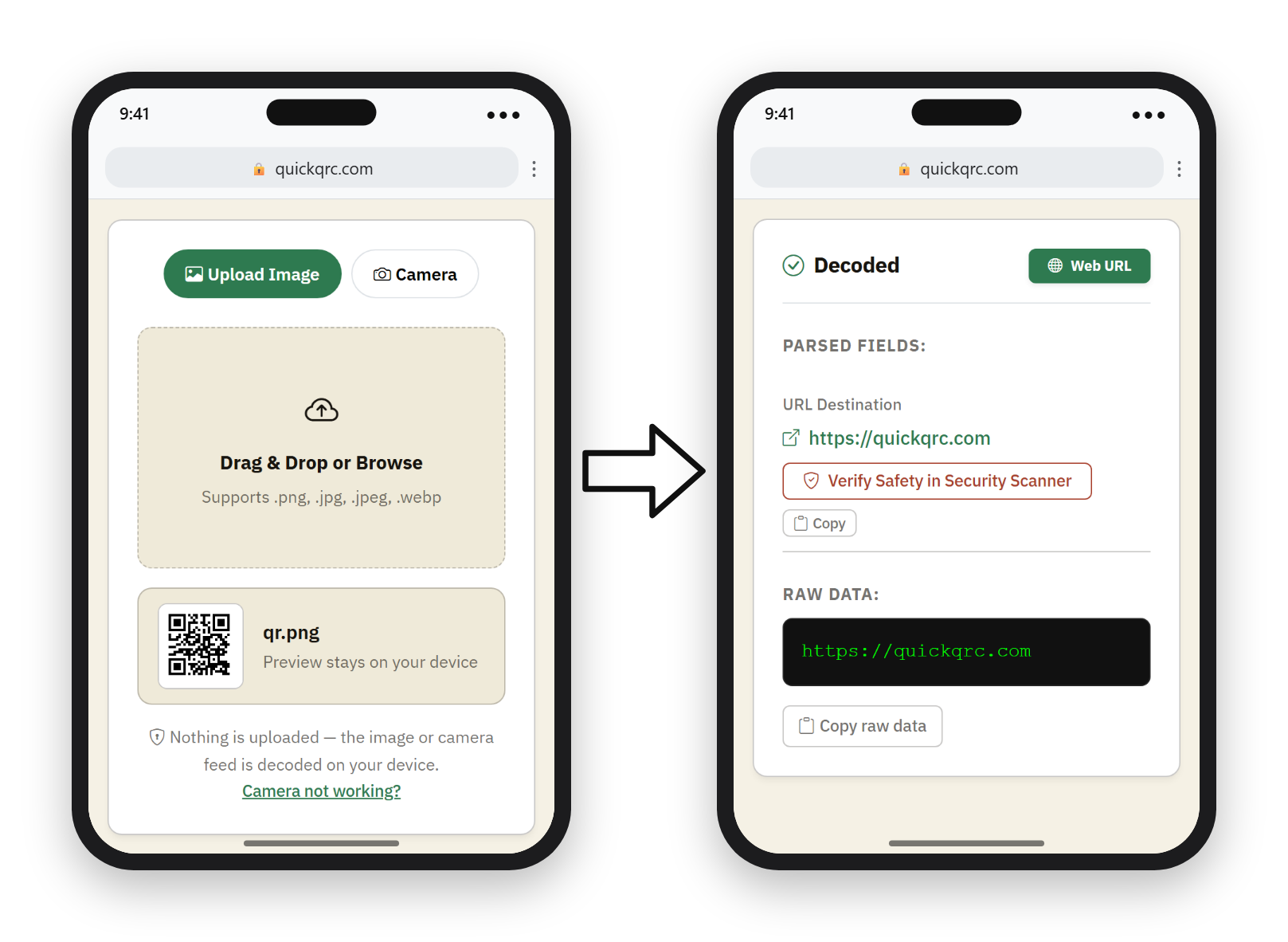
Crop away unrelated screen content if detection fails, but leave the full code and its clear white border intact. A heavily compressed image (for example one forwarded several times in a chat app) can blur the modules past the point any decoder can read; ask for the original file in that case.
How to scan a QR code that is on your own phone screen
Your phone cannot point its camera at its own display, so there are two ways round it.
- Turn it into an image. Take a screenshot, then use the Gallery, Lens, or Photos route in the previous section, or open the online scanner in the phone's browser and upload the screenshot.
- Use a second device. Show the code full-screen and scan it with another phone's Camera app. Turn the screen brightness up; a dim display often fails where a bright one reads instantly.
If the code opens a payment, login, or Wi-Fi prompt, check who sent it before acting. A code inside a message is no more trustworthy than the message itself.
Why a QR code will not scan
Most scanning failures come from focus, lighting, distortion, weak contrast, physical damage, or missing clear space around the symbol. DENSO WAVE, the company behind QR Code, warns that distorted modules, overlapping artwork, and insufficient margins can make a symbol difficult or impossible to read.
| What you observe | Likely cause | What to try |
|---|---|---|
| The camera keeps refocusing | Too close, motion, glare, or a dirty lens | Step back, steady the device, clean the lens, and change the light angle. |
| The code looks stretched | The image was resized without preserving its square proportions | Use the original file and resize proportionally. |
| Text or artwork touches the code | The required quiet zone is missing | Restore a clear border four modules wide on every side. |
| Some phones scan but others fail | The design is near the reader's tolerance limit | Increase size and contrast, simplify decoration, and test a new print proof. |
| The symbol decodes but the page fails | The QR code works; the destination does not | Check the URL, network, domain, redirect, and destination page separately. |
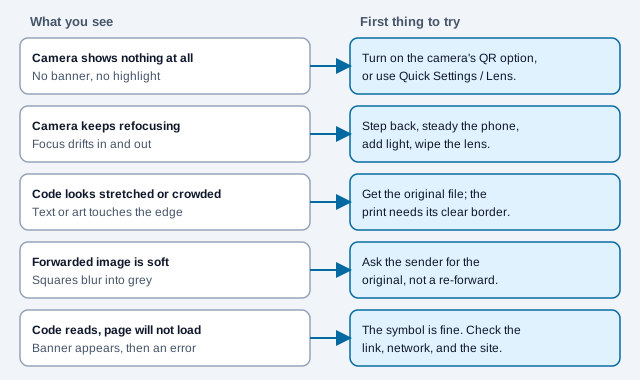
For a fuller checklist by symptom, see why a QR code is not scanning. If you made the code yourself, the QR scannability tester stresses a test image with blur, low light and other conditions before you print.
Consider a cafe regular who photographs the menu code on a table, forwards it through a chat app twice, and then finds that her friend's phone shows nothing. The friend's camera is working. The image has been recompressed until the small squares blur into grey, so no reader can sample them. Asking for the original file, or scanning the table directly, fixes it in one step.
How to check a QR link safely
Read the displayed domain before opening a QR link. A scan can lead to any text or URL chosen by its creator, so the physical location of a sticker does not prove who controls the destination.
- Confirm the domain matches the organization or service you expect.
- Treat misspellings, unrelated domains, and concealed redirects as warning signs.
- Inspect public stickers for another label placed over the original.
- Do not approve a payment, install an app, or enter a password merely because a scanned page asks.
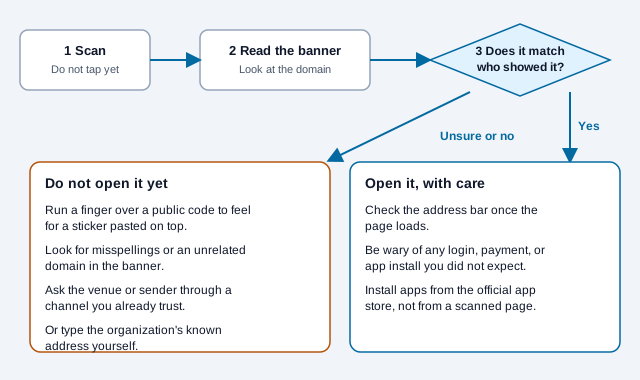
The FBI's public service announcement on tampered codes lists the same habits: confirm the address is the intended site, look for a sticker placed over the original, and avoid entering login or financial details on a page you reached by scanning. It also advises against downloading apps from QR codes and says that if a message claims a payment failed and pushes a QR code, you should contact the company through a number you already trust. The FBI adds that recovery of funds sent to a scammer is not guaranteed, and that losses can be reported to the Internet Crime Complaint Center at ic3.gov. Our guide to QR code scams covers the common lures in more depth.
To check a link before you open it, paste it into our QR code security scanner. It also reads a code from an uploaded image or your camera. It decodes the address in your browser and runs structural checks on it, such as plain HTTP, look-alike characters in the hostname, link shorteners and suspicious domain endings.
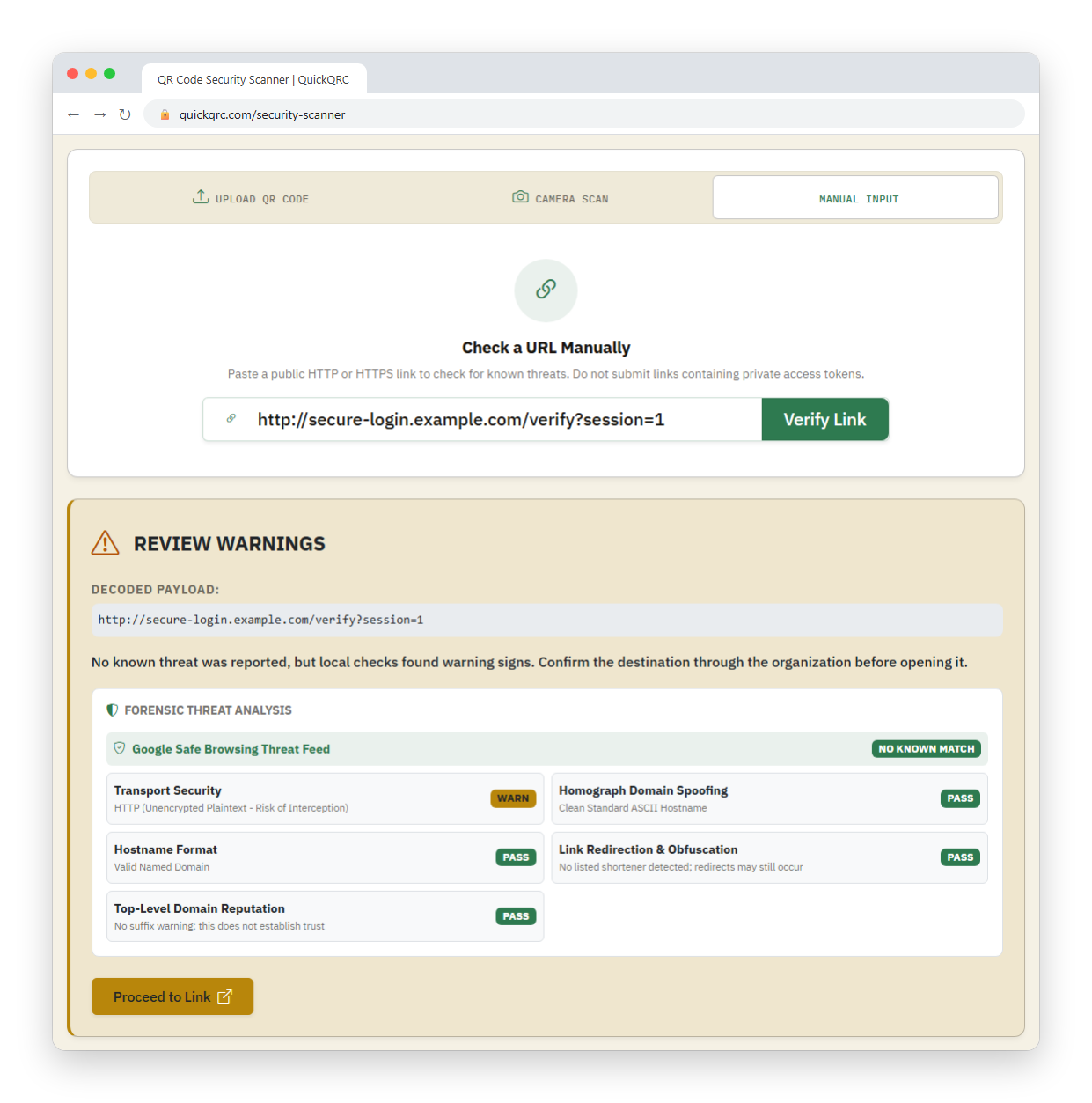
For a longer checklist, see the QR code safety guide. When creating your own code, test the final downloaded or printed version, not only the generator preview.
What are the common scanning mistakes?
Take an office manager who scans a parcel-delivery notice code from a text message, lands on a page asking for a card number to "release" the parcel, and pays a small fee before noticing the domain has nothing to do with the carrier. Three mistakes stack here: scanning a code nobody asked her to expect, tapping the banner without reading it, and entering payment details on a page reached that way. The fix is ordinary: read the domain, open the carrier's own app or site by typing it, and treat a payment request that arrived through a code as unverified until you confirm it elsewhere.
The quieter mistakes are practical ones:
- Holding the phone so close that the camera never focuses.
- Scanning a glossy poster from an angle that puts a lamp's reflection across the code.
- Installing a random scanner app after one failed scan.
- Assuming the code is broken when the website behind it is the part that has failed.
What is a quick scanning checklist?
- Decide where the code is: on a surface, on someone else's screen, on your own screen, or in a file.
- For a surface or another screen, open Camera and frame the whole code with its border.
- Read the banner. Stop if the domain does not match who showed you the code.
- For your own screen or a file, convert it to an image and use Lens, Gallery, Photos or a browser decoder.
- If nothing happens, check the camera's QR setting, then add light and distance, then ask for the original file.
- If you created the code, test the final printed copy on at least two phones.
What does this guide leave unsettled?
Menu names and available controls shift between iOS, Android, Samsung One UI and Windows releases, so a step here may be labeled differently on your device. Apple's Live Text is documented for links in photos but not for QR decoding, so whether a particular iPhone reads a code from a saved image can vary. This guide describes general safety habits and is not a guarantee that a scanned destination is safe, since an address can look right and still be controlled by someone else. If money or credentials are involved, check with the organization through a channel you already trust.
References
- Apple, “Scan a QR code with your iPhone or iPad,” Apple Support, accessed 2026.
- Apple, “Interact with content in a photo or video on iPhone,” iPhone User Guide, accessed October 2026.
- Google, “Scan QR codes on Camera from Google,” Camera from Google Help, accessed 2026.
- Google, “Scan QR codes on your Pixel phone,” Pixel Phone Help, accessed October 2026.
- Google, “Search with Google Lens in Chrome (Android),” Google Chrome Help, accessed October 2026.
- Samsung, “How to scan QR code on your Galaxy phone or tablet,” Samsung UK Support, accessed October 2026.
- Microsoft, “How to use the Windows Camera app,” Microsoft Support, accessed 2026.
- FBI Internet Crime Complaint Center, “Public service announcement on tampered QR codes,” ic3.gov, PSA220118.
- DENSO WAVE, “Examples of problems encountered in reading a code,” QRcode.com, accessed 2026.