A small business can take payments by QR code without buying a card reader: print a code that opens a payment page from your provider, and customers scan it and pay with their phone. The code itself is free to generate, but the provider still charges its own fees, and you are responsible for confirming each payment and protecting the sign from tampering.
This guide explains how QR payments work, how to set up a payment link and code, what the code can hold in different regions, how to label and protect the sign, what the money flow looks like from scan to payout, and a rollout checklist. Payment rules, fees and eligibility change often and vary by country, so treat it as a planning aid and confirm current terms with your provider.
How do QR code payments work for merchants?
EMVCo, the body behind the EMV payment standards, describes two modes. In merchant-presented mode the seller displays the code and the customer scans it. In consumer-presented mode the customer shows a code on their phone and the seller scans it with an optical reader. A printed sign is merchant-presented, which makes it the simplest start for a stall, truck or service business.
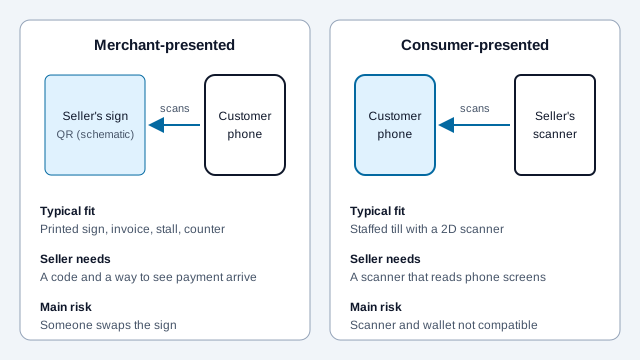
EMVCo says its merchant-presented specification lets one code support several payment programs, both account-based and card-based, and that compliant codes were read in under a second in its own lab tests. Many wallets and banks use their own formats, though, so a code made for one service usually only works in that service's app.
| Payment workflow | What the code holds | What to verify before printing |
|---|---|---|
| Stripe or Square hosted checkout | A provider-created HTTPS payment URL | Supported country, business approval, payment methods, fees, refunds, payout schedule |
| PayPal or Venmo business profile | A supported business payment link | Recipient identity, commercial-use eligibility, purchase protection, fees, withdrawal timing |
| SEPA EPC QR | Structured multiline text with transfer details, not a web URL | Bank-app support, IBAN and beneficiary, optional EUR amount, bank fees, transfer type |
| Pix or UPI | Data fields in each scheme's own format | Your bank's rules, static or dynamic type, and who issues the code |
| Bitcoin on-chain | An address or BIP 21 URI | Network, recipient, decimal BTC amount, network fee, confirmation policy |
| Lightning | A wallet-supported invoice | Wallet compatibility, invoice expiry, amount, routing fees |
The QR code has no say over what a provider charges or how fast you get paid. Published figures for QR-based payments are inconsistent: provider pages, help forums and review sites quote different rates for the same product, and the numbers differ by country and account type. Use the provider's own current fee page for your market. If you accept Bitcoin, a Bitcoin QR code holds a BIP 21 URI and the customer's wallet pays you directly, with no card network in between.
What does the code contain in different regions?
A payment code is a container, and the contents depend on the scheme. In Europe, the European Payments Council's EPC guideline defines a code that pre-fills a SEPA credit transfer, and version 3.0 of the document (September 2022) limits the payload to 331 bytes, which counts bytes rather than characters. Pix, Brazil's instant payment system, uses a BR Code format described in secondary sources as derived from the EMV standard. Those sources say a static Pix code is reusable and does not expire, while a dynamic one belongs to a single charge and usually needs an API integration with your bank or payment provider. India's UPI works similarly in outline, with static codes where the customer types the amount and dynamic codes carrying it.
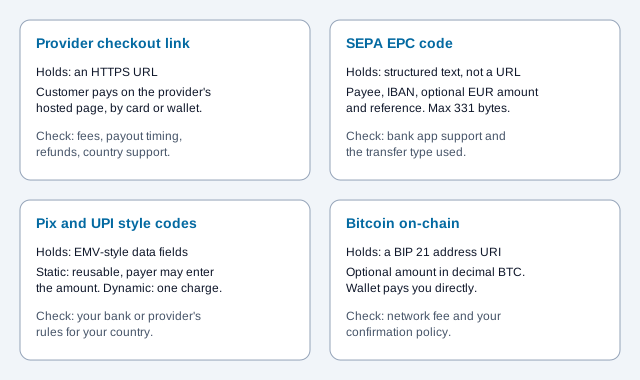
Use the generator that matches your scheme rather than a plain URL code: EPC, Pix, UPI, PayPal or Venmo. Fee and pricing policy can change for a scheme too. Reports from 2026 describe revisions to merchant discount rates on UPI, and the primary circulars should be your reference, not a blog summary. Next step: read your bank's or provider's current merchant terms before you print anything.
How do you set up a payment link and QR code?
The pattern is the same for every provider: create a payment link in the provider's dashboard, then turn the link into a high-contrast QR code, exported as a vector file. Here are three common setups.
Stripe Payment Links (service businesses and invoices)
- In the Stripe Dashboard, open Payment Links and create a link.
- Enter the product and a fixed price, or let the customer choose the amount for invoice payments.
- Copy the checkout link and paste it into the URL QR code generator. Stripe's documentation lists showing a QR code as one way to share a link, and says links can be reused or limited to a number of purchases.
- Print it on invoices, work orders or counter cards with a line such as "Scan to pay by card or Apple Pay."
Stripe's documentation also lists automatic receipts and no-code refunds for payment links. Check which payment methods are available in your country, since availability varies.
Square payment links (retail and food stalls)
- In the Square Dashboard, go to payment links and create one for a payment or an item.
- Copy the public URL and generate a static code. Square's help material describes the link opening a secure online checkout page.
- Print one card per product, or one for the counter.
- Place a test order and check how it affects inventory.
Square's payment links are described by third parties as available for domestic sales only, and one forum answer says they carry the same fee as Square Online transactions. Confirm both on Square's own pages.
Wallet handles (Venmo, PayPal.me, Cash App)
- Find your public business handle URL on the wallet's site.
- Paste it into the free QR code generator and download an SVG.
- If you take more than one wallet, place the cards side by side.
Personal-account handles are often not meant for commercial sales. Use a business profile where the service offers one, and read its terms on eligibility, fees and purchase protection.
What happens between the scan and the money in your bank?
Accepted, available and paid out are three different moments, and a code only starts the first. A customer scans, checks the payee and amount, and approves. You then need a confirmation from your own device before handing over goods. Funds become spendable or withdrawable on the provider's schedule, and a payout later reaches your bank account.
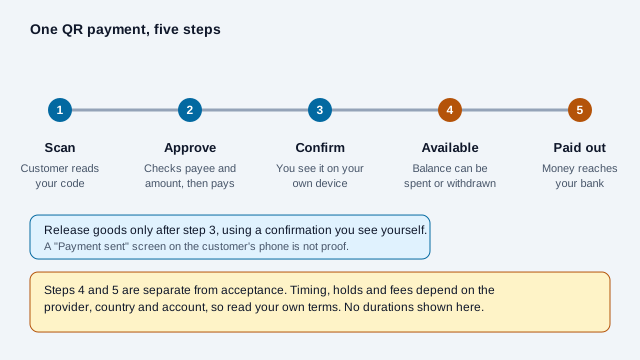
- Offline and low-signal places: the customer and the payment service both need connectivity to authorize an online QR payment, and you need a reliable way to check settlement. Offline-capable schemes carry delayed-settlement risk.
- Refunds and disputes: card-based payments can be disputed, and bank transfers generally cannot be reversed as easily. Write your refund policy on the sign or receipt, and keep the order reference.
- Tax and records: a payment page may issue its own receipts, but you still have to record sales and tax as your jurisdiction requires.
How should you label and place a payment QR code?
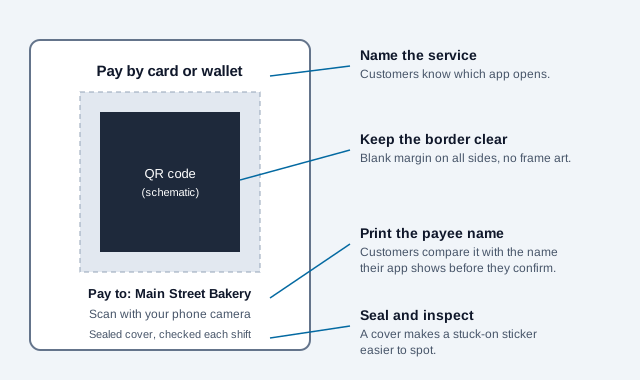
Every payment sign needs three things next to the code: the name of the payment service, your business or handle name in plain text, and a one-line instruction. The printed name is what lets a customer check they are paying the right account.
| Where you sell | Example display | What to put on the sign |
|---|---|---|
| Farmers market or craft fair | Laminated A5 tabletop stand | Logos of the apps you accept, your handle in plain text, a price list |
| Food truck or mobile catering | Weatherproof vinyl decal at the order window | A high-contrast code, "Scan to pay", where to collect the order |
| Mobile trades | Clipboard card or invoice header | The invoice number, the checkout link, how the receipt will arrive |
| Pop-up shop or event stand | Upright A4 sign at the line | A code big enough to scan from the line, wallet badges, tax information |
For a countertop sign, 30 mm (1.2 in) square is a reasonable size to start proofing, not a guaranteed minimum. Test at the distance customers will stand, and keep a plain light border at least four modules wide. The print size guide helps with larger signs.
How do you stop payment fraud and tampering?
Confirm every payment on your own device, and check that nobody has stuck a different code over yours. The FBI has warned that criminals replace legitimate codes with malicious ones, including to redirect payments, and recommends inspecting physical codes for stickers or other signs of tampering.
- Wait for the notification, sound or dashboard entry on your side. A customer's "Payment sent" screen can be faked or the payment can fail afterwards.
- Protect the sign. A sealed acrylic stand or framed code is harder to cover, and a look before each shift catches a sticker that was not there yesterday.
- Let the provider handle card data. A fully hosted checkout can reduce how much card data your business touches, but whether you qualify for the simplest PCI self-assessment depends on every criterion being met by your whole payment flow. Confirm it with your acquirer or a qualified adviser.
- Print your handle under the code, for example "Pay to: Main Street Bakery."
The guides to QR code hacking risks, quishing and checking a code's safety explain how these attacks work, and the financial services guide covers regulated settings.
What breaks a payment code, and how do you launch one?
Imagine a weekend flower stall that prints a payment code on a paper card and tapes it to the table. On a busy Saturday a customer shows a "Payment sent" screen and leaves with a bouquet. The stall owner checks later and finds nothing in the account. A second weekend, a sticker with a different code is found over the first card. Neither is an unusual failure, and each one is preventable.
- Pick the provider and read its fee, payout, refund and eligibility terms for your country.
- Create the link or code, and place a small real test payment end to end.
- Generate a vector code and print the payee name beside it.
- Cover the sign, and add "check before each shift" to the opening routine.
- Decide how staff confirm a payment on their own device before releasing goods.
- Write the refund policy where customers can see it.
- Offer a second way to pay in case the phone has no signal.
Open issues this checklist cannot settle: your tax and reporting duties, whether your account type may take commercial payments, how chargebacks affect your balance, and what your provider does with a held payment. Ask the provider or an adviser.
This article is general information, not financial, tax or legal advice. Provider fees, settlement times and payment rules change often and vary by country and account; confirm current terms directly with each provider before relying on anything above.
References
- EMVCo: the what, why and how of EMV QR codes
- European Payments Council: QR code guidelines for SEPA Credit Transfer (EPC069-12 v3.0)
- Stripe documentation: Payment Links
- Square Support: create and share payment links
- FBI IC3: cybercriminals tampering with QR codes to steal victim funds
- BIP 21: Bitcoin URI scheme
- PCI Security Standards Council: document library