A QR code loyalty program replaces the paper stamp card with a scan at the counter: the customer scans, leaves a phone number or email address, and the business gets a record of each visit. A small shop can run this on free tools such as a Google Form and a spreadsheet, and add Apple Wallet and Google Wallet passes later if it wants them.
This guide compares paper cards, forms, wallet passes and apps, shows how to build the free version, explains the abuse problem and its controls, covers what you owe customers once you hold their contact details, and ends with a short scenario and a rollout checklist. Privacy and marketing rules differ by place, so the legal parts are a checklist for discussion with an adviser, not advice.
How does a QR loyalty program compare with paper cards and apps?
The trade-off is friction against control. A paper card asks nothing of the customer but tells you nothing back, and staff cannot tell a genuine punch from a copied one. An app gives you the most control but asks the customer for a download, which many will not do for a coffee. A form behind a QR code and a wallet pass sit in between.
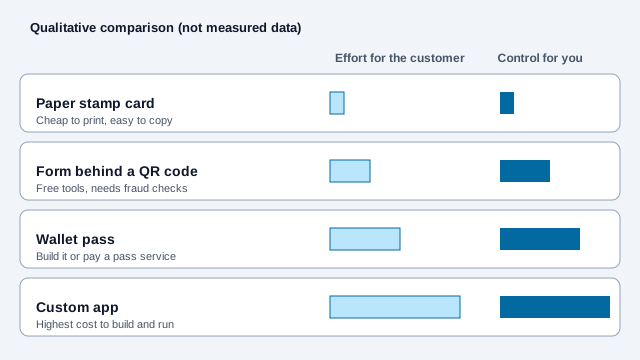
| Feature | Paper stamp card | Web form behind a QR code | Wallet pass (Apple or Google) | Custom mobile app |
|---|---|---|---|---|
| Effort for the customer | None, hand over a card | One scan, no install | One scan and a tap to save the pass | Find, download and sign in to an app |
| Customer contact data | None | Whatever you ask for on the form | Depends on how the pass is issued | A full account profile |
| Running cost | Printing | Free with Google Forms and Sheets | Varies: build passes yourself or pay a pass-builder service a monthly fee | Development and hosting, the most expensive option |
| Fraud risk | High, since anyone can copy a stamp | Medium unless you add the controls below | Lower, because the business controls how passes are issued and updated | Lower, with server-side checks |
| Getting customers back | Relies on the customer remembering | Email or text follow-ups, with consent | Pass updates and lock-screen reminders | Push notifications |
A cafe or bistro can start with the simplest option: a printed URL QR code at the register that opens a sign-up form. If you want a ready-made form link, the Google Forms QR code generator works for that.
How do you build a free loyalty system with Google Forms and Sheets?
Point a QR code at a Google Form. Every submission lands in a linked Google Sheet, where a formula counts each customer's visits. You can set it up in an afternoon.
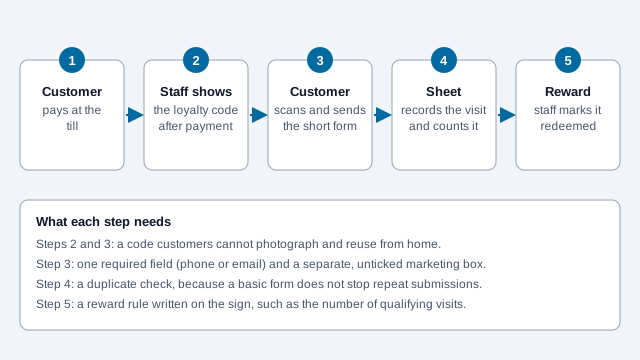
- Create a form called something like "Rewards Club" with one required question for the customer's phone number or email address.
- Set the confirmation message, for example: "Stamp recorded. Show this screen to your server to claim your reward."
- Copy the form's public link, paste it into the free QR code generator, and download an SVG for printing.
- In the linked Sheet, add a tab that counts visits per customer, for example
=COUNTIF(Responses!B:B, "customer@example.com"), adjusting the column to match.
Google Forms timestamps each response, but it does not stop the same person from submitting twice in a day. That check belongs in the Sheet, in a script, or at the counter. When someone reaches the reward threshold, staff mark the row as redeemed and the next cycle starts. Write the reward rule on the sign, so there is no argument at the till.
How many visits should earn a reward? No verified benchmark exists, and the right number depends on margin, visit frequency and basket size. A workable approach is to pick a threshold a regular customer reaches within a few weeks, watch how many people complete a cycle, and adjust.
What do Apple Wallet and Google Wallet passes add?
A wallet pass puts the loyalty card on the customer's phone without an app. Scanning a QR code can open a prompt to add the pass to Apple Wallet on an iPhone or save it to Google Wallet on Android. The business can then update the pass, for example to show a new stamp count.
- Google's documentation says a Google Wallet pass can be issued through any channel where you can share a link, including websites, email and SMS. Issuing passes requires a Google Wallet API issuer account, and its REST API is recommended for web, email and SMS.
- Apple Wallet passes have to be signed with a certificate from an Apple Developer account. Small businesses without a developer usually use a pass-builder service, which is where the monthly fee comes in.
- Both platforms let a pass be tied to store locations so it can appear on the lock screen nearby. The limits are set by Apple and Google, so check their developer documentation before you design around them.
A static QR code on the counter that opens a "Add to Wallet" page works, and the same code never needs reprinting while you change the pass behind it.
How do you stop customers gaming the program?
If the QR code sits on the counter, anyone can photograph it and submit stamps from home. Where the code lives decides how easy that is.
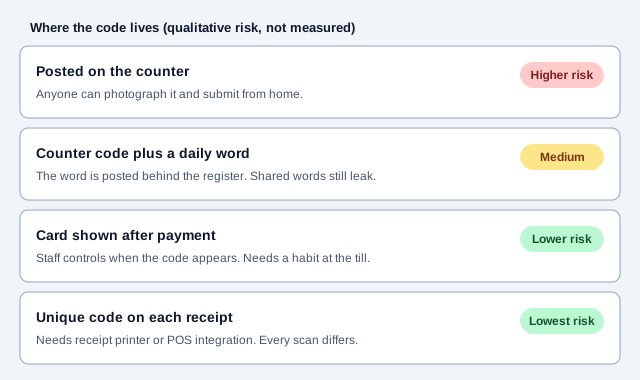
| Control | How it works | Effort | How well it works |
|---|---|---|---|
| Staff hands over the code | The code lives on a card the server shows only after payment | Low | Strong, since there is no code to photograph |
| Unique code on each receipt | The point-of-sale system prints a single-use code or transaction ID | Needs receipt printer integration | Strongest, because every scan is different |
| Daily word | The form requires a word that changes daily and is posted behind the register | Someone changes the card each day | Good against home submissions, weak against a customer who tells a friend |
| Duplicate throttling | A Sheets script ignores repeat submissions from the same person within a set window | None after setup | Limits rapid repeats only |
Dynamic codes can help here, since a managed code can be rotated without reprinting. The static vs dynamic guide explains the trade-off, and the coupon guide covers single-use vouchers for one-off rewards.
What privacy and marketing rules apply to a loyalty list?
Once you hold names, emails or phone numbers, data protection and marketing laws apply. The details vary by country and state, so treat the points below as questions to put to an adviser.
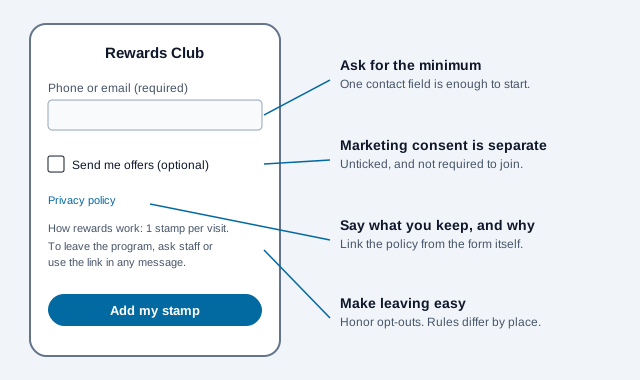
- Marketing permission: ask for it separately from sign-up. An unticked box such as "Send me offers by email or text" is clearer than assuming consent. In the EU, GDPR sets conditions for valid consent.
- Email: promotional emails need a working unsubscribe link under the US CAN-SPAM Act, which the FTC enforces.
- Texts: reports on US telemarketing rules say marketing texts generally need prior express written consent from the recipient. The rules have been revised more than once, so check current FCC requirements before you send any.
- California: law-firm commentary reports that the state's CCPA regulations treat many loyalty programs as financial incentives that call for a notice before enrollment, and that the Attorney General ran a sweep of loyalty programs in January 2022. If you serve California residents, ask a qualified adviser whether this applies to you.
- Policy and retention: link your privacy policy from the form and say what you store, why and for how long.
What breaks a loyalty code, and how do you launch one?
Imagine a bakery that prints a loyalty code on a poster by the door. Within a week, a few regulars photograph it, and the Sheet fills with stamps from people who were never in the shop. The owner cannot tell which stamps are real, tightens the reward, and annoys honest customers. The form also asks for a name, email, phone and birthday, and half the people who start it leave.
- Choose the system: paper, form, wallet pass or app.
- Write the reward rule and the expiry rule for stamps on the sign.
- Build the form with one required field and a separate marketing box.
- Choose where the code lives, and train staff to show it after payment.
- Add a duplicate check in the Sheet.
- Link the privacy policy, and set up unsubscribe handling for any email or text follow-up.
- Print a proof, scan it on three phones, and run a week of test transactions.
- Review the Sheet after a month for odd patterns.
What this checklist cannot settle
Open issues this checklist cannot settle: which consent and notice rules apply in your country or state, how long you may keep the data, and whether a reward counts as a regulated incentive. Those answers belong to your adviser.
This article is general information, not legal advice. Data-protection and marketing-consent rules (GDPR, CAN-SPAM, TCPA, CCPA and others) vary by jurisdiction and change; confirm your obligations with a qualified adviser before collecting customer data.
References
- Google Wallet: loyalty cards integration
- Apple Developer: Wallet Passes documentation
- FTC: CAN-SPAM Act compliance guide
- GDPR.eu: overview of the General Data Protection Regulation
- Federal Register: FCC TCPA consent rulemaking, January 2024
- Morrison Foerster: California AG notices of violation on loyalty programs and the CCPA