A coupon QR code connects a printed offer to something you can track and redeem: a store page with the discount already applied, a voucher code the register scans, or a pass in the customer's phone wallet. Which one fits depends on where the offer will be redeemed (online, at a modern checkout, or at an older register that cannot read a QR code), and a plain static code costs nothing to make.
This guide covers the four coupon types, how to build a trackable discount link, whether your checkout scanner can read the code, how to change an offer after printing, how to limit fraud, what to print on the coupon itself, a short scenario of what goes wrong, and a rollout checklist. Advertising and promotion rules differ by country and state, so check the ones that apply to you.
Where will the coupon be redeemed?
There are two basic jobs. A consumer-facing code sends the shopper's phone to a web page, usually with the discount attached to the link. A cashier-facing code carries a voucher code that a 2D barcode scanner at the register reads from paper or a phone screen. Start from the redemption point, because it decides everything else.
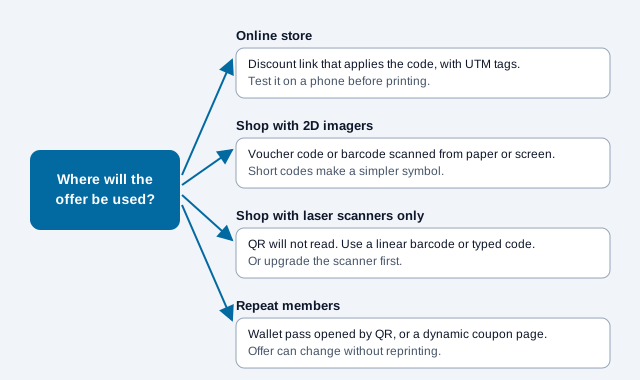
| Type | What the code holds | Read by | Best for |
|---|---|---|---|
| Auto-apply online link | A web link with the discount in it | The shopper's phone camera | Mailers, catalogs and posters that send people to an online store |
| Voucher code for the register | A plain-text code such as COUPON-89412, or a GS1 Digital Link | A 2D barcode scanner at the checkout | In-store redemption at a register or self-checkout |
| Wallet pass | A link to an Apple Wallet or Google Wallet pass | The phone camera, then the wallet | Members' discounts and recurring offers |
| Single-use voucher | A token that a server accepts once | The phone, and the register scanner | Bigger discounts that need protection against reuse |
Wallet passes and single-use vouchers need a system behind them. The loyalty program guide covers wallet passes in more detail, and the retail QR guide shows how coupons fit with shelf tags and checkout signs.
How do you create a trackable coupon code?
Create the promotion in your store or point-of-sale system first, then build a link that applies it, tag the link, and turn it into a code.
- Create the promotion, for example
SUMMER25, in Shopify, WooCommerce, Square or whatever you use. - Build the link that applies it. Shopify's help center describes a discount link in the form
/discount/CODEthat applies the discount at checkout, with an optional?redirect=to send the shopper to a page such as a collection. Other platforms handle this differently, and some need a plugin, so check your platform's documentation. - Add campaign tags with the UTM builder, so analytics can tell this flyer from the others.
- Paste the full link into the free QR code generator.
- Choose error correction level M for a clean mailer. If you plan to add a badge over the middle, use Q or H and test the result.
- Export an SVG so the print shop can reproduce sharp edges.
- Put a plain instruction beside the code, such as "Scan with your phone camera for 25% off your next order."
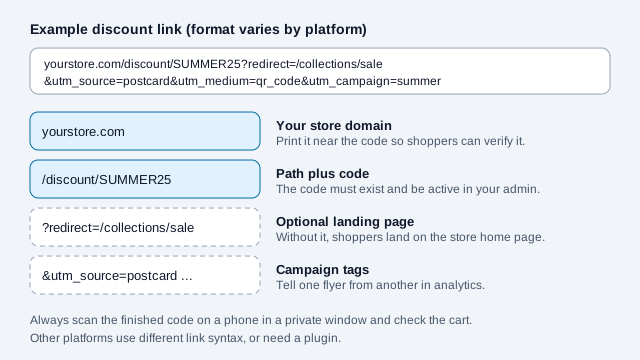
Test the finished code in a private browser window on a phone, then check the cart. Community threads for some platforms report discount links that fail to apply or ignore the redirect in certain setups, which is one more reason to test the exact link you print. A Stripe user can also add promotion codes to a payment link, according to Stripe's documentation, which suits service businesses without an online store.
Can your checkout scanner read a QR code?
Only if it is a 2D imager. Old red-line laser scanners read one-dimensional barcodes and cannot decode a QR code, and they tend to struggle with phone screens. If you plan to redeem coupons at the register, check what hardware each lane has before the campaign prints.
| Scanner | How it reads | Reads QR codes? | Reads phone screens? |
|---|---|---|---|
| Older 1D laser scanner | Sweeps a red laser line across bars | No | Usually poorly |
| Handheld 2D imager | Camera sensor with LED lighting | Yes | Yes |
| Fixed presentation imager | Camera sensor built into the counter | Yes | Yes, and designed for self-scanning |
| Phone or tablet running POS software | Built-in camera | Yes | Yes, but lighting affects it |
If a scanner beeps but rejects the code, check that it is set to accept QR Code (ISO/IEC 18004) and that the code is not so dense that the scanner cannot resolve it. A shorter voucher code makes a coarser, easier symbol. The retail industry is also moving toward 2D codes at the till: GS1 US describes Sunrise 2027 as an industry initiative, not a regulatory mandate, aimed at getting retail point-of-sale systems to read a defined set of GS1 2D barcodes alongside existing linear ones. GS1 also notes that POS systems may need upgrades. The GS1 Digital Link guide explains the QR format involved.
Can you change the offer after the coupons are printed?
Not with a static code, because the offer is fixed in the pattern. If the promotion may change, point the code at a page you can edit. QuickQRC's dynamic coupon QR code generator does this: the code opens a mobile coupon with your offer, a code customers can reveal and copy, a barcode the till can scan, and a last valid date. You can change the offer for the next promotion and keep the same printed flyers or stickers.
A static code that opens a link on your own site also lets you change the offer, since the destination page can be edited even though the code cannot. Whichever you use, the code does not enforce the offer. Your store or POS settings do, which is why the end date printed on the coupon should match the date set in your system. See how QR code expiration works for the difference between the code and the offer.
What should the printed coupon say?
State the offer in words, because shoppers decide before they scan. Include the end date, the main conditions and a typed backup code. Terms must be accurate, and rules on how discounts and "sale" prices are advertised vary by country and state, so check your local requirements before printing claims such as "was" prices or "free" gifts.
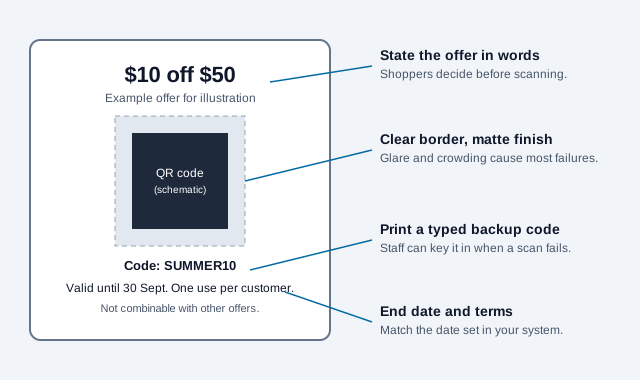
Use dark marks on a light background, black on white being safest, with a matte finish because glossy lamination creates glare. Size depends on scanning distance. The print size guide uses a rule of thumb of about one tenth of the distance, so a code scanned from 30 cm (12 in) starts near 3 cm (1.2 in) and one scanned from 1.5 m (5 ft) near 15 cm (6 in). Treat these as starting sizes and test a printed proof.
| Placement | Typical scan distance | Starting code size |
|---|---|---|
| Product hangtag or label | 15 to 25 cm (6 to 10 in) | 2.0 x 2.0 cm (0.8 x 0.8 in) |
| Direct-mail postcard | 20 to 30 cm (8 to 12 in) | 2.5 x 2.5 cm (1.0 x 1.0 in) |
| Shelf talker | 30 to 45 cm (12 to 18 in) | 3.8 x 3.8 cm (1.5 x 1.5 in) |
| Counter tent card | 45 to 60 cm (18 to 24 in) | 5.0 x 5.0 cm (2.0 x 2.0 in) |
| Storefront window poster | 90 to 150 cm (36 to 60 in) | 12.5 x 12.5 cm (5.0 x 5.0 in) |
How do you prevent coupon fraud and leakage?
A public code can end up on a deals forum soon after the mailer lands, so match the protection to the value of the offer. Light controls suit small offers, and tokens or account binding suit big ones.
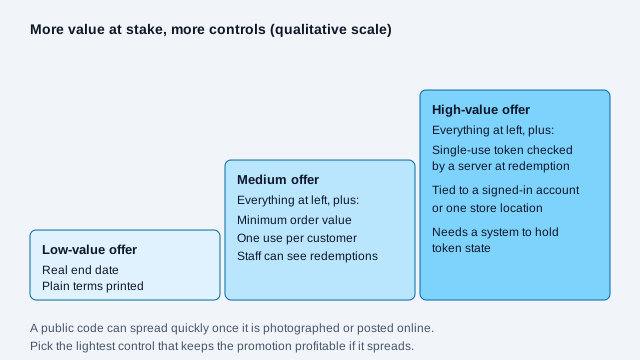
- Single-use tokens: for large discounts, send the scan through a server that marks the token as used at first redemption.
- Account binding: tie the discount to a signed-in account, or limit it to redemptions at a physical store.
- Minimum order value: a rule like "$15 off orders of $75 or more" keeps the promotion profitable even if it spreads.
- A real expiry: put the end date on the print and set the same date in your system.
Also protect the code itself. The FBI has warned that criminals replace legitimate QR codes with their own, so check posters and counter displays for stickers pasted over yours.
What breaks a coupon code, and how do you launch one?
Think of a clothing shop that mails 2,000 postcards with a code for 20% off. The link applies the discount only on the shop's homepage, the postcard code is printed under a glossy varnish, and two of the three tills still use laser scanners. In-store shoppers hold up the line while staff type the code, and the owner cannot tell which mailing list produced redemptions because the link carried no campaign tags. Each of those faults was avoidable.
- Pick the redemption point: online, 2D-capable register, or wallet.
- Create the promotion with a real start and end date, and any minimum order or usage limits your system supports.
- Build and tag the link, then scan it on a phone in a private window.
- Check every lane's scanner if you redeem in store.
- Print a proof on the final stock, and scan it on at least three phones.
- Put the end date, terms and a typed backup code on the coupon.
- Brief staff on what to do when a scan fails.
- After the end date, compare redemptions with the tagged visits.
Open issues this checklist cannot settle: how your local rules treat promotional pricing claims, whether stacking with other offers is allowed by your platform, and how many redemptions are genuine. Those depend on your market and your systems.
This article is general information, not legal advice. Advertising, promotion, privacy and consumer-protection rules vary by country and state; check the requirements that apply to your business.