A business-card QR code should do one thing: save your contact details (a vCard code) or open one page you control (a URL code). Pick the action first, then size, print and test the code on the real card.
This guide is written for one person designing one card. It covers how the choice changes the density of the code, how much room the code needs on a 3.5 x 2 inch (about 89 x 51 mm) or 85 x 55 mm card, and how to approve a printed proof. If you are coordinating cards for several employees, the team rollout checklist picks up where this page stops.
Should a business-card QR code save a contact or open a page?
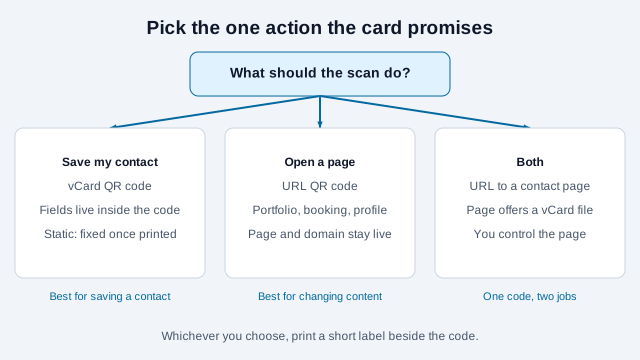
Decide what you want the person holding the card to do in the next ten seconds. A code that saves a contact finishes the job on the spot. A code that opens a page lets you show more than a card can hold, and lets you change it later. The IETF's vCard specification (RFC 6350) defines the contact format that phones import, including names, addresses, email addresses, telephone numbers and URLs.
| Option | Best use | Main limitation |
|---|---|---|
| vCard QR code | Saving name, role, phone, email and website straight into contacts | A static code cannot be edited after printing, and a longer vCard makes a denser code |
| URL QR code | Opening a portfolio, booking page or profile | The page and its domain have to stay online as long as the cards circulate |
| URL to your own contact page | One short, easy-to-scan code that can lead to a vCard download, a portfolio and a booking link | You maintain the page; the person scanning takes one extra tap |
Both static types stay valid as long as what they point to stays valid. A static vCard has nothing to expire. A static URL code works until the page behind it moves. The static vs. dynamic comparison explains when a managed redirect is worth having; for a personal card, a short URL on your own domain gives you most of that flexibility without a subscription.
What goes into a vCard QR code?
Only the fields a new contact will use: full name, job title, organization, one business phone number, one professional email address and your website. RFC 6350 supports far more, including photos, birthdays, notes and multiple addresses, but the fact that a field exists does not mean it belongs on a card that anyone can scan. A vCard code is plain text readable by every scanner app, so a home address or private number on it is as public as one printed on the card.
Why does the number of fields matter for printing?
A QR code stores data in a square grid of modules. More characters mean a bigger grid, and on a fixed-size card a bigger grid means smaller modules. A standard symbol tops out at 2,953 bytes (Version 40, lowest error correction, per the Wikipedia summary of ISO/IEC 18004), so a contact card is nowhere near the limit. The practical limit is how small a printer and a phone camera can resolve each module at card size.
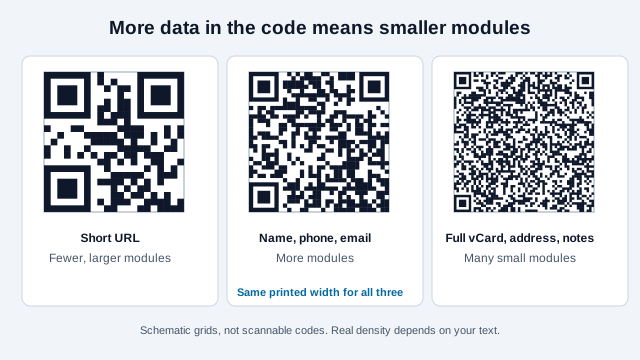
That is why a card that holds only a name, one number, one email and one URL scans more easily than one carrying two addresses and a paragraph of notes. If you want the long version of the contact, put it on a page and encode the page address.
Which vCard version should you use?
RFC 6350 defines vCard 4.0. It requires a VERSION line immediately after BEGIN:VCARD and a formatted name (FN), uses UTF-8, and allows a PHOTO as an embedded base64 data URI. Do not embed a photo in a card code: it would swell the symbol far beyond what a business card can print legibly.
Several vendor guides and forum threads recommend vCard 3.0 for QR codes because it is the older, more widely handled format, and report uneven behavior with 4.0 on some phones. Those are secondary and anecdotal sources, and neither Apple nor Google documents which version their scanners prefer, so treat the version as something to test. Whichever your generator produces, scan the printed proof on an iPhone and an Android phone and check every imported field. Accented characters are a known trouble spot: an Apple developer forum thread describes garbled special characters in a 4.0 code, and Adobe community threads describe accented characters that failed on Android.
How much room does the code need on the card?
DENSO WAVE, the inventor of the QR code, publishes a method for working out the printed area: find the symbol version that holds your data, choose a module size your printer can reproduce, multiply, and add a margin of four modules on every side. In its example, 50 alphanumeric characters at level M need Version 3 (29 modules); at 0.254 mm per module (4 dots at 400 dpi) the symbol is 7.4 mm wide, and with the margin the required area is 9.4 mm square.
Applying the same method to larger symbols shows how a longer payload eats space. Each version adds four modules per side, so Version 2 has 25 modules, Version 6 has 41 and Version 10 has 57. The area needed is (modules + 8) multiplied by the module size:
| Symbol | Modules per side | Area at 0.254 mm modules | Area at 0.4 mm modules |
|---|---|---|---|
| Version 2 | 25 | about 8.4 mm | about 13.2 mm |
| Version 6 | 41 | about 12.4 mm | about 19.6 mm |
| Version 10 | 57 | about 16.5 mm | about 26.0 mm |
These figures include the margin and come from arithmetic, not from a scan test. Which module size a given press and phone can read is exactly what the printed proof settles. Vendor guides commonly suggest about 20 x 20 mm (0.8 in) as a starting point on a business card, which fits a Version 6 symbol with a generous 0.4 mm module but leaves little room for a Version 10 one. Use the print size guide for other placements.
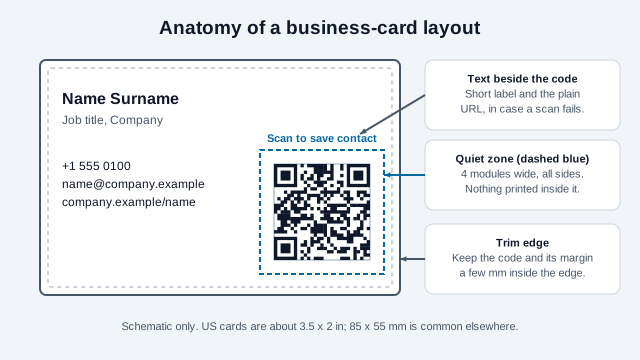
Card dimensions differ by region. The US and Canadian standard is 3.5 x 2 inches; much of Europe and the UK uses 85 x 55 mm, the ISO/IEC 7810 ID-1 size shared with bank cards; Japan, Australia and Singapore each use slightly different sizes (printer guides list 91 x 55, 90 x 55 and 90 x 54 mm). Confirm the trim size with your printer before you lay out the code, and keep the code and its margin a few millimeters inside the trim so a cutting shift cannot clip it.
How do you keep the code readable?
Four things cause most failed cards, and all of them are visible on a proof.
- Quiet zone. Keep four modules of clear space on every side. No border, text, pattern or photo may enter it. Design software can crop what looks like white space, so check the exported artwork.
- Contrast. Dark modules on a light, solid background are the safe baseline. A deep brand color can work. Check the pairing with the contrast checker and avoid gradients across the code.
- A logo. A logo in the middle hides modules. Raise error correction and keep the logo small; the logo guide and error correction levels explain the trade, which includes a larger symbol.
- File format. Export SVG for layout software if the printer accepts it, or a large PNG. Never stretch the placed file. See SVG benefits.
Finishes need testing too. A glossy laminate that throws a reflection across the code, or a soft-touch stock that absorbs ink and rounds the corners of small modules, can break a code that was fine on screen. Ask the printer which finish they will use and proof that one.
How do you test a business-card proof?
A scan from a monitor tells you the data is right. It tells you nothing about ink, stock, trimming or size. Approve the card only after scanning a physical proof at production size.
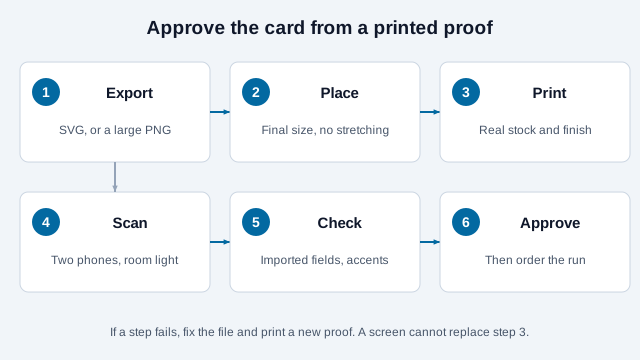
- Scan with the stock camera on an iPhone. Apple's support page describes opening the Camera app, holding the code in view and tapping the result.
- Scan with an Android phone. Google's Pixel help notes that the Camera app scans codes, and that you may have to turn on "Camera scan suggestions" in its settings. A forum user reported that a full contact code showed every field on a Pixel 7 but only the name and number on a Samsung Galaxy A14. That is one anecdote, but it is a reason to test a second Android model.
- Save the contact on each phone and read every field: name spelling, phone label, email, website, accents.
- Scan in dim room light and at the angle a person holds a card. Try the scannability stress tests in the scannability tester on the file before printing, then repeat on paper.
- Check that the quiet zone survived trimming.
Keep the plain-text website and phone number on the card as well. Some people will not scan, and a failed scan should never leave them without a way to reach you.
What is the rollout checklist for a personal card?
- Write one sentence for what the scan should do, and print that sentence beside the code.
- For a vCard, trim it to the fields in the list above, then scan it back and read it aloud against the card text. Create it with the vCard generator.
- For a URL, open the page on a phone with cellular data, signed out, and make sure it loads quickly and offers a clear next step. Use the URL generator, and consider a LinkedIn profile code only if the profile is public.
- Decide where the card will be used. Handing it across a table is forgiving; a card pinned to a crowded noticeboard is not.
- Order a single printed proof, run the tests above, then order the batch.
- Put the destination's renewal date (domain, hosting) in your calendar.
What usually goes wrong on a business card?
Imagine a freelance photographer who wants everything on the card. She builds a vCard with two phone numbers, a studio address, a short bio in the notes field and three website URLs, then places the resulting dense code at 15 mm so it fits next to her logo. On screen it scans. On the printed proof, one phone reads it slowly and another fails, and the contact that does save lists her second phone as an unlabeled number.
The fixes are all upstream of the printer. She cuts the vCard to name, role, one phone, one email and one URL, which produces a visibly coarser grid. She moves the bio and the extra links to a page and encodes that page's short address as the one thing the symbol holds. She enlarges the code to give the modules room, and she re-proofs on paper. Other common causes are a border drawn too close to the symbol, a transparent PNG placed over a textured background, and a code stretched by dragging a corner handle in layout software. When a printed code still misbehaves, the troubleshooting guide works through the symptoms.
What do your printer and phones decide?
A few things depend on you and your printer. There is no single minimum size that works for every press, stock and phone, so the proof decides. The behavior of individual phones with particular vCard fields is documented mainly through user reports, not vendor specifications. A static vCard cannot be corrected once printed, so a change of phone number or job title means a reprint, or a URL on a domain you keep. And the question of how much personal information to publish is yours to make; the code makes it easy for strangers to copy whatever you encode.
For the same decision applied to a hand-in application, see the resume QR code guide. This page is general information for designing printed cards. It is not legal or privacy advice; if you handle other people's contact details, check the data protection rules that apply where you operate.
References
- S. Perreault, "RFC 6350: vCard Format Specification," IETF, 2011.
- DENSO WAVE, "Point for determining the code area," QRcode.com.
- "QR code," Wikipedia (capacity and error correction summary of ISO/IEC 18004).
- Apple Support, "Scan a QR code with your iPhone or iPad camera."
- Google Pixel Help, "Scan QR codes with the Camera app."
- Apple Developer Forums, "iOS camera: detect QR code with vCard 4.0."
- Adobe Community, "Business card QR codes do not work with iPhone."
- PrintKeg, "Standard business card sizes guide: US, Europe, Japan and more" (printer guide, secondary source for card sizes).
- Scanova, "QR code size on a business card" (vendor guide, source of the 20 mm starting point).