A LinkedIn QR code opens a member profile or company Page when someone scans it, so the visitor never has to type or search for a name. Use LinkedIn's built-in code when two people with the app are standing next to each other, and use a custom URL code when the code has to sit on a card, resume, badge or slide.
The symbol only handles the handoff from print to phone. What the visitor sees next depends on your profile, your visibility settings and the line of text printed beside the code. This guide compares the two creation methods, shows how to pick the destination, covers resumes, badges and cards, explains tracking and privacy, and ends with a rollout checklist and a list of open questions no checklist can settle.
Should you use LinkedIn's QR code or a custom code?
Use the native code for quick phone-to-phone exchange. Use a custom URL code when the printed design, the file format or the destination matters more. Both routes can end on the same public profile.
LinkedIn's help page describes a unique code for every member. You open the app, tap the QR icon in the search bar, and the My code tab shows yours. On iOS you can share it by message, email or another app, and save it to your photos. The same help page said sharing on Android was "coming soon" when it was fetched for this guide, while saving to the gallery was available, so check what your own app offers. The Scan tab reads someone else's code, or one saved in your photos or gallery, and lands you on that member's profile, where you can connect.
A custom code simply encodes the profile's HTTPS address. You can prepare it away from the app, style it to match a card, and export the file type your printer wants. The price is responsibility: you, not LinkedIn's code screen, must keep the contrast, the blank border and the print quality right.
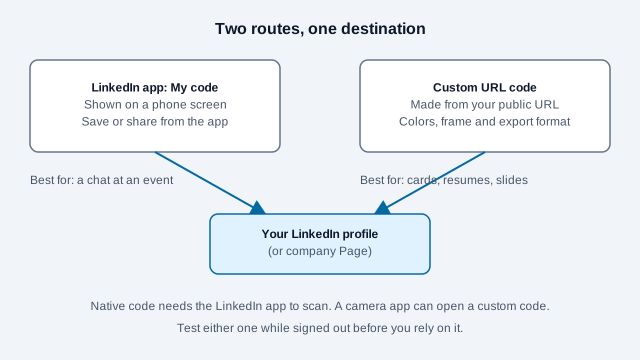
| Decision factor | LinkedIn native code | Custom URL QR code |
|---|---|---|
| Setup | Already inside the mobile app | Copy the URL, then generate artwork |
| Who can scan it | Members using the LinkedIn app scanner; a phone camera may only open a browser link | Any camera app that reads standard QR codes |
| Design control | LinkedIn's own presentation | Colors, frame, logo and export format are yours |
| Destination | Your member profile | Profile, company Page, event, post, article or your own landing page |
| Campaign tags | None you can set | Possible if the destination is a page you control |
| Best use | Showing a code on a phone mid-conversation | Resumes, business cards, signs, badges, slides |
How do you create a LinkedIn QR code?
Save the code from the app, or encode a copied public URL with a generator. Either way, test the result while signed out of LinkedIn so you see what a recruiter or new contact sees.
Method 1: save your code from the app
- Update to the latest LinkedIn mobile app.
- Tap the QR icon in the search bar, then open My code.
- Use the share or save-to-photos option your platform offers.
- Scan the saved image from a second device before it goes into any layout.
Menu labels change between app versions, so follow LinkedIn's current help page if a button has moved. A screenshot of the code screen is a poor substitute for the saved image because it carries interface clutter and low resolution.
Method 2: make a custom code from the public URL
- Open your profile and copy the full public address from Contact info or the browser bar.
- If the address ends in random characters, customize it first (see the next section).
- Paste the HTTPS address into the LinkedIn QR code generator.
- Choose dark modules on a plain light background and leave the blank border untouched.
- Export, then test the final PDF or a printed proof, not just the on-screen preview.
A static code like this costs nothing and never expires, because the address sits inside the pattern. If you add a center logo, start small and test again. Error correction can recover some covered modules, but no logo size is guaranteed to scan. The static versus dynamic guide explains when a code that can be edited later is worth having.
Which LinkedIn page should the code open?
Encode the page that matches the action printed next to the code. "Connect with Alex" belongs on a profile, "Follow our company" on a company Page, and "Read the research" on the named article.
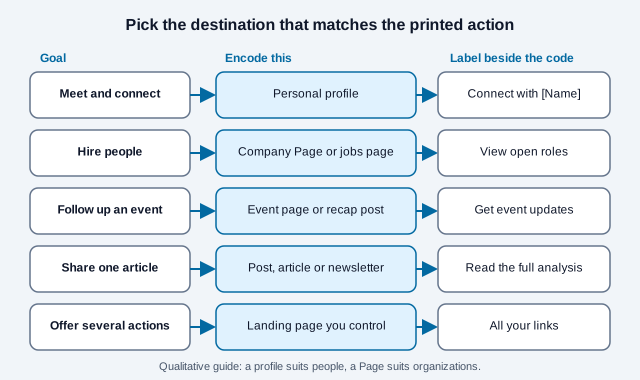
A profile is the durable choice for an individual because a job title can change without changing the address. A single post suits a short campaign but may be buried within weeks. For long-lived print, a page on a domain you own lets you change the final destination later, at the cost of keeping that domain renewed and secure.
How stable is a custom profile URL?
LinkedIn's rules for a custom public URL are specific: 3 to 100 characters, no spaces or symbols, and the word "LinkedIn" is not allowed. You can change it up to five times in six months, then wait six months after the fifth change. The old address stays associated with your profile for six months unless you unlink it, and nobody else can claim it during that window. After that, a printed code built on the old address may land on a "Profile Not Found" page.
The practical rule: pick the custom address before you print, keep it plain (a version of your name), and write the date you chose it in your print records.
Should a business card carry LinkedIn or a vCard?
Choose LinkedIn when the next step is reading your professional background and connecting. Choose a vCard when the next step is saving your phone number and email. A small card rarely has room for both codes.
| Question | LinkedIn URL code | vCard code |
|---|---|---|
| What happens after the scan? | A profile opens in the app or a browser | The phone offers to save contact fields |
| Internet needed? | Yes, to load the profile | No, to read the embedded fields |
| Can details change later? | Yes, the profile is edited online | No, printed fields are fixed |
| Privacy exposure | Whatever your settings show | Anyone holding the card can read every field |
| Best fit | Recruiting, consulting, portfolios | Sales, support, client calls |
The business card QR code guide and the business card use-case guide cover layout in detail, and the vCard QR code generator builds a contact payload.
Where should you put a LinkedIn QR code?
Put it where the viewer has a phone in hand, a reason to scan and enough time to aim the camera. No single printed size works everywhere because payload length, distance, lighting, paper and camera quality all change the result.
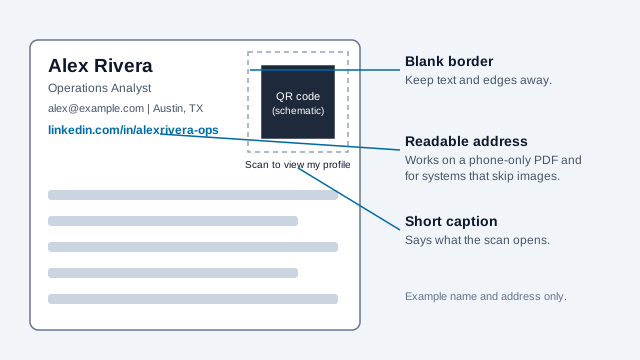
- Resume. Print the address as readable text next to the code. A recruiter reading the PDF on a phone cannot scan the screen they are holding, and tracking systems that parse resumes may ignore images. The resume QR code guide goes further.
- Business card: one side, a short instruction, clear space around the symbol, and a test of the trimmed proof.
- Name badge: keep the code flat and away from the edges, folds, lanyard clips and glare. Ask a colleague to scan it while you wear it.
- Presentation slide: make the code large enough for the back row and leave it up long enough to scan. Repeat the short URL in text.
- Banner or booth sign: size for the real viewing distance and avoid floor-level placement. Event setups are covered in the events guide.
Use the print size guide to work out a size for your own distance instead of copying a figure from another design.
How can you measure visits from a LinkedIn QR code?
Point the code at a page or redirect on a domain you control, tag the visit there, and then send the visitor on to LinkedIn. Adding UTM parameters directly to a LinkedIn address does not give you the data, because nothing guarantees those visits reach your own analytics.
Google's campaign URL guidance recommends setting utm_source, utm_medium and utm_campaign. For separate placements such as a resume, a badge and a slide, give each its own owned URL with the same campaign name and a distinct utm_content value. Build the tags with the UTM builder and read the QR code tracking guide first.
Treat the numbers as observed page visits. They are not camera scans and not unique people, since one person can scan twice and a link-preview bot can load the page. Disclose the redirect in your privacy notice. If you do not need measurement, skip it and encode the profile URL directly.
What should you check before printing?
Scan the code while signed out, then confirm the public view shows only what you want a stranger to see. A QR code makes access convenient. It cannot override LinkedIn's visibility rules.
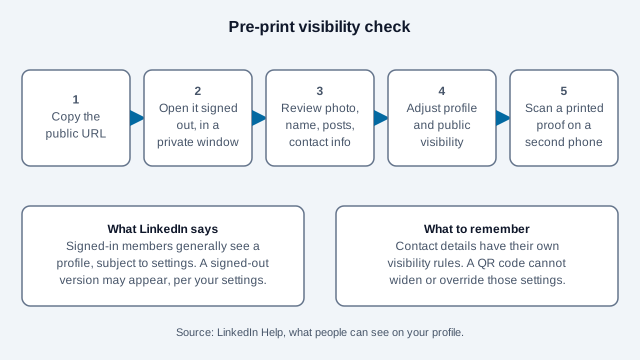
LinkedIn's help page on what people can see says signed-in members generally see a profile, subject to settings, and that a version may appear to people who are not signed in, depending on your public profile and off-LinkedIn visibility settings. Your email address is visible only to first-degree connections and some contacts, while a web page or blog link may be visible to all members. Photo, last name, connections and posts each have their own controls.
If the code appears on a resume that people download, remember that the destination can be copied and revisited long after the hiring round ends. Run the pass in the figure, then print one proof and scan it with a second phone in the lighting where the card will be used.
What goes wrong, and what does a rollout look like?
Most failures come from a mismatched destination, an untested public view or artwork altered after generation. Picture a consultant who prints 500 cards. The code was generated from a screenshot, the profile photo was set to connections only, and the custom address was changed the week before the print run. Half the recipients see a sign-in wall, a few reach "Profile Not Found," and nobody can tell why because the card has no readable address and no label. Each of those faults was cheap to catch with one signed-out test on a proof.
- Changing the custom URL casually: the old address is only held for six months.
- Treating text contrast rules as a scanning test: accessible text colors and barcode decoding are different checks, so scan the real symbol.
- A bare code with no purpose: a stranger has no reason to trust an unlabeled square. Add a name and an action.
- Testing on a single phone: try two camera apps, the signed-out view, the final material and the real distance.
- Skipping a text fallback on resumes and slides.
Rollout checklist
- Decide the single action the code supports and write the label first.
- Choose the destination from the table above and confirm it loads signed out.
- Lock the custom URL, then generate the code.
- Export at print resolution and print one proof on the real stock.
- Scan with two phones and two camera apps.
- Record the encoded address, the date and the placement in your print log.
- Recheck every few months while printed copies are still in circulation, and read why a code stops scanning if a check fails.
Pair this with the broader social media QR code guide if you list several networks, and the QR code safety guide if you also scan other people's codes.
What does LinkedIn decide that this checklist cannot?
- LinkedIn can change menu labels, Android sharing support and profile visibility behavior at any time, so confirm each step in the current app.
- Whether a given recruiter's system reads images in resumes is unknown, which is why the text address stays.
- Employer rules may restrict what you display on a badge or company-printed material. Ask before using a personal profile on work collateral.
- Printing a personal profile on public material carries privacy trade-offs that depend on your role and local rules.
This guide is general information, not legal or employment advice. Check LinkedIn's current help pages and your local rules before you distribute printed codes.
References
- LinkedIn Help: Using a LinkedIn QR Code to connect with members
- LinkedIn Help: Manage your public profile URL
- LinkedIn Help: What people can see on your profile
- LinkedIn Blog (2018): Turn your offline conversations into online connections
- ISO/IEC 18004:2024, QR code bar code symbology specification
- Google Analytics Help: Collect campaign data with custom URLs
- DENSO WAVE: QR Code area and quiet zone