A social media QR code should open one clearly identified public profile, or a mobile page that lists several verified profiles. Copy the platform's public HTTPS address, test it while signed out, print a label saying what the scan opens, and keep a text fallback for anyone who cannot scan.
A code never follows, subscribes, likes, joins or messages on the visitor's behalf. Those actions stay with the viewer and may need an account, a sign-in or an app. This guide compares direct and multi-link destinations, shows how to verify a profile address, explains what platform rules say about renaming, and finishes with a rollout checklist and open questions.
Should the code open one profile or a link page?
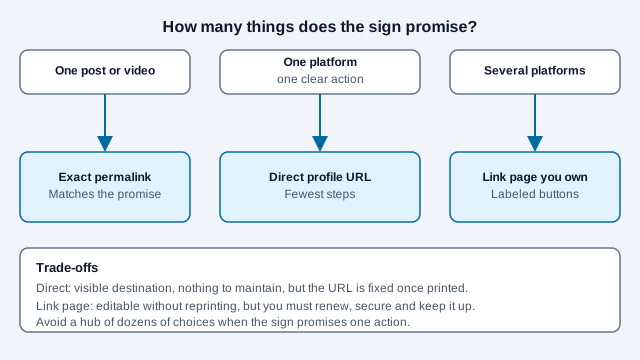
Open one profile when the sign promises one platform. Open a link page on a domain you control when the sign offers several. Open the exact permalink when the sign promotes a single post or video.
| Goal | Best destination | Why |
|---|---|---|
| Promote one primary channel | Direct public profile URL | Fewest steps and clear intent |
| Offer several platforms | Link page on your own domain | Each choice is labeled and the page can be updated |
| Promote one post or video | Exact public permalink | Matches a specific promise on the sign |
| Build professional connections | Verified LinkedIn profile or Page | Fits a professional context |
| Run a short campaign | Maintained campaign page | Can show current content, terms and alternatives |
Avoid sending people to a hub with dozens of unrelated choices when the printed line promises one action. Each extra decision costs attention. The LinkedIn QR code guide works through the professional case in detail.
How do you make a social media QR code?
- Open the exact public profile, Page, channel, post or video.
- Use the platform's Share or Copy link control.
- Open that address in a signed-out private window.
- Confirm the handle, display name and account identity match your official website.
- Encode the complete HTTPS address in a generator. Platform-specific tools include the Instagram, Facebook, TikTok and YouTube QR code generators.
- Write a label naming the platform and the action.
- Scan on representative phones, then print a proof and scan that.
Several platforms also show a code inside their own apps. X's help center says its QR code stores your profile link and is found through the profile menu. Instagram and TikTok offer app-based codes too, although the guides read for this article described slightly different menu paths for each, and Snapchat's Snapcode is generated inside the app only. Menu paths change with app versions, so follow the labels you see. App-made codes are convenient for a phone-to-phone chat. A generator code gives you export control for print.
How do you verify the profile address?
Handles, display names, profile IDs and public URLs are not interchangeable. A display name may not be unique, and an impersonator can copy branding. Copy the URL from the authenticated account or its official public page, and link back to the same profile from your website.
- YouTube handles create channel URLs of the form
youtube.com/@handle. YouTube's help page says handles must be unique and 3 to 30 characters long (limits differ for some scripts). - X states that the unique handle appears in the profile URL.
- Facebook usernames form the web address of a profile or Page.
- LinkedIn lets members customize a public profile URL of 3 to 100 characters.
Write the encoded address, the account owner and the date checked into your print log so a future colleague can audit or replace the sign.
Can one QR code open Instagram, TikTok, LinkedIn and YouTube?
A standard code holds one address. To offer several networks, point it at a responsive page that lists individually labeled links. Host the page on a domain your organization owns if you can.
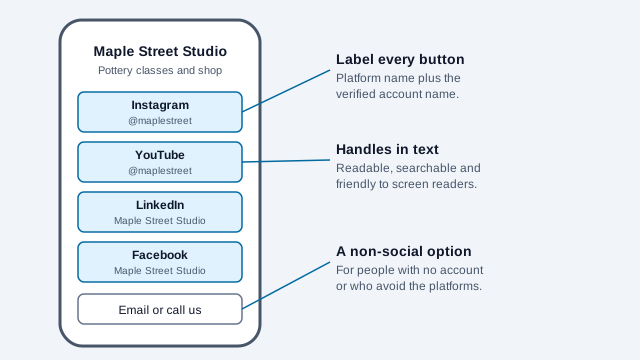
The page should load fast, avoid pop-ups, show account handles as text, work with keyboard and screen readers, and offer an email or phone route for people who avoid social platforms. Do not turn on analytics by default simply because the page can. Mentioning "Follow us" alone gives the visitor nothing to evaluate, so give each button the platform name and the account name.
Will the visitor need the platform's app?
That depends on the operating system, the platform, the login state and the visitor's settings. An HTTPS profile URL may open in a browser or be handed to an installed app, and a generator cannot force one behavior.
Some profiles show only a limited preview when signed out. LinkedIn says a signed-out version of a profile may appear depending on public profile settings, and some visitors may still be asked to sign in. Test without saved sessions and with the app uninstalled if you can.
Can a code automatically follow or subscribe?
No. The code opens a destination, and the viewer then uses the platform's own controls. Avoid "scan to auto-follow." Use "Scan to visit our Instagram profile," "Scan to watch on YouTube" or "Scan to view our LinkedIn Page." Honest labels set expectations and cut suspicion about unlabeled squares.
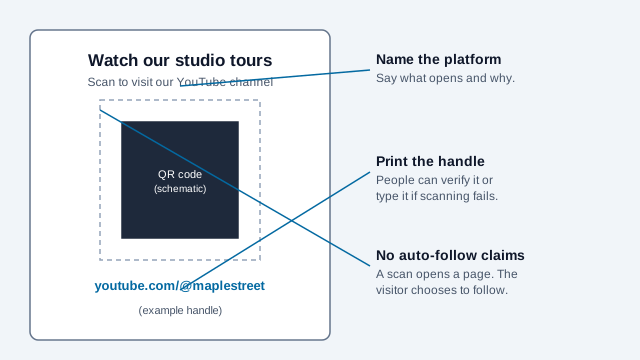
Use dark modules on a light plain background and leave a blank border of four modules. Follow each platform's current brand-asset rules if you add its logo near the code. Size the code for viewing distance with the print size guide, and see the poster guide and business card guide for the two most common placements. For messaging channels instead of public profiles, compare the WhatsApp and Telegram guides.
Direct platform URL or your own domain?
A direct link is simple, and the destination domain is visible before opening. A page on your own domain lets you change profiles without reprinting and adds room for a fallback, accessibility information and a few labeled choices.
That page also creates duties: renew the domain, secure the site, prevent open redirects, keep links current, disclose analytics, and keep it online for as long as printed material circulates. A free link service whose terms, ads or availability you do not control can break a printed run. The static versus dynamic guide explains the middle route, a dynamic code whose destination you can edit.
What happens when a handle changes?
Platform rules differ, and the differences are the risk. X's help center says changing your username changes the profile QR code and makes the previous one invalid. LinkedIn says a previous custom URL stays associated with your profile for six months unless you unlink it, and it limits changes to five per six months. YouTube says it reserves the right to change, reclaim or remove a handle at any time.
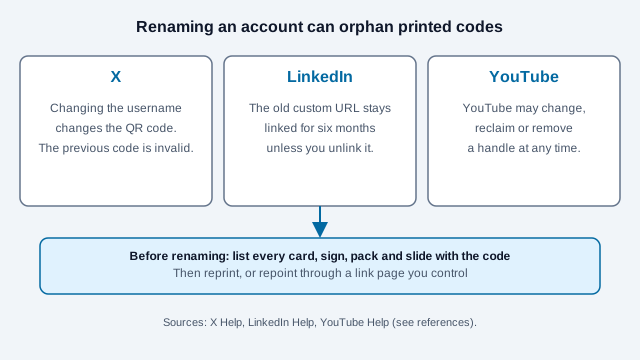
Before changing a handle, list every card, sign, package, slide, email signature and ad that carries the old code. For expensive long-run print, a link page you control spares you a reprint if identity changes.
How do you measure results without overclaiming?
A direct static code does not count scans. A redirect or analytics layer can count requests, but one person may scan several times, bots may fetch the link, and a visit is not a follow, a subscriber or a sale. Use the UTM builder for tags and read the QR code tracking guide before you add any layer.
Decide the outcome first, collect the least data you need, and give notice where your local rules require it. Platform-native insights and first-party web analytics answer different questions, so label which is which in any report. Agencies running several accounts can adapt the marketing agency guide.
What privacy and safety risks apply?
- Anyone can photograph and redistribute a public code.
- A platform logo next to a code does not prove the account is authentic.
- Public profiles can expose posts, connections, location clues and contact details.
- Children, schools, healthcare and vulnerable groups need a stricter review.
- Stickers can be put over a real printed code. Consumer coverage of QR scams, read here only secondhand, describes this on posters and parking machines, so inspect public signs. See the QR code safety guide.
- Redirect analytics may process device, IP address, time and referral information.
Use organization-owned accounts for campaigns, protect account recovery, and publish a way to report impersonation or a takeover.
What does a rollout look like, and what goes wrong?
Look at a cafe that prints 300 coasters with a code to its Instagram profile. Two weeks later the owner changes the Instagram handle to match a rebrand. The old address no longer opens the profile, a similar-looking account claims the freed name, and the coasters now send customers to a stranger. A link page the cafe owned, or a decision to list prints before renaming, would have prevented it.
- Pick one promise per sign and choose the destination from the table above.
- Verify the account against your official website and copy the address from the account itself.
- Test signed out, with and without the app, on iPhone and Android.
- Write the label, print the handle and size the code for the real distance.
- Print a proof and scan it on two phones.
- Log the address, owner, date and placement.
- Retest periodically while printed copies circulate. If a code stops working, the troubleshooting guide narrows the cause.
Which platform rules can change after you print?
- Platforms change menus, URL rules and app behavior without notice, so confirm each step in the current app.
- Instagram, TikTok and Snapchat menu paths came from third-party guides, not the platforms' own help pages, which could not be read here.
- How a given phone hands a profile URL to an installed app varies and cannot be forced.
- Rules on impersonation, children's data and tracking differ by country. Check your local rules.
This guide is general information, not legal advice. Review each platform's current terms and the privacy rules that apply where you operate.
References
- YouTube Help: handles and channel URLs
- X Help: About QR codes on X
- X Help: handles and profile URLs
- Facebook Help: usernames and public URLs
- LinkedIn Help: manage your public profile URL
- LinkedIn Help: what people can see on your profile
- How-To Geek: how to get your Instagram QR code
- DENSO WAVE: QR Code area and quiet zone