An Instagram QR code from this generator encodes https://instagram.com/<username>, so scanning it with a phone camera opens your profile in the Instagram app or in a browser. It works for personal, creator, and business accounts, because it is just your public profile address.
The code is built in your browser and stays free and permanent, with no scan limit and no expiry. Instagram also offers its own in-app profile QR code; this one is for when you want control over the design and how it prints.
How do you make an Instagram QR code?
- Type your handle in the Instagram Username field. With or without the
@works, and so does pasting your full profile link. - Choose colors and shapes, and add your logo if it helps recognition.
- Download the PNG or SVG and scan it before it goes anywhere near a printer.
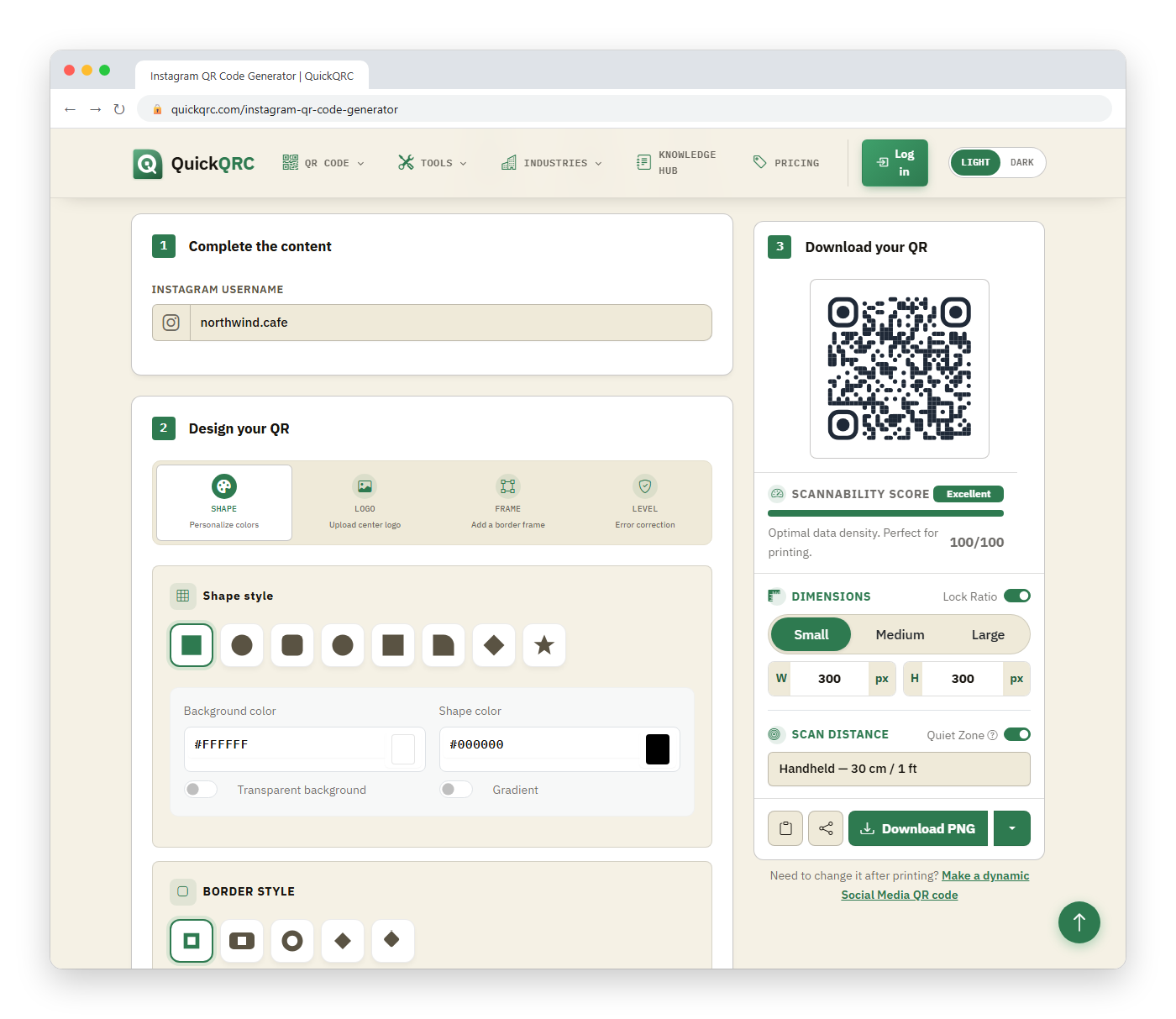
For the handle quickqrc_demo the code encodes:
https://instagram.com/quickqrc_demoThat is a short string, so the resulting QR has a low module count and stays legible even at small print sizes, such as a 1 inch (2.5 cm) sticker. Longer inputs, like a link with tracking parameters, would produce a denser pattern.
Should you use Instagram's own QR code or this one?
Instagram's built-in code is convenient and always tied to your account. This generator is better in three situations.
- Branding: you need colors, corner shapes, or a logo that match packaging or a menu.
- Print quality: you want a vector SVG for signage, which scales without blurring.
- Consistency: you are producing a set of codes for several channels and want them to look like one family.
If none of those apply, the in-app code is fine and you can skip the generator. You will find it on your own profile in the Instagram app; the Instagram Help Center explains how to open and customize it.
How do you add a logo without breaking the scan?
Add the logo and the generator switches to error correction Level H on its own. Level H lets a scanner rebuild up to 30% of the code's data blocks, which is what leaves room for a logo sitting over part of the pattern. That figure is not the share of the surface a logo may cover: at Level H this generator caps the logo at roughly 35% of the code's width, so the hidden modules stay near 12% of the total.
Keep the mark simple and give it a small white pad so its edge does not blend into the modules next to it. A profile link is short, so the grid stays coarse and a logo costs less than it would on a long tracking URL. The QR code generator with logo has the full size table, and the logo best practices guide covers contrast and placement.
Can the code open a post, reel, or link in bio instead?
This page builds a profile link only. To send people to a single post or reel, copy that item's link from its Share menu in Instagram and paste it into the URL QR code generator. Expect that code to stop being useful if the post is deleted or archived, while a profile code keeps working as long as the handle stays the same. If you want one code to lead to several places, point it at a link-in-bio page instead; the social media QR codes guide compares the options.
Should you download a PNG or an SVG?
Use PNG for screens: Stories, email signatures, and slides. Use SVG for anything printed or resized, such as table tents, shop windows, and packaging, because a vector file stays sharp at any size while an enlarged PNG goes soft at the module edges. If a print shop asks for a PDF or EPS, send the SVG; design tools such as Illustrator and Inkscape convert it without losing quality.
What if you want to measure scans?
A static profile link carries no analytics; Instagram will show you profile visits, but not which poster produced them. Two workable approaches:
- Print a different code at each location and compare follower growth or profile visits by time window. It is crude but free.
- Point the QR to a landing page or link you control with UTM parameters, so your analytics platform records the source. This adds a step between the scan and Instagram, and the destination page must be maintained.
The tracking guide compares these options in more detail.
What can go wrong?
- Renaming the account. The code stores your username. If you change it, printed codes point at the old name. Decide on the handle before a print run.
- Private accounts. A scan reaches the profile, but visitors must send a follow request to see posts. For marketing, use a public account or accept the friction.
- Typos. Instagram handles allow letters, numbers, periods, and underscores.
l(lowercase L) andI(capital i) look alike, so copy the handle from the app instead of retyping it.
How do you test it?
Scan with two phones, one with Instagram installed and one without. Confirm the profile that opens is the right one and not a lookalike. Then check the file with the scannability tester, which simulates glare, blur, and low light, and review the print size guide for starting sizes.
To plan your wider social presence, see social media QR codes.